1. Kupu Whakataki
This manual provides comprehensive instructions for the setup, operation, maintenance, and troubleshooting of your COBY CR-A78 AM/FM Digital Alarm Clock with Time Projector. Please read this manual thoroughly before using the device to ensure proper function and to maximize your user experience. Keep this manual for future reference.
2. Hua Neke Atuview
The COBY CR-A78 is a versatile digital alarm clock featuring an AM/FM radio tuner and a unique time projection function. It is designed to provide reliable timekeeping, alarm functions, and radio entertainment, with the added convenience of projecting the current time onto a wall or ceiling.
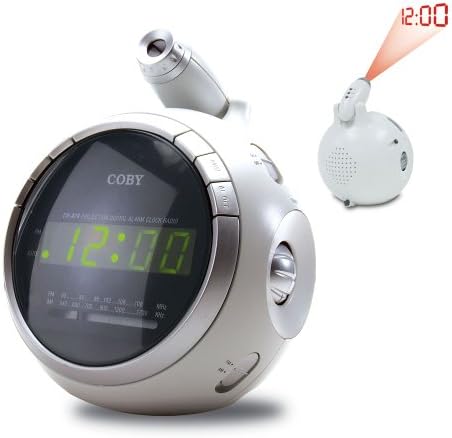
Whakaahua 2.1: Mua view of the COBY CR-A78 digital alarm clock, showing the green LED display and the adjustable time projector. An inset image illustrates the time '12:00' being projected onto a surface.
3. Nga ahuatanga
- AM/FM Digital Tuner: Hei whakarongo ki ō teihana reo irirangi tino pai.
- Large Green LED Display: Provides clear visibility of the time.
- Integrated Time Projector: Ka whakaata i te wā o nāianei ki runga i te pakitara, i te tuanui rānei, kia māmā ai viewing.
- Taumahi Whakaoho Matarua: Whakaritea kia rua nga whakaoho motuhake mo nga wa oho ake.
- Mahinga Tohu: Ka taea te whakatā mo te wa poto o te whakaoho.
- Waka Moe: Fall asleep to music with an automatic shut-off feature.
- Pūrua Pūhiko: Ka mau tonu i te wa me nga tautuhinga whakaoho i te wa o te hiko outages (requires 9V battery, not included).
4. Ihirangi mokete
- COBY CR-A78 AM/FM Digital Alarm Clock
- Pouaka AC
- Pukapuka Kaiwhakamahi (tenei tuhinga)
5. Tatūnga
5.1. Hononga Mana
- Insert the small end of the AC power adapter into the DC IN jack located on the back of the unit.
- Plug the other end of the AC power adapter into a standard wall outlet (AC 120V, 60Hz).
- The unit will power on, and the display will flash, indicating it is ready for time setting.
5.2. Tāuta Pūrua Pūhiko
A 9-volt battery (not included) can be installed to provide backup power for the clock and alarm settings during a power interruption.
- Rapua te uhi o te wahanga pākahiko kei raro o te waeine.
- Remove the cover by sliding it off.
- Connect a 9-volt battery to the battery connector inside the compartment, observing polarity (+ and -).
- Place the battery into the compartment and replace the cover securely.
6. Nga Tohutohu Whakahaere
6.1. Te Whakatakoto i Te Wa
- Patohia me te pupuri i te PANUITANGA TIME pēhi i te pātene kia tīmata rā anō te kimo o ngā mati o te hāora.
- Pehia te HOUR te paatene ki te whakatika i te haora. Tirohia te tohu PM mo te tautuhinga AM/PM tika.
- Pehia te MINI pēhi i te pātene kia maha ngā wā hei whakarite i te meneti.
- Pehia te PANUITANGA TIME te paatene ano ki te whakaū me te puta i te aratau tautuhinga wa.
6.2. Te Whakatakoto i te Whakaoho
The CR-A78 features two independent alarms, Alarm 1 and Alarm 2.
- Patohia me te pupuri i te WHAKAMAHI 1 SET (ranei WHAKAMAHI 2 SET) kia kimo rā anō ngā mati o te hāora whakaoho.
- Pehia te HOUR pātene hei whakarite i te hāora whakaoho e hiahiatia ana.
- Pehia te MINI paatene hei whakarite i te meneti whakaoho e hiahiatia ana.
- Pehia te WHAKAMAHI 1 SET (ranei WHAKAMAHI 2 SET) button again to confirm the alarm time.
- Hei whakahohe i te whakaoho, paheke te OHO OHO 1 ON/OFF (ranei OHO OHO 2 ON/OFF) switch to the 'ON' position. Select 'BUZZER' for a beeping alarm or 'RADIO' to wake to the radio.
6.3. Te whakamahi i te Taumahi Whakamoe
Ka tangi ana te whakaoho, paatohia te Whakatā button. The alarm will temporarily stop and sound again after approximately 9 minutes. To turn off the alarm completely, press the PANUWHIRI ON / WAWHI switch to 'OFF'.
6.4. Mahi Irirangi (AM/FM)
- Pehia te RADIO ON/OFF pātene hei whakakā i te reo irirangi.
- Kiriata te AM/FM switch to select the desired band.
- Hurihia te WHAKARANGA pēhi i te pātene hei kimi i te teihana e hiahiatia ana.
- Whakaritehia te puoro ma te whakamahi i te ROTO puku.
- Hei whakaweto i te reo irirangi, pehia te RADIO ON/OFF pātene ano.
6.5. Using the Time Projector
- Locate the projector lens on top of the unit.
- Pehia te KAUPAPA KAUPAPA KAUPAPA button to activate the time projection.
- Rotate the projector lens to adjust the focus of the projected time.
- Adjust the angle of the projector arm to direct the time onto your desired surface (wall or ceiling).
- Pehia te KAUPAPA KAUPAPA KAUPAPA button again to turn off the projection.
7. Tiaki
- Te horoi: Whakamahia he kakahu ngohengohe, maroke hei horoi i waho o te waahanga. Kaua e whakamahi i nga kai horoi me nga whakarewa.
- Tiaki Mata: Gently wipe the projector lens with a soft, lint-free cloth if it becomes dusty.
- Turanga: Whakatakotoria te waeine ki runga i tētahi mata pūmau, papatahi, kia matara atu i te rā tika, i ngā pūtake wera, me te makuku nui.
- Whakakapinga Pūhiko: Replace the 9-volt backup battery annually or if the unit experiences frequent power outages to ensure continuous backup functionality.
8. Te Raru
| Raruraru | Take pea | Rongoā |
|---|---|---|
| Karekau te waeine i te hiko. | Kāore i te hono tika te urutau AC. | Me whakarite kei te hono tika te urutau AC ki te waeine me te putanga pakitara e mahi ana. |
| Kare e tangi te whakaoho. | Ko te whakaoho kaore i te whakahohe, i te he ranei te whakatakotoranga. | Verify the alarm time is set correctly and the ALARM ON/OFF switch is in the 'ON' position (BUZZER or RADIO). |
| He ngoikore te reo irirangi. | Antenna not extended or unit too close to interference. | Extend the FM wire antenna fully. For AM, rotate the unit for best reception. Move away from other electronic devices. |
| Ko te wa e matapaetia ana he rangirua. | Projector focus not adjusted. | Rotate the projector lens to adjust the focus until the time is clear. |
| Wā/tautuhinga ngaro i muri i te mana outage. | Backup battery is dead or not installed. | Install a fresh 9-volt battery or replace the existing one. |
9. Whakatakotoranga
| Āhuahira | Whakatakotoranga |
|---|---|
| Waitohu | Coby |
| Tauira | CR-A78 |
| Momo Whakaatu | Digital LED (Green) |
| Radio Tuner | Analog AM/FM |
| Puna Mana | AC 120V, 60Hz |
| Pūrua Pūhiko | 1 x 9V pākahiko (kaore i whakauruhia) |
| Rahi Hua (L x W x H) | 12.7 x 10.16 x 15.24 cm (5 x 4 x 6 inihi) |
| Taumaha Hua | 567 g (1.25 lbs) |
| Tae | Hiriwa |
10. Pūtāhui me te Tautoko
For warranty information or technical support, please refer to the documentation provided at the time of purchase or contact Coby customer service. Keep your purchase receipt as proof of purchase for any warranty claims.


