1. Kupu Whakataki
The Extech EX310 is a compact, manual-ranging digital multimeter designed for a variety of electrical measurements. It features an extra-large 2000-count LCD and a built-in Non-Contact AC Voltage Detector (NCV) for enhanced safety. This device is capable of measuring AC/DC Voltage, AC/DC Current, Resistance, Diode, and Continuity, and includes a battery test function for 1.5V and 9V batteries. Its robust design, including a protective rubber holster and tilt stand, makes it suitable for field use.
2. Nga korero haumaru
Always adhere to safety precautions when using any electrical testing equipment. Failure to do so may result in injury or damage to the meter or equipment under test.
- The Extech EX310 is UL listed with a CAT III – 600 Volt safety rating.
- Kaua e tono nui ake i te reiti voltage, as marked on the meter, between terminals or between any terminal and ground.
- Tirotirohia nga kaiarahi whakamatautau mo te kino i mua i te whakamahi. Whakakapihia mena ka taupatupatu te whakamaarama.
- Kia tino tupato i te wa e mahi ana me nga iahiko ora.
- Whakamahia te Voltage (NCV) detector as a preliminary check for live AC voltage, but always verify with direct contact measurements when possible.
- Ensure the function switch is set to the correct range before making measurements.
3. Nga Hua o te Hua
- 9-Function Manual-Ranging DMM: Ine AC/DC voltage, AC/DC current (up to 10 A), resistance, diode, continuity, plus 1.5 V/9 V battery tests.
- Kore-Whakapā Voltage (NCV) Detector: Built-in NCV with red LED and audible beeper alerts to the presence of live AC (100-600 VAC) without probes.
- Extra-Large 2000-Count Display: Clear, easy-to-read 1-inch digits on a high-count LCD ensure readability.
- Rugged, Portable Design: Compact meter (5.7 × 2.9 × 1.6 in, 9 oz) with protective rubber holster, tilt stand, and low-battery indicator.
- Reliable Safety & Accuracy: 0.5% basic accuracy. Designed to UL/CAT II-1000 V & CAT III-600 V safety standards.
4. Ihirangi mokete
The Extech EX310 package includes the following items:
- Extech EX310 Mini Digital Multimeter
- Nga Tohu Whakamatau
- 9 Volt Pūhiko
- Whakatairanga Tu
5. Hua Neke Atuview (Controls and Display)
Familiarize yourself with the components of your EX310 multimeter:

Whakaahua: Mua view of the Extech EX310 Mini Digital Multimeter, showing the large LCD display, function dial, NCV button, and input jacks.
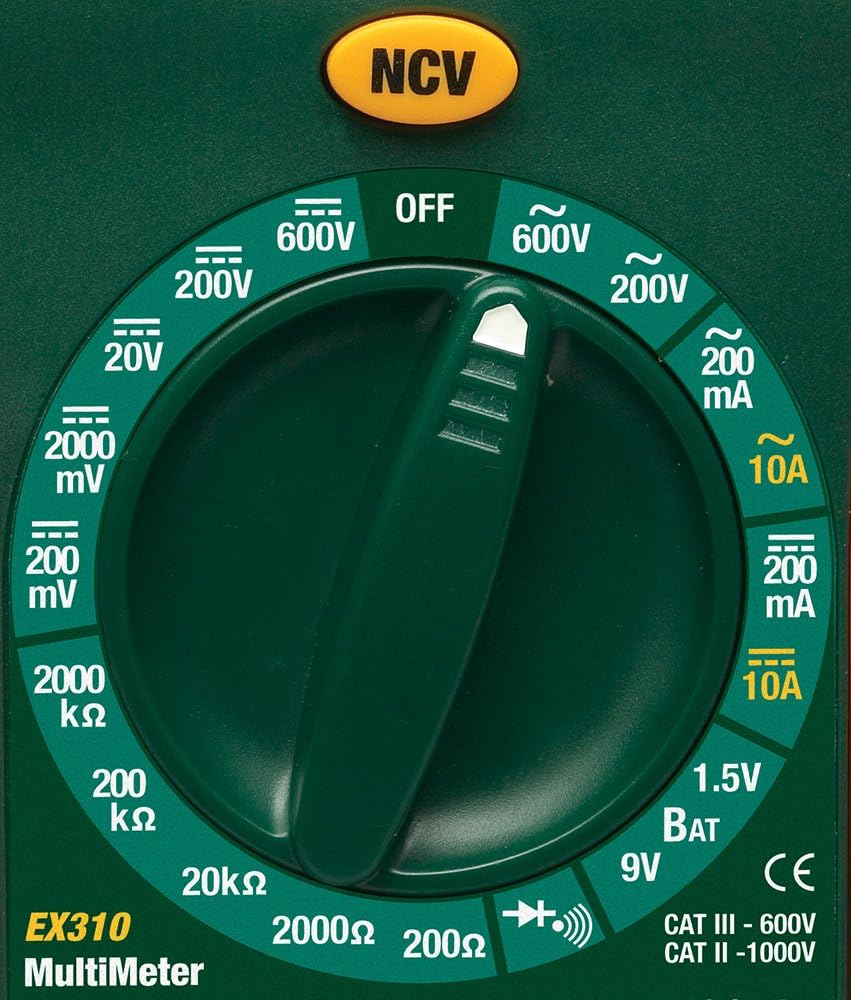
Image: Close-up of the Extech EX310's function dial, illustrating the various measurement ranges and functions such as voltage, current, resistance, diode, continuity, and battery test.
- Whakaaturanga LCD: E whakaatu ana i ngā pānui ine, ngā waeine, me ngā tohu mahi.
- Whakawhiti Mahi: Rotary dial to select the desired measurement function and range.
- NCV Button: Whakahohe i te Rōrahi Kore-Papatage detection feature.
- Ngā Jack Tāuru: Terminals for connecting test leads (COM, VΩmA, 10A).
6. Tatūnga
6.1. Tāuta Pūhiko
- Me whakaweto te mita maha.
- Kimihia te taupoki o te wāhanga pākahiko kei muri o te mita.
- Wetekina te tīwiri pupuri, ka tangohia te taupoki.
- Insert a new 9V battery, observing correct polarity.
- Replace the cover and secure with the screw(s).
A low battery indicator will appear on the display when the battery needs replacement.
6.2. Te hono i nga Kaitohu Whakamatau
Connect the test leads to the appropriate input jacks:
- Whakauruhia te mata whakamatautau pango ki roto i te COM (common) jack.
- Mō te nuinga o ngā inenga (Voltage, Resistance, Diode, Continuity, mA Current), insert the red test lead into the VΩmA koki.
- Mō ngā inenga au teitei (tae atu ki te 10A), whakauruhia te taura whakamātautau whero ki roto i te 10A koki.
7. Nga Tohutohu Whakahaere
Before making any measurement, ensure the test leads are correctly connected and the function switch is set to the desired range.
7.1. AC/DC Voltage Inenga
- Set the function switch to the desired ACV (~) or DCV (---) range (e.g., 200V, 600V).
- Connect the red test lead to the VΩmA jack and the black test lead to the COM jack.
- Touch the test probes to the circuit points where voltage me ine.
- Pānuihia te voltage uara i runga i te LCD.
7.2. AC/DC Inenga o naianei
Tupato: Never attempt to measure current on a circuit with voltage present across the current terminals. This can blow the fuse or damage the meter.
- Whakawetohia te hiko ki te ara iahiko.
- Set the function switch to the desired ACA (~) or DCA (---) range (e.g., 200mA, 10A).
- Connect the red test lead to the appropriate current jack (VΩmA for mA, 10A for 10A) and the black test lead to the COM jack.
- Open the circuit where current is to be measured and connect the meter in series.
- Apply power to the circuit and read the current value on the LCD.
7.3. Te Ine Ātete
- Me whakarite kua whakakorea te hiko o te ara iahiko, o te wāhanga rānei.
- Set the function switch to the desired Resistance (Ω) range (e.g., 200Ω, 20kΩ).
- Connect the red test lead to the VΩmA jack and the black test lead to the COM jack.
- Pā atu ki ngā porotiti whakamātautau puta noa i te wāhanga, i te ara iahiko rānei e inehia ana.
- Pānuihia te uara ātete i runga i te LCD.

Image: The Extech EX310 Multimeter displaying a reading while test leads are connected to a circuit board, demonstrating a typical measurement scenario.
7.4. Whakamātautau Diode
- Ensure the component is de-energized.
- Set the function switch to the Diode (→|) position.
- Connect the red test lead to the VΩmA jack and the black test lead to the COM jack.
- Touch the red probe to the anode and the black probe to the cathode of the diode.
- Panuitia te pukapuka whakamuatage drop on the LCD. Reverse the probes to check for an open circuit (OL).
7.5. Whakamātautau Tonu
- Me whakarite kua whakakorea te hiko o te ara iahiko, o te wāhanga rānei.
- Set the function switch to the Continuity (→))) position.
- Connect the red test lead to the VΩmA jack and the black test lead to the COM jack.
- Pa ki nga tirotiro whakamatautau puta noa i te ara iahiko, i te waahanga ranei.
- An audible tone will sound if continuity exists (resistance below approximately 30Ω).

Whakaahua: He tata view of the Extech EX310 Multimeter with its test leads connected to an internal electronic circuit, demonstrating precise measurement capabilities.
7.6. Whakapā-kore Voltage (NCV) Rapunga
- Tautuhia te pana mahi ki tetahi waahi.
- Press and hold the NCV button.
- Move the top of the meter (where the NCV sensor is located) close to the suspected AC voltage source (e.g., wire, outlet).
- A red LED will illuminate and an audible beeper will sound, increasing in intensity as the meter gets closer to the live AC voltage.

Image: A hand holding the Extech EX310 Multimeter near an electrical wall outlet, demonstrating the use of the Non-Contact Voltage (NCV) detection feature to identify live circuits.
7.7. Battery Test (1.5V/9V)
- Set the function switch to the 1.5V BAT or 9V BAT position.
- Connect the red test lead to the VΩmA jack and the black test lead to the COM jack.
- Touch the red probe to the positive terminal and the black probe to the negative terminal of the battery.
- Pānuihia te voltage i runga i te LCD.
8. Tiaki
8.1. Whakakapinga Pūhiko
Refer to Section 6.1 for detailed instructions on replacing the 9V battery when the low battery indicator appears.
8.2. Whakakapinga Fuse
If the current measurement functions cease to operate, the internal fuse(s) may need replacement. The fuses are typically located beneath the battery compartment. Refer to the full product manual for specific fuse ratings and replacement procedures. Always replace with fuses of the identical type and rating.
8.3. Te horoi
I ia wa, horoia te keehi me te panuiamp kakahu me te hopi horoi ngawari. Kaua e whakamahia he mea whakakoi, he mea whakarewa rānei. Me whakarite kia maroke rawa te mita i mua i te whakamahinga.
9. Te Raru
- Kore Whakaatu: Check the 9V battery. Ensure it is correctly installed and has sufficient charge.
- Pānui hē: Verify that the function switch is set to the correct measurement type and range. Ensure test leads are properly connected and making good contact with the circuit.
- Kāore te Ine o Nāianei e Mahi Ana: Check the internal fuse(s). Refer to the Maintenance section for fuse replacement.
- Kaore te NCV e kitea: Ensure the NCV button is pressed and held. Confirm the presence of AC voltage (100-600 VAC) in the area being tested.
10. Whakatakotoranga
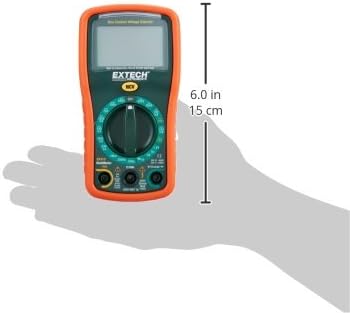
Image: Diagram illustrating the physical dimensions of the Extech EX310 Multimeter, showing a length of 6.0 inches (15 cm).
| Whakatakotoranga | Uara |
|---|---|
| Waitohu | Extech |
| Tau tauira | EX310 |
| Momo Ine | Imita maha |
| Kāhua | Awhi-a-ringa |
| Te Tika Tika | +/-0.5% |
| Whakaatu | 2000-Count LCD |
| Whakatauranga Haumaru | UL listed CAT III - 600V, CAT II - 1000V |
| Puna Mana | 9V Pūhiko |
| Rahi Tūemi (L x W x H) | 5.7 x 1.6 x 2.9 inihi (14.5 x 4.1 x 7.4 cm) |
| Taumaha Tūemi | 0.704 hekere (0.02 Kirokaramu) |
| Nga Waahanga kei roto | Test leads, 9 Volt battery, tilt stand |
11. Nga Korero Whakaputanga
The Extech EX310 Mini Digital Multimeter is covered by a 1-tau nga waahanga me te whakamana mahi from the date of purchase. Please retain your proof of purchase for warranty claims. This warranty covers manufacturing defects and workmanship under normal use.
12. Tautoko Kiritaki
For technical assistance, troubleshooting beyond this manual, or warranty service, please contact Extech customer support. Refer to the official Extech webte waahi, te kohinga hua ranei mo nga korero whakapiri o naianei.


