Kupu Whakataki
The Celestron NexStar 5SE is a powerful, feature-rich telescope designed for observing celestial objects. It combines advanced Schmidt-Cassegrain optics with a fully automated GoTo mount, making it suitable for both beginners and experienced users. This manual provides essential information for setting up, operating, and maintaining your telescope to ensure optimal performance and enjoyment of the night sky.

Image: The Celestron NexStar 5SE Computerized Telescope, featuring its distinctive orange optical tube, black computerized mount, and included accessories like the 25mm Plössl eyepiece and StarPointer finderscope.
He aha kei roto i te Pouaka
I te wa e wetewete ana, tirohia nga waahanga katoa e whai ake nei:
- ngongo whatu
- Single Fork Arm Mount and Tripod
- Paepae Tautoko
- Whetu Tohu Tohu Whetu
- Built-In Wedge
- NexStar+ Mana Ringa
- 25mm kanohi kanohi
- Whetu Hauroki
Tatūnga
Setting up your NexStar 5SE is a straightforward process that requires no tools. Follow these steps to prepare your telescope for observation.
1. Tripod and Mount Assembly
The tripod and single fork arm mount come pre-assembled. Extend the tripod legs to a stable height and secure them. Attach the accessory tray to the center spreader for convenient storage of eyepieces and other small items.
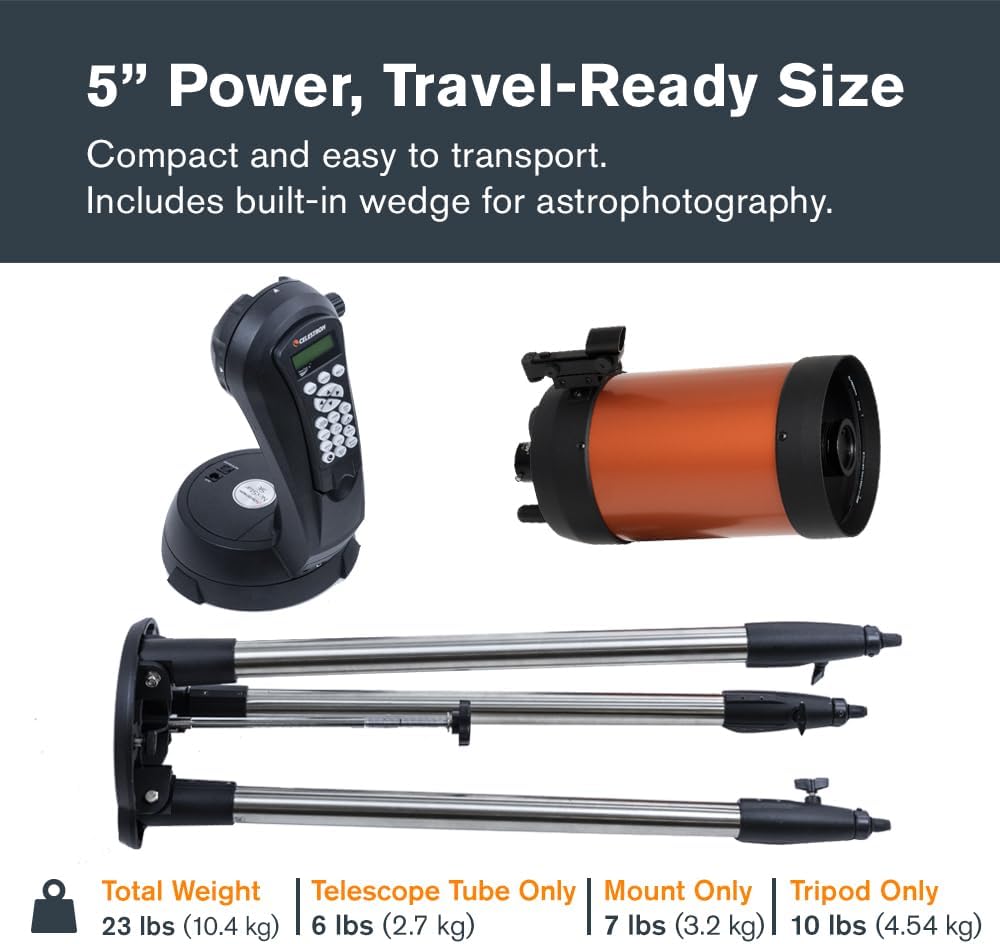
Image: Components of the Celestron NexStar 5SE, including the optical tube, mount, and tripod, illustrating its compact and travel-ready size when disassembled.
2. Te Whakapiri i te Ngongo Whatu
Carefully attach the optical tube to the single fork arm mount. Ensure it is securely fastened to prevent movement during observation. The telescope features a built-in wedge, which can be used for polar alignment, especially beneficial for astrophotography.
3. Installing Eyepiece and Star Diagonal
Insert the Star Diagonal into the visual back of the optical tube. Then, insert the 25mm eyepiece into the Star Diagonal. This eyepiece provides 50x magnification, suitable for initial observations.

Image: A 25mm Plössl eyepiece shown against a backdrop of the Moon, indicating its 50x magnification capability for detailed lunar views.
4. Powering the Telescope
The NexStar 5SE requires 8 AA batteries (not included) or a 12V AC adapter (not included), or any of Celestron’s PowerTank external power sources. Install the batteries into the internal battery compartment or connect an external power source. The internal battery compartment helps prevent cord wrap during use.
5. Attaching the StarPointer Finderscope
Attach the StarPointer finderscope to the optical tube. This will assist in initial alignment and accurately locating objects.
Te whakahaere i te Telescope
The NexStar 5SE features a fully automated GoTo system and SkyAlign technology for effortless celestial navigation.
1. Initial Power On and Hand Control
Turn on the telescope using the power switch. The NexStar+ hand control will illuminate and display prompts. This hand control features a double-line, 16-character liquid crystal display with backlit LED buttons for easy operation.
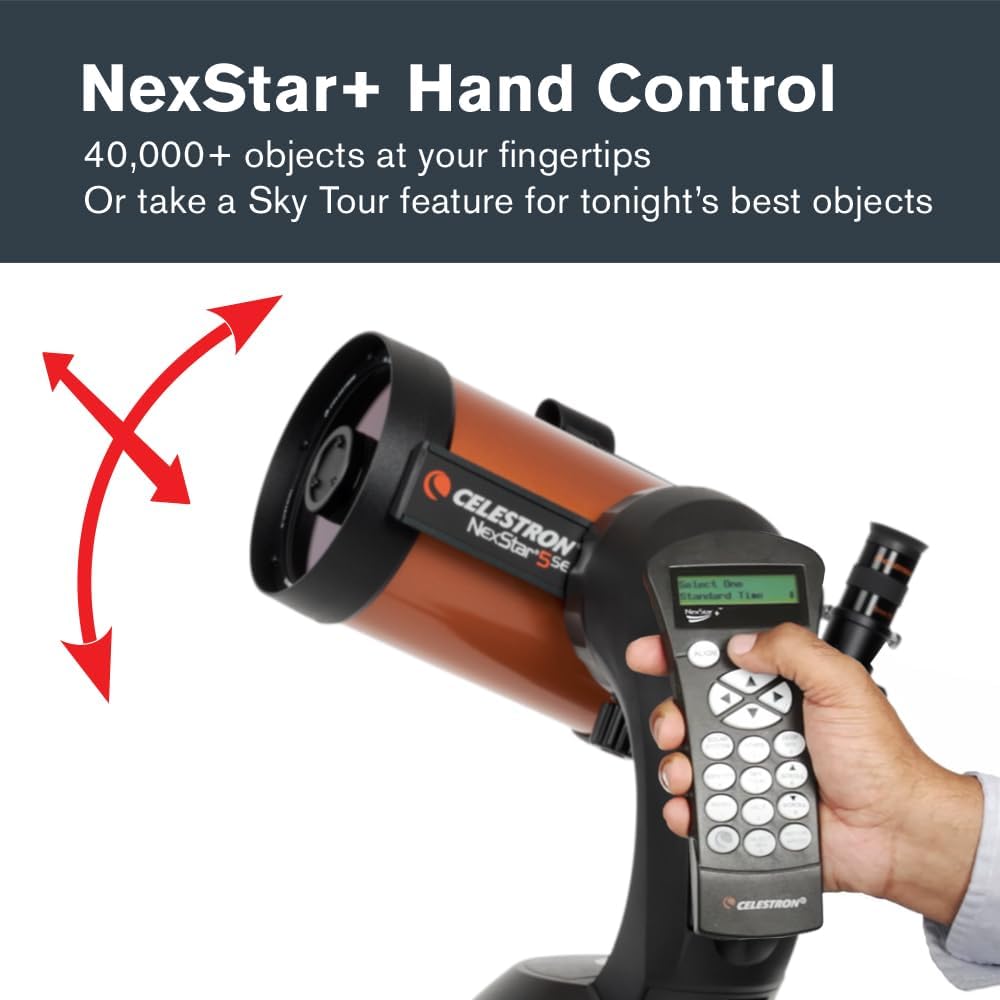
Image: A hand operating the NexStar+ Hand Control, which features a digital display and an array of buttons for navigating the telescope's computerized functions.
2. SkyAlign Technology
SkyAlign is Celestron's revolutionary alignment technology that simplifies the setup process. To align the telescope:
- Center any three bright stars or planets in the eyepiece. You do not need to know their names.
- The system will automatically calculate your position and align the telescope in minutes.

Image: A graphic illustrating Celestron's SkyAlign technology, showing three stars forming a triangle with the text "Easy as 1-2-3! No Astronomy Knowledge Required".
3. GoTo Functionality
Once aligned, use the NexStar+ hand control to select from a database of over 40,000 celestial objects. The computerized mount will then automatically locate and track your chosen target with precision, eliminating the need for star charts or manual tracking.

Image: The NexStar+ Hand Control displaying "Solar System Saturn" on its screen, next to an image of Saturn, demonstrating its object-finding capability.
4. Astrophotography Features
The built-in wedge allows for polar alignment, which is crucial for longer exposures and more accurate tracking during astrophotography. The telescope also includes a camera control feature and shutter release cable, enabling you to remotely take a series of timed exposures using your digital SLR camera.
Te tiaki
Mā te tiaki tika ka roa te ora me te mahi a tō karu tiro.
- Whakapai i nga Optik: Use only specialized optical cleaning solutions and cloths to clean lenses and mirrors. Avoid touching optical surfaces with bare hands.
- Tiaki Pūhiko: If using AA batteries, ensure they are fresh for optimal performance. Remove batteries if the telescope will not be used for an extended period to prevent leakage. Consider using a rechargeable Celestron Power Tank for longer observation sessions.
- Rokiroki: Store the telescope in a dry, dust-free environment. Use dust caps for the optical tube and eyepieces when not in use.
Raparongoā
If you encounter issues with your telescope, refer to the following common solutions:
- Take Tirohanga: Ensure the telescope is level and pointing generally north before starting SkyAlign. Verify that the correct time, date, and location settings are entered into the hand control.
- Nga raruraru hiko: Check battery levels or external power connections. Ensure the power switch is fully engaged.
- Whakautu Motini: If motors are unresponsive, check all cable connections to the hand control and mount.
- Kare i marama Views: Ensure eyepieces are clean and properly seated. Adjust the focus knob slowly for a sharp image. Allow the telescope to acclimate to the ambient temperature to reduce thermal currents affecting image quality.
For further assistance, Celestron offers US-based technical support. You can also find product updates and additional resources online.
Whakatakotoranga
| Hunga Hua | 32 x 34 x 52 inihi |
| Taumaha Tūemi | 17.6 pauna |
| Tauira Tuemi | 11036 |
| Waitohu | Celestron |
| Ingoa Tauira | NexStar 5SE Telescope Rorohiko |
| Te Roopu Optical | 330 Mirimita |
| Whakaahuatanga Arotahi kanohi | 25mm kanohi kanohi |
| Te Diameter Arotahi Whainga | 127 Mirimita |
| Whakaahuatanga Maunga Telescope | Computerized Altitude-Azimuth Single Fork Arm |
| Momo Arotahi | Arotahi a-ringa |
| Puna Mana | 8-AA batteries, 12v AC adapter, or Celestron PowerTank (none included) |
| Finderscope | StarPointer™ red dot finderscope |
Ataata Hua Whaimana
Celestron NexStar SE Telescopes Overview
Ataata: Kua mutu te rangatiraview of the Celestron NexStar SE series of telescopes, highlighting key features and benefits for users interested in computerized astronomy.
Pūtāhui me te Tautoko
The Celestron NexStar 5SE is backed by Celestron’s 2-Year Warranty. Customers also receive unlimited access to technical support from Celestron's US-based experts. For warranty claims or technical assistance, please refer to the contact information provided in your product packaging or visit the official Celestron webpae.
Tuhinga e pa ana - NexStar 5SE
 |
Celestron NexStar SE Instruction Manual: Models #11068 & #11069 - Explore the Universe Comprehensive instruction manual for the Celestron NexStar SE telescopes (Models #11068 and #11069), detailing assembly, operation, alignment, and maintenance. Designed for astronomers of all levels. |
 |
Celestron NexStar 4SE Instruction Manual A comprehensive instruction manual for the Celestron NexStar 4SE computerized telescope, detailing assembly, operation, alignment, celestial observing, maintenance, and technical specifications for amateur astronomers. |
 |
Celestron NexStar 6SE & 8SE Instruction Manual: Your Guide to the Cosmos Comprehensive instruction manual for Celestron NexStar 6SE and 8SE computerized telescopes. Learn assembly, operation, alignment, and celestial observing techniques for amateur astronomers. |
 |
Aratohu Whakatū Tere mō Celestron NexStar SE A step-by-step guide for setting up and aligning your Celestron NexStar SE telescope, covering tripod assembly, finder scope alignment, and hand control operation. |
 |
Aratohu Whakatū Tere mō Celestron NexStar SE He aratohu whānui mō te whakatū me te whakahāngai i tō karu tiro Celestron NexStar 6SE, 8SE rānei, e kapi ana i ngā mahi katoa mai i te huihuinga ki te whakahāngaitanga tuatahi mō te pai rawa atu. viewing. |
 |
Celestron Astro Fi Telescope Tohutohu Torotoro te rangi po me te Telescope Celestron Astro Fi (Tauira #22204). Ko tenei pukapuka tohutohu taipitopito e whakarato ana i nga aratohu marama, taahiraa-i-te-taahiraa mo te huihuinga, te whakatikatika, te mahi ma te taupānga SkyPortal, me te astrophotography atamai. He tino pai mo te hunga timata me te hunga kaingākau e rapu ana i nga mea whakamiharo tiretiera. |