1. Hua Neke Atuview
The Lutron Diva DVSCELV-300P-BI is a 300-watt single pole electronic low-voltage dimmer designed to control lighting from one location. It features a large paddle switch for on/off control and a linear slider for precise dimming adjustments. This dimmer is specifically for use with electronic low-voltage lighting applications. It allows users to adjust light levels, contributing to energy savings and creating desired room atmospheres. Wallplates are sold separately.
2. Nga korero haumaru
- WHAKATPATO: SHOCK HAZARD. May result in serious injury or death. Turn OFF power at the circuit breaker or fuse box before installing.
- Whakauruhia kia rite ki nga waehere hiko o te motu me te rohe.
- Mena kaore koe e tino mohio ki tetahi waahanga o enei tohutohu, tirohia atu ki tetahi tohunga hiko whai mana.
- Do not use with standard incandescent, magnetic low-voltage, or fluorescent lighting. This dimmer is for electronic low-voltage tono anake.
- Me whakarite te wat katoatage of the connected lighting does not exceed 300 watts.
3. Ihirangi mokete
- Lutron Diva DVSCELV-300P-BI Dimmer
- Wire connectors (various colors, typically yellow and blue)
- Aratohu Tāuta
Note: Wallplate is not included and must be purchased separately.
4. Whakatakotoranga
| Āhuahira | Taipitopito |
|---|---|
| Tau tauira | DVSCELV-300P-BI |
| Wattage | 300 Watts |
| Mahinga Mahi Voltage | 120 Volts |
| Momo iahiko | Single Pole (1-way) |
| Taupānga | Hiko Iti-Voltage (ELV) |
| Ahu (L x W x H) | 1.75 x 2.2 x 4.25 inihi |
| Tae | Pihikete |
| Tikanga Mana | Paddle Switch with Linear Slider |
| Rauemi | Parahi (Rauemi Whakapā) |
5. Tāutanga
Before beginning installation, ensure you have turned off power at the circuit breaker. This dimmer is designed for single-pole applications where the light is controlled from one switch. A neutral wire connection is typically required for proper operation.
5.1. Whakaritenga
- Whakawetohia te hiko: Locate your circuit breaker panel and turn off the power to the light switch you are replacing.
- Manatoko kua weto te hiko: Flip the existing switch on and off to confirm the power is disconnected.
- Remove existing wallplate and switch: Unscrew the wallplate and then the mounting screws holding the old switch in place. Carefully pull the switch out from the wall box.
- Tautuhia nga waea: Note the connections of the existing wires. Typically, a single-pole switch will have two load/line wires and a ground wire. Some dimmers may require a neutral wire (usually white).
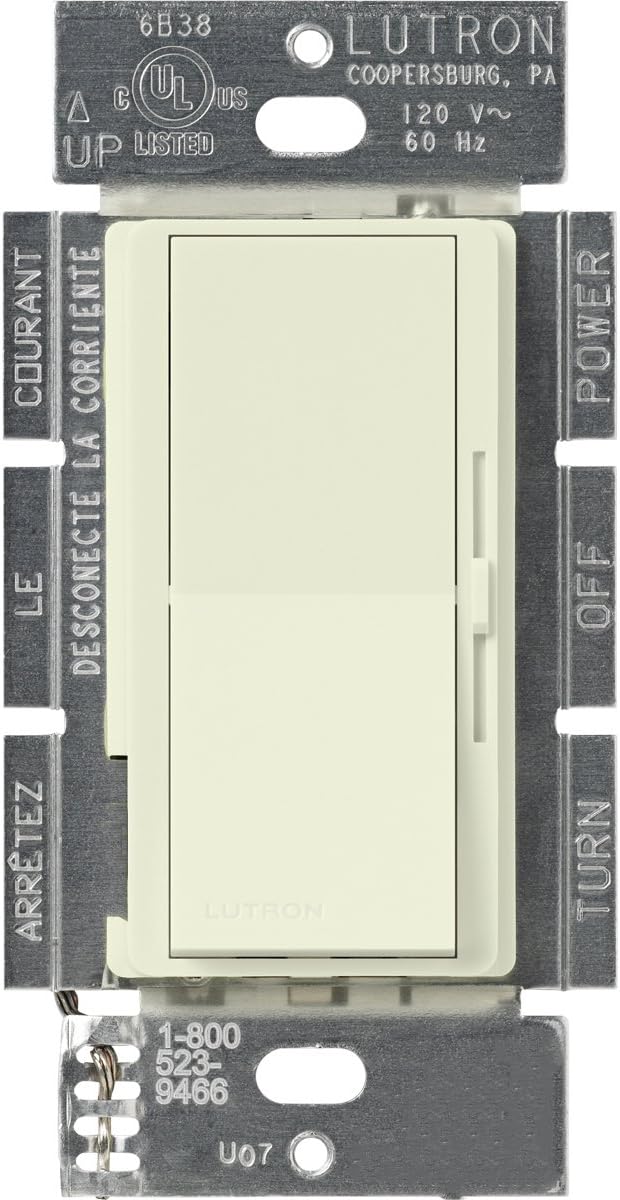
Whakaahua: Mua view of the Lutron Diva DVSCELV-300P-BI Electronic Low-Voltage Dimmer, showing the paddle switch and linear slider.

Whakaahua: Taha view of the Lutron Diva DVSCELV-300P-BI Dimmer, illustrating the pre-stripped wires for connection.
5.2. Wiring the Dimmer
The Lutron Diva DVSCELV-300P-BI dimmer typically has three wires: a green wire (ground), a black wire (hot/line), and a yellow wire (load). Some models may also include a white wire (neutral).
- Waea Papa: Connect the green wire from the dimmer to the bare copper or green ground wire in the wall box using a wire connector.
- Hot/Line Wire: Connect the black wire from the dimmer to the incoming hot/line wire from the circuit breaker (often black or red) using a wire connector.
- Uta Waea: Connect the yellow wire from the dimmer to the load wire that goes to the light fixture (often black or red) using a wire connector.
- Neutral Wire (if applicable): If your dimmer has a white wire and your wall box has a neutral wire bundle (usually white wires twisted together), connect the white dimmer wire to the neutral bundle using a wire connector. If no neutral wire is present in the wall box, cap off the white wire from the dimmer with a wire connector.
Video: This video demonstrates the wiring process for a single-pole dimmer with one black, one yellow, and one white wire, which is applicable to the Lutron Diva DVSCELV-300P-BI. It covers connecting the ground, hot, load, and neutral wires.
5.3. Finishing Installation
- Secure the dimmer: Carefully push all wires back into the wall box. Mount the dimmer to the wall box using the provided screws.
- Attach wallplate: Install the coordinating wallplate (sold separately) over the dimmer.
- Whakaora mana: Return to your circuit breaker panel and turn the power back on.

Image: The Lutron Diva DVSCELV-300P-BI Dimmer installed in a wall, ready for use.
6. Mahi
- Whakakaina/Weto Raiti: Press the large paddle switch to turn the connected lights on or off.
- Whakaritea Tirohanga: Use the linear slider located next to the paddle switch to adjust the light level. Slide up for brighter lights and down for dimmer lights.
- Preset Dimming: The dimmer will return to the previously set light level when turned back on.

Image: A hand demonstrating the operation of the Lutron Diva DVSCELV-300P-BI Dimmer, highlighting the paddle switch and linear slider.
7. Tiaki
- Te horoi: Clean the dimmer and wallplate with a soft, damp kakahu. Kaua e whakamahi i nga kai horoi me nga whakarewa.
- Karekau he waahanga e taea ana e te Kaiwhakamahi: Karekau he waahanga e taea ana e te kaiwhakamahi ki roto i te whakamarumaru. Kaua e ngana ki te whakatuwhera, ki te whakatika ranei i te waahanga.
8. Te Raru
| Raruraru | Te Take Taea / Rongoa |
|---|---|
| Kaore nga rama e ka ana. |
|
| Ka kemo, ka haruru rānei ngā rama. |
|
| Dimmer does not dim properly. |
|
9. Pūtāhui me te Tautoko
For warranty information, technical support, or further assistance, please visit the official Lutron website or contact Lutron customer service. Keep your purchase receipt for warranty claims.
Lutron Support: Lutron.com/support