1. Kupu Whakataki
This manual provides essential information for the safe and efficient use of your Panasonic Compact Stereo System D-dock, model SC-HC4-K. Please read these instructions thoroughly before operating the unit and retain them for future reference.
The SC-HC4-K is a compact audio system designed for versatile playback, featuring a CD player, an iPod/iPad dock, an SD card slot, and an AM/FM radio tuner. Its slim design integrates advanced audio technologies for clear sound reproduction.
2. Whakatupato Haumaru
- Puna Hiko: Honoa te waeine ki te pūhiko hiko kua tohua anaketage. Ensure the power cord is securely plugged into an outlet.
- Whakahau: Kaua e araia nga whakatuwheratanga hau. Whakaaetia he mokowhiti tika huri noa i te waahanga mo te rere o te hau kia kore ai e wera rawa.
- Te makuku me te wai: Do not expose the unit to rain, moisture, or dripping/splashing liquids. Keep objects filled with liquids, such as vases, away from the unit.
- Ahanoa Tawahi: Do not insert any metallic objects or flammable materials into the unit.
- Ratonga: Do not attempt to repair this unit yourself. Refer all servicing to qualified service personnel.
- Turanga: Place the unit on a flat, stable surface. Avoid placing it in direct sunlight, near heat sources, or in excessively dusty or humid environments.
3. Ihirangi mokete
Manatokona kei roto katoa nga mea kei roto i te kete:
- Panasonic Compact Stereo System (SC-HC4-K)
- Mana Mamao me nga pākahiko
- Waea hiko AC
- FM Antenna Roo
- Antenna Loop AM
- Nga Tohutohu Whakahaere (tenei pukapuka)
4. Tatūnga
4.1 Te Wetewete me te Whakanoho
Carefully remove the unit from its packaging. Choose a location that is flat, stable, and provides adequate ventilation. Ensure the unit is not exposed to extreme temperatures or humidity.
4.2 Te Mana Hononga
- Insert the AC power cord into the AC IN terminal on the rear of the unit.
- Monohia te tahi pito o te taura hiko ki te putanga pakitara.
4.3 Hononga Antenna
For optimal radio reception, connect the supplied antennas:
- Antenna FM: Connect the FM indoor antenna to the FM ANT terminal. Extend the wire fully and position it for best reception.
- Antenna AM: Connect the AM loop antenna to the AM ANT terminals. Position the loop antenna away from the main unit and other electronic devices to minimize interference.
4.4 iPod/iPad Docking
The unit features a motorized slide door for accessing the iPod/iPad dock. To dock your device:
- Pehia te TUwhera/KATI button to slide open the front panel.
- Carefully place your iPod or iPad onto the dock connector. Ensure it is seated firmly.
- The device will begin charging automatically when docked.
- Pehia te TUwhera/KATI button again to close the panel, protecting the docked device.
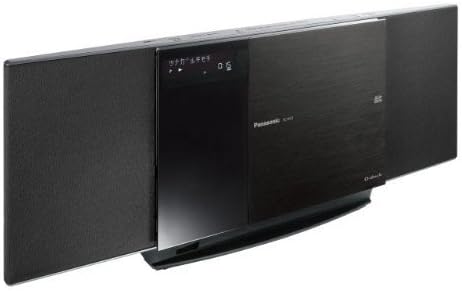
Image: The Panasonic SC-HC4-K Compact Stereo System. This image shows the main unit with its speakers on either side and the central panel, which includes the display and the motorized door for the CD player and iPod/iPad dock, slightly open to reveal the dock. The unit is black with a brushed metal finish on the central panel.
4.5 Kōkuhu Kāri SD
To insert an SD card:
- Locate the SD card slot, typically behind the motorized panel or on the side of the unit.
- Insert the SD card with the contacts facing down until it clicks into place.
5. Nga Tohutohu Whakahaere
5.1 Mana Taketake
- Power (ON/STANDBY): Pehia te MANA button on the unit or remote control to turn the unit on or off.
- Rōrahi: Whakamahia te MANU +/- buttons on the unit or remote to adjust the sound level.
- Tīpako Tāuru: Pehia te WHAKAMAHI or PUTANGA button to cycle through available inputs (CD, iPod/iPad, SD, FM, AM).
5.2 Whakahoki CD
- Pehia te TUwhera/KATI pātene hei whakatuwhera i te paepae CD.
- Tuhia he CD me te taha tapanga ki runga ki te paepae.
- Perehi TUwhera/KATI ano ki te kati i te paepae.
- Select the CD function using the WHAKAMAHI pātene.
- Perehi TAKARO kia timata te purei. Whakamahi HUKU nga paatene hei whakatere i nga ara me te KATI/TAATA mo te whakahaere.
5.3 iPod/iPad Playback
- Dock your iPod/iPad as described in Section 4.4.
- Select the iPod/iPad function using the WHAKAMAHI pātene.
- Use the remote control or your device's controls to select and play music or videos.
5.4 SD Card Playback
- Insert an SD card with compatible audio files (hei tauira, MP3).
- Select the SD function using the WHAKAMAHI pātene.
- Ka kitea aunoatia e te waeine, ā, ka tīmata te purei files, or you can navigate using the remote control.
5.5 Te Mahi Reo Irirangi
- Select FM or AM function using the WHAKAMAHI pātene.
- Pehia te WHAKARANGA +/- nga patene hei whakatangi-a-ringa ki tetahi teihana.
- Pēhi me te pupuri WHAKARANGA +/- mo te matawai teihana aunoa.
- Hei tatūkē i te teihana, waea ki te teihana e hiahiatia ana, ka pehi WHAKAMAHI ka whai i te paatene tau tatūkē.
5.6 Recording (CD to SD)
The unit supports high-speed recording from CD to SD card (up to 8x speed).
- Insert a CD and an SD card.
- Tīpakohia te mahi CD.
- Pehia te REC button. Follow the on-screen prompts to select recording options (e.g., entire CD, single track).
- Perehi Timata ki te tiimata ki te tuhi.
5.7 Nga Mahi Matama
The unit includes alarm and sleep timer functions. Refer to the detailed instructions in the full manual for setting these features.
6. Tiaki
- Te horoi i te Waehe: Wipe the unit with a soft, dry cloth. For stubborn dirt, use a cloth lightly dampened with water and a mild detergent, then wipe dry. Do not use abrasive cleaners, benzene, thinner, or alcohol.
- Te horoi i te karu CD: Use a commercially available CD lens cleaner.
- Rokiroki: Mena kāore te taputapu e whakamahia mō te wā roa, momotuhia te taura hiko mai i te putanga pakitara.
7. Te Raru
| Raruraru | Rongoā |
|---|---|
| Karekau he kaha | Ensure the AC power cord is securely connected to both the unit and the wall outlet. |
| Karekau he tangi | Check the volume level. Ensure the correct input source is selected. Check speaker connections if applicable (this model has integrated speakers). |
| Kaore te CD e purei | Ensure the CD is inserted correctly with the label side up. Check if the CD is scratched or dirty. Try a different CD. |
| iPod/iPad not recognized | Ensure the device is properly docked. Try removing and re-docking the device. Update your device's software if necessary. |
| He pai te powhiri reo irirangi | Adjust the position of the FM and AM antennas. Move the unit away from other electronic devices that may cause interference. |
8. Whakatakotoranga
- Tauira: SC-HC4-K
- Waitohu: Panasonic
- Pāpāho Hototahi: CD, iPod/iPad, SD Card
- Tuner: FM/AM Digital Tuner
- Te tuhi: CD to SD (Max 8x speed)
- Ahu (Ahua.): 56 cm (W) x 25.2 cm (H) x 17.2 cm (D) (Note: Based on package dimensions)
- Taumaha (Tata.): 4.12 kg (Note: Based on package weight)
- Puna Hiko: AC 100-240V, 50/60Hz (Typical range, specific voltage not detailed in provided specifications)
9. Pūtāhui me te Tautoko
For warranty information and customer support, please refer to the warranty card included with your product or contact Panasonic customer service in your region. Keep your purchase receipt as proof of purchase for warranty claims.
Online resources and frequently asked questions may be available on the official Panasonic website. For technical assistance, please provide your model number (SC-HC4-K) and serial number.


