1. Kupu Whakataki
This manual provides detailed instructions for the installation, operation, maintenance, and troubleshooting of the Altronix AL175X220 Power Supply. Please read this manual thoroughly before attempting to install or operate the unit to ensure proper functionality and safety.
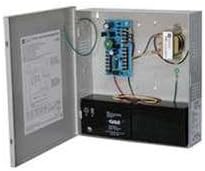
Figure 1: Altronix AL175X220 Power Supply with enclosure open.
This image displays the Altronix AL175X220 Power Supply unit. The metal enclosure is open, showing the internal circuit board, transformer, and a black battery located at the bottom. Wiring connects the components within the enclosure.
2. Tatūnga me te Tāuta
Proper installation is crucial for the safe and efficient operation of the AL175X220. Ensure all local and national electrical codes are followed.
2.1 Whakapiki
- Select a suitable mounting location that is dry, well-ventilated, and protected from extreme temperatures and moisture.
- Securely mount the power supply enclosure to a wall or other stable surface using appropriate fasteners.
2.2 Waea Whakahoahoa
- Mana Whakauru: Connect the 220V AC input power to the designated terminals on the power supply board. Ensure the power source is de-energized before making connections.
- Mana Putanga: Connect your devices requiring 12VDC or 24VDC to the appropriate output terminals. Verify correct polarity.
- Pūrua Pūhiko (Kōwhiringa): If using battery backup, connect a compatible 12V or 24V battery to the battery terminals. Observe correct polarity (+ to + and - to -).
- Whakapapa: Me whakarite kei te tika te hononga whenua o te waeine kia rite ki ngā ture hiko ā-rohe.
WARNING: Disconnect all power before servicing the unit.
3. Nga Tohutohu Whakahaere
Once installed, the AL175X220 operates automatically. Follow these steps for initial power-up.
- After all wiring connections are complete and verified, apply 220V AC power to the unit.
- Observe the status indicator LEDs (if present) on the circuit board. Refer to the product's technical specifications for LED meanings.
- The unit will begin providing regulated 12VDC or 24VDC output to connected devices and will charge the connected backup battery (if installed).
4. Tiaki
The AL175X220 is designed for reliable operation with minimal maintenance. However, periodic checks can help ensure longevity and performance.
- Tirohanga Tau: Tirohia te waeine i ia tau mō ngā tohu o te pakaru tinana, te ngoikore o ngā hononga, te waikura rānei.
- Tirotiro Pūhiko (mēnā e tika ana): If a backup battery is installed, check its condition and charge level periodically. Replace batteries every 3-5 years or as recommended by the battery manufacturer.
- Te horoi: Keep the enclosure clean and free of dust and debris. Use a soft, dry cloth for cleaning. Do not use liquid cleaners.
5. Te Raru
If the AL175X220 is not functioning as expected, refer to the following common issues and solutions.
- Kāore he Mana Putanga:
- Check the 220V AC input power source.
- Manatokohia he haumaru, he tika hoki nga hononga waea.
- Check for blown fuses or tripped circuit breakers within the unit or external power circuit.
- Karekau te pākahiko i te utu:
- Me whakarite kei te hono tika te pākahiko, ā, he tika hoki te polarity.
- Check the battery's condition; it may be faulty or at the end of its life.
- Verify AC input power is present.
- Tikanga taumaha:
- If the unit shuts down or indicators suggest an overload, disconnect some load devices.
- Ensure the total current draw of connected devices does not exceed the power supply's rated output (1.5AMP).
If problems persist after attempting these solutions, contact Altronix technical support.
6. Whakatakotoranga
| Whakatakotoranga | Uara |
|---|---|
| Tauira | AL175X220 |
| Whakauru Voltage | 220V AC |
| Putanga Voltage | 12VDC / 24VDC (selectable) |
| Putanga o naianei | 1.5 AMP |
| Kaihanga | ALTRONIX |
| ASIN | B002PNC9HC |
| Te Ra Tuatahi Wātea | Hui-tanguru 12, 2012 |
7. Nga Korero Whakaputanga
Altronix products are designed for high reliability. For detailed warranty terms and conditions, please refer to the official Altronix webte waahi, te kaari whakamana ranei kei roto i to putunga hua. Puritia to tohu hoko mo nga kereme whakamana.
8. Tautoko Hangarau
For technical assistance, product inquiries, or service, please contact Altronix customer support through their official webpae, nga korero whakapā ranei e whakaratohia ana i roto i to tuhinga hua.
Altronix Official Webpae: www.altronix.com (Kia mōhio mai: He wāhi pupuri whānui tēnei URL as specific support links were not provided.)


