1. Hua Neke Atuview
The TP-Link TL-SF1008D Fast Ethernet Switch is designed to expand your network connectivity for small office or home office (SOHO) environments. This unmanaged switch offers 8 10/100 Mbps auto-negotiation RJ45 ports, providing a simple and efficient solution for adding more wired connections to your router or modem. Its plug-and-play design requires no configuration, making setup straightforward. The device incorporates innovative energy-efficient technology to reduce power consumption and features a fanless design for quiet operation.
Āhuatanga matua:
- Mono-me-Play: Easy setup with no configuration or software needed.
- 8 Fast Ethernet Ports: 8 10/100 Mbps auto-negotiation RJ45 ports for expanding network capacity.
- Pūngao-He pai: Innovative green technology saves power consumption by up to 70%.
- Hoahoa Kirikore: Ensures quiet operation, ideal for any environment.
- MDI-Aunoa/MDIX: Eliminates the need for crossover cables.
- Whakawhiti Raraunga Pono: IEEE 802.3x flow control provides dependable data transmission.
- Hoahoa Kiato: Desktop or wall-mounting options for flexible placement.
2. Ihirangi mokete
Manatokohia kei roto i to kete nga mea e whai ake nei:
- TP-Link 8-Port 10/100Mbps Desktop Switch (TL-SF1008D)
- Pūurutau Hiko
- Aratohu Kaiwhakamahi
3. Whakaahuatanga Tinana
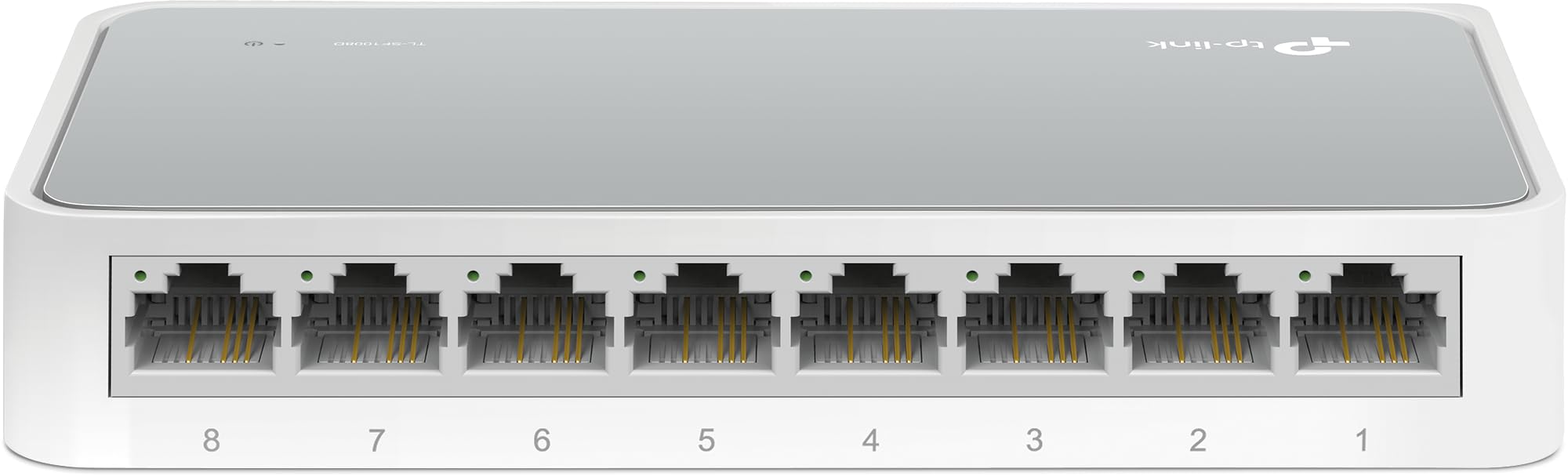
Pikitia 1: Koki mai i runga ki raro view of the TP-Link TL-SF1008D 8-Port Fast Ethernet Switch, showing the compact white casing and the eight RJ45 ports on the front.

Whakaahua 2: Koki-mua view of the TP-Link TL-SF1008D 8-Port Fast Ethernet Switch, highlighting the eight RJ45 ports labeled 1 through 8, and the power LED indicator.

Whakaahua 3: Runga view of the TP-Link TL-SF1008D 8-Port Fast Ethernet Switch, showing the TP-Link logo, model number, and the power and link/activity LED indicators.
Tohu LED:
- Arahina hiko: E tohu ana i te mana o te pana. Ka kā ina whakakāhia, ka mate ina kore.
- Link/Act LEDs (1-8): Indicates the link status and network activity for each port. Solid green indicates a valid network link, blinking indicates data transmission.
4. Tatūnga me te Tāuta
The TL-SF1008D switch is designed for simple plug-and-play installation. No software configuration is required.
- Tūhonohia te Pūurutau Hiko: Plug the provided power adapter into the switch's power port and then into a standard electrical outlet. Ensure the Power LED on the switch illuminates.
- Connect to Your Network: Connect an Ethernet cable from your router or modem to any of the 8 RJ45 ports on the switch. The corresponding Link/Act LED for that port should light up, indicating a successful connection.
- Tūhono ō Pūrere: Connect your network devices (e.g., computers, gaming consoles, printers, smart TVs) to the remaining RJ45 ports on the switch using Ethernet cables. The Link/Act LEDs for these connected devices should also light up.
The switch automatically detects the speed and cable type (Auto-MDI/MDIX) for each connected device, eliminating the need for manual configuration or special crossover cables.
5. Nga Tohutohu Whakahaere
Once installed, the TL-SF1008D operates automatically. It functions as an unmanaged switch, meaning it requires no user intervention for basic network operation. Data packets are forwarded and filtered at full wire-speed for maximum throughput.
Whiriwhiri-Aunoa:
Each port on the switch supports auto-negotiation, which automatically determines the optimal connection speed (10 Mbps or 100 Mbps) and duplex mode (half or full duplex) with the connected device. This ensures compatibility and optimal performance without manual settings.
Mana Rere:
The switch supports IEEE 802.3x flow control. This mechanism helps prevent data loss during periods of high network traffic by temporarily pausing data transmission from a congested device, ensuring reliable data transfer across your network.
6. Tiaki
To ensure optimal performance and longevity of your TP-Link TL-SF1008D switch, consider the following maintenance tips:
- Turanga: Place the switch in a well-ventilated area to prevent overheating. Avoid placing it near heat sources or in enclosed spaces.
- Te horoi: Horoia te taha waho o te pana i ia wā ki te kakahu ngohengohe, maroke. Kaua e whakamahi i ngā horoi wai, i ngā horoi hau rānei.
- Whakaha Uepu: Ensure Ethernet cables are neatly organized and not excessively bent or kinked to prevent damage and maintain signal integrity.
- Tuku Hiko: Whakamahia te urutau hiko anake me te taputapu.
7. Te Raru
If you encounter issues with your TL-SF1008D switch, try the following basic troubleshooting steps:
- Kore Mana: Check if the power adapter is securely connected to the switch and a working electrical outlet. Verify the Power LED is on.
- Kore he Hononga/Mahi i runga Tauranga:
- Me whakarite kei te hono tika te taura Ethernet ki te tauranga pana me te pūrere kua honoa.
- Whakamātauria tētahi atu taura Ethernet hei whakakore i te hapa o te taura.
- Manatokohia kei te noho te taputapu hono me te mahi tika.
- Ngana ki te hono i te taputapu ki tetahi tauranga rereke i runga i te whakawhiti.
- Tere Whatunga Puturi:
- Ensure all connected devices and cables support 100 Mbps speeds for optimal performance.
- Check for excessive network traffic or bandwidth-intensive applications running on your network.
Mō ētahi atu āwhina, tirohia ngā mōhiohio tautoko i te Wāhanga 9.
8. Whakatakotoranga
| Hunga Hua | 5.3"L x 5.3"W x 0.9"H |
| Taumaha Tūemi | 0.86 Pauna (13.8 hekere) |
| Voltage | 110 Volts (AC) |
| Rauemi Take | Aluminum or Alloy Steel or Metal |
| Te Whakatauranga Te Pawera o runga | 40 Paetukutuku Celsius |
| Momo Atanga | RJ45 |
| Rere Whakawhiti Raraunga | 100 Megabits ia Hekona |
| Whakatauranga o naianei | 0.6 Amps |
| Te maha o nga Tauranga | 8 |
| Tae | Mā |
| Pūrere Hototahi | Desktop, Gaming console, Router, Printer, Laptop, Camera |
9. Pūtāhui me te Tautoko
TP-Link provides unlimited 24/7 technical support for free. For any issues or questions regarding your TL-SF1008D switch, please contact TP-Link support.
Mōhiohio Whakapā:
- Tautoko Waea: (866) 225-8139
- Webpae: myproducts.tp-link.com/us
- Tautoko Īmēra: tautoko.USA@tp-link.com
Whakakahoretanga Ture:
Each item is provided AS IS, and there is no warranty on these items. If an item does not work, please contact the manufacturer directly, as we do not test every unit for reliability.


