Kupu Whakataki
The Sangean DDR-31+ is a compact, acoustically tuned wooden cabinet radio designed for high-quality audio reception. It supports both DAB+ (Digital Audio Broadcasting Plus) and FM radio bands, providing a wide range of listening options. The FM receiver includes RDS (Radio Data System) functionality, displaying additional information such as song titles and artist names. This radio also features an AUX-in connection for external audio devices and a line-out for connecting to an external amplifier. This manual provides detailed instructions for the proper setup, operation, and maintenance of your Sangean DDR-31+ radio.
Nga Tohutohu Haumaru
- Me ata panui nga tohutohu katoa i mua i te whakahaere i te taputapu.
- Puritia te pukapuka hei tohutoro a meake nei.
- Kaua e tukuna te reo irirangi ki te ua, te makuku, te wera nui ranei.
- Me whakarite kia tika te hau; kaua e aukati i nga whakatuwheratanga hau.
- Whakamahia anake te urutau hiko e whakaratohia ana me te waeine.
- Kaua e ngana ki te mahi i a koe ake. Tukuna atu nga ratonga katoa ki nga kaimahi whai tohu.
- A ape i te whakanoho i te waeine ki te taha o nga puna wera penei i nga radiators, rehita wera, umu, me etahi atu taputapu (tae atu ki ampkaiwhakaora) e whakaputa ana i te wera.
Ihirangi mokete
Manatokona kei te noho nga mea katoa i te wa e wetewete ana:
- 1 x Sangean DDR-31+ Portable Radio
- 1 x Pūurutau Hiko
- 1 x Mana Mamao (me ngā pākahiko)
- Pukapuka Kaiwhakamahi (tenei tuhinga)
Ka mutu te huaview
Familiarize yourself with the controls and features of your Sangean DDR-31+ radio.
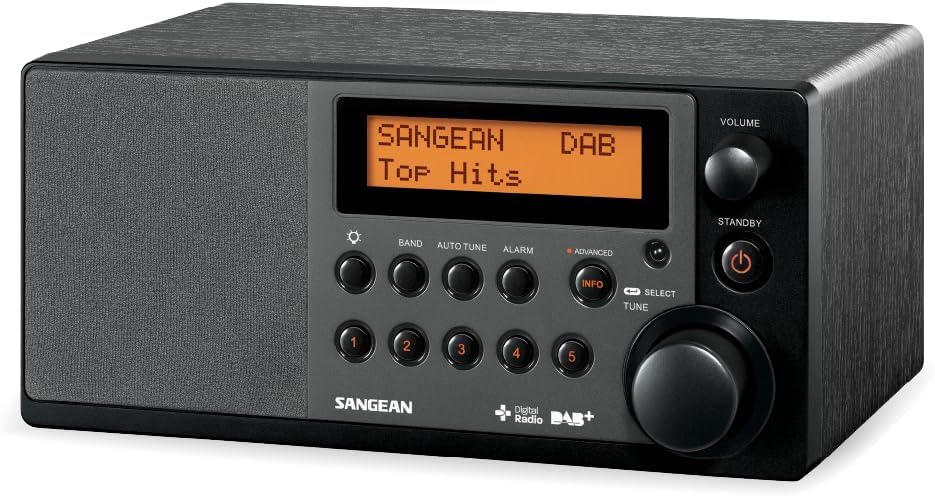
Whakaahua 1: Mua view of the Sangean DDR-31+ Portable Radio, showing the display, control buttons, and rotary knobs.
Mana Paewhiri Mua
- Whakaatu: He whakaatu i nga korero teihana, te wa, me nga whiringa tahua.
- Pene BAND: Switches between DAB+ and FM radio bands.
- AUTO TUNE Button: Ka timata te matawai teihana aunoa.
- Pātene oho: Ka uru atu ki ngā tautuhinga whakaoho.
- Pato INFO: Displays additional information (e.g., RDS data, program type).
- PRESET Buttons (1-5): Ka rongoa, ka whakahoki anō hoki i ngā teihana tino pai.
- SELECT/TUNE Knob: Rotates to navigate menus or tune frequencies; presses to confirm selections.
- PUKA PUKA: Whakaritea te taumata whakaputa ororongo.
- Pātene tūtū: Ka whakakaha, ka weto ranei te waeine.
Hononga Paewhiri Whakamuri
- Hononga AUX-in: Connects external audio devices (e.g., MP3 player).
- Tihakihihi Mo te whakarongo motuhake.
- DC I roto i te Jack: Ka hono i te urutau hiko.
- Antenna Telescopic: Mō te whiwhinga oro DAB+ me te FM.
Tatūnga
1. Hononga Mana
- Insert the DC plug of the supplied power adapter into the DC In jack on the rear of the radio.
- Monohia te urutau AC ki tetahi putanga pakitara paerewa.
2. Whakatikatika Antenna
Extend the telescopic antenna fully for optimal DAB+ and FM reception. Adjust its position for the best signal quality.
3. Hia Tuatahi
Pehia te KAUPAPA button to turn on the radio. The unit will typically start in the last used mode or initiate a DAB+ scan upon first use.
Nga Tohutohu Whakahaere
1. Te Mahi Reo Irirangi DAB+
- Pehia te PĀERE button repeatedly until "DAB" appears on the display.
- If this is the first time using DAB+ or if the station list is empty, the radio will automatically perform a full scan. Otherwise, press AUTO TUNE to initiate a scan.
- Kia oti te matawai, hurihia te SELECT/TUNE knob to browse the available stations.
- Pehia te SELECT/TUNE knob to select and play a station.
- Pehia te INFO button to cycle through different information displays (e.g., program type, signal strength, bit rate).
2. Mahi Irirangi FM
- Pehia te PĀERE te paatene kia puta noa te "FM" ki te whakaaturanga.
- Hei matawai aunoa mō te teihana e whai ake nei e wātea ana, pēhi me te pupuri i te SELECT/TUNE knob. The radio will tune to the next strong station.
- Hei whakatangi a-ringa, hurihia te SELECT/TUNE knob in small increments.
- The display will show RDS information (station name, program type, etc.) if available. Press the INFO button to cycle through RDS data.
3. Storing and Recalling Presets
The radio allows you to store up to 5 DAB+ and 5 FM stations as presets.
- Hei Rokiroki: Whakatangihia ki te teihana e hiahiatia ana. Patohia me te pupuri i tetahi o nga PRESET (1-5) buttons until the display confirms the station has been saved.
- Hei Mahara: Patohia poto te hiahia PRESET (1-5) button to instantly tune to the stored station.
4. Te Whakatakoto i te Whakaoho
The Sangean DDR-31+ features two alarm timers.
- Pehia te ohooho button to enter the alarm setup menu.
- Hurihia te SELECT/TUNE knob to select Alarm 1 or Alarm 2, then press to confirm.
- Follow the on-screen prompts to set the alarm time, source (DAB+, FM, or Buzzer), and volume.
- Pehia te SELECT/TUNE pihi hei whakaū i ia tautuhinga.
5. Aratau AUX-in
Connect an external audio device (e.g., MP3 player, smartphone) to the AUX-in jack on the rear panel using a 3.5mm audio cable.
- Pehia te PĀERE pēhi i te pātene kia maha ngā wā tae noa ki te puta mai o te "AUX" ki te mata.
- Start playback on your external device. The audio will be routed through the radio's speaker.
- Whakaritehia te puoro ma te whakamahi i te ROTO knob on the radio or on your external device.
6. Aratau oro
The radio offers various equalizer presets to enhance your listening experience:
- Papatahi
- Jazz
- Toka
- Tauhira
- Pop
- Rongorongo
Access these modes through the menu system (refer to the on-screen prompts or remote control for specific navigation).
Te tiaki
Te horoi
- Horoihia te waho o te reo irirangi ki te ngohengohe, damp kakahu.
- Kaua e whakamahi i nga kai horoi, i nga whakarewa ranei, na te mea ka pakaru te mutunga.
- Me mohio kua wetekina te taputapu i mua i te horoi.
Tiaki Whānui
- Avoid placing heavy objects on the radio.
- Tiakina te waeine mai i nga papa autō kaha.
- Mena kāore e whakamahia te taputapu mō te wā roa, momotuhia mai i te putanga hiko.
Raparongoā
| Raruraru | Take pea | Rongoā |
|---|---|---|
| Karekau he kaha | Ko te urutau hiko kaore i te hono, kei te he te putanga. | Tirohia ngā hononga hiko. Whakamātauria tētahi atu putanga hiko. |
| Te koretake o te whiwhinga DAB+/FM | Ko te Antenna kaore i roa, he ngoikore ranei te waahi tohu. | Fully extend and adjust the telescopic antenna. Try relocating the radio. |
| Karekau he tangi | Volume too low or headphones connected. | Whakanuia te oro. Momotuhia ngā paneoro mēnā kāore i te whakaarohia hei whakamahi. |
| Ko te mana mamao kaore e mahi | Kua pau nga pākahiko, kua arai ranei. | Replace remote control batteries. Ensure no obstruction between remote and radio. |
Whakatakotoranga
| Āhuahira | Whakatakotoranga |
|---|---|
| Tau tauira | A500212 |
| Waitohu | Sangean |
| Nga Roopu Reo Irirangi | DAB+, FM |
| Hononga | Auxiliary (AUX-in), IR (for remote control) |
| Nga waahanga motuhake | Portable, RDS, 2 Alarm Timers, Sound Effects (Flat, Jazz, Rock, Classic, Pop, News) |
| Pūrere Hototahi | MP3 Player (via AUX-in) |
| Puna Mana | AC Power Adapter (12V 1A) |
| Ahu (L x W x H) | 18.1 x 24 x 11.7 cm (tata) |
| Hoahoa Ahumoana | rūnanga rakau kua whakararangihia |
Pūtāhui me te Tautoko
Sangean products are manufactured to high-quality standards. This product comes with a limited warranty against defects in materials and workmanship.
- Wāhanga Wāhanga Wātea: 1 Tau
- For warranty claims or technical support, please refer to the contact information provided on the Sangean official webpae, to tohatoha rohe ranei.
- Keep your proof of purchase for warranty service.


