1. Neke atu i teview
The Casio AE1000W Digital Watch is designed for durability and functionality, offering a range of features suitable for daily wear and travel. This manual will guide you through its various functions and ensure optimal use.
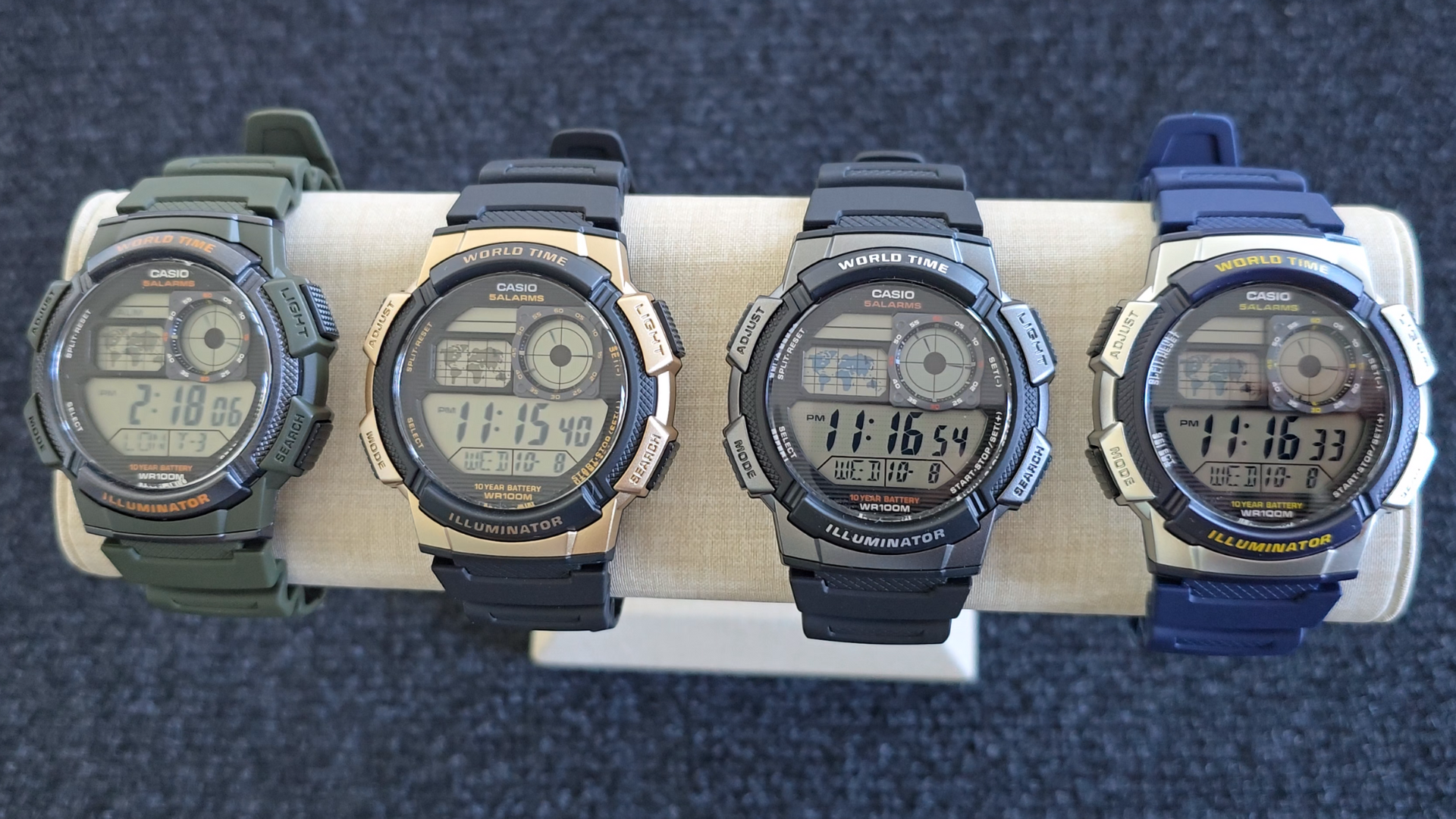
Image: Casio AE1000W Digital Watch series in various color options.
2. Nga waahanga matua
- Wā o te Ao: Displays current time in 48 cities (31 time zones) with a world map indicator.
- Multi Alarms: Features five independent daily alarms.
- Maatamato: 1/100-second stopwatch with measuring modes: elapsed time, split time, 1st-2nd place times.
- Taima Whakatau: Measuring unit: 1 second, Countdown range: 24 hours.
- Rama LED: Illuminates the watch face for easy reading in low light conditions.
- Ātete wai: 100 meters (330 feet) suitable for swimming and snorkeling.
- 10-Tau Te Ora Pūhiko: Pūhiko roa mo te whakamahi roa.
- Ko te nekehanga o te Quartz: Ka whakarite i te wa tika.
- Glass Crystal: Durable watch face protection.

Image: Emblem highlighting the 10-year battery life feature.
3. Tatūnga
3.1 Tautuhinga Wā tuatahi me te Rā
- I roto i te Aratau Timekeeping, pehia me te pupuri i te WHAKAARO button until the city code starts to flash.
- Whakamahia te RAPU a MODE buttons to select your desired city code (Home City).
- Pehia te WHAKAARO button to move to the DST (Daylight Saving Time) setting. Use RAPU to toggle DST On/Off.
- Perehi WHAKAARO again to cycle through the settings: 12/24-hour format, Seconds, Hour, Minute, Year, Month, Day. Use RAPU a MODE ki te huri i nga uara.
- Kia tika nga tautuhinga katoa, pehia te WHAKAARO pātene ki te puta i te aratau tautuhinga.
4. Nga Tohutohu Whakahaere
4.1 Aratau Whakaterenga
Pehia te MODE button to cycle through the different modes: Timekeeping, World Time, Alarm, Stopwatch, and Countdown Timer.
4.2 Mahi Wā o te Ao
In World Time Mode, the watch displays the current time in 48 cities across 31 time zones. The world map indicator visually highlights the selected time zone.
- Enter World Time Mode by pressing the MODE pātene.
- Whakamahia te RAPU button to scroll through the different city codes. The time for the selected city will be displayed, and the corresponding area on the world map will be highlighted.
- To swap your Home City time with a World Time City, press and hold the WHAKAARO button while in World Time Mode.
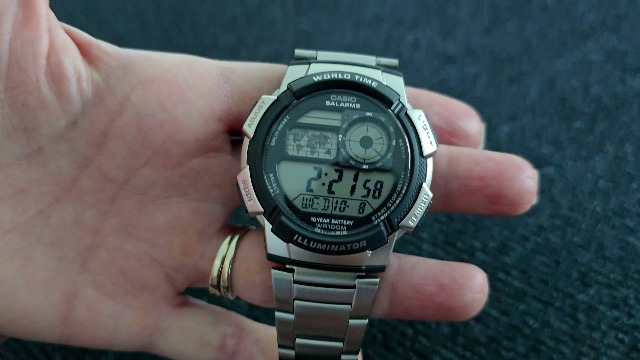
Whakaahua: Mua view of the Casio AE1000W watch, showing the digital display and world map.
4.3 Whakaoho
The watch features five daily alarms. You can set each alarm independently.
- Tomo ki te Aratau Whakaoho mā te pēhi i te MODE button until "ALM" appears.
- Whakamahia te RAPU button to cycle through the five alarms (AL1 to AL5) and the Hourly Waitohu Wā (SIG).
- To set an alarm, select the desired alarm (e.g., AL1) and press and hold the WHAKAARO patene tae noa ki nga mati o te haora.
- Whakamahi RAPU a MODE ki te whakarite i te haora me te meneti.
- Perehi WHAKAARO ki te whakaū me te puta.
- To turn an alarm On/Off, select the alarm and press the WHAKAARO poto poto.
4.4 Tapukawati
The stopwatch measures elapsed time, split times, and 1st-2nd place times.
- Whakauruhia te Aratau Waatiti ma te pehi i te MODE button until "STW" appears.
- Perehi START/STOP/SET(+) to start and stop the stopwatch.
- Perehi WAHI/WAHIA to record split times or reset the stopwatch to zero.
4.5 Kaute Taima
Ka taea te whakatakoto i te taima tatau-muri mō te 24 hāora.
- Enter Countdown Timer Mode by pressing the MODE button until "TMR" appears.
- Hei whakarite i te wā tatau whakamuri, pēhi me te pupuri i te WHAKAARO patene tae noa ki nga mati o te haora.
- Whakamahi RAPU a MODE ki te whakarite i te haora me te meneti.
- Perehi WHAKAARO ki te whakau.
- Perehi START/STOP/SET(+) hei tīmata me te whakamutu i te tatau whakamuri.
4.6 LED Whakamuri
Pehia te KAMARAMA button to illuminate the watch face for a few seconds, making it easy to read in the dark.
5. Tiaki
- Te horoi: Wipe the watch with a soft, dry cloth. For water-resistant models, you can rinse it with fresh water after exposure to saltwater.
- Ātete wai: While water-resistant to 100M, avoid operating buttons underwater to prevent water ingress.
- Pūhiko: The watch features a 10-year battery. When the display becomes dim or functions become erratic, it may be time for a battery replacement by a qualified technician.
- Te pāmahana: A ape i te tuku i te mataaratanga ki nga wera nui, te ra tika mo te wa roa, me nga waahi autō kaha.
6. Te Raru
- Wā Hē: Ensure your Home City is correctly set and Daylight Saving Time (DST) is adjusted as needed. Refer to Section 3.1.
- Patene Kaore i te Whakautu: Check if the watch is in a specific setting mode. Exit any setting mode by pressing the WHAKAARO button. If the issue persists, a full reset may be required (refer to the full Casio manual for advanced reset procedures).
- He pōuri te whakaaturanga: This may indicate a low battery. While rated for 10 years, environmental factors can affect battery life. Consider professional battery replacement.
7. Whakatakotoranga
| Āhuahira | Taipitopito |
|---|---|
| Waitohu | Casio |
| Tau tauira | AE-1000W-1BVCF |
| Hunga Hua | 2.4 x 4.09 x 3.78 inihi |
| Taumaha Tūemi | 1.41 hekere |
| Rauemi | Resin |
| Pūhiko | 1 pūhiko Lithium Metal (kei roto) |
| Ātete wai | 100 Mita (330 Puawai) |
| Te nekehanga | Quartz |
| Momo Whakaatu | Mamati me te Whakaaturanga Analog LC |
8. Pūtāhui me te Tautoko
Mō ngā mōhiohio pūtāhui me te tautoko kiritaki, tirohia te paetukutuku mana o Casio webpaetukutuku, whakapā atu ranei ki ta raatau ratonga kaihoko. Puritia to riirii hoko hei tohu mo te hoko mo nga kereme whakamana.
Tautoko Aipurangi: Tirohia te Tautoko Casio Webpae for FAQs, manuals, and service center locations.


