Kupu Whakataki
The Brookstone Cool It Personal Fan is a portable, battery-powered device designed to provide personal cooling. Its compact size and flexible blades make it suitable for various environments, offering an adjustable airflow for comfort.
Ko nga ahuatanga matua ko:
- Portable design for personal use anywhere.
- Adjustable fan speed for customized airflow.
- Flexible, finger-safe blades for enhanced safety.
- Includes a lanyard for hands-free carrying.
- E whakamahia ana ngā pākahiko AA e 4 (kāore i whakaurua).
Tatūnga
1. Tāuta Pūhiko
The Brookstone Cool It Personal Fan requires 4 AA batteries for operation. Batteries are not included with the product.
- Locate the battery compartment cover on the back of the fan handle.
- Panuku ata, wetewetehia ranei te uhi hei whakatuwhera i te waahanga.
- Whakauruhia kia toru ngā pākahiko AA, kia tika ai te polarity (+ me te -) e ai ki te tohu i roto i te wāhanga.
- Whakakapia te taupoki o te wāhanga pākahiko, me te whakarite kia kati pai.

Whakaahua: Taha view of the fan, illustrating the general area for battery access.
2. Taapiri Lanyard
A lanyard is included for convenient, hands-free carrying.
- Locate the small loop or attachment point at the top of the fan handle.
- Thread the lanyard through this loop and secure it according to the lanyard's design.
Nga Tohutohu Whakahaere
Te Whakakā/Te Whakaweto me te Whakaritenga Tere
The fan features a variable speed control for customized airflow.
- To turn the fan on, rotate the control dial, typically located on the handle, clockwise.
- Continue rotating the dial clockwise to increase the fan speed.
- To decrease the fan speed, rotate the dial counter-clockwise.
- To turn the fan off, rotate the dial fully counter-clockwise until it clicks into the 'off' position.

Whakaahua: Mua view of the fan, highlighting the fan blades and the control dial on the handle.
Te Whakamahi i te Tūnga Whakauru
The fan includes a small integrated stand for tabletop use.
- Locate the stand mechanism on the bottom or side of the fan handle.
- Extend or unfold the stand until it locks into position, allowing the fan to sit upright on a flat surface.
- Ensure the fan is stable before use.
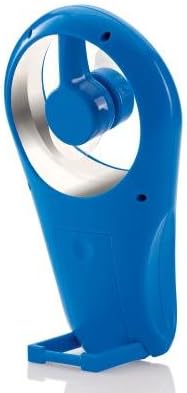
Whakaahua: Taha view of the fan with its integrated stand extended for tabletop use.
Te tiaki
Te horoi
To maintain optimal performance and appearance, clean the fan periodically.
- Ensure the fan is turned off and batteries are removed before cleaning.
- Horoia nga mata o waho ki te ngohengohe, damp kakahu. Kaua e whakamahi i nga kai horoi me nga whakarewa.
- The flexible blades can be gently wiped if dust accumulates. Avoid bending them excessively.
- Kaua e rumakina te mea powhiriwhiri ki te wai, ki tetahi atu wai ranei.
Whakakapinga Pūhiko
Replace batteries when the fan's performance diminishes or it stops working.
- Follow the battery installation steps outlined in the Setup section.
- Me whakakapi ngā pākahiko AA e whā i te wā kotahi ki ētahi mea hou.
- Kaua e hanumi nga pākahiko tawhito me nga pākahiko hou, nga momo pākahiko rereke ranei.
- Makahia nga pākahiko kua whakamahia kia rite ki nga ture o te rohe.
Raparongoā
| Raruraru | Take pea | Rongoā |
|---|---|---|
| Kare te Fan e huri. | Kua pau nga pākahiko, kua he ranei te whakaurunga. | Tirohia te polarity pākahiko. Whakakapihia ki nga pākahiko AA hou. |
| Low airflow or weak fan speed. | Batteries are low. Speed dial is set too low. | Replace batteries. Rotate the control dial clockwise to increase speed. |
| Ka haruru rerekee te Fan. | Obstruction near blades. Loose battery cover. | Ensure no foreign objects are near the blades. Check if battery cover is secure. |
Whakatakotoranga
- Waitohu: Brookstone
- Ingoa Tauira: Cool It
- Tauira Tūemi: 883594041181
- Puna Hiko: Pūhiko Powered
- Pūhiko: 4 x AA (kaore i whakauruhia)
- Tikanga Mana: Variable Dial Control
- Nga waahanga motuhake: Portable, Flexible Blades, Integrated Stand
- Nga Waahanga Kei roto: Lanyard
- Rahi Hua: 4 x 2 x 7 inihi (L x W x H)
- Taumaha Tūemi: 8 hekere (kare he pākahiko)
- Whakamahinga o roto/waho: Waho
Pūtāhui me te Tautoko
Warranty information for the Brookstone Cool It Personal Fan is not provided within this manual. For details regarding warranty coverage, product support, or service inquiries, please refer to the official Brookstone webpaetukutuku, whakapā atu ranei ki ta raatau ratonga kaihoko.
You may find additional information and contact options on the Brookstone Store on Amazon.