Kupu Whakataki
The Sangean CL-100 is a Public Alert certified weather radio designed to keep you informed about severe weather advisories, watches, warning conditions, civil emergencies, hazards, and evacuation details. It receives all NOAA reports, providing crucial time to react before dangerous situations. Beyond its primary alert function, the CL-100 also features AM/FM-RBDS radio capabilities and serves as a versatile alarm clock.
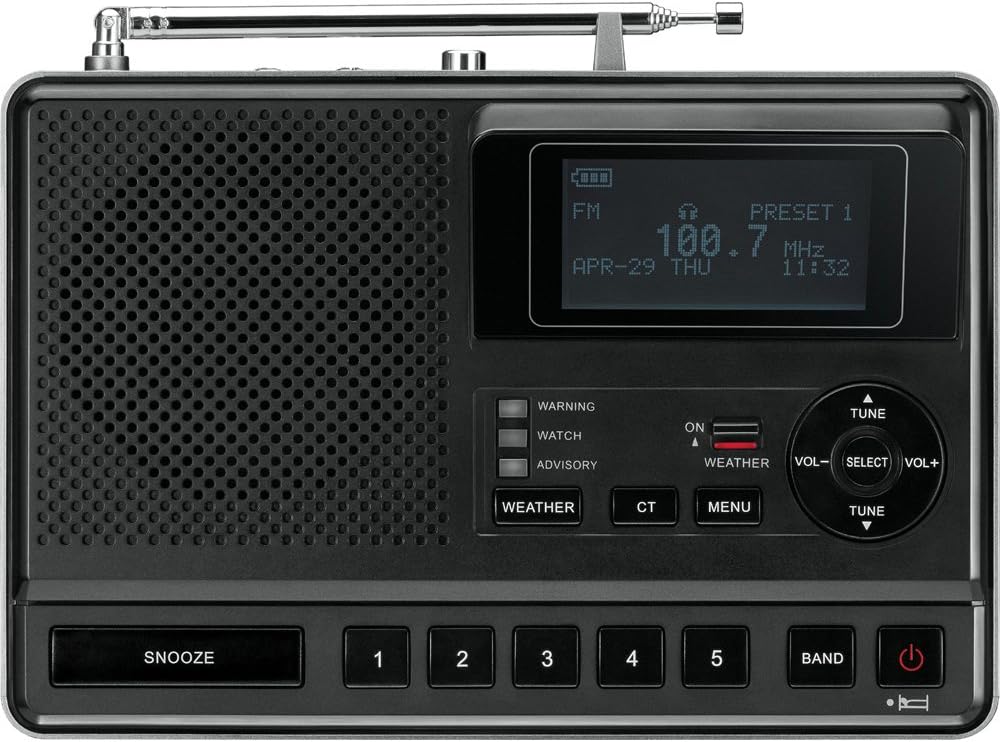
Whakaahua: Mua view of the Sangean CL-100 radio, showing the speaker grille, LCD display, and control buttons.
Tatūnga
Whakakaha i te Pūrere
The CL-100 can be powered using the included AC adapter or 4 AA batteries (not included) for portable operation and backup. For optimal performance and to retain settings during power outages, it is recommended to install batteries even when using the AC adapter.
- AC Whāurutau: Connect the DC 6V/400mA AC adapter to the DC IN port on the rear of the unit and plug it into a standard wall outlet.
- Tāuta Pūhiko: Open the battery compartment cover on the bottom of the unit. Insert 4 AA (1.5V) batteries, ensuring correct polarity. Close the battery compartment cover securely.

Whakaahua: Rear view of the Sangean CL-100 radio, highlighting the DC IN, AUX IN, EXT. ALERT, WX/FM EXT. ANT., AM-EXT., and GND ports.
Tatūnga Antenna
The CL-100 features a built-in telescopic antenna for FM and Weather band reception, and an internal ferrite bar antenna for AM reception. For improved reception, especially in remote areas, external antennas can be connected.
- Antenna Telescopic: Extend the telescopic antenna for optimal FM and Weather band reception. Adjust its position for the best signal.
- External FM/Weather Antenna: Connect an optional external FM/Weather antenna to the WX/FM EXT. ANT. port for enhanced reception.
- External AM Antenna: Connect an optional external AM antenna to the AM-EXT. terminals for improved AM reception.
- Kāpeka Whenua: For optimal performance and safety, connect a ground wire to the GND terminal, especially when using external antennas.
Initial Configuration (Time, Date, FIPS Codes)
Upon first power-up or after a complete power loss without backup batteries, you will need to set the time, date, and configure your Specific Area Message Encoding (S.A.M.E.) county codes.
- Te whakarite i te Wa me te Ra: Access the MENU and navigate to the Clock settings. Use the TUNE/SELECT knob to adjust the time, date, and year. The radio also supports automatic time setting via RBDS CT (Clock Time) if available from your FM station.
- Entering S.A.M.E. County Codes: The CL-100 allows you to store up to 25 S.A.M.E. county codes. These codes specify the geographic areas for which you want to receive alerts.
- Find your local S.A.M.E. codes on the NOAA website. These are typically 6-digit codes.
- Navigate to the "County Code" option in the MENU.
- Select "Single" or "Multiple" to add codes. When entering a 5-digit code into a 6-digit field, prepend a '0' (e.g., 0XXXXX).
- Confirm each code to save it.
- Configuring Alert Types: The radio allows you to enable or disable specific alert types (e.g., Avalanche Watch, Child Abduction Emergency, Coastal Flood Warning, Dust Storm Warning, Evacuation Watch, Flash Flood Warning, Flood Watch, Flood Warning, High Wind Watch, Hurricane Statement, Iceberg Warning, National Audio Test, National Silent Test, Power Outage, Practice Demo, Severe Thunderstorm Watch, Severe Thunderstorm Warning, Special Weather Statement, Tsunami Watch, Tsunami Warning, Volcano Warning, Winter Storm Warning). Access the "Defeat Siren" option in the MENU to customize which alerts trigger an audible siren.
Video: This video provides an unboxing, setup, and overview of the Sangean CL-100 radio, including details on FIPS code entry and alert configuration.
Nga Tohutohu Whakahaere
Radio Operation (AM/FM/Weather)
The CL-100 offers reception for AM, FM, and NOAA Weather bands.
- Tīpakonga Band: Press the BAND button to cycle through AM, FM, and Weather bands.
- Whakatika: Use the TUNE/SELECT knob to manually tune to desired frequencies. The radio also features an auto-station-search function to find strong signals.
- Tatūkē Teihana: Store up to 5 AM and 5 FM stations using the preset buttons (1-5) for quick access.
- RBDS (Radio Broadcast Data System): For FM stations broadcasting RBDS, the CL-100 can display information such as Program Service (PS) name, Radio Text (RT) messages, Clock Time (CT), and Date.
Nga Mahi Karaka Whakaoho
The CL-100 includes dual alarms, a snooze function, and a sleep timer.
- Pūoho Matarua: Set two independent alarm times. You can choose to wake up to either the AM/FM radio or a Human Wake-up System (HWS) buzzer alarm.
- Pakuora: Press the SNOOZE button to temporarily silence the alarm.
- Waka Moe: Configure the radio to automatically turn off after a set period (15, 30, 45, 60, 90, or 120 minutes).
Audio and Display Adjustments
- Mana Rōrahi: Adjust the volume using the VOL-/VOL+ buttons.
- Paoro & Takitoru: Fine-tune the audio output using the bass and treble controls available in the MENU.
- Whakaaturanga LCD: The graphic LCM (128 x 64 pixels) LCD module offers excellent display quality. Adjust dimmer and contrast controls for optimal viewi roto i nga ahuatanga rama rereke.
Hononga o waho
- Tāuru Āwhina: Connect external audio devices (e.g., MP3 player, CD player) to the 3.5mm AUX IN socket on the rear.
- External Alert Output: The EXT. ALERT output jack allows connection to external accessories such as flashing lights or sirens for hearing/visually impaired users.
- Putanga Puoro: Use the 3.5mm headphone jack for private listening.
Video: This video addresses frequently asked questions about the Sangean CL-100 radio, including details on FIPS codes, firmware, and weekly/monthly test alerts.
Te tiaki
- Te horoi: Use a soft, dry cloth to clean the radio's exterior. Avoid abrasive cleaners or solvents.
- Whakakapinga Pūhiko: Replace batteries when the low battery indicator appears on the display or when the radio fails to power on without the AC adapter. Ensure to use 4 new AA batteries of the same type.
- Rokiroki: If storing the radio for an extended period, remove the batteries to prevent leakage and damage.
Raparongoā
- Kore Mana: Check AC adapter connection. Ensure batteries are correctly installed and not depleted.
- Poihiri kino: Extend and adjust the telescopic antenna. Try connecting an external antenna. For AM, rotate the radio for better signal.
- Karekau he matohi: Verify S.A.M.E. county codes are correctly entered. Ensure the weather band is active and alert types are enabled in the "Defeat Siren" menu. Check for weekly/monthly test alerts to confirm functionality.
- Wā/Rā hē: Manually set the time and date via the MENU or ensure RBDS CT is enabled and receiving a signal.
Whakatakotoranga
| Hunga Hua | 7.16 x 5.19 x 2.5 inihi |
| Taumaha Tūemi | 1.1 pauna |
| Tauira Tuemi | CL-100 |
| Pūhiko | E 4 nga papahiko AA e hiahiatia ana |
| Kaihanga | Sangean |
| Waitohu | Sangean |
| Tae | Pango |
| Āhuahira Motuhake | Maamaa |
| Hangarau Hononga | Tautoko |
| Hangarau Tuner | AM, FM |
| Puna Mana | Te Puhiko, Te Hiko Hiko |
| Kua Tautokohia nga Roopu Irirangi | AM, FM |

Whakaahua: Koki view of the Sangean CL-100 radio with product dimensions (7.16"L x 5.19"W x 2.5"H) overlaid.
He aha kei roto i te Pouaka
- Deluxe Tabletop AM/FM Clock Radio with S.A.M.E. Weather Alert
- Pouaka AC
- Pukapuka Tohutohu
Pūtāhui me te Tautoko
For warranty information, technical support, or service inquiries, please refer to the warranty card included in your product packaging or visit the official Sangean webpae. Puritia to riiki hoko hei tohu mo te hoko.


