Kupu Whakataki
The PreSonus HD7 headphones are designed for professional monitoring, tracking, and mixing applications. They feature a patented semi-open sound chamber for enhanced low-frequency response, accurate midrange, and extended treble. The lightweight and ergonomic design ensures comfort during prolonged use.

Image: PreSonus HD7 headphones in use by a musician in a studio setting.
Nga waahanga hua
- High resolution neodymium drivers for clear audio reproduction.
- Patented, precision-tuned acoustic chamber for deep low frequencies and powerful bass.
- Extended bass response for detailed sound monitoring.
- Comfortable, long-lasting ear pads and an auto-fit headband for extended wear.
- Lightweight, yet built tough to withstand regular use.
- Single-sided cable for convenience and reduced tangling.
- Optimized pressure for a secure yet comfortable fit.

Image: Close-up of the HD7 headphones with callouts for key features including drivers, frequency range, and cable specifications.
Tatūnga
Te hono i nga Waea
- Identify the 3.5mm audio jack on your audio device (e.g., audio interface, computer, smartphone).
- Insert the 3.5mm plug of the HD7 headphone cable into the audio output jack of your device.
- If your device requires a 6.35mm (1/4-inch) jack, attach the included 6.35mm adapter to the 3.5mm plug before inserting it into the device.
Te Whakatikatika
- The HD7 headphones feature an auto-fit headband that automatically adjusts to your head size for optimal comfort.
- Ensure the earcups fully enclose your ears to maximize sound isolation and audio quality.
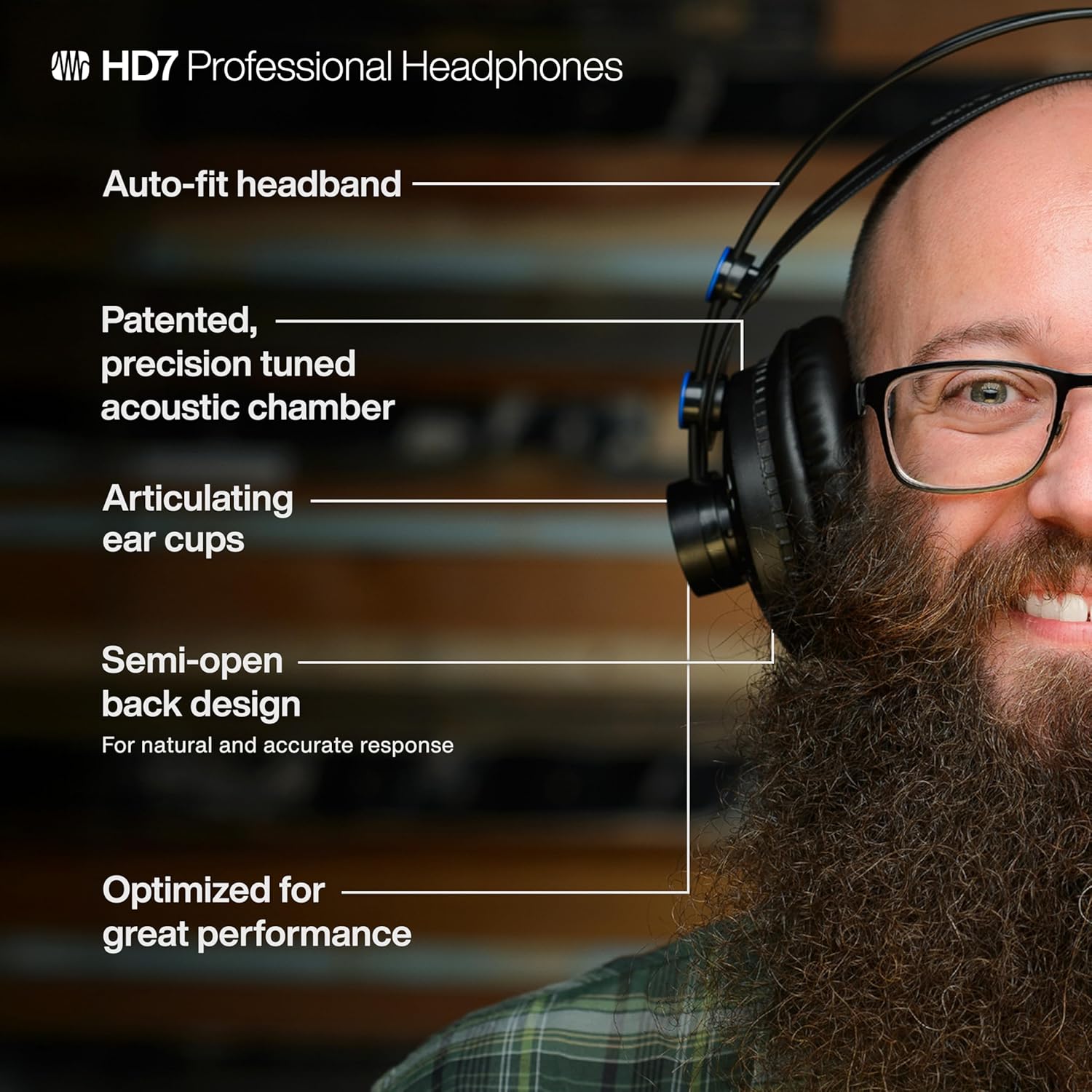
Image: A user wearing the HD7 headphones, demonstrating the comfortable fit and design elements.
Nga Tohutohu Whakahaere
Whakamahinga Tono
- Once connected, play audio from your device.
- Adjust the volume using your audio device's volume controls. The HD7 headphones do not have integrated volume controls.
- For optimal listening, ensure the volume is set to a comfortable level to prevent hearing damage.
Te Aroturuki me te Whakaranu
The semi-open design of the HD7 headphones allows for a natural soundstage, which can be beneficial for critical listening during mixing and tracking. This design provides a balanced audio experience, allowing you to discern fine details in your audio.
Ataata: Kua mutuview of the PreSonus HD7 Headphones, demonstrating their features and suitability for studio use.
Te tiaki
Te horoi
- Horoia nga taringa ki te kakahu ngohengohe, maroke.
- Do not use liquid cleaners or solvents, as these may damage the finish or internal components.
- Keep the headphone jack clean and free of debris.
Rokiroki
- Penapenahia ngā paneoro ki te wāhi hauhautanga, maroke, kia matara atu i te rā tika me te pāmahana tino kino.
- Avoid placing heavy objects on the headphones to prevent damage to the headband or earcups.
- Gently coil the cable to prevent kinks and damage.
Whakakapinga Paparongo
Over extended periods of use, earpads may show signs of wear. Replacement earpads can be purchased from authorized PreSonus dealers or their official website. Follow the instructions provided with the replacement earpads for proper installation.
Raparongoā
- Kore Oro: Ensure the headphone cable is securely plugged into both the headphones and the audio device. Check the volume level on your audio device. Test with another audio source or device to rule out a device-specific issue.
- Oro korikori: Reduce the volume on your audio device. Ensure the cable is not damaged or improperly connected.
- Whakararuraru Te Pai: The auto-fit headband should adjust automatically. If discomfort persists, ensure the earcups are correctly positioned over your ears.
Whakatakotoranga
| Āhuahira | Whakatakotoranga |
|---|---|
| Ingoa Tauira | HD7 |
| Tauira Tuemi | HD7-A |
| Waitohu | Tuhinga o mua |
| Tae | Pango |
| Hangarau Hononga | Waea |
| Pooro Jack | 3.5 mm Jack |
| Te aukati | 32 Ohm |
| Te Whakanoho Taringa | Taringa tuwhera |
| Hanga Whakatangitangi | Semi-Open Back |
| Momo Atekōkiri Ororongo | Atekōkiri Hihiko |
| Taumaha Tūemi | 16 hekere (1 pauna) |
| Hunga Hua | 8.5 x 4.2 x 9 inihi |
| Nga Waahanga kei roto | Headphones, 6.35mm (1/4-inch) adapter |
| Taumata Atete Wai | Ehara i te wai ātete |
| Tautoko Hangarau Nihokikorangi | Kao |
Nga korero haumaru
WHAKATŪPATO: Ka taea e tenei hua te whakararu i a koe ki nga matū tae atu ki te mata, e mohiotia ana e te State of California ka pa mai te mate pukupuku me te koha whanau me etahi atu kino uri. Mo etahi atu korero, haere ki www.P65Warnings.ca.gov.
To prevent possible hearing damage, do not listen at high volume levels for long periods. Always adjust the headphones to a comfortable listening level. Never wear these headphones while driving, as their audio isolation would prevent you from hearing the sounds in your environment.
Pūtāhui me te Tautoko
For warranty information, technical support, or service inquiries, please visit the official PreSonus webpaetukutuku, whakapā atu ranei ki ta raatau tautoko kaihoko. Puritia to riirii hoko mo nga kereme whakamana.
Ataata: He arotake taipitopitoview of the PreSonus HD7 headphones, covering various aspects including sound quality and comfort.


