1. Hua Neke Atuview
The DB DRIVE E7 3X is a 3-Way Active Electronic Crossover designed to optimize audio signal distribution in a car audio system. It features 2 stereo inputs with parallel input options and 3 stereo outputs, providing precise control over frequency ranges for different speakers.
Āhuatanga matua:
- Front & Rear High-Pass Crossover: -18dB Octave, Variable Frequency 35 - 45Hz.
- Sub Low Pass Crossover: -18dB Octave, Variable Frequency 45 - 250Hz.
- Bass Boost: Variable to +/- 18dB @ 40 to 120Hz.
- 2 Stereo Inputs with Parallel Input Options.
- 3 Stereo Outputs.
- Remote Bass Control included.
2. Tatūnga me te Tāuta
Before beginning installation, ensure all audio components are powered off and disconnected from the vehicle's battery. Proper installation is crucial for optimal performance and safety. It is recommended to have this unit installed by a professional car audio technician.
He aha kei roto i te Pouaka:
- DB DRIVE E7 3X Crossover Unit
- Bass Mamao
- Pukapuka Tohutohu (tenei tuhinga)
Hipanga Tāuta:
- Whakapiki: Choose a secure, dry location for the crossover unit, away from direct heat or moisture. Ensure adequate ventilation.
- Hononga Hiko: Connect the unit to a stable 12V DC power source (typically the vehicle's battery) with an inline fuse. Ensure proper grounding to the vehicle chassis.
- Whakakā Mamao: Connect the remote turn-on wire from your head unit or amplifier to the crossover's remote input.
- Tāuru Ororongo: Connect the audio output from your head unit to the crossover's stereo inputs. The unit supports parallel input options.
- Putanga Ororongo: Connect the crossover's stereo outputs to the appropriate amplifiers for your front, rear, and subwoofer speakers.
- Mana Paoro Mamao: Connect the remote bass control to the designated port on the crossover unit.
- Hinga-Whakaoho tuatahi: After all connections are made and verified, reconnect the vehicle's battery and power on your audio system.
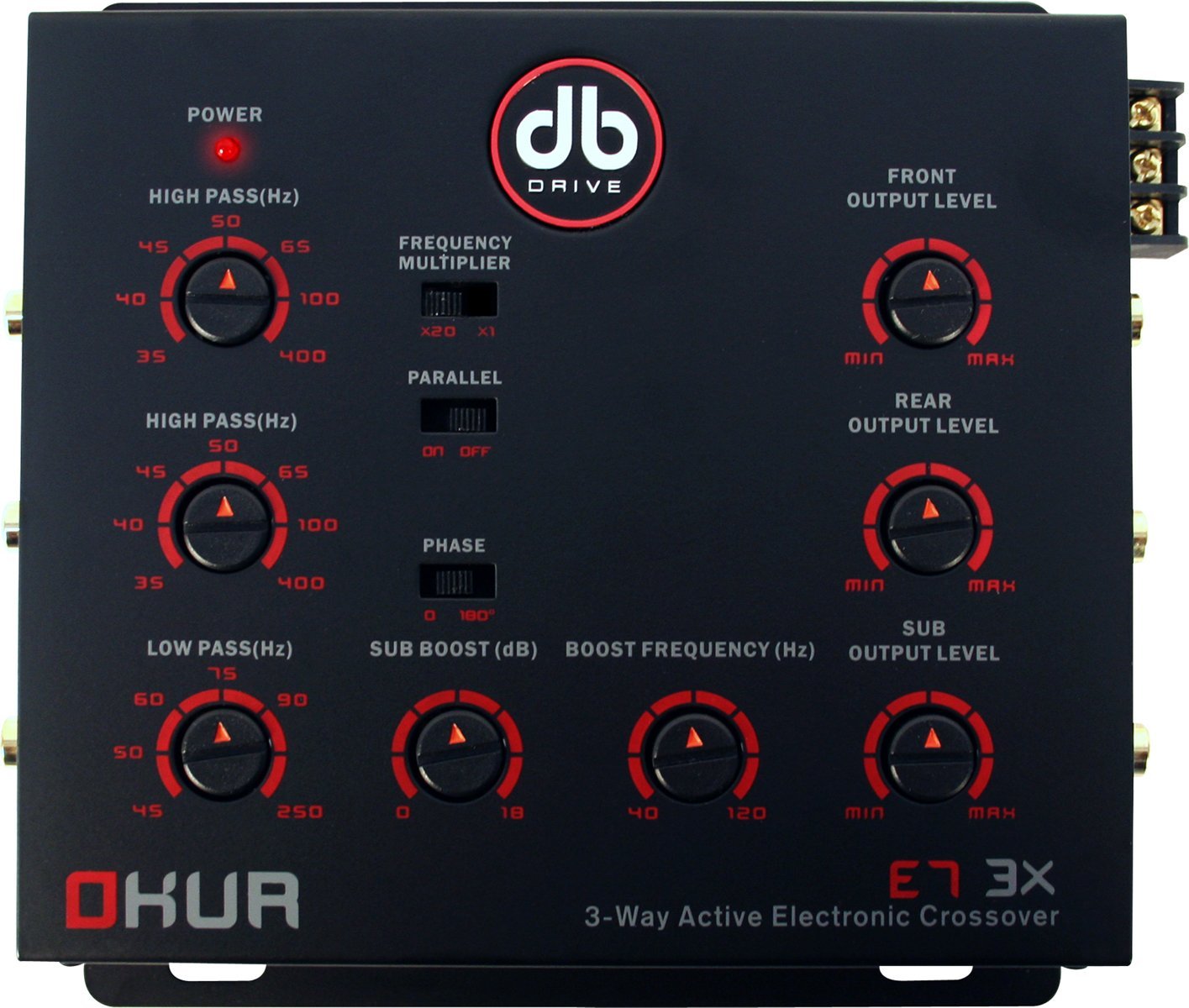
Figure 2.1: DB DRIVE E7 3X Electronic Crossover unit. This image shows the compact design and the various connection points for power, audio inputs, and audio outputs, along with control knobs.
3. Nga Tohutohu Whakahaere
The E7 3X crossover allows for precise tuning of your audio system to achieve optimal sound quality and speaker protection. Adjustments should be made incrementally and with careful listening.
Te Whakarerekētanga Auau Whakawhiti:
- Front & Rear High-Pass: Use the dedicated knobs to set the high-pass frequency for your front and rear speakers. This filters out low frequencies, preventing distortion and protecting smaller speakers. The variable range is 35 - 45Hz with an -18dB/octave slope.
- Puhi iti iti: Adjust the low-pass frequency for your subwoofer output. This ensures only low frequencies are sent to the subwoofer, maximizing bass performance. The variable range is 45 - 250Hz with an -18dB/octave slope.
Mana Whakanui Panguru:
The E7 3X includes a variable bass boost feature. Use the dedicated knob on the unit or the remote bass control to adjust the bass level. The bass boost is variable up to +/- 18dB at a frequency range of 40 to 120Hz. Adjust this setting to your personal preference, being mindful of potential distortion at extreme levels.
4. Tiaki
The DB DRIVE E7 3X Electronic Crossover is designed for reliable operation with minimal maintenance. Follow these guidelines to ensure its longevity:
- Te horoi: Horoia te waeine i ia wā ki te kakahu ngohengohe, maroke hei tango i te puehu. Kaua e whakamahi i ngā matū kaha, i ngā kaihoroi whakakoi rānei.
- Hononga: Tirohia ngā hononga waea katoa i ētahi wā kia mōhio ai kei te mau tonu, ā, kāore he waikura. Ka raru pea te mahi a ngā hononga wetekina, ka pakaru rānei.
- Taiao: Ensure the unit remains in a dry, well-ventilated area. Avoid exposing it to extreme temperatures or direct sunlight.
7. Pūtāhui me te Tautoko
Mōhiohio Pūtāhui:
For detailed warranty information regarding your DB DRIVE E7 3X Electronic Crossover, please refer to the warranty card included with your product or visit the official DB DRIVE webpae. Ka rereke pea nga tikanga me nga tikanga mo ia rohe me nga kaihoko.
Tautoko Kiritaki:
If you require technical assistance, have questions about installation, or need further support, please contact DB DRIVE customer service. Contact information can typically be found on the manufacturer's webte waahi kei runga ranei i te kohinga hua.


