1. Kupu Whakataki
Mauruuru koe mo te hokoasing the RCA DHT235A 3.5-Inch LED-lit 720p 60Hz TV. This portable television is designed to provide digital television viewing on a compact screen. This manual provides instructions for the proper setup, operation, and maintenance of your device.
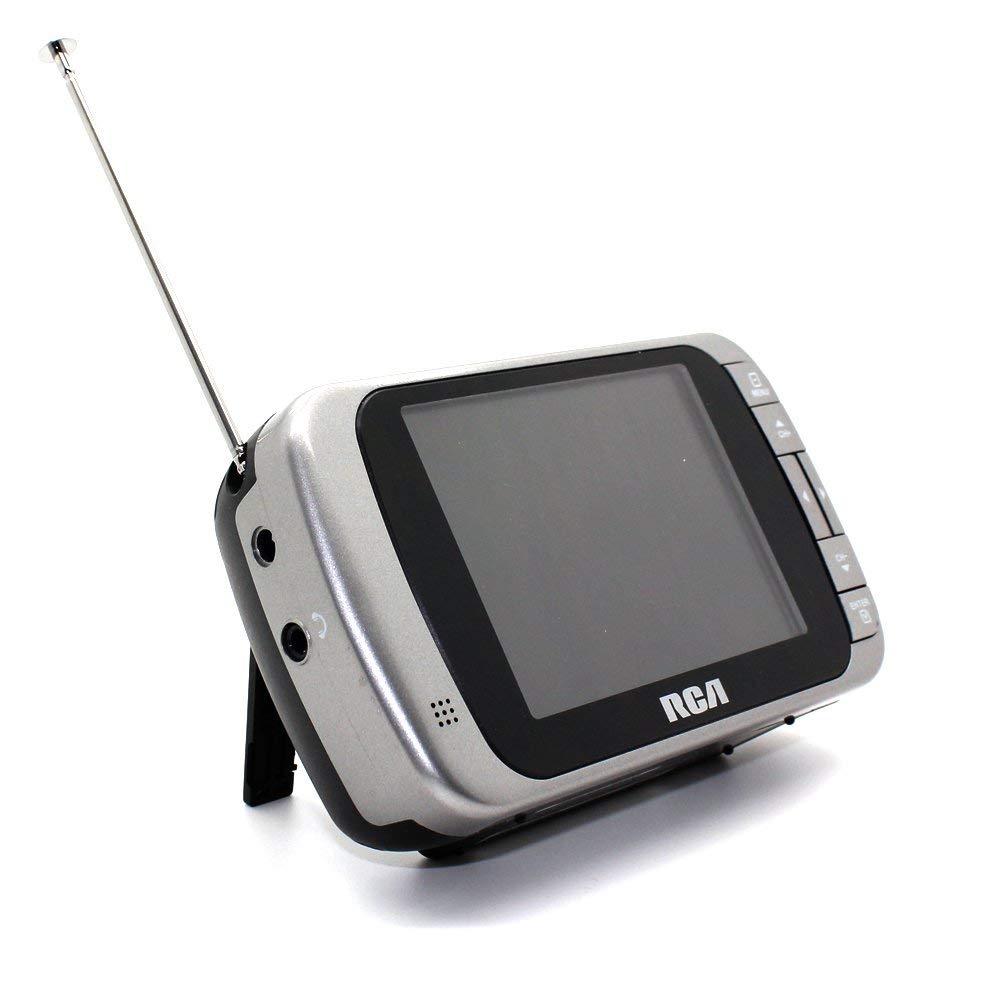
Image 1.1: The RCA DHT235A portable television, featuring its 3.5-inch screen and compact design.
2. Nga korero haumaru
- Pānuihia nga tohutohu katoa i mua i te whakahaere i te taputapu.
- Kaua e tukuna te waahanga ki te ua, ki te makuku ranei hei aukati i te ahi me te ru hiko.
- Kaua e araia nga whakatuwheratanga hau. Me whakarite kia tika te mokowhiti huri noa i te waeine kia pai ai te rere o te hau.
- Use only specified power sources (4 AA batteries or compatible AC adapter).
- A ape i te tuku, te tuku ranei i te waeine ki nga paanga kaha.
- Kaua e tarai ki te mahi i tenei hua maau ake. Tirohia nga ratonga katoa ki nga kaimahi tohu tohu.
- Horoihia nga pākahiko kia rite ki nga ture a rohe.
3. Ihirangi mokete
Manatokona kei roto katoa nga mea kei roto i te kete:
- RCA DHT235A Portable TV Unit
- Tu
- Quick Guide (refer to this manual for detailed instructions)
- Pukapuka a te Kaipupuri (tenei tuhinga)
4. Hua Neke Atuview
The RCA DHT235A features a 3.5-inch LED-lit display, designed for portable digital television reception. Key components include:
- 3.5-Inch LED Backlit LCD Display: Provides clear visual output.
- Kaikorero Roa-roto: Mo te putanga ororongo.
- Tihakihihi Mo te whakarongo motuhake.
- Embedded Monopole Antenna: For receiving terrestrial ATSC and NTSC signals.
- Wāhanga Pūhiko: Mo nga pākahiko 4 AA.
- AC Adapter Input (9-24VDC): For external power.
- Patene Mana: For power, channel, volume, and menu navigation.
5. Tatūnga
5.1 Powering the TV
The TV can be powered by 4 AA batteries or an optional AC adapter.
Whakamahi Pūhiko:
- Locate the battery compartment on the back of the TV.
- Whakatuwheratia te uhi o te wahanga pākahiko.
- Whakauruhia nga pākahiko AA e 4, kia tika te polarity (+/-).
- Katia kia mau te uhi o te wahanga pākahiko.
Using AC Adapter (Optional):
- Connect a compatible 9-24VDC AC adapter (not included) to the DC input jack on the TV.
- Monohia te urutau AC ki tetahi putanga pakitara paerewa.
5.2 Tatūnga Antenna
Extend the embedded monopole antenna fully for optimal signal reception. For improved reception, especially in areas with weak signals, an external antenna may be connected to the dedicated RCA connector input.
6. Nga Tohutohu Whakahaere
6.1 Hiko / Whakaweto
Pehia te MANA pātene hei whakakā, whakaweto rānei i te pouaka whakaata.
6.2 Initial Channel Scan
Upon first use or after moving to a new location, perform an auto channel scan to find available digital and analog channels.
- Pehia te MENU pātene.
- Navigate to the "Channel" or "Setup" menu using the arrow buttons.
- Select "Auto Scan" or "Auto Program" and confirm.
- The TV will scan for available channels. This process may take several minutes.
6.3 Kōwhiringa Hongere
- Whakamahia te CH+ a CH- buttons to cycle through available channels.
- For direct channel input, use the numeric keypad (if available on your model) or the "Direct Channel Changing" option in the menu.
6.4 Whakaritenga Rōrahi
Whakamahia te VOL+ a VOL- ngā pātene hei whakarite i te ororongo.
6.5 Whakatere Tahua
Pehia te MENU button to access settings. Use the arrow buttons to navigate and the OK or KAUPAPA pātene hei whakaū i ngā kōwhiringa. Perehi MENU again or an Waiho pātene ki te waiho i te tahua.
Available menu options include:
- Tautuhinga Pikitia: Adjust brightness, contrast, color.
- Tautuhinga oro: Adjust audio mode, balance.
- Tautuhinga Hongere: Auto scan, manual scan, channel editing.
- Tautuhinga Wā: Auto time setting, time zone.
- Reo: Select menu language (English, Spanish).
- Tapanga Kati: Enable/disable digital closed captioning (E1A-708B compliant).
7. Tiaki
7.1 Te horoi
- Before cleaning, ensure the TV is powered off and disconnected from any external power source.
- Whakamahia he kakahu ngohengohe, maroke hei muru i te mata me nga papa o waho.
- Mo nga tohu pakeke, kia ngawari dampHoroia te kakahu ki te wai. Kaua e whakamahia he kai horoi whakakoi, he ware pi, he whakarewa rānei.
- Kaua e rehu tika ngā wai ki runga i te mata, ki roto rānei i tētahi pūaha.
7.2 Rokiroki
When storing the TV for an extended period, remove the batteries to prevent leakage. Store the unit in a cool, dry place away from direct sunlight and extreme temperatures.
8. Te Raru
| Raruraru | Rongoa pea |
|---|---|
| Karekau he Mana | Ensure batteries are correctly inserted and not depleted. If using AC adapter, verify it is properly connected and the outlet is functional. |
| No Picture/Weak Signal | Extend the antenna fully. Perform an auto channel scan. Try repositioning the TV or antenna. Consider using an external antenna for better reception. Check signal strength display in the menu. |
| Kore Oro | Increase the volume. Check if headphones are plugged in. Ensure the Mute function is not active. |
| Nga Patene Kaore i te Whakautu | Turn the TV off and then on again. If the issue persists, remove and reinsert batteries or disconnect/reconnect the AC adapter. |
| Screen Scratches Easily | Handle the screen with care. Use a screen protector if desired (not included). |
| Poto Pūhiko Ora | Use fresh, high-quality alkaline or rechargeable batteries. Consider using the AC adapter for extended viewing. |
| Low Audio Volume | Ensure volume is set to maximum. For better audio, consider connecting external speakers to the headphone jack. |
9. Whakatakotoranga
- Tauira: DHT235A
- Rahi Whakaatu: 3.5 Inihi (hauroki)
- Momo Whakaatu: LED Backlight LCD
- Whakatau: 320 x 240 digital RGB (720p compatible)
- Rere tāmata: 60Hz
- Wetewaehere Ataata: MPEG-2 (MP at ML, MP at HL)
- Waewaewae Ororongo: Dolby Digital Audio, Digital multi-lingual
- Tuner: Terrestrial ATSC 8VSB, Terrestrial NTSC CH2 - CH69
- Puna Hiko: 4 AA Batteries or 9-24VDC AC Adapter (optional)
- Ora Pūhiko: Approximately 2+ hours of DTV playback on 4 AA batteries
- Putanga Ororongo: Headphone jack, Built-in speaker
- Ētahi atu āhuatanga: Real-time signal strength display, On-screen program information, Direct channel changing, Channel editing, Time zone setting, Auto channel scan, Digital Closed Captioning (E1A-708B compliant), Menu languages (English, Spanish).
- Ahu: Tata ki te 4.84 x 1.34 x 2.83 inihi
- Taumaha: Tata ki te 5.6 hekere
10. Nga Korero Whakaputanga
This product is covered by a limited warranty. For detailed warranty terms and conditions, please refer to the warranty card included with your purchase or visit the official RCA webpae. Puritia to tohu hoko mo nga kereme whakamana.
11. Tautoko Kiritaki
If you encounter any issues or have questions not covered in this manual, please contact RCA customer support. You can find contact information on the official RCA webpae, na roto ranei i nga tuhinga e whakaratohia ana me to hua.
Tautoko Aipurangi: Tirohia te RCA mana webpae mo nga FAQ me nga rauemi tautoko.
Tautoko Waea: Refer to your product packaging or the RCA webpae mo nga nama whakapā o naianei.


