Kupu Whakataki
This manual provides comprehensive instructions for the installation, operation, maintenance, and rekeying of your Weiser Lock GDC9471 Elements Single Cylinder Deadbolt. This deadbolt is designed for security and convenience, featuring SmartKey technology for easy rekeying and enhanced resistance against picking and bumping.
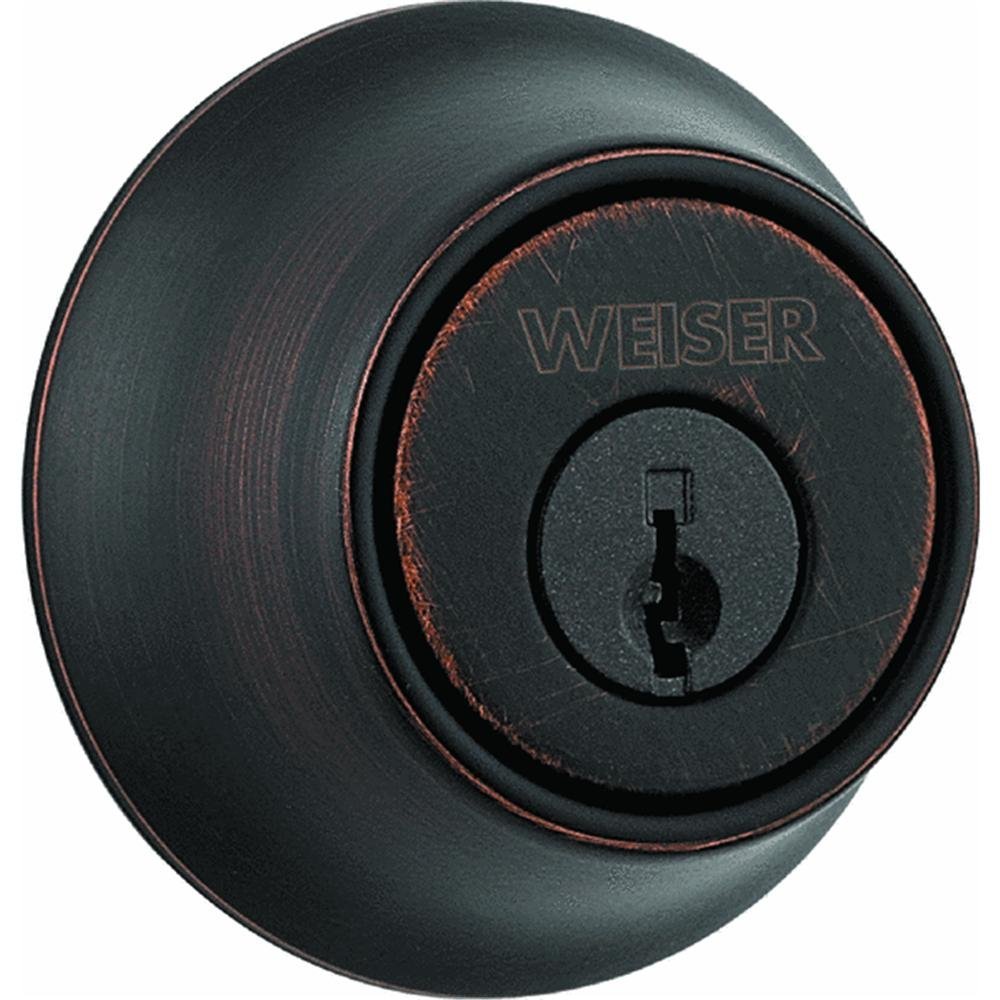
Image: Weiser Lock GDC9471 Elements Single Cylinder Deadbolt, showing the exterior key cylinder and interior thumb turn components.
Nga waahanga hua
- Single Cylinder Design: Key access from the exterior, thumb turn operation from the interior.
- Full 1-inch Throw: Provides enhanced security with a robust deadbolt extension.
- Haumarutanga SmartKey: Features a Kwikset chassis with SmartKey cylinder technology, eliminating traditional pins and springs.
- Rekeying Capability: Allows for instant rekeying in three simple steps using the included learning tool.
- Haumarutanga Whakarei ake: Designed to be bump-resistant and highly pick-resistant.
- Papa Whakamuri Whakarite: Standard adjustable backset for versatile installation.
Ihirangi mokete
Manatokona kei te noho nga waahanga katoa i mua i te tiimata o te whakaurunga:
- Exterior Deadbolt Cylinder Assembly
- Interior Thumb Turn Assembly
- Deadbolt Latch Mechanism
- Pahi Wharahi
- Whakaeke Tiu
- Pātuhi Paerewa
- SmartKey Rekeying Learning Tool
Nga Whakaritenga Whakauru
Me whakarite kia tutuki to tatau ki nga whakaritenga e whai ake nei mo te whakaurunga tika:
- Matotoru o te tatau: Fits all standard doors 1-3/4 inches thick.
- Crossbore Hole: Requires a 2-1/8 inch diameter crossbore hole.
- Edge Bore: Requires a 1 inch diameter edge bore.
- He Tautuhi: Compatible with 2-3/8 inch to 2-3/4 inch adjustable backsets.
For detailed installation steps, refer to the diagram included with your product packaging. Professional installation is recommended if you are unfamiliar with door hardware installation.
Nga Tohutohu Whakahaere
Te Maukati i te Deadbolt:
- Mai i waho: Insert the key into the exterior cylinder and turn it 90 degrees clockwise to extend the deadbolt into the strike plate. Remove the key.
- Mai i roto: Rotate the thumb turn on the interior assembly to extend the deadbolt into the strike plate.
Te Wewete i te Deadbolt:
- Mai i waho: Insert the key into the exterior cylinder and turn it 90 degrees counter-clockwise to retract the deadbolt. Remove the key.
- Mai i roto: Rotate the thumb turn on the interior assembly to retract the deadbolt.
Tohutohu Rekeying SmartKey
The SmartKey feature allows you to rekey your deadbolt to a new key in three simple steps. This is useful for security updates or if you wish to use a single key for multiple SmartKey locks.
- Whakauruhia te Kī o Nāianei: Insert your currently working key fully into the cylinder and turn it 90 degrees clockwise to the horizontal position.
- Insert Learning Tool: While the current key is still turned 90 degrees, insert the SmartKey learning tool fully into the small hole on the face of the cylinder. Remove the learning tool.
- Whakauruhia he Kī Hou: Remove the current key. Insert your new key fully into the cylinder and turn it 180 degrees counter-clockwise back to the vertical position. Your lock is now rekeyed to the new key. Test the new key to ensure proper operation.
Hiranga: Always test the new key with the door open first to avoid accidental lockout.
Te tiaki
Regular maintenance ensures the longevity and smooth operation of your deadbolt.
- Te horoi: Horoia nga papa o waho ki te ngohengohe, damp kakahu. A ape i nga kaihoroi awhiowhio, nga whakarewa ranei ka pakaru te mutunga.
- Whakahinuhinu: If the deadbolt mechanism feels stiff, apply a small amount of graphite-based lubricant (not oil-based) into the keyway and the latch mechanism. Do not over-lubricate.
- Tiu Tiu: Periodically check and tighten all mounting screws to ensure the deadbolt remains securely fastened to the door. Do not overtighten.
Raparongoā
| Raruraru | Take pea | Rongoā |
|---|---|---|
| E kore te Kī e huri, e maro ranei. | Incorrect key, debris in keyway, or lack of lubrication. | Ensure you are using the correct key. Clean keyway with compressed air. Apply graphite lubricant. |
| Kāore te pōro mate e totoro katoa, e hoki whakamuri katoa rānei. | Misalignment with strike plate, loose screws, or obstruction. | Check strike plate alignment and adjust if necessary. Tighten mounting screws. Ensure no debris obstructs the bolt path. |
| Thumb turn is loose or not engaging. | Loose interior assembly screws. | Remove interior cover and tighten the screws that secure the thumb turn assembly. |
Whakatakotoranga
| Waitohu | Weiser |
| Tau tauira | GDC9471 11P K3 SMT MS RL |
| Momo Potakaro | Porotaka kotahi |
| Aranui | SmartKey |
| Rahi Whakamuri | Adjustable 2-3/8" to 2-3/4" |
| Exterior Access | Kī |
| Interior Action | Huringa koromatua |
| Standard Door Thickness | 1-3/4" |
| Required Crossbore Hole | 2-1/8" diameter |
| Required Edge Bore | 1" te whānui |
| Rauemi | Parahi |
| Whakaoti | Maeneene Bronze |
| Taumaha Tūemi | 12 pauna |
| UPC | 059184203271 |
Pūtāhui me te Tautoko
Specific warranty details are not provided in this document. For warranty information, technical support, or to purchase replacement parts, please contact Weiser customer service directly. You can typically find contact information on the manufacturer's webte waahi kei runga ranei i te kohinga hua.
Kaihanga: Weiser Lock


