Kupu Whakataki
This manual provides detailed instructions for the operation and maintenance of your RadioShack Analog AM/FM Pocket Radio. Designed for portability and ease of use, this radio allows you to enjoy AM and FM broadcasts wherever you go. Please read this manual thoroughly before using your radio to ensure proper function and longevity.
Nga waahanga hua
- Classic Rotating Tuning Dial: For precise station selection.
- 1/8" Headphone Jack: Ka taea te whakarongo motuhake me te kore e whakararuraru i etahi atu.
- Pūihi Whakawhānui: Enhances reception for clearer audio.
- Awhe Auautanga Whānui: AM: 530-1710 kHz; FM: 87.5-108 MHz.
- Hoahoa Kiato me te Mama: Ideal for portability.
- Kaikōrero whakauru: 57mm (2.25 Inches) speaker with 0.5W output.
Ihirangi mokete
Tena koa tirohia nga ihirangi o te kete kia mohio kei te noho katoa nga taonga:
- RadioShack Analog AM/FM Pocket Radio
- Telescoping Antenna (integrated)
- Wrist Strap (attached)
Tuhipoka: 2 AA batteries are required and are not included in the package.
Tatūnga
1. Tāuta Pūhiko
- Kimihia te uhi o te wahanga pākahiko kei muri o te reo irirangi.
- Peia te uhi ki raro hei whakatuwhera i te wahanga.
- Whakauruhia kia rua (2) nga pākahiko AA, kia tika te polarity (+ me te -) kua tohua ki roto i te waahanga.
- Katia te taupoki o te wāhanga pākahiko mā te neke ake ki runga kia pāwhiritia rā anō ki tōna wāhi tika.

Whakaahua 1: Whakamuri view of the radio showing the battery compartment. Ensure correct battery orientation when installing.
2. Tatūnga Antenna
For optimal FM reception, extend the telescoping antenna fully. For AM reception, the internal antenna is typically sufficient, but you may need to rotate the radio for best signal.

Whakaahua 2: Mua view of the radio with the telescoping antenna extended for improved FM reception.
Nga Tohutohu Whakahaere
1. Te Hiko / Whakaweto me te Mana Rōrahi
The power switch and volume control are integrated into a single rotary dial located on the side of the radio.
- Hei tahuri i te reo irirangi ON, rotate the dial clockwise until you hear a click and the radio powers on.
- Continue rotating clockwise to whakanui i te rōrahi.
- Rotate the dial counter-clockwise to whakaitihia te rōrahi.
- Hei tahuri i te reo irirangi WATE, rotate the dial counter-clockwise until it clicks and the radio powers off.
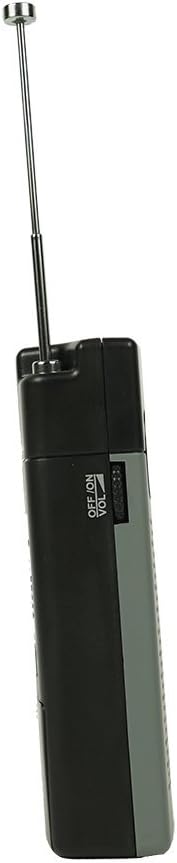
Whakaahua 3: Te taha view illustrating the combined ON/OFF and Volume control dial.
2. AM/FM Band Selection
A slide switch on the side of the radio allows you to select between AM and FM bands.
- Kiriata te pana ki "AM" mo Amplitude Modulation broadcasts.
- Kiriata te pana ki "FM" for Frequency Modulation broadcasts.

Whakaahua 4: Te taha view showing the AM/FM selector switch and headphone jack.
3. Te Whakatūnga ki tētahi Teihana
Use the tuning dial to find your desired radio station.
- Once the radio is powered on and the desired band (AM/FM) is selected, slowly rotate the Waea Huri located on the side of the radio.
- Observe the frequency scale on the front of the radio to identify the station frequency.
- Adjust the dial until the desired station is clear.
4. Te whakamahi i nga Waea
For private listening, plug standard 1/8" (3.5mm) stereo headphones into the headphone jack located on the side of the radio. The internal speaker will automatically mute when headphones are connected.
Te tiaki
Te horoi
Horoia te reo irirangi ki te ngohengohe, damp kakahu. Kaua e whakamahi i nga kai horoi, i nga whakarewa ranei, na te mea ka pakaru te mutunga.
Whakakapinga Pūhiko
When the sound becomes distorted or the volume decreases significantly, it is time to replace the batteries. Follow the battery installation steps outlined in the "Setup" section. Always replace both batteries at the same time with new AA batteries.
Hiranga: Remove batteries if the radio will not be used for an extended period to prevent battery leakage and damage to the unit.
Raparongoā
| Raruraru | Take pea | Rongoā |
|---|---|---|
| Kaore he tangi, he iti rawa te reo. |
|
|
| Te whiwhinga ngoikore, te pao rānei. |
|
|
| Tuning dial is stiff or difficult to turn. | He paru, he para ranei kei roto i te miihini. | Do not force the dial. Contact customer support if the issue persists after gentle cleaning around the dial. |
Whakatakotoranga
| Tau tauira | FBA_120-0586 |
| Awhe Auautanga | AM: 530-1710 kHz; FM: 87.5-108 MHz |
| Rahi Kaioro | 57mm (2.25 Inihi) |
| Putanga Kaikōrero | 0.5W |
| Puna Mana | 2 x Pahiko AA (kaore i whakauruhia) |
| Ahu (WHD) | 73 mm x 117 mm x 30 mm (tata ki te 2.87 x 4.61 x 1.18 inihi) |
| Taumaha Tūemi | 10.4 hekere (tata ki te 295 karamu) |
| Tiki Waeoro | 1/8" (3.5mm) Stereo |
| Nga Waahanga kei roto | Integrated Telescoping Antenna |
Pūtāhui me te Tautoko
For information regarding warranty coverage or technical support for your RadioShack Analog AM/FM Pocket Radio, please refer to the documentation provided at the time of purchase or visit the official RadioShack webpae. Tērā pea ka rerekē ngā tikanga motuhake o te pūtāhui i runga i te rohe me te kaihokohoko.
Ka taea hoki e koe te toro ki te RadioShack Store on Amazon mo etahi atu korero hua me nga rauemi tautoko.


