1. Kupu Whakataki
Thank you for choosing the Zipro Pacemaker Treadmill. This manual provides essential information for the safe assembly, operation, and maintenance of your new fitness equipment. Please read this manual thoroughly before using the treadmill and keep it for future reference.
The Zipro Pacemaker Treadmill is designed for home use, offering a robust construction, a wide running belt, and a powerful motor for various training intensities. Its folding design and transport wheels ensure convenient storage and mobility.
2. Nga Tohutohu Haumaru
WARNING: Before starting any exercise program, consult your physician, especially if you have pre-existing health conditions.
- Always place the treadmill on a flat, stable surface with adequate clearance around it (at least 2 meters behind and 0.6 meters on each side).
- Kia matara atu nga tamariki me nga kararehe mai i te mira i te wa e mahi ana.
- Kia mau ki ngā hu hākinakina me ngā kākahu e tika ana. Āta karohia ngā kākahu koretake ka mau pea i ngā wāhanga e neke ana.
- Always use the safety key/clip. Attach the clip to your clothing before starting your workout. In case of an emergency, pulling the safety key will immediately stop the treadmill.
- Do not step on or off the treadmill while the belt is moving. Start at a slow speed and gradually increase.
- Hold onto the handrails for balance, especially when starting or adjusting speed/incline.
- Do not attempt to service the treadmill yourself. Refer to qualified service personnel for repairs.
- Ensure the power cord is not damaged or placed under the treadmill.
- Maximum user weight capacity: 150 kg.
3. Ihirangi mokete
Manatokohia kei te noho nga waahanga katoa i roto i te kete:
- 1 x Zipro Pacemaker Treadmill (main unit)
- 1 x Pukapuka Kaiwhakamahi
- Assembly tools (if applicable)
- Kī Haumaru
4. Tatūnga me te Runanga
The Zipro Pacemaker Treadmill features a convenient folding design for easy setup and storage. Follow these general steps for assembly:
- Wewete ana: Kia ata tangohia nga waahanga katoa mai i te kete.
- Turanga: Place the treadmill on a level surface in your desired workout area. Ensure sufficient space around the unit.
- E tuwhera ana: Gently lower the running deck from its folded position until it locks into place. Refer to the specific instructions in your included manual for the exact unfolding mechanism.
- Tiaki Wae: Attach any loose components such as the console, handrails, or safety key holder as per the detailed assembly instructions.
- Hononga Hiko: Monohia te taura hiko ki roto i te putanga hiko kua tu.


5. Nga Tohutohu Whakahaere
5.1 Ka mutu te Papatohuview
The treadmill features an intuitive LED display console that shows key workout metrics.


5.2 Timata i te Mahi Mahi
- Ensure the treadmill is plugged in and the safety key is in place.
- Piki atu ki ngā reera taha o te mīhini oma.
- Pehia te Timata button on the console. The belt will begin to move at a low speed.
- Carefully step onto the moving belt and begin walking.
5.3 Te Whakatikatika i te Tere me te Piko
- Tere: Whakamahia te KOE + a TERE - buttons to adjust the belt speed from 1 km/h to 22 km/h. Quick speed buttons may also be available for instant adjustments.
- Piko: Whakamahia te WHAKANUI + a WHAKAPIKI - buttons to adjust the incline level (0-15 levels). Quick incline buttons may also be available.
5.4 Whakamutua te Mahi Mahi
- Pehia te KATI te patene ki te puhoi haere me te whakamutu i te wīra.
- In an emergency, pull the safety key to immediately stop the treadmill.
5.5 Using Bluetooth and USB
- Nihokikorangi: The treadmill supports Bluetooth connectivity. Pair your device to stream audio through the integrated speakers or connect to compatible fitness applications like Kinomap for interactive workouts.
- USB: Use the USB port to charge your mobile devices during your workout.
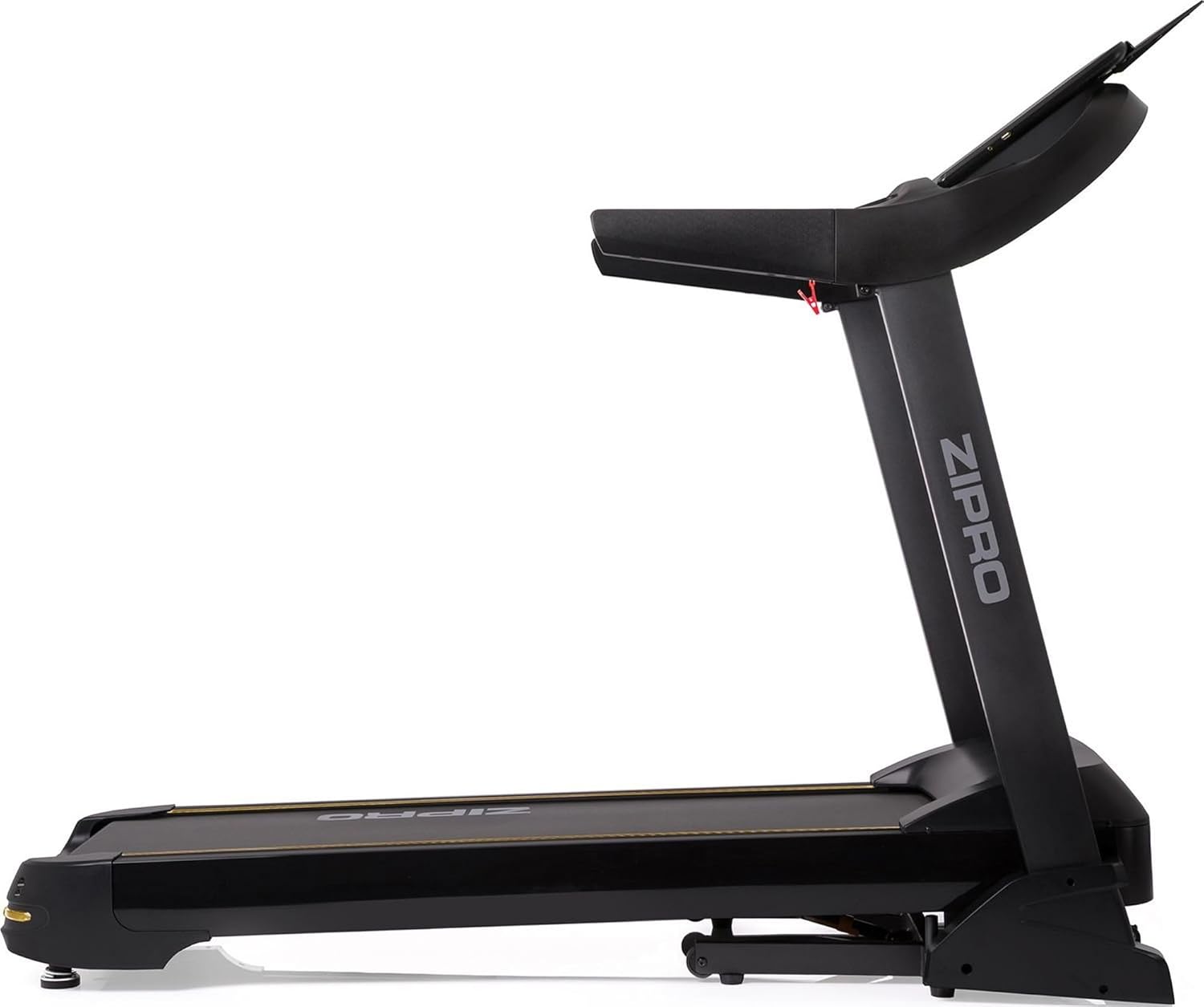

6. Ngā Papatono me ngā Āhuatanga
The Zipro Pacemaker Treadmill offers a variety of training options to suit your fitness goals:
- Papatono kua tautuhi-mua: The computer is equipped with 99 pre-set workout programs designed for various fitness levels and goals.
- Papatono Kaiwhakamahi: Create and save up to 3 individual user programs to customize your training experience.
- Te Arotake i te Ngakau: Integrated pulse sensors in the handrails allow you to monitor your heart rate during your workout.
- Raina Whakaritea: Simulate uphill running with 15 levels of electronic incline adjustment.
- Wide Speed Range: Speeds from 1 to 22 km/h accommodate walking, jogging, and high-intensity running.
7. Tiaki
Ko te tiaki i nga wa katoa ka mau te roa me te tino pai o te mahi o to wīra.
- Te horoi: Horoia te papatohu me ētahi atu mata ki te pānuitangaamp kakahu i muri i ia whakamahinga. A ape i te horoi horoi.
- Whakawhana whitiki: Periodically lubricate the running belt according to the instructions in your specific manual (usually every few months depending on usage). This reduces friction and extends belt life.
- Te Taapiri me te Whakariterite: Check the running belt tension and alignment regularly. Adjust if necessary to prevent slipping or rubbing.
- Taupoki Mōta: Kia ma te taupoki o te mōtini, kia kore hoki he puehu hei whakarite kia tika te hauhautanga.
- Tirotiro: Regularly inspect all nuts, bolts, and moving parts for tightness and wear. Tighten or replace as needed.


8. Te Raru
If you encounter issues with your Zipro Pacemaker Treadmill, refer to the following common problems and solutions:
- Kāore te mīhini wīra e whakakā:
- Tirohia mehemea kua honoa te taura hiko ki tetahi putanga mahi.
- Ensure the safety key is correctly placed in its slot.
- Check the circuit breaker or fuse in your home.
- Running belt slips or hesitates:
- The running belt may need lubrication. Refer to the maintenance section.
- The running belt may be too loose. Adjust the tension according to your specific manual.
- Console display is not working correctly:
- Ensure all cable connections to the console are secure.
- Try turning the treadmill off and on again.
- Nga haruru rereke i te wa e mahi ana:
- Check for any loose parts or foreign objects under the belt.
- Ensure the treadmill is on a level surface.
For persistent issues not covered here, please contact customer support or refer to the full troubleshooting guide in your included manual.
9. Whakatakotoranga
| Āhuahira | Whakatakotoranga |
|---|---|
| Tau tauira | 5942805 |
| Waitohu | ZIPRO |
| Ahu (Kua Tuwhera) | 188 x 82 x 151 cm (L x W x H) |
| Nga Rahi (Kaha) | 118 x 82 x 151 cm (L x W x H) |
| Taumaha | 81 kg |
| Taumaha Kaiwhakamahi Morahi | 150 kg |
| Awhe Tere | 1 - 22 kiromita/h |
| Ngā Taumata Piko | 15 (Ka taea te whakarite) |
| Hiko Motuka | 5 HP (Peak) |
| Momo Whakaatu | LED (7 windows) |
| Papatono Mahi | 99 Pre-set + 3 User Programs |
| Hononga | Nihokikorangi, USB |
| Rauemi | Polyethylene (PE), Metal, Plastic |
| Nga waahanga motuhake | Adjustable incline, Bluetooth app compatibility, Elegant design, Transport wheels |
10. Pūtāhui me te Tautoko
For information regarding warranty coverage, product registration, or technical support, please refer to the warranty card included with your purchase or visit the official ZIPRO webpae. Puritia to tohu hoko mo etahi kereme whakamana.


