1. Kupu Whakataki
Thank you for choosing the DB Technologies Cromo 10+ Active PA Speaker. This manual provides essential information for the safe and efficient operation of your new speaker. Please read it thoroughly before use and keep it for future reference.
Nga waahanga matua
- Speaker Type: 2-Way Active Speaker
- Frequency Response [-10dB]: 65 - 20.000 Hz
- Frequency Response [+/- 3dB]: 70 - 19.000 Hz
- Morahi SPL: 121 dB
- Type HF: Compression driver
- Amp Technology: Digipack
- Hononga: Nihokikorangi, USB
- Tikanga Mana: Pa
2. Nga korero haumaru
Kia mau tonu ki nga whakaritenga haumaru e whai ake nei hei aukati i te ru hiko, te ahi, te whara ranei:
- Kaua e whakaaturia te kaikorero ki te ua, ki te makuku rānei.
- Kaua e araia nga whakatuwheratanga hau.
- Me whakarite he turanga tika mo nga hononga hiko katoa.
- Kaua e huakina te pouaka o te kaikorero; tukua ngā mahi tiaki katoa ki ngā kaimahi whai tohu.
- Avoid prolonged exposure to high volume levels, which may cause hearing damage.
- Momotuhia te taura hiko i te wa e uira ana te tupuhi, i te kore ranei e whakamahia mo te wa roa.
3. Hua Neke Atuview
Waehanga
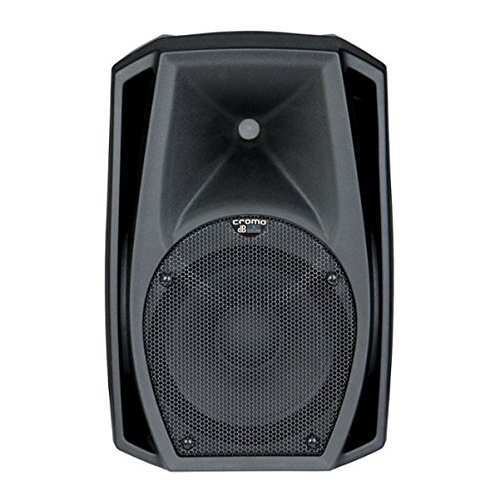
The Cromo 10+ features a durable cabinet designed for portability and performance, housing a 10-inch woofer and a compression driver for clear audio reproduction.
4. Tatūnga
Te wetewete
Carefully remove the speaker from its packaging. Inspect for any signs of damage during transit. Retain the packaging for future transportation or storage.
Whakanoho
Position the speaker on a stable, flat surface or mount it securely using appropriate hardware (not included). Ensure adequate ventilation around the unit. For optimal sound dispersion, consider the acoustics of your environment.
Hononga
The Cromo 10+ offers various input options:
- Tāuru Ororongo: Connect your audio source (mixer, microphone, instrument) to the appropriate input jacks on the rear panel.
- Mana: Connect the supplied power cable to the AC inlet and then to a suitable power outlet.
- Nihokikorangi: For wireless audio streaming, enable Bluetooth on your device and pair with the Cromo 10+.
- USB: Connect compatible devices via USB for audio playback or other functions as supported by the speaker.
5. Nga Tohutohu Whakahaere
Te Hia/Weto
- Me whakarite kia mau nga hononga katoa i mua i te whakakaha.
- Turn the master volume control to its minimum setting.
- Flip the power switch located on the rear panel to the 'ON' position. The power indicator light will illuminate.
- To power off, reverse these steps, turning the volume down before switching off the unit.
Whakahoki Ororongo
Once powered on and connected to an audio source:
- Gradually increase the master volume to your desired listening level.
- Adjust input levels for individual sources as needed to prevent distortion.
Tikanga Mana
The speaker features a touch control interface for intuitive adjustments. Refer to the specific icons and indicators on the control panel for detailed operation.
6. Tiaki
Te horoi
To maintain the appearance and longevity of your speaker:
- Momotu i te hiko i mua i te horoi.
- Whakamahia he kakahu ngohengohe, maroke hei muru i waho.
- Do not use abrasive cleaners, solvents, or waxes.
Rokiroki
When not in use for extended periods, store the speaker in a cool, dry place, ideally in its original packaging, to protect it from dust and physical damage.
7. Te Raru
If you encounter issues with your Cromo 10+, refer to the table below for common problems and solutions:
| Raruraru | Take pea | Rongoā |
|---|---|---|
| Karekau he kaha | Power cable not connected; Power outlet faulty; Speaker switch off | Tirohia te hononga taura hiko; Whakamātauria tētahi putanga hiko rerekē; Me whakarite kei te ON te pana hiko |
| Kaore he putanga oro | Volume too low; Input source not connected; Incorrect input selected; Faulty cable | Increase volume; Check audio source connection; Select correct input; Replace cable |
| Oro kerekere | He teitei rawa te taumata tāuru; Kua utaina te kaikorero; He taura hapa | Reduce input level; Lower master volume; Check/replace cables |
| Nihokikorangi kore hono | Karekau te kaikorero i te aratau takirua; He tawhiti rawa te taputapu; Te pokanoa | Ensure speaker is discoverable; Move device closer; Reduce interference |
8. Whakatakotoranga
| Āhuahira | Taipitopito |
|---|---|
| Ingoa Tauira | Cromo 10 |
| Momo Kaikorero | 2-Way Active Speaker (Tweeter) |
| Nga Whakamahinga Manakohia | For Public Address Systems, Events |
| Pūrere Hototahi | Laptop, Microphone, Smartphone, Tablet |
| Taumaha Tūemi | 8 kg (17.64 Pauna) |
| He parewai | teka |
| Tikanga Mana | Paa |
| Hangarau Whakawhitiwhiti Ahokore | Nihokikorangi |
| Rahi Kaioro | 10 Inihi |
| Puna Mana | Pūhiko Powered |
| Rahi Hua (LxWxH) | 170 x 100 x 110 cm |
| Wattage | 180 Watts |
| Kaihanga | DB Technologies |
| Hangarau Hononga | Nihokikorangi, USB |
| Aratau Putanga Ororongo | Karapoti |
| Momo Whakaeke | Maunga Ripanga |
9. Pūtāhui me te Tautoko
Nga korero Whakaputanga
This product is covered by a manufacturer's warranty. Please refer to the warranty card included with your purchase for specific terms and conditions, including warranty period and coverage details. Keep your proof of purchase for warranty claims.
Tautoko Kiritaki
For technical assistance, troubleshooting beyond this manual, or warranty inquiries, please contact dB Technologies customer support. Visit the official dB Technologies webpae mo nga korero whakapā me etahi atu rauemi.


