1. Kupu Whakataki
Thank you for choosing the TFA 30.5027.02 Digital Thermometer/Hygrometer. This device is designed to accurately measure and display indoor temperature and humidity, providing a clear indication of the comfort level in your environment. Its ultra-flat design and high-gloss surface make it a discreet and functional addition to any room. Please read this manual carefully to ensure proper setup and operation.
2. Nga korero haumaru
- Puritia tenei pukapuka tohutohu hei tohutoro a meake nei.
- Ko te tikanga tenei taputapu mo roto anake.
- Do not expose the device to extreme temperatures, direct sunlight, moisture, or strong vibrations.
- Kaua e rumakina te taputapu ki te wai, ki etahi atu wai ranei.
- Do not attempt to open or modify the device. This will void the warranty.
- Puritia nga pākahiko kei taea e nga tamariki. Mena ka horomia, me toro atu ki te rongoa.
- Makahia nga pākahiko kua whakamahia kia rite ki nga ture a rohe.
- Horoia te taputapu ki te ngohengohe, damp kakahu. Kaua e whakamahi i nga kai horoi me nga whakarewa.
3. Ihirangi mokete
Tena koa tirohia kei te noho katoa nga waahanga me te kore e pakaru:
- 1x TFA 30.5027.02 Digital Thermometer/Hygrometer
- 1x CR2 Lithium Battery (pre-installed or separate)
- 1x Manual Tohutohu (tenei tuhinga)
4. Hua Neke Atuview
The TFA 30.5027.02 features a clear digital display showing current temperature and humidity. It also includes a comfort level indicator and a maximum/minimum value memory function.

Whakaahua 1: Mua view of the TFA 30.5027.02 Digital Thermometer/Hygrometer. The display shows temperature in Celsius and relative humidity percentage, along with a comfort level icon.
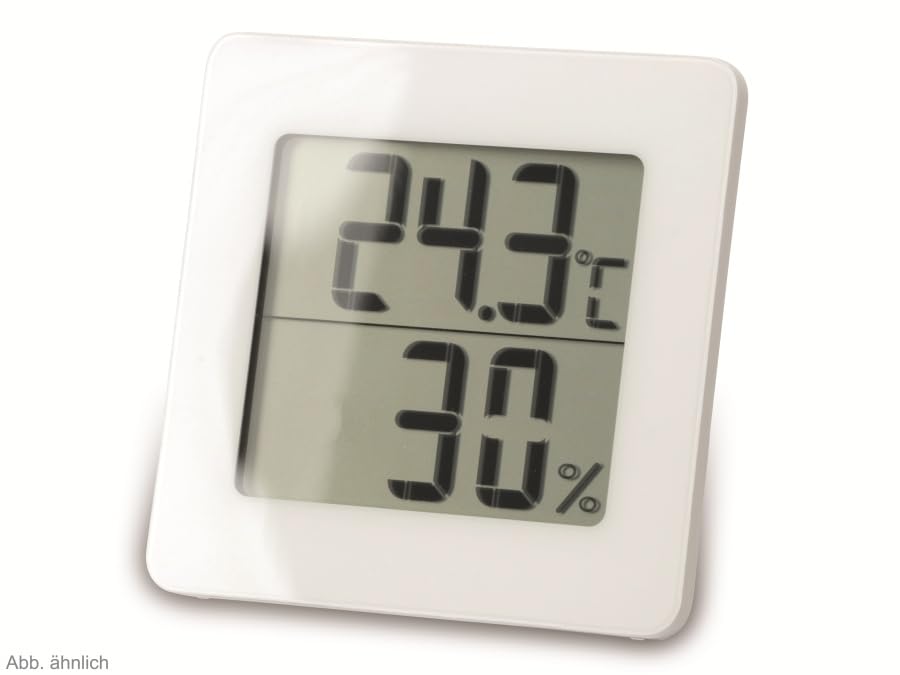
Whakaahua 2: Karekau view of the TFA 30.5027.02 showing different temperature and humidity readings, demonstrating the device's clear digital display.
Āhuatanga matua:
- Digital display for temperature (°C) and humidity (% RH)
- Ultra-flat design with high-gloss finish
- Comfort level indicator (smiley icon)
- Maximum and minimum value memory function
- Ka taea te whakairi i te pakitara
5. Tatūnga
5.1 Tāuta Pūhiko
- Kimihia te uhi o te wahanga pākahiko kei muri o te taputapu.
- Remove the cover by sliding or gently prying it open.
- Insert one CR2 Lithium battery, ensuring the correct polarity (+/-) as indicated inside the compartment.
- Whakakapihia te uhi o te wahanga pākahiko kia mau.
- The device display should activate, showing current temperature and humidity readings.
5.2 Te Whakanoho Tuatahi
For accurate readings, place the thermometer/hygrometer in a location free from direct sunlight, drafts, or heat sources. The device can be placed on a flat surface or mounted on a wall using the integrated mounting hole on the back.
- Whakapiki taiepa: Use a small screw (not included) suitable for your wall type. Hang the device securely.
- Turanga Ripanga: Ensure the device is stable on a flat, level surface.
6. Nga Tohutohu Whakahaere
6.1 Whakaatu i rungaview
The large digital display shows two main values:
- Whakaaturanga Runga: Current temperature in degrees Celsius (°C).
- Whakaatu Raro: Current relative humidity in percentage (% RH).
- Tohu Taumata Whakamarie: A small icon (e.g., a smiley face) indicates the current indoor climate comfort level based on temperature and humidity.
6.2 Max/Min Mahi
The device records the maximum and minimum temperature and humidity values measured since the last reset. To access these values:
- Pehia te MAX/MIN button (if present, typically on the back or side). The display will show the maximum recorded temperature and humidity.
- Pehia te MAX/MIN pātene ano ki view the minimum recorded temperature and humidity.
- Pehia te MAX/MIN button a third time to return to current readings.
Hei tautuhi anō i ngā uara MAX/MIN, pēhi me te pupuri i te MAX/MIN button for a few seconds while viewing the MAX or MIN values. The memory will clear, and new maximum and minimum values will begin recording from that point.
6.3 Tohu Taumata Whakamarie
The comfort level indicator provides a quick visual reference for indoor climate conditions:
- Happy Face: Indicates optimal comfort (e.g., 20-25°C and 40-70% RH).
- Neutral Face: Indicates acceptable but not optimal conditions.
- Sad Face: Indicates uncomfortable conditions (e.g., too dry, too humid, too hot, or too cold).
Note: Specific ranges for comfort levels may vary slightly by model. Refer to the device's display for the exact icon representation.
7. Tiaki
7.1 Te horoi
Horoia te taputapu ki te ngohengohe, paku damp cloth. Do not use abrasive cleaning agents, solvents, or alcohol, as these can damage the surface and display.
7.2 Whakakapinga Pūhiko
When the battery power is low, a low battery indicator (if available) will appear on the display. Replace the battery as follows:
- Whakatuwheratia te uhi o te wahanga pākahiko kei muri o te taputapu.
- Remove the old CR2 Lithium battery.
- Insert a new CR2 Lithium battery, observing the correct polarity (+/-).
- Katia te uhi o te wahanga pākahiko.
Note: After battery replacement, the device may reset, and MAX/MIN values will be cleared.
8. Te Raru
| Raruraru | Take pea | Rongoā |
|---|---|---|
| Kaore he whakaaturanga, he whakaaturanga ngoikore ranei | Kua mate te pākahiko, kua he ranei te whakaurunga. | Replace the battery with a new CR2 Lithium battery, ensuring correct polarity. |
| Nga korero tika | Device is placed in an unsuitable location (e.g., near a window, heat source, or vent). | Relocate the device to a stable indoor environment away from direct influences. Allow 15-30 minutes for readings to stabilize. |
| Comfort indicator always shows the same face | Environmental conditions are consistently outside or within a specific comfort range. | This indicates the device is functioning correctly. Adjust your indoor environment if desired. |
9. Whakatakotoranga
- Tau tauira: 30.5027.02
- Waitohu: TFA
- Tae: Mā
- Rahi Hua (L x W x H): 10 x 1.2 x 8.2 cm (3.94 x 0.47 x 3.23 inihi)
- Taumaha Tūemi: 70 Karamu (2.47 hekere)
- Pūhiko: 1 x CR2 Lithium (included)
- Momo Whakapuru: Maunga Taiepa
- Operational Humidity Range: 20% ki te 95% RH
- Upper Rated Temperature: 50°C (122°F)
- Tikanga o te Pamahana: ±1°C
- Te Tikanga Panui Panui: ±1°C
10. Pūtāhui me te Tautoko
For warranty information and customer support, please refer to the terms and conditions provided by your retailer or contact the manufacturer directly. Keep your proof of purchase for any warranty claims.
Kaihanga: TFA Dostmann GmbH & Co. KG
For further assistance, please visit the official TFA webpaetukutuku, whakapā atu ranei ki ta raatau tari ratonga kaihoko.


