Kupu Whakataki
The Intermatic TN111RM40 is a mechanical 24-hour timer designed for controlling lamps and small appliances. This timer allows for up to two ON and two OFF events per day, making it suitable for automating various electrical devices, including landscape lighting systems. It features a 2-prong polarized outlet and a manual override function. The timer is housed in a 3R enclosure, indicating its suitability for outdoor use.
This manual provides instructions for the safe and effective operation of your Intermatic TN111RM40 timer.
Nga korero haumaru
- Panuihia nga tohutohu katoa i mua i te whakamahi.
- Kaua e rumakina ki te wai.
- Ensure the timer is unplugged before making any adjustments or cleaning.
- Do not exceed the electrical ratings of the timer.
- This timer is designed for use with 2-prong polarized plugs only.
Ka mutu te huaview
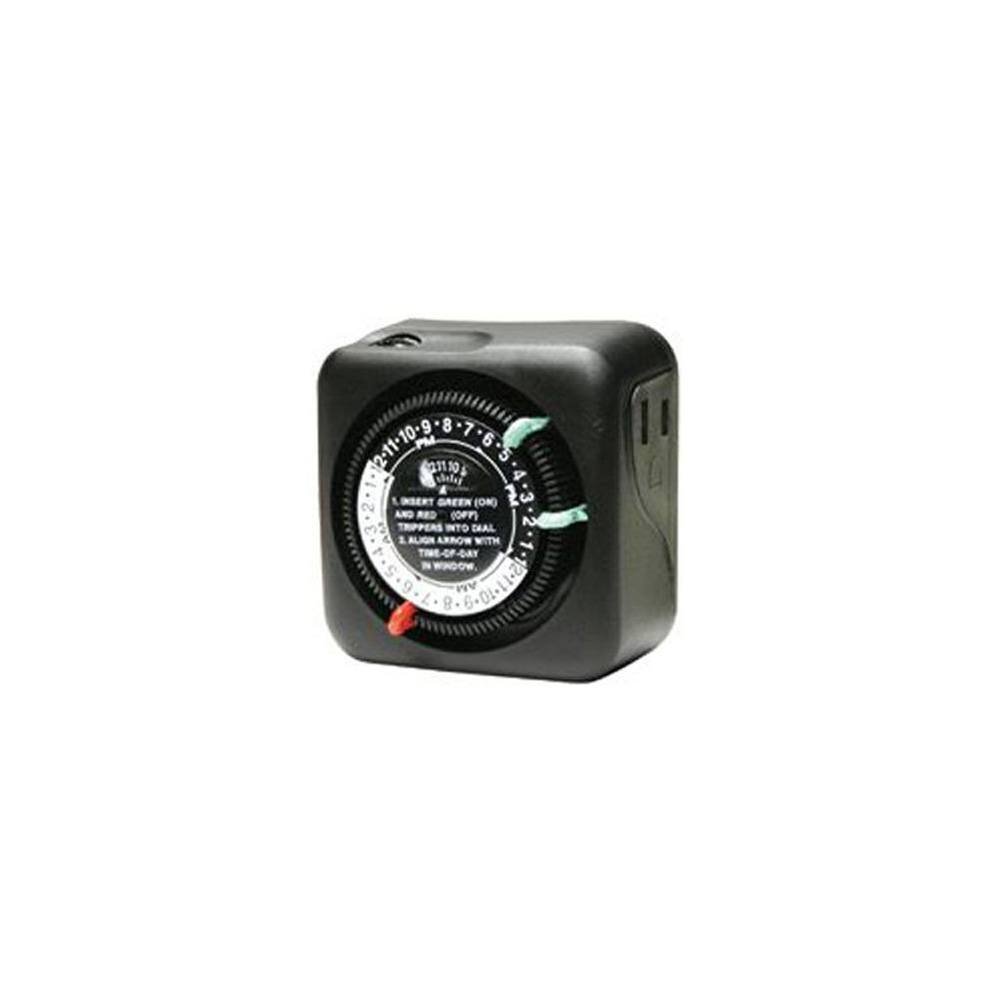
Whakaahua 1: Mua view of the Intermatic TN111RM40 timer, highlighting the 24-hour dial, green (ON) and red (OFF) trippers, and the time-of-day window. The image also shows the product dimensions: 3 inches deep, 4 inches wide, and 3 inches high.
The Intermatic TN111RM40 timer features a rotating 24-hour dial with markings for AM and PM. It includes removable trippers (pins) for setting ON and OFF times, a manual override switch, and a single 2-prong polarized outlet.
Tatūnga
- Wewetehia te Matama: Carefully remove the timer from its packaging. Inspect for any damage.
- Tautuhia nga Waahanga: Locate the green (ON) trippers and red (OFF) trippers. These are small pins that insert into the dial.
- Tautuhi Wā Onāianei:
- Rotate the entire dial clockwise until the current time aligns with the "TIME-OF-DAY" arrow in the window. Ensure to distinguish between AM and PM hours.
- Insert ON/OFF Trippers:
- Insert the green (ON) trippers into the dial at the desired times you want the connected appliance to turn ON.
- Insert the red (OFF) trippers into the dial at the desired times you want the connected appliance to turn OFF.
- The timer supports up to two ON and two OFF settings per 24-hour period.
- Monohia te Taima: Plug the timer into a standard 2-prong wall outlet.
- Hononga taputapu: Monohia te lamp or small appliance into the 2-prong polarized outlet on the side of the timer. Ensure the appliance is switched to the ON position if it has its own power switch.
Nga Tohutohu Whakahaere
Once set up, the timer will automatically turn your connected appliance ON and OFF according to the programmed times. The dial will continuously rotate clockwise, indicating the passage of time.
Whakakore a-ringa
The Intermatic TN111RM40 includes a manual override feature. This allows you to temporarily turn the connected appliance ON or OFF without disturbing the programmed schedule.
- To manually turn the appliance ON or OFF, locate the manual override switch (often a small lever or button) on the timer.
- Toggle the switch to the desired position. The timer will resume its programmed schedule at the next ON or OFF event.
Te tiaki
- Te horoi: Momotuhia te taima mai i te putanga hiko i mua i te horoinga. Horoia te taha o waho ki te wai ngohengohe.amp kakahu. Kaua e whakamahi i nga kai horoi me nga whakarewa.
- Rokiroki: Ki te mea ka roa te wā e rongoa ai te taima, kia ma, kia maroke hoki. Rokiroki ki te wāhi hauhautanga, maroke, kia matara atu i te rā tika.
- Tirotiro: Periodically inspect the timer and its cord for any signs of wear or damage. If damage is found, discontinue use and replace the unit.
Raparongoā
| Raruraru | Take pea | Rongoā |
|---|---|---|
| Kāore te taputapu e tahuri/whakaweto i ngā wā kua whakaritea. |
|
|
| Kāore te mata o te taima e hurihuri ana. |
|
|
Whakatakotoranga
- Tauira: TN111RM40
- Waitohu: Intermatic
- Momo: 24-Hour Mechanical Timer
- Tautuhinga: Up to 2 ON/OFF events per day
- Momo Putanga: 2-Prong Polarized
- Whakapiri: 3R (Suitable for outdoor use)
- Tae: Pango
- Rauemi: Kirihou
- Rahi Hua: 3" (Hohonu) x 4" (Whanui) x 3" (Teitei)
- Taumaha Tūemi: 5.3 hekere
- UPC: 702811361973
Pūtāhui me te Tautoko
For warranty information or technical support, please refer to the official Intermatic webpaetukutuku, whakapā atu ranei ki ta raatau tari ratonga kaihoko. Puritia to rihiti hoko mo nga kereme whakamana.
Intermatic Customer Support: www.intermatic.com/support


