1. Kupu Whakataki
This manual provides essential information for the safe and efficient operation of your Sony STR-DA2800ES 7.2 Channel 4K AV Receiver. Please read this manual thoroughly before using the receiver and retain it for future reference. This receiver is designed to deliver high-quality audio and video performance, integrating advanced features for a comprehensive home theater experience.
2. Nga korero haumaru
To prevent fire, electric shock, or product damage, observe the following safety precautions:
- Puna Hiko: Connect the unit only to an AC power source within the specified voltage awhe.
- Whakahau: Ensure adequate ventilation. Do not block ventilation openings. Maintain a minimum clearance of 10 cm (4 inches) around the unit.
- Waiwai: Kaua e tukuna te waeine ki te ua, ki te makuku ranei. Kaua e waiho nga mea kua whakakiia ki te wai, penei i nga ipu, ki runga i te waahanga.
- Ahanoa Tawahi: Do not insert any metallic objects or flammable materials into the unit's ventilation openings.
- Ratonga: Kaua e ngana ki te mahi i a koe ake. Tukuna nga ratonga katoa ki nga kaimahi ratonga whai tohu.
- Turanga: Place the unit on a stable, level surface away from direct sunlight, heat sources, and excessive dust or vibration.
3. Ihirangi mokete
Manatokohia kei roto i to kete nga mea e whai ake nei:
- Sony STR-DA2800ES AV Receiver Unit
- Mana Mamao
- Pūhiko AA (mō te mana mamao)
- Tatūnga Whakaorooro
- FM Antenna Waea
- Antenna Loop AM
- Waea hiko
4. Paepae Mua Neke atuview
Mā te papatohu o mua ka taea e koe te uru atu ki ngā mana whakahaere me ngā tohu matua mō te mahi o ia rā.

Whakaahua 1: Mua view of the Sony STR-DA2800ES AV Receiver. This image displays the receiver's front panel, featuring the power button, input selector knob, master volume knob, display screen, and various function buttons for tuning, tone control, and memory.
Key controls include:
- ON/SANDBY Button: Ka whakakā, ka whakaweto rānei i te kaiwhiwhi.
- INPUT SELECTOR Knob: Rotates to choose the desired audio/video input source.
- MASTER VOLUME Knob: Whakaritea ai te taumata oro katoa.
- DISPLAY MODE Button: Changes the information shown on the front display.
- TONE/TUNING Buttons: Adjusts tone settings or radio tuning.
- MEMORY/ENTER Button: Used for saving settings or confirming selections.
- Waea Jack: Ka hono i ngā paneoro hei whakarongo tūmataiti.
- SPEAKERS (OFF/A/B/A+B) Button: Selects which speaker sets are active.
5. Hononga Paewhiri Whakamuri
The rear panel houses all input and output terminals for connecting your audio and video components.
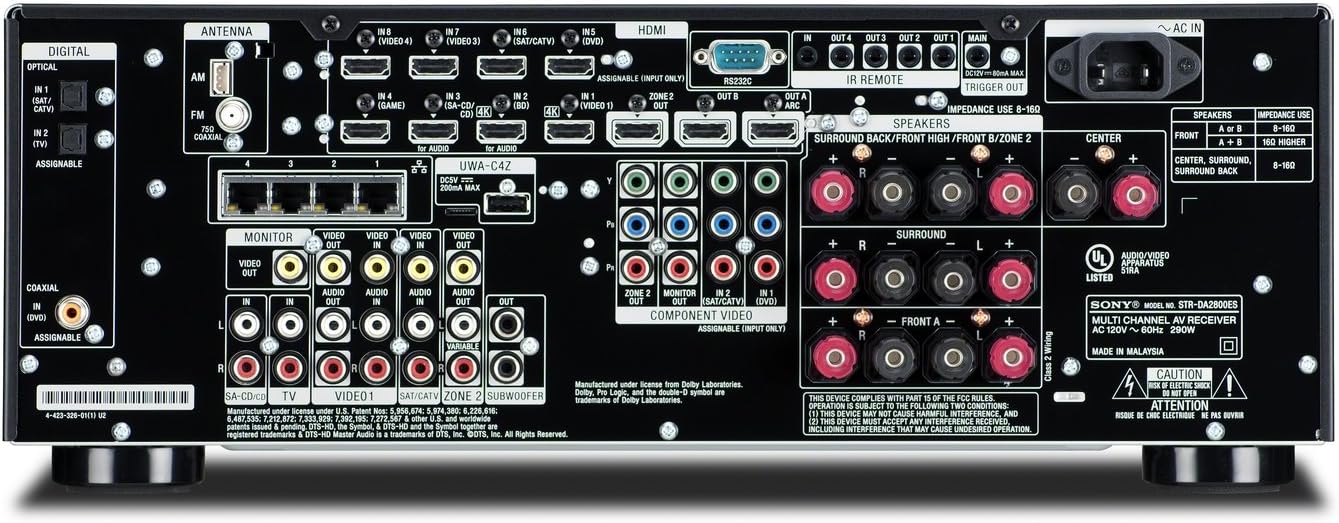
Whakaahua 2: Whakamuri view of the Sony STR-DA2800ES AV Receiver. This image shows the comprehensive array of connection ports, including multiple HDMI inputs and outputs, speaker terminals for 7.2 channels, digital and analog audio inputs, component video inputs, and network/USB ports.
Key connection types:
- HDMI ROTO/WHAWHI: Connects HDMI-compatible devices (e.g., Blu-ray player, game console) and your TV/projector. The receiver features 8 HDMI inputs and 2 HDMI outputs.
- COMPONENT VIDEO IN: For connecting devices with component video output.
- ORORO MAMATI I ROTO (WHANGA/WHAKAPĀ): Mō ngā pūtake oro mamati.
- ANALOG AUDIO IN/OUT: For traditional analog audio connections.
- SPEAKER TERMINALS: Connect your 7.2 channel speaker system. Ensure correct polarity (+/-) and impedance matching (8 Ohm recommended).
- NETWORK (LAN) Port: Mo te hononga ipurangi waea.
- Tauranga USB: Mo te hono i nga taputapu rokiroki USB.
- ANTENNA (FM/AM): Connect the supplied FM wire and AM loop antennas.
6. Tatūnga
6.1 Hononga Tukuoro
Connect your speakers to the corresponding terminals on the rear panel. The STR-DA2800ES supports a 7.2 channel configuration. Ensure that the impedance of your speakers is compatible with the receiver (8 Ohm recommended). Connect the front, center, surround, surround back, and subwoofer speakers according to the labels.
6.2 Hononga HDMI
- Connect your source devices (e.g., Blu-ray player, game console, cable box) to the HDMI IN ports on the receiver. The receiver has 8 HDMI inputs.
- Connect your TV or projector to one of the HDMI OUT ports (e.g., HDMI OUT 1 or HDMI OUT 2).
- For optimal 4K video quality, ensure your HDMI cables are high-speed and support 4K resolution.
6.3 Hononga Whatunga
Connect an Ethernet cable from your router to the NETWORK (LAN) port on the receiver for a stable internet connection. This enables network features such as music streaming and firmware updates.
6.4 Initial Setup Wizard and Automatic Calibration
Upon first power-on, the receiver will guide you through an initial setup wizard. Use the supplied setup microphone to perform automatic speaker calibration. Place the microphone at your primary listening position, and the receiver will automatically detect speaker connections, adjust levels, and optimize sound settings for your room.
7. Mahi
7.1 Mahi Taketake
- Hiko Whakaka/Weto: Press the ON/STANDBY button on the front panel or remote control.
- Kōwhiringa Tāuru: Use the INPUT SELECTOR knob on the front panel or the input buttons on the remote control to switch between connected devices.
- Mana Rōrahi: Adjust the MASTER VOLUME knob on the front panel or the volume buttons on the remote control.
7.2 Aratau oro
The receiver offers various sound modes to enhance your listening experience. Use the remote control to select modes such as Surround Sound, Stereo, or Direct. Refer to the on-screen display for available options.
7.3 Nga waahanga Whatunga
With a network connection, you can stream music from supported internet services like Pandora and Slacker. The receiver can also be controlled via a dedicated app on compatible Android or iOS smartphones.
7.4 4K Pass-through and Upscaling
The STR-DA2800ES supports 4K pass-through, allowing 4K video signals from source devices to pass through to a 4K display without degradation. It also features 4K upscaling, which can enhance lower-resolution video content to near-4K quality.
7.5 Home Automation Integration
This receiver is designed for integration into home automation systems, including Control4. It supports custom scenes for automated control of your home theater and lighting, enhancing convenience and user experience.
8. Tiaki
- Te horoi: Wipe the exterior of the receiver with a soft, dry cloth. Do not use abrasive pads, scouring powder, or solvents such as alcohol or benzene.
- Whakahau: Me tirotiro tonu kei aukatia ngā pūaha hau e te puehu, e te paru rānei.
- Waea Hiko: Momotuhia te taura hiko mai i te putanga o te pakitara ki te kore e whakamahia te waeine mo te wa roa.
9. Te Raru
Mena ka pāngia koe e ngā raruraru me tō kaiwhiwhi, tirohia ngā raruraru me ngā otinga e whai ake nei:
| Raruraru | Te Take Taea / Rongoa |
|---|---|
| Karekau he kaha | Ensure the power cord is securely connected to both the receiver and a working wall outlet. Check the ON/STANDBY button. |
| Karekau he tangi | Check speaker connections and ensure they are correctly wired. Verify the input source is selected correctly. Adjust volume. Ensure speakers are not set to OFF. |
| Karekau he ataata | Verify HDMI connections from source to receiver and receiver to TV. Ensure the correct input is selected on both the receiver and the TV. |
| Nga take hononga whatunga | Check Ethernet cable connection. Restart your router and the receiver. Verify network settings in the receiver's menu. |
| Ko te mana mamao kaore e mahi | Replace batteries. Ensure no obstructions between the remote and the receiver's IR sensor. |
| HDMI pass-through unreliable when receiver is off | This can sometimes occur. Try turning the receiver on and then off again to re-establish the pass-through signal. Ensure HDMI Control (BRAVIA Sync) settings are configured correctly. |
| Blu-ray player menu not detected through receiver | Ensure the Blu-ray player is connected to an appropriate HDMI input. Check HDMI Control settings on both the receiver and the Blu-ray player. Some players may have specific settings for HDMI output when connected via a receiver. |
If the problem persists after attempting these solutions, contact Sony customer support.
10. Whakatakotoranga
- Tau tauira: STR-DA2800ES
- Hongere: 7.2 Channel
- Mana Putanga: 100W per channel (8 Ohm, 20-20kHz, 0.09% THD)
- Tauranga HDMI Tapeke: 8 (Inputs), 2 (Outputs)
- Hangarau Hononga: Nihokikorangi, Ipurangi Ipurangi, HDMI, USB
- Momo Kaitatau: Android, Control4, iOS
- Ratonga Ipurangi Tautoko: Pandora, Slacker
- Aratau Putanga Ororongo: Karapoti
- Taumaha Tūemi: 30.63 Pauna (tata ki te 13.9 kg)
- Kaihanga: Sony
11. Pūtāhui me te Tautoko
Ko tenei hua Sony ka hipokina e te raihana iti. Mo nga kupu whakamana me nga tikanga motuhake, tirohia te kaari whakamana kei roto i to hua, toro atu ranei ki te tautoko mana a Sony website. For technical assistance, troubleshooting, or service inquiries, please contact Sony customer support through their official channels.


