1. Nga Tohutohu Haumaru Nui
Pānuihia ngā tohutohu haumaru me ngā tohutohu whakahaere katoa i mua i te whakamahinga o tēnei pouaka whakaata. Puritia ēnei tohutohu hei tirotiro māu ā muri ake nei.
- Puna Hiko: Whakahaerehia te pouaka whakaata mai i te momo pūtake hiko kua tohua ki te tapanga tohu.
- Whakahau: Me whakarite kia tika te hau. Kaua e araia nga whakatuwheratanga hau.
- Te wai me te makuku: Kaua e tukua te pouaka whakaata ki te ua, ki te makuku rānei. Kaua e whakamahia ki te taha o te wai.
- Te horoi: Wewetehia te pouaka whakaata mai i te putanga o te pakitara i mua i te horoi. Whakamahia he kakahu ngohengohe, maroke.
- Ratonga: Kaua e tarai ki te mahi i tenei hua maau ake. Tirohia nga ratonga katoa ki nga kaimahi tohu tohu.
- Turanga: Whakanohoia te pouaka whakaata ki runga i te papa, papa. A ape i te tuu ki te ra tika, ki te tata ranei ki nga puna wera.
2. Ihirangi mokete
Manatokona kei roto katoa nga mea kei roto i te kete:
- Coby LEDTV3218 32-Inch LED TV
- Mana Mamao (e rua nga pākahiko AAA)
- Tūranga Pouaka Whakaata me ngā Tīwiri
- Waea hiko
- Pukapuka Kaiwhakamahi (tenei tuhinga)
3. Hua Neke Atuview
The Coby LEDTV3218 is a 32-inch LED television designed for clear picture quality and versatile connectivity. It features a 720p resolution display and a 60Hz refresh rate, suitable for everyday viewing.

Whakaahua 3.1: Mua view of the Coby LEDTV3218 LED TV, showing the screen and stand.

Whakaahua 3.2: Taha view of the Coby LEDTV3218, illustrating its slim design.
4. Tatūnga
4.1 Te Whakapiri i te Tu
- Me ata tuu te mata-whakararo pouaka whakaata ki runga i te mata ngawari, ma kia kore e pakaru.
- Align the TV stand base with the mounting holes on the bottom of the TV.
- Whakapaia te turanga ma te whakamahi i nga wiri kua whakaratohia. Me whakarite kia tino titi nga wiri katoa.
4.2 Hononga Pūrere
The TV offers various input ports for connecting external devices. Refer to Figure 4.1 for port locations.
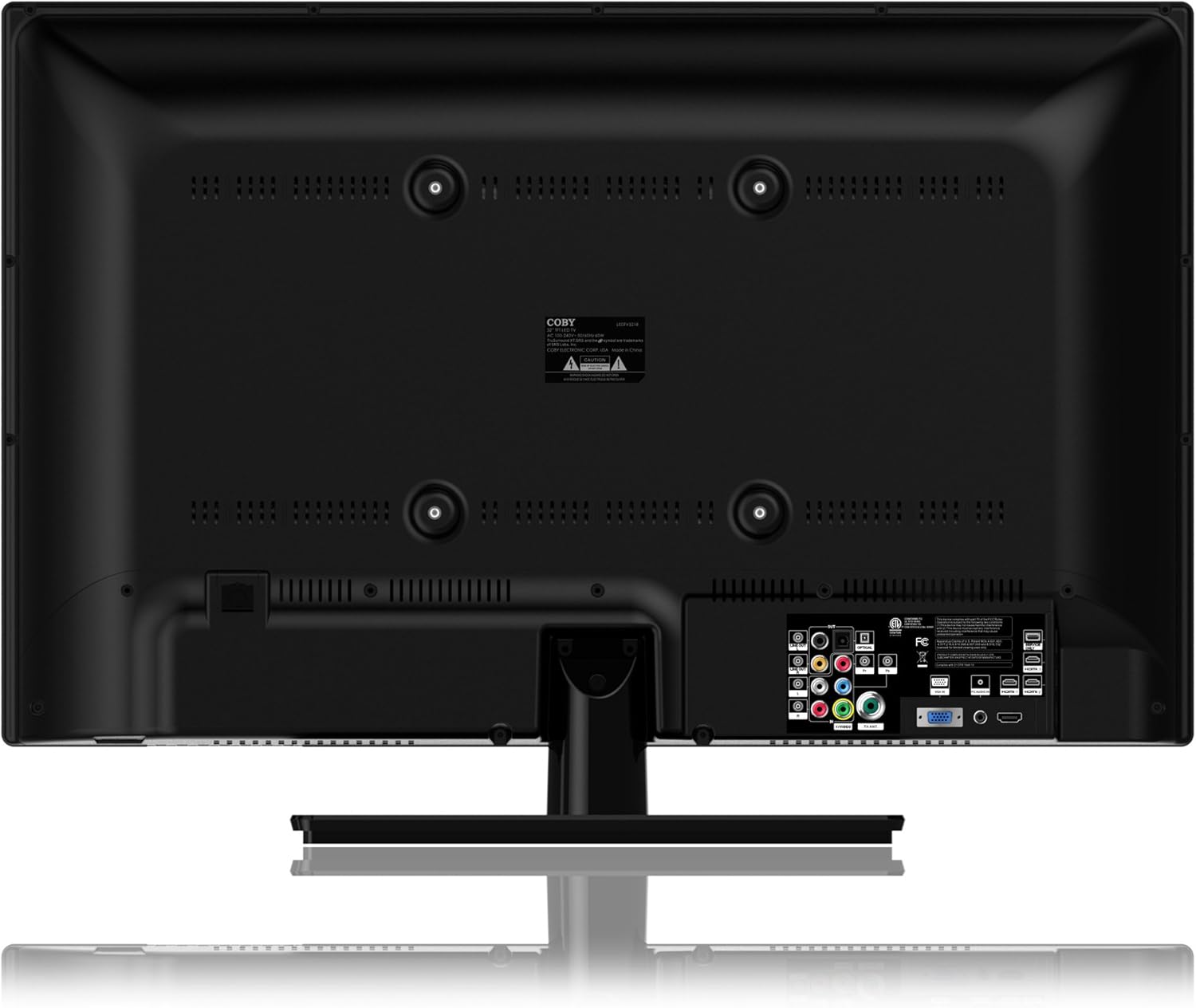
Figure 4.1: Rear panel connections of the Coby LEDTV3218.
- Ngā Tāurunga HDMI (3): Honoa ngā kaitākaro Blu-ray, ngā papatohu kēmu, ngā pouaka taura/amiorangi, ētahi atu taputapu HDMI rānei.
- VGA (PC Input): Honoa he rorohiko hei whakamahi hei aroturuki.
- Component Video (YPbPr): Connect older video devices using component cables.
- Composite Video (AV): Connect older video devices using RCA cables.
- Antenna/Cable (RF): Honoa he antenna mo nga haapurorotanga-a-rangi, he hononga pouaka whakaata ranei.
- USB: For media playback (check manual for supported formats).
- Ororongo Kei: Connect to external audio systems.
4.3 Hiko Tuatahi
- Honoa te taura hiko ki te pouaka whakaata, katahi ki te putanga pakitara.
- Pēhia te pātene mana i runga i te pouaka whakaata, i te mana mamao rānei.
- Follow the on-screen prompts to complete the initial setup, including language selection and channel scanning.
5. Whakahaerehia Tou TV
5.1 Nga Mahi Mana Mamao
The remote control allows you to access all TV functions. Insert the two AAA batteries (included) into the remote control, observing polarity.
- Mana: Ka whakakā, whakaweto rānei i te pouaka whakaata.
- Tāuru: Selects the input source (HDMI, AV, Component, etc.).
- Rōrahi +/-: Whakaritea te taumata oro.
- Channel +/-: Huri hongere.
- Tahua: Opens the On-Screen Display (OSD) menu.
- Pātene Whakaterenga (Whakarunga/Whakararo/Mauī/Matau/ĀE): Whakatere i roto i nga tahua me te whakaū i nga whiringa.
- Putaatu: Closes the current menu.
- Wahangu: Wahangu, wetewete ranei te oro.
5.2 Tahua Whakaatu Ma-Mata (OSD).
Pehia te Tahua button on the remote to access the OSD. Use the navigation buttons to select and adjust settings.
- Tautuhinga Pikitia: Adjust brightness, contrast, color, tint, sharpness, and select picture modes (e.g., Standard, Dynamic, Movie).
- Tautuhinga oro: Adjust bass, treble, balance, and select sound modes (e.g., Standard, Music, Movie). Enable or disable SRS TRuSurround XT.
- Tautuhinga Hongere: Perform auto-scan or manual scan for channels. Access parental controls (V-Chip).
- Tautuhinga Wā: Set current time, sleep timer, and auto-off functions.
- Tatūnga: Language selection, factory reset, software update (if available).
6. Tiaki
6.1 Te horoi i te pouaka whakaata
Wewetehia te TV i mua i te horoi.
- Mata: Mā te āta horoi i te mata ki tētahi kakahu ngohengohe, kore-miro. Mō ngā tohu uaua, whakamahia he kaihoroi mata i hangaia mō ngā whakaaturanga LED, i pania ki te kakahu, kaua ki te mata tika.
- Te Rūnanga: Wipe the cabinet and stand with a soft, dry cloth. Do not use abrasive cleaners or solvents.
6.2 Rokiroki
Ki te mea he roa te wā e rongoa ai te pouaka whakaata, momotuhia ngā taura katoa ka rongoa ki te wāhi hauhautanga, maroke, ko te mea pai ko roto i tōna takai taketake hei tiaki i te puehu me ngā kino tinana.
7. Te Raru
Mena ka raru koe ki to pouaka whakaata, tirohia nga raru me nga otinga e whai ake nei:
- Kore Mana:
- Me mohio kua mau te taura hiko ki te pouaka whakaata me te putanga pakitara.
- Tirohia mehemea kei te mahi te putanga o te pakitara ma te hono atu ki tetahi atu taputapu.
- Patohia te paatene hiko i runga i te pouaka whakaata, kaua ko te mamao anake.
- No Picture/Poor Picture:
- Manatokohia kua tohua te puna whakauru tika (hei tauira, HDMI 1, AV).
- Tirohia nga hononga taura katoa i waenga i te pouaka whakaata me nga taputapu o waho.
- Adjust picture settings (brightness, contrast, sharpness) in the OSD menu.
- Mena kei te whakamahi koe i te pūihi, me matawai i te hongere.
- No Sound/Poor Sound:
- Me whakarite kia kaua e wahangu te oro, ka ara ake.
- Check audio cable connections for external devices.
- Adjust sound settings in the OSD menu.
- Mana Mamao Kaore i te Mahi:
- Whakakapihia nga pākahiko ki nga mea hou, kia tika te polarity.
- Me whakarite karekau he arai i waenga i te mamao me te pukoro IR o te pouaka whakaata.
- Tohua te mamao ki te pouaka whakaata.
8. Whakatakotoranga
Technical specifications for the Coby LEDTV3218 32-Inch LED TV:
| Āhuahira | Whakatakotoranga |
|---|---|
| Waitohu | Coby |
| Tau tauira | LEDTV3218 |
| Rahi Mata | 32 Inihi |
| Hangarau Whakaatu | LED |
| Whakatau | 720p |
| Rere tāmata | 60 Hz |
| Taumaha Tūemi | 15.4 Pauna |
| Hunga Hua | 8 x 28.9 x 20.6 inihi |
| Tae | Pango |
| Tauranga HDMI Tapeke | 3 |
| Parental Control Technology | V-Chip |
| Energy Compliance | Energy Star 6.0 Compliant |

Figure 8.1: Energy Guide label for the Coby LEDTV3218, showing estimated yearly energy cost.
9. Pūtāhui me te Tautoko
For warranty information or technical support, please refer to the warranty card included with your product or visit the official Coby webpae. Puritia to riirii hoko hei tohu mo te hoko mo nga kereme whakamana.


