1. Hua Neke Atuview
The Coleman Mach Manual RV Thermostat (Model 7330G3351) provides straightforward control over your RV's heating and cooling systems. This analog thermostat is designed for ease of use, allowing you to manage your air conditioner, heat pump, gas, hydronic, or electric strip heating, and fans from a single, convenient wall-mounted unit. Its simple slide selection switch and thermistor air temperature sensor ensure your ideal environment is maintained efficiently.
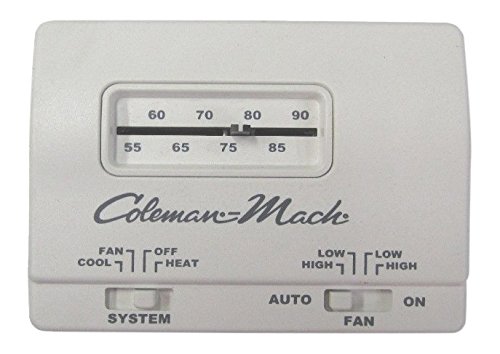
Image: A white rectangular thermostat with a digital display showing '79 COOL LO AUTO' and three gray buttons below the display.
2. Nga waahanga matua
- Whakaatu Anarite: Clear and easy-to-read temperature and mode indicators.
- Heating and Cooling Control: Manages both air conditioning and various heating types (heat pump, gas, hydronic, electric strip).
- Tautuhinga Tere Kiri: Adjustable fan speeds (High, Low, Auto) for personalized comfort.
- Push Button Interface: Simple up/down buttons for temperature adjustment and a mode button for function selection.
- Hononga Waea: Ensures reliable communication with your RV's HVAC system.
- Pūhiko Mana: Operates independently, typically using standard batteries (check specifications for type).
- Hoahoa Maunga Taiepa: Compact and stylish, designed to complement RV interiors.
3. Tatūnga me te Tāuta
Installation of the Coleman Mach Manual RV Thermostat is designed to be straightforward, often utilizing existing wiring from previous Coleman Mach thermostats. If you are replacing an older unit, ensure the power to your RV's HVAC system is turned off before beginning.
3.1 Waea Whakahoahoa
- Momotu Mana: Turn off all power to your RV's heating and cooling system at the circuit breaker.
- Tango Thermostat Tawhito: Carefully remove the old thermostat from the wall. Note the color and connection point of each wire. It is recommended to label each wire as you disconnect it.
- Connect New Thermostat: Connect the wires from your RV to the corresponding terminals on the new Coleman Mach thermostat. The wiring colors are typically consistent with previous Coleman Mach units. Refer to the detailed wiring diagram provided in the packaging for specific connections.
- Waea Haumaru: Me whakarite kia mau nga hononga waea katoa me te whakamaarama tika.
3.2 Whakapiki
- Position Thermostat: Place the new thermostat's backplate against the wall, aligning it with the existing mounting holes if possible.
- Haumaru ki te Taiepa: Use the provided screws to firmly attach the thermostat backplate to the wall.
- Attach Front Cover: Snap the front cover of the thermostat onto the mounted backplate.
- Whakaora i te Mana: Turn the power back on to your RV's HVAC system.
4. Nga Tohutohu Whakahaere
The Coleman Mach Manual RV Thermostat offers intuitive controls for managing your RV's climate.
4.1 Te Whakatau i te Pawera
- Whakamahia te Runga (▲) a Raro (▼) arrow buttons to adjust the desired temperature. The display will show the set temperature.
4.2 Te Huri i ngā Aratau
- Pehia te Aratau button (typically the bottom rectangular button) to cycle through the available operating modes:
- Matao: Activates the air conditioning.
- TE wera: Ka whakahohe i te punaha whakawera.
- pā: Operates the fan only, without heating or cooling.
- WATE: Turns off all heating, cooling, and fan functions.
4.3 Tautuhinga Tere Fan
When in COOL or FAN mode, you can adjust the fan speed:
- Pehia te Aratau button repeatedly until the desired fan speed appears on the display (e.g., LO, HI, AUTO).
- LO (Paheke): Fan runs continuously at a low speed.
- HI (Teitei): Fan runs continuously at a high speed.
- MOTO: Fan operates only when heating or cooling is active, and cycles on/off with the system to maintain the set temperature. This is generally the most energy-efficient setting.
5. Tiaki
Ma te tiaki i nga wa katoa ka pai te mahi me te roa o to whakamaarama.
- Te horoi: Periodically wipe the thermostat's exterior with a soft, dry cloth. Avoid using abrasive cleaners or solvents.
- Whakakapinga Pūhiko: If your model uses batteries (e.g., for display backlight or memory), replace them annually or when the low battery indicator appears. Refer to the product packaging or specific model instructions for battery type and replacement procedure.
- Ūkui Ārai: Ensure no furniture, curtains, or other objects block the airflow around the thermostat, as this can affect temperature readings.
6. Te Raru
Mena ka pā mai he raruraru ki tō thermostat, ngana ki ēnei mahi whakatau raruraru:
- Kāore te Thermostat e Whakakā:
- Check if the RV's main power supply to the HVAC system is on.
- Verify that the thermostat is securely mounted and all wiring connections are firm.
- Mena he pākahiko te mea e whakamahia ana, whakakapia ngā pākahiko.
- Kore Te Panui Panuitanga:
- Me whakarite kia kore te whakamaarama e pa ana ki te ra tika, ki nga tauira, ki nga puna wera ranei (hei tauira, lamps, taputapu) tera pea ka pa ki tana pukoro.
- Horoia he puehu, he para ranei mai i nga hau o te whakamahana.
- System Not Reaching Set Temperature:
- Confirm the thermostat is set to the correct mode (COOL for cooling, HEAT for heating).
- Check if the fan speed is set to AUTO; if so, the fan will only run when the system is actively heating or cooling. Try setting it to LO or HI to see if the fan operates continuously.
- Ensure RV windows and doors are closed to prevent heat/cool loss.
- Verify that your RV's HVAC unit (AC or furnace) is functioning correctly.
- Display Not Lighting Up (if applicable):
- Whakakapihia nga pākahiko.
If these steps do not resolve the issue, contact a qualified RV technician or Coleman customer support.
7. Whakatakotoranga
| Huanga | Taipitopito |
|---|---|
| Waitohu | Koremana |
| Ingoa Tauira | 7330G3351 |
| Momo Kaiwhakahaere | Patene Pana |
| Āhuahira Motuhake | Mana a-ringa |
| Tae | Kerei |
| Nga Whakamahinga Motuhake mo te Hua | Te whakamahana me te whakamatao |
| Momo Mana Pawera | Te whakamatao |
| Hangarau Hononga | Waea |
| Nga Waahanga kei roto | Thermostat |
| Puna Mana | Pūhiko Powered |
| Taumaha Tūemi | 0.2 Pauna (3.2 hekere) |
| Hunga Hua | 5 x 5 x 5 inihi |
| Momo Whakaatu | ā-ringa |
| Tikanga Mana | Pā (e pā ana ki te pēhi pātene) |
| Momo Whakaeke | Maunga Taiepa |
| Whakamuri | Kao |
8. Pūtāhui me te Tautoko
For specific warranty information, please refer to the documentation included with your product or visit the official Coleman website. For technical support, troubleshooting assistance beyond this manual, or to inquire about replacement parts, please contact Coleman customer service directly.
Tautoko Aipurangi: www.coleman.com


