1. Hua Neke Atuview
The Dell Ultrasharp 1909Wf is a 19-inch widescreen LCD monitor designed for various computing needs. It features a highly adjustable stand, offering swivel, tilt, and height adjustments, including the ability to rotate to a vertical orientation. The monitor also provides multiple connectivity options and integrated USB ports and an SD card reader for enhanced convenience.

Whakaahua 1: Mua view of the Dell Ultrasharp 1909Wf monitor, showcasing its widescreen display and Dell branding.
2. Tohutohu Tatūnga
2.1 Te Wetewete me te Huihuinga
- Kia ata tango i te kaitirotiro me ona waahanga mai i te kete.
- Place the monitor base on a stable surface.
- Attach the monitor panel to the stand, ensuring it is securely fastened.
2.2 Te hono i te Aroturuki
The Dell 1909Wf monitor offers various ports for connecting to your computer and other devices.
- Hononga Hiko: Connect the standard power cable to the monitor's power input and then to a power outlet.
- Waitohu Ataata: Use either a VGA or DVI-D cable to connect the monitor to your computer's video output port.
- Tauranga USB: The monitor includes USB ports for connecting peripherals.
- Kaipānui Kāri SD: An integrated SD card reader is available for convenient data transfer.
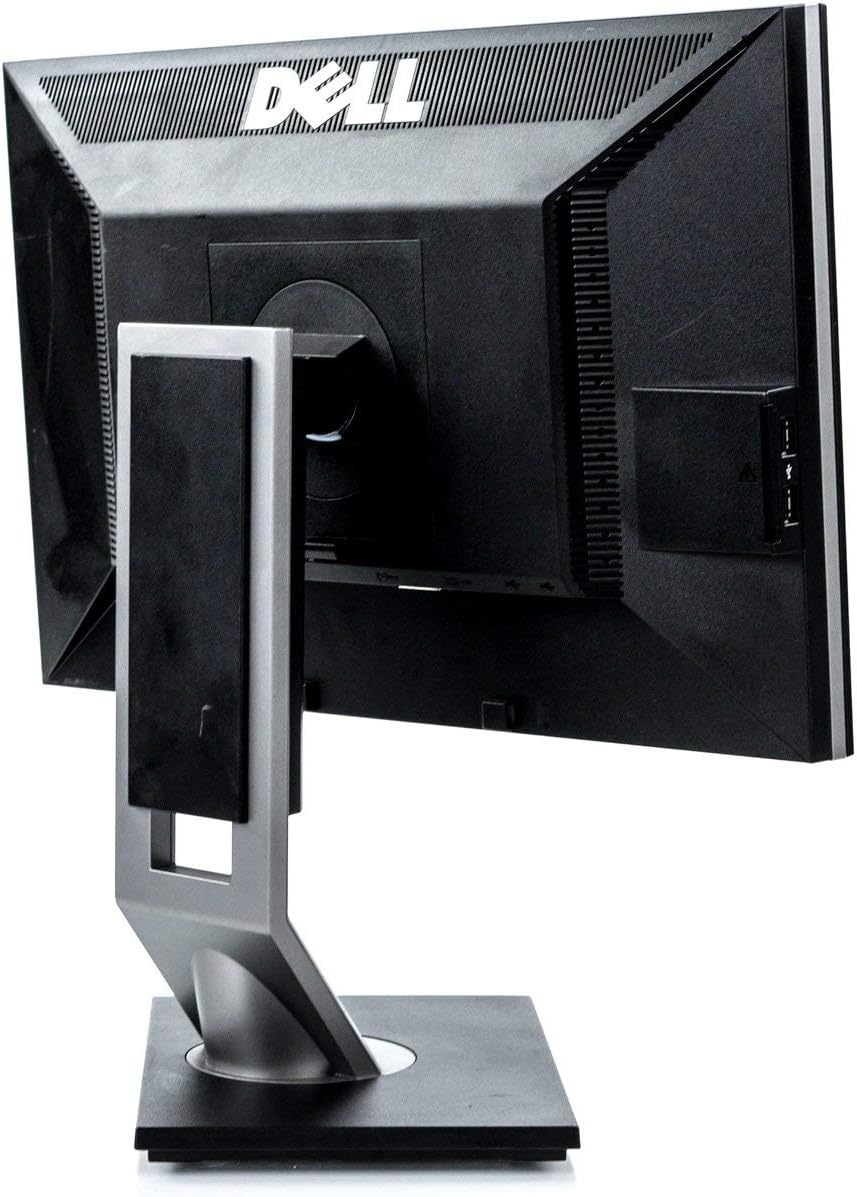
Whakaahua 2: Whakamuri view of the monitor, highlighting the various input and output ports for connectivity.

Whakaahua 3: Taha view of the monitor, showing the conveniently located USB ports and SD card reader.
3. Whakahaere i te Aroturuki
3.1 Kei te Hiko / Weto
Press the power button located on the front bezel of the monitor to turn it on or off. The power indicator light will illuminate when the monitor is active.
3.2 Te Whakatikatika i te Whakaaturanga
The Dell 1909Wf monitor features a versatile stand for optimal viewte whakamarie:
- Whakatikatika Teitei: Gently push or pull the monitor panel up or down to adjust its height.
- Whakaritea Tita: Tilt the monitor screen forwards or backwards to find your preferred viewkoki.
- Whakatikatika hurihuri: Hurihia te aroturuki maui, matau ranei i runga i tona turanga.
- Pivot (Vertical Orientation): The monitor can be rotated 90 degrees to a vertical (portrait) orientation. This is useful for viewing long documents or web wharangi.

Whakaahua 4: Mua view of the monitor with the screen off, showing the Dell logo and control buttons.
3.3 Tahua Whakaatu Ma-Mata (OSD).
Use the buttons on the front bezel to navigate the On-Screen Display (OSD) menu. This menu allows you to adjust various display settings such as brightness, contrast, color temperature, and input source selection.
4. Tiaki
4.1 Te horoi i te Aroturuki
- Whakawetohia i nga wa katoa ka wetewetehia te kaitirotiro i mua i te horoi.
- Kia ngawari te whakamahi i te kakahu ngohengohe, karekau he ngongo dampened with water or a non-abrasive screen cleaner to wipe the screen and exterior surfaces.
- Avoid using harsh chemicals, solvents, or abrasive materials, as these can damage the monitor's finish.
4.2 Tiakitanga Whanui
- Puritia te kaitirotiro mai i te ra tika, nga puna wera, me te makuku nui.
- Me whakarite kia pai te hau huri noa i te kaitirotiro kia kore ai e wera rawa.
- A ape i te whakatakoto i nga mea taumaha ki runga i te kaupane, i ona taura ranei.
5. Te Raru
This section addresses common issues you might encounter with your Dell Ultrasharp 1909Wf monitor.
5.1 Kore he Atahanga i runga Mata
- Check if the monitor is powered on and the power indicator light is active.
- Verify that the video cable (VGA or DVI-D) is securely connected to both the monitor and the computer.
- Ensure the correct input source is selected via the OSD menu.
- Test the monitor with another computer or a different video cable if possible.
5.2 Nga Take Kounga Atahanga
- Whakaritea ngā tautuhinga kanapa me te rerekētanga mā te tahua OSD.
- Ensure the display resolution on your computer is set to the monitor's native resolution (e.g., 2048 x 1536 or FHD 1080p, depending on specific configuration).
- Check for any physical damage to the screen or video cable.
5.3 Stand Adjustment Issues
- Ensure no cables are obstructing the movement of the stand.
- Apply gentle, even pressure when adjusting height, tilt, or swivel.
6. Whakatakotoranga
| Āhuahira | Taipitopito |
|---|---|
| Waitohu | Dell |
| Tau tauira | 1909Wf |
| Rahi Mata | 19 Inihi |
| Aspect Ratio | 16:9 |
| Whakatau | 2048 x 1536, FHD 1080p |
| Tirohanga Atahanga | 300 cd/m² |
| Tauwehenga Purata | 1000:1 |
| Wā Whakautu | 5ms |
| Tae Gamut | 83% |
| Whakaahua Mata Mata | Moataata |
| Hononga | VGA, DVI-D, USB Ports, SD Card Reader |
| Whakamahi Hiko | Average 25 watts (2 Cold Cathode Fluorescent Lamps) |
| Taumaha Tūemi | 12.25 pauna |
| Ahu mōkihi | 18.23 x 18.07 x 7.01 inihi |
| Kaihanga | Nga Rorohiko Dell |
7. Pūtāhui me te Tautoko
For warranty information and technical support, please refer to the documentation provided with your purchase or visit the official Dell support website. You can also find additional resources and contact information on the Dell Store on Amazon.


