1. Kupu Whakataki
This manual provides essential information for the installation, operation, and maintenance of the Schneider Electric Zelio SR2B201BD Logic Relay. Please read this manual thoroughly before using the device to ensure safe and efficient operation.
The Zelio SR2B201BD is a compact programmable logic relay designed for simple automation systems. It features 20 I/O points and operates on a 24Vdc power supply.
2. Nga korero haumaru
- Me mohio kua momotuhia te hiko i mua i te whakaurunga, te tiaki ranei.
- Installation and wiring must be performed by qualified personnel in accordance with local and national electrical codes.
- Kaua e whakaatuhia te taputapu ki te makuku, ki ngā pāmahana tino kino, ki ngā taiao waikura rānei.
- Manatoko tika voltage supply (24Vdc) before powering on.
3. Hua Neke Atuview
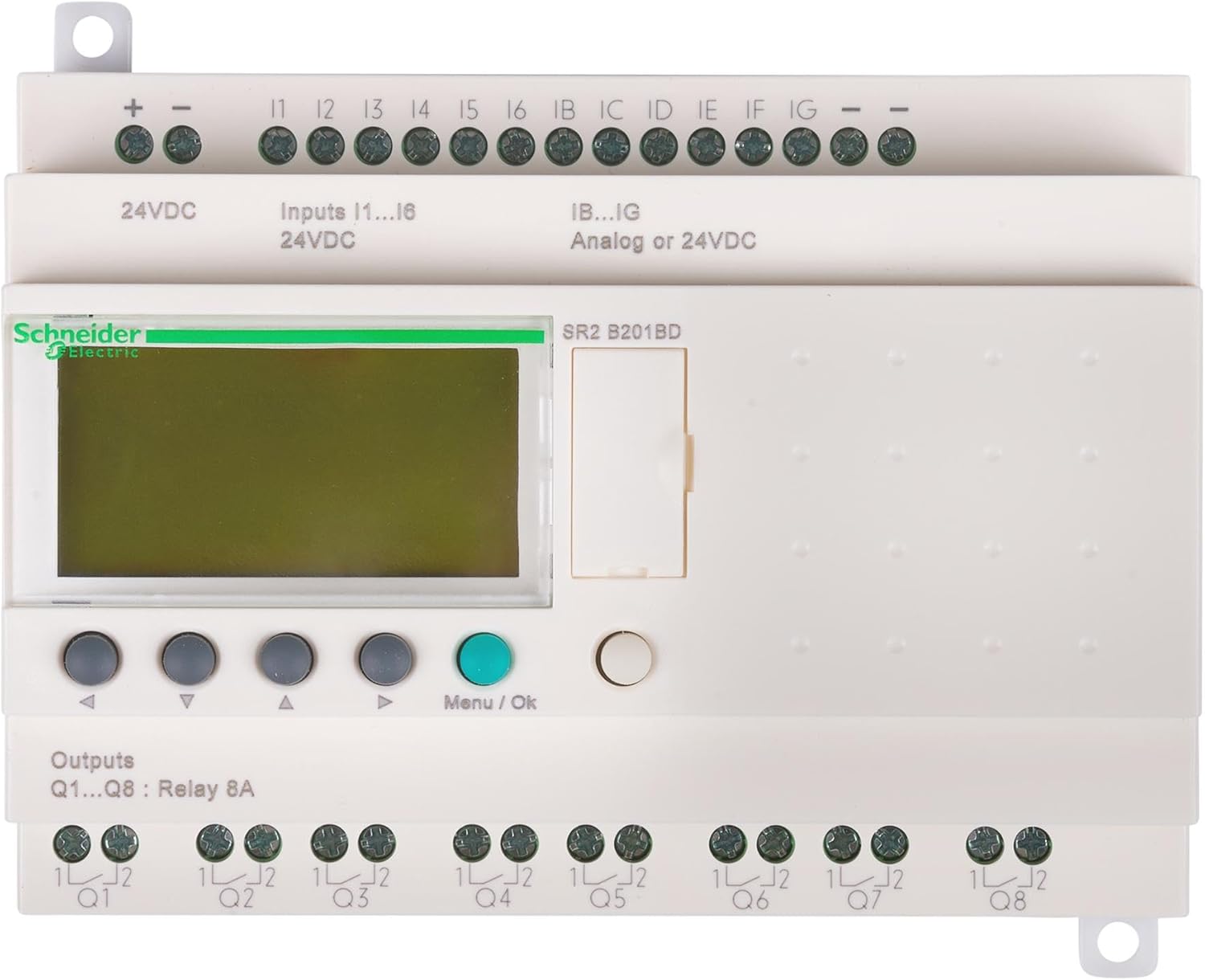
The Schneider Electric Zelio SR2B201BD is a compact logic relay with integrated display and control buttons. It provides various input and output terminals for connecting to sensors, actuators, and other control components.
3.1. Nga waahanga matua
- 20 I/O points (12 digital inputs, 8 relay outputs)
- 24Vdc power supply
- Integrated LCD display and push-buttons for programming and monitoring
- Hoahoa kiato mo te DIN rail whakapuru
3.2. Ahu me te Taumaha
- Rahi: 5.3 x 2.6 x 3.9 inihi (134.6 x 66 x 99 mm)
- Taumaha: 12.6 hekere (357.2 karamu)
4. Tatūnga me te Tāuta
4.1. Whakapiki
The Zelio SR2B201BD is designed for DIN rail mounting. Ensure adequate ventilation around the device.
4.2. Waaho
Refer to the terminal markings on the device for correct wiring connections. Use appropriate wire gauges for all connections.
4.2.1. Power Supply (24Vdc)
- Honoa te + terminal to the positive 24Vdc supply.
- Honoa te - terminal to the negative 24Vdc supply.
4.2.2. Inputs (I1-I6, IB-IG)
- I1-I6: Digital inputs, 24Vdc. Connect sensors or switches to these terminals.
- IB-IG: Analog or 24Vdc digital inputs. These inputs can be configured for either analog signal reception or digital 24Vdc input.
4.2.3. Outputs (Q1-Q8)
- Q1-Q8: Relay outputs, 8A. These are potential-free contacts for controlling external loads. Connect the load to the respective Q terminal and its common (1L/2L).
5. Nga Tohutohu Whakahaere
5.1. Kei te Hiko Nei
Once all wiring is complete and verified, apply 24Vdc power to the device. The LCD display will illuminate, and the device will initiate its startup sequence.
5.2. Navigation and Programming
Use the navigation buttons (up, down, left, right) to scroll through menus and parameters on the LCD display. Press the Tahua/Ok te paatene hei kowhiri i tetahi whiringa, hei whakau ranei i tetahi tautuhinga.
- Papatonotanga: Programs can be created directly on the device using the function block diagram (FBD) or ladder logic (LAD) editors via the display and buttons. Alternatively, programs can be developed using Zelio Soft 2 software on a PC and then transferred to the relay.
- Aroturuki: The display allows real-time monitoring of input/output states, timer values, and counter values.
- Whakaritenga Tawhā: Adjust various operational parameters such as timer presets, counter limits, and input/output configurations.
5.3. Software Integration (Zelio Soft 2)
For advanced programming and easier configuration, use the Zelio Soft 2 software. Connect the logic relay to a PC using the appropriate programming cable (sold separately). The software provides a graphical interface for program development, simulation, and transfer.
6. Tiaki
The Zelio SR2B201BD is designed for minimal maintenance. Regular checks can help ensure long-term reliability.
- Te horoi: Puritia te pūrere kia ma, kia kore hoki he puehu. Whakamahia he kakahu ngohengohe, maroke hei horoi. Kaua e whakamahi i ngā kaihoroi whakakoi, i ngā whakarewa rānei.
- Hononga: Ia wa, tirohia nga hononga waea katoa mo te piri me nga tohu o te waikura.
- Taiao: Me whakarite kia noho tonu te taiao whakahaere i roto i nga awhe pāmahana me te makuku.
7. Te Raru
| Raruraru | Take pea | Rongoā |
|---|---|---|
| Kaore te taputapu i te hiko. | Kāore he pūtake hiko, he hē rānei te rahi o te hikotage. | Verify 24Vdc power supply connections and voltage. Check fuses if applicable. |
| Ko nga whakaurunga kaore i te whakautu. | Incorrect wiring, faulty sensor, or program error. | Check input wiring. Test sensor functionality. Review program logic for input conditions. |
| Ko nga putanga kaore i te hohe. | Incorrect wiring, faulty load, or program error. | Check output wiring and load connections. Test load functionality. Review program logic for output conditions. |
| Ka whakaatuhia te karere hapa i te mata. | Internal fault or programming issue. | Note the error code and consult the detailed Zelio SR2 programming manual or Schneider Electric support. Try resetting the device. |
8. Whakatakotoranga
| Tawhā | Uara |
|---|---|
| Tau tauira | SR2B201BD |
| Waitohu | Schneider Hiko |
| Tuku Hiko | 24Vdc |
| Whakauru Mamati | 12 (I1-I6, IB-IG configurable) |
| Nga Input Pouakauru | Up to 6 (configurable from IB-IG) |
| Relay Huaputa | 8 (Q1-Q8), 8A per output |
| Whakaatu | LCD Whakauru |
| Whakaeke | Rerewe DIN |
| Ahu (L x W x H) | 5.3 x 2.6 x 3.9 inihi (134.6 x 66 x 99 mm) |
| Taumaha | 12.6 hekere (357.2 karamu) |
| Rauemi | Te whakarewa |
9. Pūtāhui me te Tautoko
9.1. Nga Korero Whakaputanga
Schneider Electric products are covered by a standard manufacturer's warranty. For specific warranty terms and conditions, please refer to the documentation provided with your purchase or visit the official Schneider Electric webpae. Puritia to tohu hoko mo nga kereme whakamana.
9.2. Tautoko Hangarau
For technical assistance, programming queries, or troubleshooting beyond the scope of this manual, please contact Schneider Electric customer support or visit their official support portal. You can find contact information on the Schneider Electric webpae: www.he.com


