1. Hua Neke Atuview
The Gioteck EX-05S High Definition Headset is designed to deliver superior stereo game sound and crystal-clear voice communication. It is compatible with multiple platforms including PS4, PS3, Xbox 360, PC, and Mac. This headset features 40mm high-quality stereo drivers, a noise-isolating microphone, and breathable micro-fibre ear cups for extended comfort.
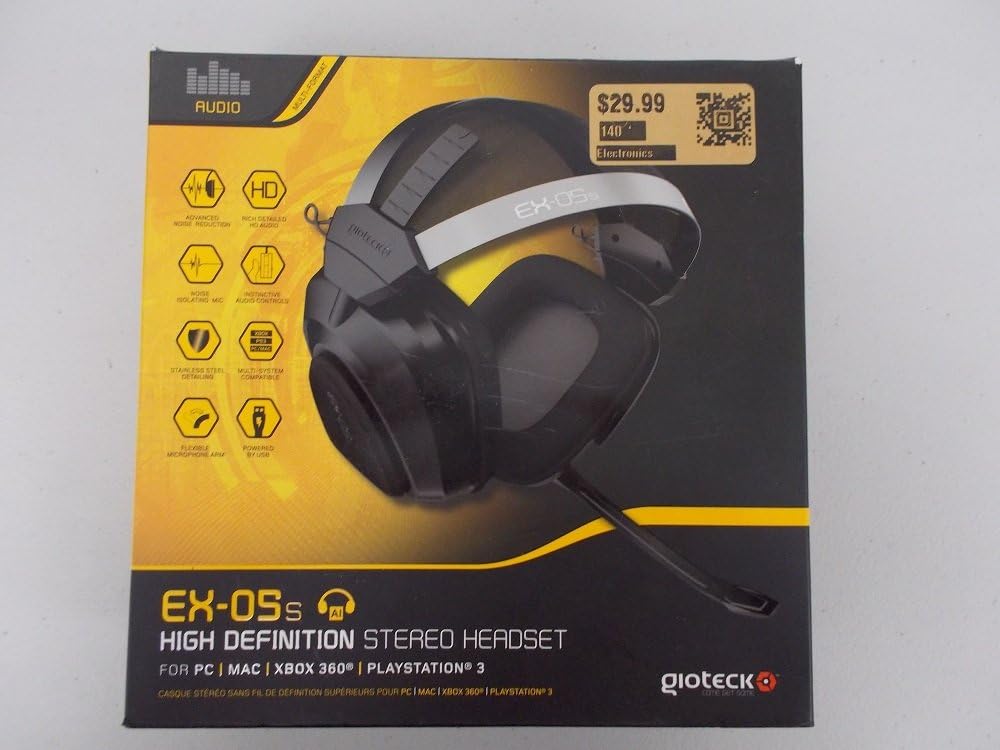
Figure 1.1: Gioteck EX-05S Headset packaging, highlighting key features and compatibility.

Whakaahua 1.2: Taha view of the Gioteck EX-05S Headset, showing the ear cup and microphone arm.
2. Nga ahuatanga
- 40mm High Quality Stereo Drivers: Delivering rich, detailed audio for an immersive gaming experience.
- Noise Isolating Microphone: Designed to eliminate echo and external noise for clear communication.
- Breathable Micro-Fibre Ear Cups: Ka whakarite i te whakamarie i ngā wā roa o te tākaro.
- Whakaheke Haruru Ake: Minimizes game sound interference from external speakers.
- Flexible and 180-Degree Rotating Microphone Arm: Allows for optimal microphone positioning.
- Instinctive and Accessible Controls: Conveniently located controls for voice and game sound adjustments.
- Stainless Steel Detailing: Provides durability and a premium finish.
- Hototahitanga-maha: Works with PS4, PS3, Xbox 360, PC, and Mac.
3. Ihirangi mokete
Kia tino mohio kei roto i tō kete ngā mea katoa e whai ake nei:
- Gioteck EX-05S Universal High Definition Stereo Headset
4. Aratohu Tatūnga
4.1 Connecting to Gaming Consoles (PS4, PS3, Xbox 360)
- Locate the 3.5mm audio jack on your gaming controller or console.
- Insert the 3.5mm connector from the EX-05S headset firmly into the audio jack.
- Ensure your console's audio settings are configured to output game audio and chat through the connected headset. Refer to your console's system settings for specific audio output configurations.
4.2 Te hono atu ki te PC/Mac
- For PCs with separate audio and microphone jacks, you may need a PC splitter cable (not included) to connect the single 3.5mm headset jack to your computer's audio output and microphone input ports.
- For devices with a combined 3.5mm audio/microphone jack, simply plug the headset's 3.5mm connector directly into the port.
- Adjust your computer's sound settings to select the EX-05S headset as the default playback and recording device.
5. Nga Tohutohu Whakahaere
5.1 Mana Rōrahi
The EX-05S headset features an inline control box on the cable. Use the volume dial to adjust the overall audio level of your game and chat sound.
5.2 Whakangū i te Hopuoro
A switch or button on the inline control box allows you to quickly mute or unmute your microphone. Ensure the microphone is unmuted when you wish to communicate.
5.3 Te Tūnga o te Hopuoro
The flexible microphone arm can be rotated 180 degrees. Position the microphone approximately 1-2 inches from your mouth for optimal voice clarity and to minimize background noise.
6. Tiaki me te Tiaki
- Te horoi: Use a soft, dry cloth to clean the headset. For ear cups, a slightly damp Ka taea te whakamahi i te kakahu, engari kia kore te makuku e uru ki roto i ngā mata o te kaikorero. Kaua e whakamahi i ngā matū kaha, i ngā mea horoi rānei.
- Rokiroki: Whakaorangia te pane ki te waahi makariri, maroke atu i te ra tika me te wera nui. A ape i te whiri i te taura.
- Te whakahaere: Always grasp the plug when disconnecting the cable, rather than pulling on the cable itself, to prevent damage to the wiring.
- Ngā Kapu Taringa: The breathable micro-fibre ear cups can be gently wiped clean. Avoid excessive pressure or stretching.
7. Te Raru
7.1 Kāore he Oro mai i te Paneoro
- Me mohio kua whakauruhia te jack 3.5mm ki te tauranga ororongo.
- Tirohia te mana whakahaere oro ā-roto i runga i te taura pane whakarongo, kia tino whakanuia.
- Verify your device's (console, PC, Mac) audio output settings are configured to send sound to the headset.
- Whakamātauria te pane whakarongo i runga i tētahi atu pūrere hei whakakore i te raruraru e pā ana ki tētahi pūrere.
7.2 Kaore i te Mahi te hopuoro
- Check the microphone mute switch on the inline control box and ensure it is unmuted.
- Verify your device's (console, PC, Mac) microphone input settings are configured to receive input from the headset.
- Ensure the microphone arm is positioned correctly and not obstructed.
- Test the microphone on another device or application to confirm functionality.
7.3 Static or Distorted Audio
- Me whakarite kia mau te hononga, ā, kia kore he paru.
- Try adjusting the volume levels on both the headset and the connected device.
- Move away from potential sources of electromagnetic interference (e.g., Wi-Fi routers, cordless phones).
- Whakamātauria ki tētahi atu pūtake oro, ki tētahi atu taputapu rānei.
8. Whakatakotoranga
| Āhuahira | Taipitopito |
|---|---|
| Ingoa Tauira | E5SUNI-11-MU |
| Hangarau Hononga | Waea |
| Nga Waahanga kei roto | Pūorooro |
| Awhe Tau (Whakaahuatanga) | Pakeke |
| Rauemi | Kowiri tira |
| Nga Whakamahinga Motuhake mo te Hua | Te petipeti |
| Pūrere Hototahi | Gaming Consoles, Computers |
| Momo Mana | Mana Rōrahi |
| Āhuahira taura | Ka taea te tango |
| Taumaha Tūemi | 669 Karamu (1.47 pauna) |
| Tikanga Mana | Reo |
| Momo Atekōkiri Ororongo | Atekōkiri Hihiko |
| Hanga Whakatangitangi | Ki runga-taringa |
| Pooro Jack | 3.5 mm Jack |
| Hunga Hua | 8.46 x 7.87 x 3.94 inihi |
9. Pūtāhui me te Tautoko
Gioteck products are manufactured to high standards and undergo rigorous testing. For information regarding warranty coverage, technical support, or service, please refer to the official Gioteck webpaetukutuku, whakapā atu ranei ki ta raatau tautoko kaihoko. Puritia to tohu hoko mo etahi kereme whakamana.
Mo nga korero tautoko hou rawa atu, tirohia koa: www.gioteck.com/support


