1. Kupu Whakataki
Thank you for choosing the Mastech MS2115B True RMS Digital Clamp Meter. This instrument is designed for safe and accurate measurement of various electrical parameters. This manual provides essential information for the proper and safe operation, maintenance, and troubleshooting of your device. Please read this manual thoroughly before use and retain it for future reference.
2. Nga korero haumaru
Hei whakarite i te haumaru o te mahi me te ratonga o te mita, me whai i ēnei whakatūpato haumaru:
- Kia mau tonu ki nga ture haumaru o te rohe me te motu.
- Kaua e whakamahia te mita ki te ahua kua pakaru, ki te whakararu ranei te whakamaarama o te arataki whakamatautau.
- Kaua rawa e tono nui ake i te vol reititage, as marked on the meter, between terminals or between any terminal and ground.
- Kia tino tupato ki te mahi me te voltages above 60V DC or 30V AC RMS. These voltaghe morearea ohorere.
- Keep your fingers behind the probe barriers when making measurements.
- Disconnect the test leads from the circuit before changing functions.
- Tangohia ngā taura whakamātautau mai i te mita i mua i te whakatuwheratanga i te taupoki pākahiko.
- Whakakapihia te pākahiko ina puta te tohu o te pākahiko iti kia kore ai e tika nga korero.
- Kaua e whakahaerehia te mita i roto i ngā taiao pahū hau, kohu, puehu rānei.
- Me whakarite te clamp jaw is fully closed when taking current measurements.
3. Hua Neke Atuview
The Mastech MS2115B is a True RMS digital clamp meter designed for professional and home use. It offers a wide range of measurement capabilities and features for electrical testing.
3.1 Nga waahanga matua
- Dual Display with 6000 counts for clear readings.
- Jaw size up to Ø40mm (1.6 inch) for various conductor sizes.
- Auto Ranging and Manual Ranging capabilities.
- DC/AC current measurement up to 1000A.
- Tests AC/DC voltage and current, resistance, capacitance, frequency, and duty cycle.
- True RMS (Root Mean Square) measurement for accurate readings on non-sinusoidal waveforms.
- NCV (Kore-Whakapā Voltage Detector) for identifying live wires without direct contact.
- Inrush current measurement for motor startup analysis.
- Data Hold, MAX/MIN Value Measurement, and Relative Measurement functions.
- Diode test and Continuity Buzzer (<50 ohm).
- Display Backlight and Work Light for use in dimly lit areas.
- Low Battery Display and Auto Power Off for extended battery life.
- USB interface for data communication with Windows OS.
3.2 Waehanga
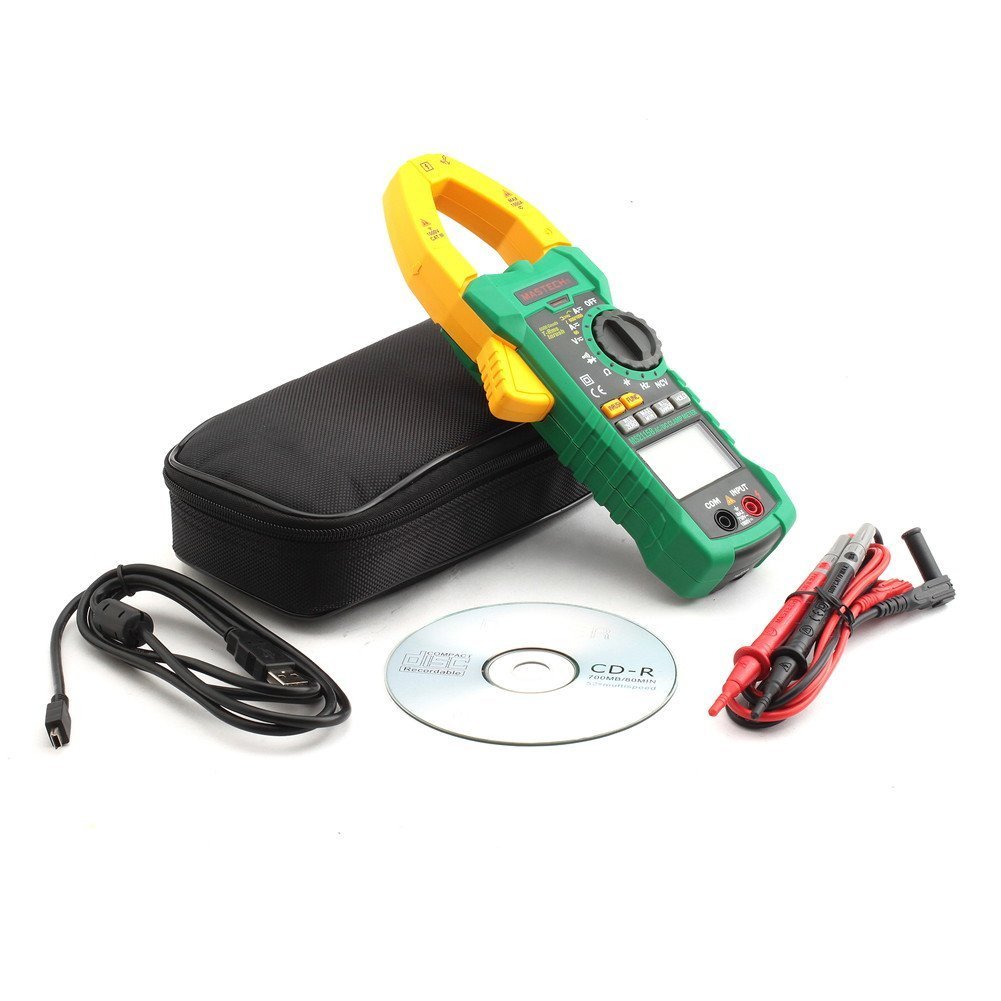
Familiarize yourself with the main components of the MS2115B clamp mita:


4. Tatūnga
4.1 Tāuta Pūhiko
The Mastech MS2115B requires batteries for operation. Please note that batteries are not included in the package.
- Ensure the meter is turned OFF and disconnect all test leads.
- Kimihia te uhi o te wahanga pākahiko kei muri o te mita.
- Whakamahia he huriwiri ki te wetewete i te tīwiri e mau ana i te uhi pūhiko.
- Tango kia ata tirohia te taupoki puhiko.
- Insert the required batteries, observing correct polarity (+ and -).
- Whakakapihia te uhi o te pākahiko ka mau ki te huri.

4.2 Te hono i nga kaiarahi Whakamātautau
Mo te voltage, resistance, capacitance, frequency, diode, and continuity measurements, connect the test leads:
- Insert the red test lead into the "INPUT" terminal.
- Insert the black test lead into the "COM" (common) terminal.
4.3 USB Interface Setup (for Windows OS)
The MS2115B features a USB interface for data logging and analysis on a computer running Windows OS.
- Install the provided communication software from the included CD onto your Windows computer.
- Connect the USB communication cable to the meter's USB port and to an available USB port on your computer.
- Follow the software instructions to establish communication and begin data transfer.
5. Nga Tohutohu Whakahaere
5.1 Power On/Off and Auto Power Off
- To power on, rotate the rotary switch from "OFF" to any desired measurement function.
- To power off, rotate the rotary switch back to "OFF".
- The meter features an Auto Power Off function to conserve battery life. It will automatically turn off after approximately 15 minutes of inactivity. To disable this feature temporarily, refer to the full user manual for specific button combinations during power-on.
5.2 Pihi Mahi
- MAHI: Selects between different measurement modes within a single rotary switch position (e.g., AC/DC voltage, Diode/Tonu).
- RANGE: Toggles between auto-ranging and manual ranging. In manual ranging, press repeatedly to cycle through ranges.
- Tohu: Ka whakatio i te pānui whakaaturanga o nāianei. Pēhia anō hei tuku.
- MAX / MIN: Displays the maximum or minimum reading recorded since activation. Press repeatedly to cycle through MAX, MIN, and current readings.
- REL/ZERO: Activates relative measurement mode, displaying the difference between the current reading and a stored reference value. Also used for zeroing DC current readings.
- RUHI: Measures the inrush current (startup current) of motors or other inductive loads.
- Backlight/Work Light: Activates the display backlight and work light for improved visibility.
5.3 Ngā Tukanga Ine
5.3.1 DC / AC Voltage Inenga
- Connect the red test lead to the "INPUT" terminal and the black test lead to the "COM" terminal.
- Rotate the rotary switch to the V (Voltage) position. Press Puapuaki to select between DC V= AC ranei V~.
- Pāhia ngā porotiti whakamātautau ki ngā pūwāhi whakamātautau e hiahiatia ana i roto i te ara iahiko.
- Pānuihia te voltage uara kei runga i te whakaaturanga.
5.3.2 DC/AC Current Measurement (Clamp)
- Rotate the rotary switch to the A (Current) position. Press Puapuaki to select between DC A= AC ranei A~.
- Whakatuwheratia te clamp jaw and enclose only one conductor of the circuit. Ensure the jaw is fully closed.
- For DC current, press REL/ZERO to zero the display before measurement if needed.
- Pānuihia te uara o nāianei i te whakaaturanga.
5.3.3 Ine Atete
- Connect test leads as for voltage.
- Rotate the rotary switch to the Ω Tūnga (Ātete).
- Me whakarite kua whakakorea te hiko o te ara iahiko e whakamatautauria ana.
- Pā atu ki ngā porotiti whakamātautau puta noa i te wāhanga, i te ara iahiko rānei hei ine i te ātete.
- Panuihia te uara aukati kei runga i te whakaaturanga.
5.3.4 Inenga Raukaha
- Connect test leads as for voltage.
- Rotate the rotary switch to the KAUPAPA tūranga (pūngao).
- Me whakarite kia tino tukuna te hiko o te pūnga i mua i te ine.
- Pā atu ki ngā pūwero whakamātautau puta noa i ngā pito o te pūnga hiko.
- Panuihia te uara capacitance kei runga i te whakaaturanga.
5.3.5 Te Ine i te Auautanga me te Huringa Mahi
- Connect test leads as for voltage.
- Rotate the rotary switch to the Hz /% (Frequency/Duty Cycle) position.
- Perehi Puapuaki to toggle between Frequency (Hz) and Duty Cycle (%).
- Touch the test probes to the signal source.
- Pānuihia te uara auau, te huringa mahi rānei kei runga i te whakaaturanga.
5.3.6 Te Whakamātautau me te Haere Tonu o te Diode
- Connect test leads as for voltage.
- Rotate the rotary switch to the Diode/Tonu tūnga.
- Perehi Puapuaki to select between Diode test or Continuity test.
- For Diode Test: Touch the red probe to the anode and the black probe to the cathode. The display shows the forward voltagtaka. Hurihia ngā ine hei tirotiro mēnā he ara iahiko tuwhera.
- For Continuity Test: Touch the probes to the circuit. A continuous beep indicates continuity (resistance less than 50 ohms).
5.3.7 NCV (Kore-Whakapā Voltage) Rapunga
- Rotate the rotary switch to the NCV tūnga.
- Nekehia te tihi o te clamp meter near a conductor or outlet.
- The meter will emit an audible beep and the NCV indicator will light up if AC voltagka kitea e.
5.3.8 Inrush Current Measurement
- Rotate the rotary switch to the A~ tūranga (Au AC).
- Pehia te RUHI pātene.
- Whakatuwheratia te clamp jaw and enclose only one conductor of the circuit where the inrush current is to be measured.
- Turn on the device or motor. The meter will capture and display the peak inrush current.
6. Tiaki
6.1 Te horoi
- I ia wa, horoia te keehi me te panuiamp kakahu me te horoi ngawari. Kaua e whakamahi i te abrasive me te whakarewa.
- Keep the input terminals free of dirt and moisture.
6.2 Whakakapinga Pūhiko
When the low battery indicator appears on the display, replace the batteries immediately to ensure accurate readings. Refer to Section 4.1 for battery installation instructions.
6.3 Rokiroki
- Ki te kore e whakamahia te mita mo te wa roa, tangohia nga pākahiko kia kore ai e pakaru me te pakaru.
- Penapenahia te mita ki te wāhi hauhautanga, maroke, kia matara atu i te rā tika me ngā pāmahana tino kino.
7. Te Raru
If you encounter issues with your Mastech MS2115B, refer to the following common troubleshooting steps:
| Raruraru | Take pea | Rongoā |
|---|---|---|
| Kaore te mita i te hiko. | Nga pākahiko kua mate, kua he ranei te whakaurunga. | Tirohia te polarity pākahiko; whakakapi pākahiko. |
| No reading or "OL" displayed. | Open circuit, out of range, or incorrect function selected. | Check circuit connections, select appropriate range/function, ensure continuity. |
| Ko nga panui kore tika. | Low battery, dirty test leads/terminals, external interference. | Replace batteries, clean leads/terminals, move away from strong electromagnetic fields. |
| Auto Power Off activates too quickly. | Normal operation (15 min inactivity). | Press any button or rotate the switch to reset the timer. Refer to the full manual to disable this feature if needed. |
| Clamp current reading is zero or incorrect. | Multiple conductors in jaw, jaw not fully closed, DC current not zeroed. | Ensure only one conductor is in the jaw, close jaw completely, press REL/ZERO for DC current. |
If the problem persists after trying these steps, please contact Mastech customer support or your local distributor for assistance.
8. Whakatakotoranga Hangarau
The following table outlines the technical specifications for the Mastech MS2115B Digital Clamp mita:
| Mahi Ine | Awhe | Tika |
|---|---|---|
| DC Voltage | 600mV / 6V / 60V / 600V / 1000V | ±(0.5% + 3) for 600mV-600V, ±(0.8% + 2) for 1000V |
| AC Voltage | 600mV / 6V / 60V / 600V / 750V | ±(0.8% + 3) for 600mV-600V, ±(1% + 4) for 750V |
| DC Naianei | 60A/600A/1000A | ± (3.0% + 3) |
| AC o nāianei | 60A/600A/1000A | ± (2.5% + 3) |
| Ātete | 600Ω / 6kΩ / 60kΩ / 600kΩ / 6MΩ / 60MΩ | ±(1.0% + 3) for 600Ω-6MΩ, ±(1.5% + 3) for 60MΩ |
| Te kaha | 6nF / 60nF / 600nF / 6uF / 60uF / 600uF / 6mF / 60mF | ± (4.0% + 3) |
| Frequency (from Clamp) | 0 ~ 10kHz | ± (1.5% + 5) |
| Frequency (AC Voltage) | 0 ~ 10kHz | ± (1.5% + 5) |
| Auautanga arorau | 0 ~ 60MHz | ± (0.5% + 3) |
| Huringa Mahi | 10% ~ 90% | ±3.0% |
| Whakamatau Diode | 2.7V | Whakamua Voltage maturuturu |
| Whakaputanga Buzzer | <50 ohm | Ka tangi te tangi |
Whakatakotoranga Whānui:
- Whakaatu: Dual Display, 6000 counts
- Tuwhera kauae: Ø40mm (1.6 inihi)
- RMS Pono: Ae
- NCV: Ae
- Runganui: Ae
- Pupuri Raraunga: Ae
- MAX / MIN: Ae
- Inenga Whānui: Ae
- Backlight/Work Light: Ae
- Tohu Pūhiko Iti: Ae
- Whakaweto Aunoa: Ae
- Atanga USB: Yes (Windows OS compatible)
- Puna Hiko: Whakahikohia te Pūhiko (Karekau he pākahiko)
- Ahu: Tata ki te 26 x 14 x 6.6 cm
- Taumaha: Tata ki te 720g
- Kaihanga: HE MAIHEI
- Tau tauira: MS2115B
- ASIN: B00LD8IIJS
- UPC: 702382755386, 702382755881, 706551142168
9. Pūtāhui me te Tautoko
For warranty information, please refer to the documentation provided with your purchase or contact the seller directly. Mastech products typically come with a manufacturer's warranty against defects in materials and workmanship.
For technical support, troubleshooting assistance beyond this manual, or inquiries about replacement parts, please contact Mastech customer service or your authorized Mastech distributor. Contact details can usually be found on the manufacturer's official webpaetukutuku, i runga rānei i tō pire hoko.


