1. Kupu Whakataki
This manual provides essential instructions for the safe and efficient operation of your COTEK SP-1500-112 Pure Sine Wave Inverter. This device is designed to convert 12V DC battery power into stable 120V AC household power, making it suitable for a wide range of electronic devices, including sensitive equipment.
2. Nga korero haumaru
Tena panuihia me te mohio ki nga tohutohu haumaru katoa i mua i te whakauru, te whakahaere ranei i te kaihurihuri. Ki te kore e whai i enei tohutohu ka puta pea he ru hiko, he ahi, he whara kino ranei.
Whakatupato Haumaru Whānui
- Whakahau: Ensure the inverter is installed in a well-ventilated area to prevent overheating. Do not block ventilation openings.
- makuku: Kaua e whakaaturia te inverter ki te ua, ki te makuku, ki te haumākū nui rawa rānei.
- Rauemi mura: Keep the inverter away from flammable materials, gases, or liquids.
- Waea waea: All wiring must comply with local and national electrical codes. Use appropriate gauge wiring for DC input and AC output connections.
- Whakapapa: The inverter must be properly grounded. Connect the chassis ground terminal to a reliable earth ground.
- Momotu Mana: Always disconnect all power sources (DC input and AC output) before performing any maintenance or servicing.
- Kaimahi Tohu: Ko te whakaurunga me te mahi ma nga kaimahi mohio anake.

Image: Safety gear including a hard hat, safety glasses, and gloves, emphasizing the importance of personal protection during installation.

Image: A car battery, representing the DC power source for the inverter, highlighting the need for proper battery handling.
3. Nga Hua o te Hua
The COTEK SP-1500-112 Inverter offers the following key features:
- Pure sine wave output for sensitive electronics.
- Power ON / OFF remote control capability (Green Terminal).
- Input & output fully isolated for enhanced safety.
- Temperature & load controlled cooling fan for efficient operation.
- Atanga ratarata-kaiwhakamahi.
- Type 1 Indoor Aluminum Enclosure for durability.
4. Hua Neke Atuview

Whakaahua: Koki view of the COTEK SP-1500-112 Pure Sine Wave Inverter, showcasing its blue and gray casing.
Paepae Mua
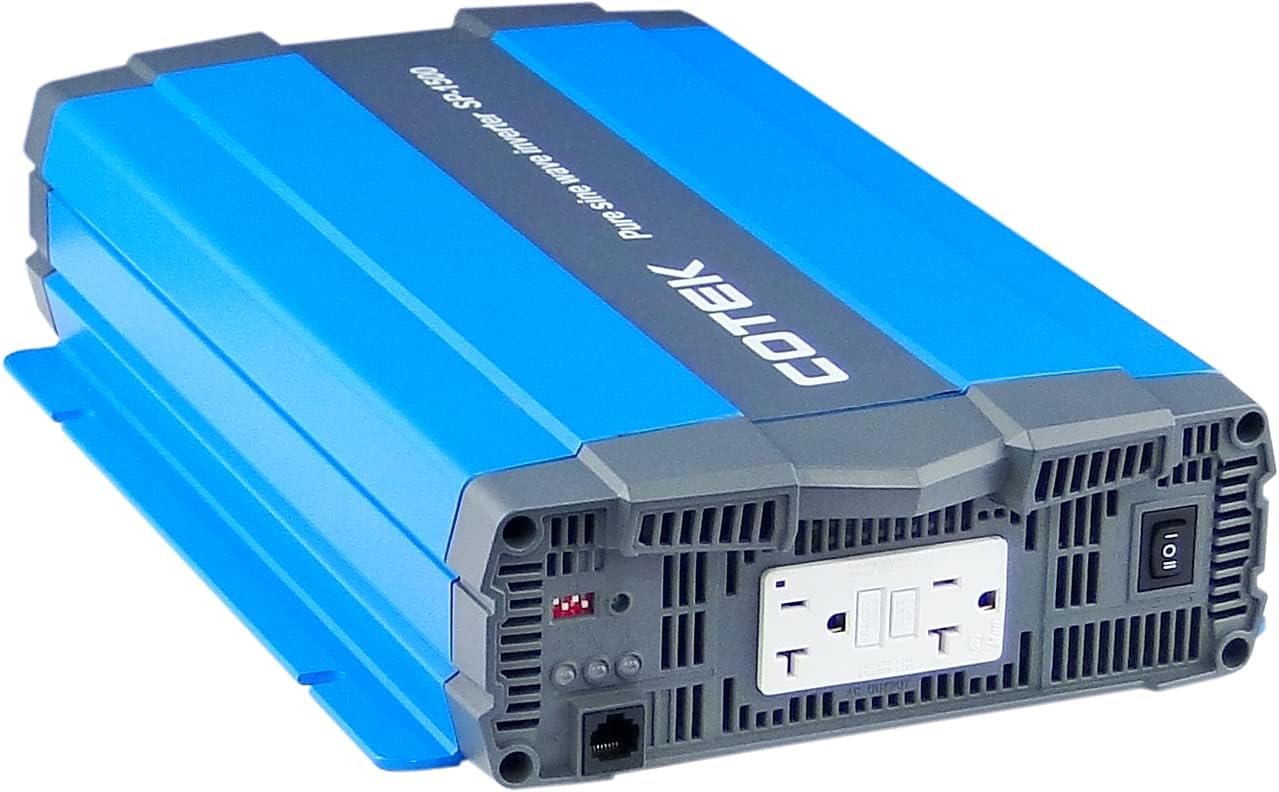
Whakaahua: Mua view of the COTEK SP-1500-112 Pure Sine Wave Inverter, showing the dual GFCI AC output receptacles, power switch, and indicator lights.
Paewhiri Whakamuri

Whakaahua: Rear view of the COTEK SP-1500-112 Pure Sine Wave Inverter, displaying the DC input terminals, chassis ground connection, and remote control port.
Te taha View

Whakaahua: Taha view of the COTEK SP-1500-112 Pure Sine Wave Inverter, highlighting the cooling fins and robust aluminum enclosure.
5. Tāuta me te Tatūnga
Proper installation is crucial for the safe and reliable operation of your inverter.
Whakaeke
- Whiriwhiria he waahi maroke, hauhautanga me te hau pai.
- Mount the inverter securely to a stable surface.
- Ensure there is adequate clearance around the inverter for proper airflow and cooling.
Waea waea
- Hononga Whakauru DC: Connect the DC input cables from your 12V battery bank to the inverter's DC input terminals. Ensure correct polarity (positive to positive, negative to negative) and secure connections. Use appropriately sized cables to minimize voltage maturuturu.
- Papa Chassis: Connect the inverter's chassis ground terminal to a reliable earth ground or vehicle chassis using a suitable ground wire.
- Hononga Putanga AC: Plug your AC loads directly into the inverter's AC output receptacles. Ensure the total wattage of your connected devices does not exceed the inverter's continuous power rating.
Mana Mamao (Kōwhiri)
If using a remote control, connect it to the designated remote control port on the inverter. Refer to the remote control's specific instructions for setup and operation.
6. Mahi
Follow these steps for basic operation of your COTEK SP-1500-112 Inverter.
Te Hia/Weto
- To turn on the inverter, press the power switch on the front panel to the 'ON' position. The power indicator light should illuminate.
- To turn off the inverter, press the power switch to the 'OFF' position.
- If using a remote control, use its power button to control the inverter.
Uta hono
Once the inverter is powered on, you can connect your AC devices to the output receptacles. Always ensure the total power consumption of your devices does not exceed the inverter's continuous power rating of 1500W.
Maama Tohu
The inverter features indicator lights to provide status information:
- Tohu Hiko: Illuminates when the inverter is operating normally.
- Fault/Warning Indicator: Illuminates or flashes to indicate a fault condition (e.g., overload, over-temperature, low battery voltage). Refer to the troubleshooting section for details.
7. Tiaki
Mā te tiaki auau ka roa te ora me te mahi tino pai o tō inverter.
- Te horoi: Ia wa, horoia te waho o te kaitahuri ki te kakahu maroke, ngawari. Kaua e whakamahia nga kai horoi wai, nga whakarewa ranei.
- Whakahau: Ensure that all ventilation openings are free from dust, debris, or obstructions. The cooling fan should operate freely.
- Hononga: Regularly check all DC input and AC output connections for tightness. Loose connections can cause overheating and poor performance.
- Tiaki Pūhiko: Maintain your battery bank according to the battery manufacturer's recommendations.
8. Te Raru
This section provides solutions to common issues you might encounter with your inverter.
| Putanga | Take pea | Rongoā |
|---|---|---|
| Kāore te Inverter e tahuri | No DC input power; Low battery voltage; Loose DC connections; Blown DC fuse. | Tirohia nga hononga pākahiko me te voltage; Ensure battery is charged; Inspect and replace DC fuse if necessary. |
| Kaore he putanga AC | Inverter in fault mode (overload, over-temperature, low voltage); AC output circuit breaker tripped. | Reduce AC load; Allow inverter to cool down; Recharge battery; Reset AC circuit breaker. |
| Overload warning/shutdown | Connected load exceeds inverter's rating. | Whakaitihia te wat katoatage of connected AC devices. |
| Over-temperature warning/shutdown | Hauātanga ngoikore; Te pāmahana teitei o te taiao; Te taumahatanga nui rawa. | Improve ventilation; Reduce ambient temperature; Reduce AC load. |
| Puhiko pūhiko ititage whakatūpato / whakaweto | Pūhiko voltage has dropped below safe operating level. | Recharge or replace the battery bank. |
9. Whakatakotoranga
Key technical specifications for the COTEK SP-1500-112 Pure Sine Wave Inverter:
| Whakatakotoranga | Uara |
|---|---|
| Ingoa Tauira | SP-1500-112 |
| Wattage (Tonu) | 1500 watts |
| Whakauru Voltage | 12VDC |
| Putanga Voltage | 120VAC |
| Puka Ngaru Huaputa | Wore Hine Pure |
| Taumaha Tūemi | 11.76 pauna |
| Ahu mōkihi | 19.02 x 11.97 x 5.91 inihi |
| Puna Mana | Pūhiko Powered |
| Nga Whakamahinga Manakohia | Waka |

Image: Detailed specifications sheet for the COTEK SP-1500 series inverters, showing electrical parameters, environmental ratings, and certifications.

Image: Mechanical drawings and dimensions of the COTEK SP-1500 series inverter, useful for installation planning.
10. Nga tono
The COTEK SP-1500-112 Pure Sine Wave Inverter is suitable for various applications requiring reliable AC power from a DC source.

Image: Mobile homes or an RV park at dusk, illustrating typical off-grid or mobile power applications for the inverter.

Image: A glowing lightbulb, symbolizing energy and power solutions provided by the inverter for various electrical needs.
11. Nga Korero Whakaputanga
The COTEK SP-1500-112 Pure Sine Wave Inverter is covered by a 2 tau te whakamana a te kaiwhakanao. This warranty covers defects in materials and workmanship under normal use. Please retain your proof of purchase. For full terms and conditions, refer to the warranty card included with your product or visit the official COTEK webpae.
12. Tautoko Kiritaki
For technical assistance, troubleshooting guidance, or service inquiries regarding your COTEK SP-1500-112 Inverter, please contact COTEK customer support. You can typically find contact information, including phone numbers and email addresses, on the official COTEK webte waahi kei roto ranei i te kohinga hua.
When contacting support, please have your product model number (SP-1500-112) and purchase date available.


