Kupu Whakataki
This document provides comprehensive instructions for the Casio Original Watch Strap, Model 71604262. This genuine factory replacement band is designed for various Casio G-Shock models, including the DW-6900 series. Please read this manual thoroughly before installation and use to ensure proper fitting and longevity of your watch strap.
The strap features a durable silicone material and a tang buckle clasp, ensuring a secure and comfortable fit for daily wear.
Nga waahanga hua
- Genuine Factory Casio Replacement Band.
- Lug Width: 16mm, Band Width: 26mm.
- Replaces Band Numbers: 70642266 and 71604349.
- Compatible with Casio models: DW-6900, DW-5300, DW-5900, DW-6000, DW-6100, DW-6200, DW-6600, DW-6695, DW-8700, G-6900, GW-6900.
- Material: Durable Silicone.
- Clasp Type: Tang Buckle.
Tatūnga me te Tāuta
Installing your new Casio watch strap requires careful handling to avoid damage to your watch or the strap. A spring bar tool is recommended for this process.
- Whakaritehia to Mokowāmahi: Lay your watch face down on a soft, clean cloth to prevent scratches. Ensure you have good lighting.
- Remove the Old Strap:
- Locate the spring bars that hold the current strap to the watch lugs.
- Using a spring bar tool, gently compress one end of the spring bar and pull the strap away from the watch case.
- Repeat for the other side of the strap and for the second strap piece. Retain the old spring bars if they are in good condition, as new ones are not typically included with the replacement strap.
- Inspect Spring Bars: Examine your existing spring bars for any bends or damage. If they are compromised, it is recommended to acquire new ones for a secure fit.
- Attach the New Strap:
- Insert one end of a spring bar into a lug hole on the watch case.
- Place one piece of the new strap between the watch lugs.
- Using the spring bar tool, compress the other end of the spring bar and guide it into the opposite lug hole. Ensure both ends of the spring bar are securely seated in the lug holes.
- Gently tug on the strap to confirm it is firmly attached and does not easily detach.
- Repeat this process for the second piece of the watch strap.
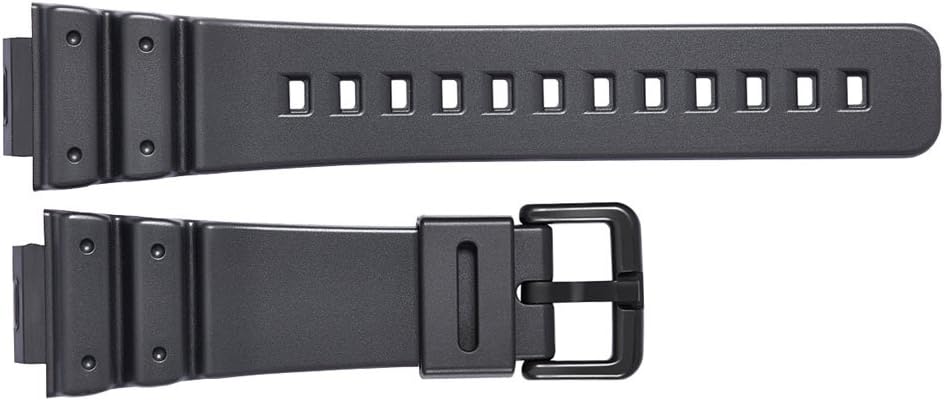
Image: The two components of the Casio watch strap, ready for installation onto the watch case.

Image: The Casio watch strap fully assembled with its tang buckle.
Nga Tohutohu Whakahaere
Once installed, the watch strap is ready for use. Adjust the strap to a comfortable fit on your wrist.
- Te mau i te mataara: Place the watch on your wrist. Insert the end of the strap through the buckle and secure the tang (pin) into one of the adjustment holes.
- Te Whakatikatika i te Whakauru: Select an adjustment hole that allows the watch to sit snugly but comfortably on your wrist. It should not be too tight to restrict circulation, nor too loose to slide freely.
- Securing the Excess Strap: Thread the excess strap through the keeper loops to prevent it from flapping.
Te tiaki
Proper maintenance will extend the life and appearance of your Casio watch strap.
- Te horoi: Clean the silicone strap regularly with mild soap and water. Use a soft cloth or brush to gently scrub away dirt and grime. Rinse thoroughly with clean water and dry completely with a soft towel.
- Aukati i nga matū kino: Do not use strong detergents, solvents, or abrasive cleaners, as these can damage the silicone material.
- Rokiroki: Ki te kore e whakamahia, rongoatia te mātaaratanga ki te wāhi hauhautanga, maroke, kia matara atu i te rā tika me te pāmahana tino kino.
- Tirotiro: Periodically inspect the strap for any signs of wear, cracks, or damage, especially around the lug attachments and buckle.
Raparongoā
| Raruraru | Take pea | Rongoā |
|---|---|---|
| Strap does not attach securely. | Spring bars not properly seated; damaged spring bars; incorrect strap size. | Ensure spring bar ends are fully engaged in lug holes. Replace bent or damaged spring bars. Verify strap is correct model for your watch. |
| Strap feels uncomfortable or causes irritation. | Strap is too tight or too loose; skin sensitivity to silicone; dirt buildup. | Adjust the strap to a comfortable fit. Clean the strap thoroughly. If irritation persists, consult a dermatologist. |
| Strap appears discolored or worn. | Exposure to harsh chemicals; prolonged direct sunlight; natural wear over time. | Clean the strap as per maintenance instructions. Avoid exposure to harsh chemicals and direct sunlight. Consider replacement if wear is significant. |
Whakatakotoranga
| Whakatakotoranga | Taipitopito |
|---|---|
| Tauira Tuemi | 71604262 |
| Kaihanga | Casio |
| Rauemi | Hikaona |
| Momo awhi | Tang Buckle |
| Whanuitanga Rug | 16mm |
| Whanui Band | 26mm |
| Ahu mōkihi | 7.68 x 1.77 x 0.51 inihi |
| Taumaha Tūemi | 0.35 hekere |
| Te Ra Tuatahi Wātea | Maehe 14, 2015 |
Nga korero Whakaputanga
This Casio Original Watch Strap is a genuine replacement part. For specific warranty details regarding replacement parts, please refer to the warranty documentation provided with your original Casio watch or contact Casio customer support directly. Typically, replacement parts may carry a limited warranty against manufacturing defects.
Tautoko
If you encounter any issues or have questions regarding the installation or use of your Casio watch strap, please contact Casio customer support or the retailer from whom you purchased the product. You may find contact information on the official Casio webpae, to rihīti hoko ranei.
For additional resources, visit the official Casio webpae: www.casio.com
Ataata Hua Whaimana
No official product videos from the seller are available for this specific watch strap at this time.


