Kupu Whakataki
Mauruuru koe mo te hokoasing the Audioengine A2+ Powered Desktop Speakers. These speakers are designed to provide clear, full audio and can easily connect to various devices. This manual provides essential information for setting up, operating, and maintaining your speakers.

Image: A pair of red Audioengine A2+ powered desktop speakers, showcasing to ratou hoahoa kiato.
He aha kei roto
Your Audioengine A2+ package includes the following components:
- Pair of Audioengine A2+ Powered Speakers (one active, one passive)
- 2m Speaker Wire for connecting the active and passive speakers
- Whakawhiwhi Hiko & Waea
- USB cable for digital audio input
- 1.5m Mini-Jack Audio Cable for analog audio input
- Microfiber Speaker bags and Cable Bags for protection
- Setup Guide and Brochure

Image: All cables and the power supply unit included with the Audioengine A2+ speakers.
Tatūnga
Follow these steps to set up your Audioengine A2+ speakers:
- Turanga: Position the active (left) speaker and passive (right) speaker on your desktop or desired location. Ensure adequate space for ventilation.
- Tūhono Kaikōrero: Use the included speaker wire to connect the active speaker's "Out to Right" terminals to the passive speaker's input terminals. Match the positive (+) and negative (-) terminals.
- Hono Hono: Connect the power supply to the active speaker's "Power" input, then plug the power cord into a wall outlet.
- Tāuru Ororongo: Kōwhiria te tikanga whakauru oro e pai ana ki a koe:
- Ororongo USB: Connect the USB cable from your computer to the "USB Input" on the active speaker.
- Mini-Jack Audio: Use the 1.5m mini-jack cable to connect your device's headphone output to the "Input" mini-jack on the active speaker.
- RCA Audio: Use RCA cables (not included) to connect your device's RCA outputs to the "Input" RCA jacks on the active speaker.
- Whakahiko: Turn the volume knob on the active speaker clockwise to power on the unit.
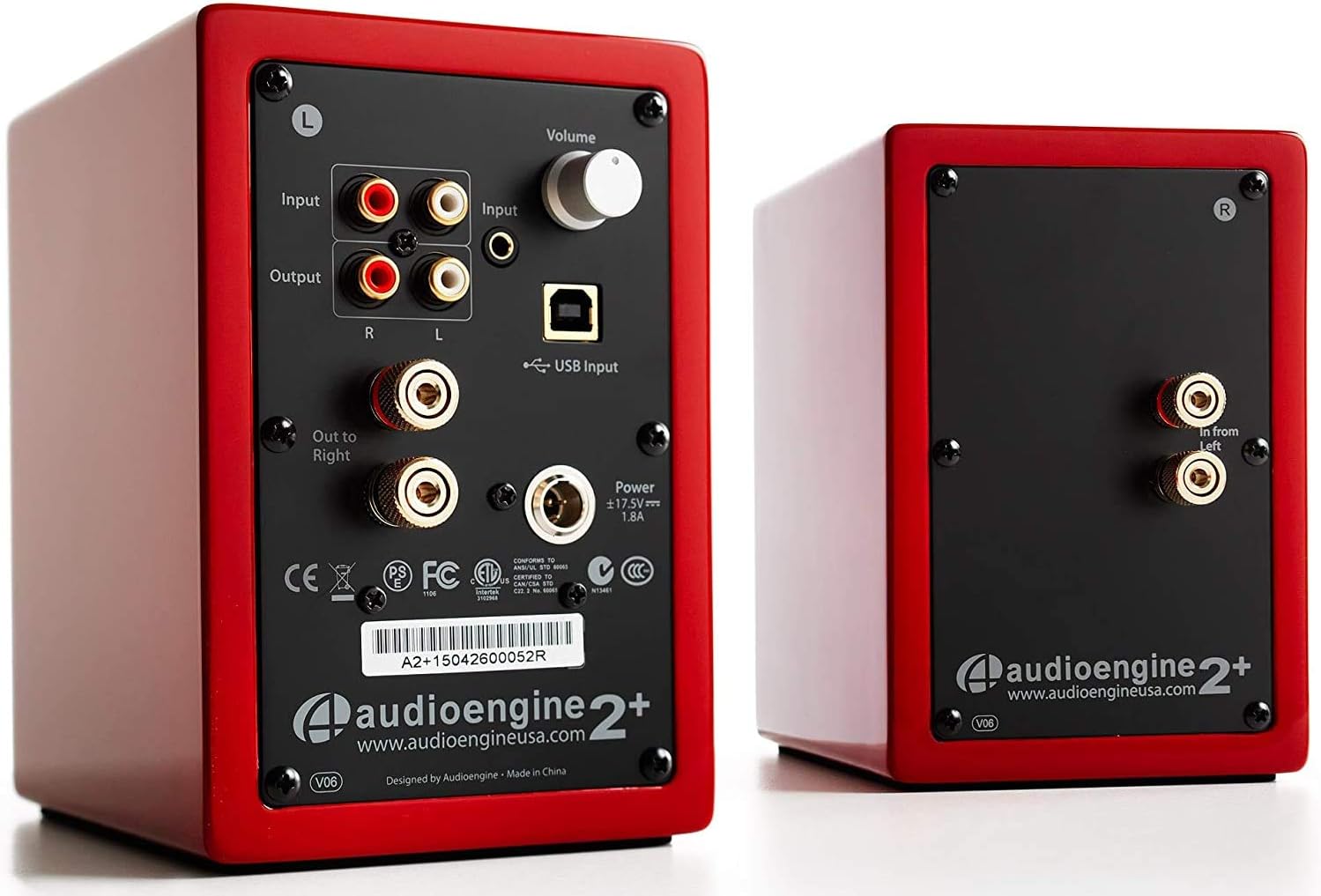
Image: Rear panel of the active speaker, highlighting various input and output connections.

Image: A detailed diagram of the A2+ speaker connections, including volume, inputs, and outputs.
Ataata: Kua mutuview of the Audioengine A2+ speakers, demonstrating setup and features.
Te Whakahaere i ō Kaikōrero
Once set up, operating your A2+ speakers is straightforward:
- Mana Rōrahi: Adjust the volume using the knob on the active speaker. You can also control volume from your connected device.
- Kōwhiringa Tāuru: The A2+ automatically detects and prioritizes active inputs. If multiple inputs are connected, ensure only one is playing audio at a time for optimal performance.
- Hononga Nihokikorangi: The A2+ features Bluetooth for wireless audio streaming. Refer to your device's Bluetooth pairing instructions and select "Audioengine A2+" from the available devices.
- Huaputa Subwoofer: The variable audio output allows for easy connection to a subwoofer (e.g., Audioengine S8) for enhanced bass.

Image: Versatile playback options for the A2+ speakers, illustrating connections for phone, USB, and turntable.
Video: Demonstrates various ways to play music through Audioengine speakers, highlighting different connectivity options.
Te tiaki
To ensure the longevity and optimal performance of your Audioengine A2+ speakers, follow these maintenance guidelines:
- Te horoi: Use a soft, dry cloth to clean the speaker cabinets. Avoid using harsh chemicals or abrasive cleaners.
- Parenga puehu: When not in use, consider covering the speakers with the included microfiber bags to protect them from dust.
- Whakahau: Ensure the speakers have adequate airflow around them to prevent overheating. Do not block the rear panel.
- Aukati i te makuku: Keep the speakers away from water and excessive humidity.
Raparongoā
If you encounter issues with your A2+ speakers, try the following common troubleshooting steps:
- Kore Oro:
- Check all cable connections (power, speaker wire, audio input).
- Ensure the volume knob on the active speaker is turned up.
- Verify the volume on your connected device is not muted or too low.
- If using USB, ensure your computer's audio output is set to the A2+ speakers.
- Oro korikori:
- Reduce the volume on both the speakers and your source device.
- Tirohia mo nga hononga kua wetekina, kua pakaru ranei nga taura.
- Kia tino mohio kei nui rawa te tangi o te pūtake oro.
- Nga Take Takirua Nihokikorangi:
- Ensure the speakers are in pairing mode (refer to your device's Bluetooth settings).
- Nekehia tō pūrere kia tata atu ki ngā kaikorero.
- Forget the device on your source and re-pair.
Mo etahi atu rapurongoā taipitopito, tirohia te mana Pukapuka Kaiwhakamahi (PDF).
Whakatakotoranga
| Āhuahira | Taipitopito |
|---|---|
| Ingoa Tauira | A2+ Red |
| Momo Kaikorero | Whata pukapuka |
| Āhuahira Motuhake | Ahokore |
| Nga Whakamahinga Manakohia | Waiata |
| Pūrere Hototahi | Smartphone, Tablet, MP3 Player, Desktop, Television, Laptop |
| Kaikorero Te Mana Putanga Morahi | 60 Watts |
| Hangarau Hononga | Bluetooth - Wired |
| Aratau Putanga Ororongo | Tirooro |
| Hunga Hua | 5.25"D x 4"W x 6"H |
| Taumaha Tūemi | 3.6 Pauna |
| Woofer Diamita | 2 Inihi |
| Tohu Waitohu-ki-Toi | 95 dB |
Pūtāhui me te Tautoko
Audioengine stands behind the quality of their products. All Audioengine products come with a 3-tau te raihana whakawhiti. For warranty claims or technical support, please refer to the official Audioengine webte pae, te korero whakapā ranei kei roto i to kete hua.
Additional resources can be found in the comprehensive Pukapuka Kaiwhakamahi (PDF).


