1. Kupu Whakataki
The Edifier P180 is a stereo earbud headset designed for clear audio and convenient communication. Featuring an inline microphone and control, it offers a comfortable listening experience for various devices.

Figure 1: Edifier P180 Wired Earbud Headset
2. He aha kei roto i te Pouaka
- Edifier P180 Earbud Headset
- Tauera
3. Nga waahanga matua
- Classic Comfort: Ergonomic design for comfortable wear without irritating the ear canal.
- Kounga oro tino pai: Equipped with 16mm neodymium magnetic monomers for high-fidelity audio playback.
- Integrated Microphone and Control: 3.5mm stereo earphones with a built-in microphone and remote button for mobile phone communication.
- Taumahinga: Single button control for picking up/hanging up calls and skipping songs (device dependent for iOS/Android).
- Hoahoa Roa: Constructed with quality materials for longevity.

Figure 2: Ergonomic design for comfortable fit.
4. Tatūnga
- Wewete: Carefully remove the Edifier P180 headset from its packaging.
- Tirotiro: Check the earbuds and cable for any visible damage.
- Tūhono: Insert the 3.5mm audio jack into the headphone port of your compatible device (smartphone, tablet, computer, etc.). Ensure the jack is fully inserted for proper audio and microphone function.
- Tūnga: Place the earbuds comfortably in your ears. The ergonomic design is intended to rest well without causing irritation.
5. Nga Tohutohu Whakahaere
The Edifier P180 features an inline control button for easy management of calls and music playback.
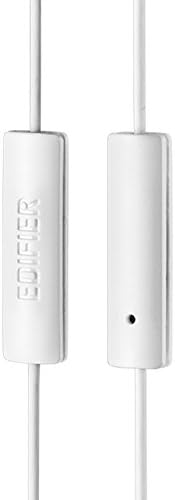
Figure 3: Inline microphone and control button.
- Whakautu / Waea Whakamutunga: Pēhia te pātene whakahaere kotahi hei whakautu i tētahi waea e haere mai ana. Pēhia anō hei whakamutu i tētahi waea e hohe ana.
- Purei/Tatari Puoro: Press the control button once to play or pause audio playback.
- Hukarere Riu: Double-press the control button to skip to the next track. Triple-press to go to the previous track (functionality may vary by device and operating system).
- Kaiawhina Reo: Long-press the control button to activate your device's voice assistant (e.g., Siri, Google Assistant).
Ataata 1: Kua mutu te hua whaimanaview of the Edifier P180 Classic Earbud Headsets, demonstrating features and usage.
6. Tiaki
- Te horoi: Āta horoia ngā pane taringa me te taura ki te kakahu ngohengohe, maroke. Kaua e whakamahi i ngā matū kaha, i ngā mea whakakoi rānei.
- Rokiroki: Ki te kore e whakamahia, penapenahia te pane ki tetahi waahi ma, maroke, kia matara atu i te wera nui me te ra tika. A ape i te whiri i te taura.
- Aukati i te makuku: Do not expose the headset to water or excessive moisture, as this can damage the internal components.
7. Te Raru
- Kore Oro:
- Me whakarite kua whakaurua katoatia te hononga 3.5mm ki te tauranga oro o tō pūrere.
- Tirohia ngā tautuhinga oro o tō pūrere.
- Whakamatautauria nga purongo ki tetahi atu taputapu hei whakakore i tetahi take motuhake.
- Kaore i te Mahi:
- Me mohio kua whakaurua katoatia te Jack 3.5mm.
- Tirohia ngā tautuhinga tāuru hopuoro o tō pūrere.
- Whakamātauria te hopuoro me tētahi atu taputapu, taupānga rānei.
- Ororongo Waahi:
- Check the cable for any kinks or damage.
- Me whakarite kia ma te hononga oro, ā, kia kore he paru.
8. Whakatakotoranga
| Āhuahira | Whakatakotoranga |
|---|---|
| Tau tauira | P180 |
| Whakautu auau | 20 Hz - 20,000 Hz |
| Pooro Jack | 3.5 mm Jack |
| Hangarau Hononga | Waea |
| Taumaha Tūemi | 1.76 hekere (50 Karamu) |
| Hunga Hua | 2.01 x 5.59 x 0.91 inihi |
| Rauemi | Neodymium |
| Momo Mana | Inline Control Button |
| Te aukati | 32 Ohm |
| Mana Haruru | Wehenga oro |
9. Raihana me te Tautoko
The Edifier P180 headset is backed by a 1-tau pūtāhui. For any support inquiries or warranty claims, please refer to the contact information provided with your purchase or visit the official Edifier webpae.