1. Kupu Whakataki
This manual provides detailed instructions for the installation, operation, and maintenance of your Lightkiwi C7816 Lilium 6 Inch Warm White Modular LED Under Cabinet Lighting Panel. Please read this manual thoroughly before installation and retain it for future reference.
2. Nga korero haumaru
Kia mau ki nga whakaritenga haumaru e whai ake nei hei aukati i te whara, i te kino ranei o te hua:
- This product operates on 24V DC. Ensure your power supply is compatible and provides the correct voltage.
- A power supply is not included with this panel. Use a compatible 24V DC power supply (sold separately).
- Do not exceed the recommended number of panels per power supply. Refer to the "Power Supply Requirement Chart" in the Installation section.
- To prevent the risk of fire, do not install this product in a small enclosed space without adequate ventilation.
- This product is suitable for mounting on the inside of cabinets.
- Momotuhia te hiko i mua i te tāutanga, te tiaki, te horoi rānei.
- Do not attempt to modify or repair the unit. Contact qualified personnel for service.
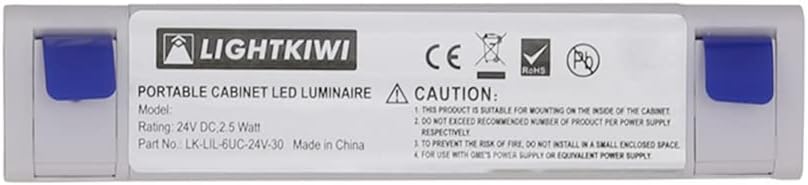
Whakaahua: Rear view of the LED panel displaying the Lightkiwi logo, model number, 24V DC 2.5 Watt rating, and important caution notes regarding installation and power supply compatibility.
3. Ihirangi mokete
Manatokona kei te noho nga waahanga katoa i mua i te tiimata o te whakaurunga:
- Lightkiwi C7816 Lilium 6 Inch LED Panel
- Interconnect Cable (for linking multiple panels)
- Interconnect Coupler (for direct connection of two panels)
- Whakaeke Tiu
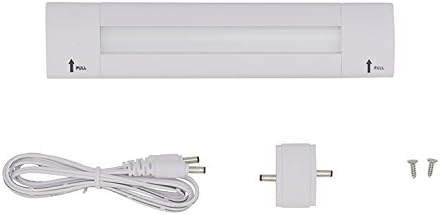
Image: The Lightkiwi C7816 LED panel shown with its accessories, including an interconnect cable, a small coupler, and two mounting screws.
4. Tatūnga me te Tāuta
The Lightkiwi C7816 LED panel features a simple plug-in installation. A 24V DC power supply is required and sold separately.
4.1 Mounting the LED Panel
- Identify the desired mounting location under your cabinet or shelf.
- Locate the blue labels on the ends of the LED panel. Gently pull these labels to reveal the mounting holes.
- Position the panel and mark the screw locations.
- Secure the panel using the provided mounting screws.
- Once mounted, push the blue labels back into place to cover the screws.

Image: A sequence of three images demonstrating how to pull the blue end caps to access the mounting holes for securing the LED panel.
4.2 Connecting Multiple Panels (Optional)
If installing multiple panels, use the interconnect cables or couplers to link them. Ensure the total wattage of all connected panels does not exceed the maximum capacity of your 24V DC power supply.
4.3 Hononga Tuku Hiko
Connect the 24V DC power supply (not included) to the input port of the first LED panel in your series. Ensure a secure connection.
Power Supply Requirement Chart
Refer to the chart below to determine the appropriate power supply wattage based on the number of panels you intend to install. Each C7816 panel consumes 2.5 Watts.

Image: A chart detailing the maximum number of 6-inch LED panels that can be connected to various 24V DC power supplies (e.g., 6W, 12W, 24W, 36W, 45W, 40W Dimmable Transformer, 96W Dimmable Transformer).
Important: Please ensure the wattage of the combined units does not exceed the maximum wattage of the power supply used.
5. Mahi
Once properly installed and connected to a compatible 24V DC power supply, the Lightkiwi C7816 LED panel will provide instant warm white illumination.
- Inamata i: The LED panel provides immediate full brightness upon power activation.
- Ka taea te atarua: This panel is dimmable when used with a compatible 24V DC dimmable power supply or dimmer switch (sold separately). Refer to your dimmer's instructions for operation.
- Tikanga Mana: The product supports app control if integrated with a compatible smart home system and controller (sold separately).
6. Tiaki
The Lightkiwi C7816 LED panel requires minimal maintenance.
- Te horoi: Ensure the power is disconnected before cleaning. Wipe the panel with a soft, dry, or slightly damp kakahu. Kaua e whakamahi i nga kai horoi me nga whakarewa.
- LED Roa: LED lights have a long lifespan and do not require bulb replacement.
7. Te Raru
| Raruraru | Take pea | Rongoā |
|---|---|---|
| Light panel does not turn on. |
|
|
| Ka whiti te marama, ka pouri ranei. |
|
|
8. Whakatakotoranga
| Ingoa Tauira | C7816 |
| Waitohu | Lightkiwi |
| Momo | Modular LED Under Cabinet Lighting Panel |
| Tae Maama | Mahana Ma (3000 Kelvin) |
| Voltage | 24 Volts DC |
| Wattage per Unit | 2.5 Watts |
| Koki Kurupae | 120 Waeine |
| Nga waahanga motuhake | Ka taea te atarua, Inamata i te |
| Rauemi | Te whakarewa, te Kirihou |
| Momo Whakaeke | I raro i te Rūnanga Minita |
| Ahu | 12 x 1.8 x 0.7 inihi (Pake) |
| Taumaha Tūemi | 3.19 hekere |
| Tiwhikete | UL kua whakarārangitia |
9. Pūtāhui me te Tautoko
This Lightkiwi product comes with a manufacturer's warranty. For specific warranty details, please refer to the documentation included with your purchase or contact Lightkiwi customer support.
For technical assistance, troubleshooting, or to inquire about compatible accessories (such as power supplies or dimmers), please visit the official Lightkiwi store or contact their customer service department.
Lightkiwi Store: https://www.amazon.com/stores/Lightkiwi/page/94D70B44-AC6D-4078-AE0F-A865518024E1

