Kupu Whakataki
The Electro-Harmonix KEY9 Electric Piano Machine Pedal is designed to emulate a variety of classic electric pianos and other keyboard instruments. This pedal allows guitarists to transform their instrument's sound, offering a versatile range of tones from iconic Wurlitzer and Rhodes sounds to mallets and steel drums. Each of the 9 presets provides control over fundamental parameters that define the instrument's sound, often including adjustable modulation effects such as tremolo, phaser, and chorus. The KEY9 is a powerful tool for expanding your sonic palette.

Figure 1: The KEY9 Electric Piano Machine Pedal positioned on a keyboard.
Tatūnga
To begin using your KEY9 pedal, follow these steps:
- Hononga Hiko: Connect the included 9.6VDC 500mA power supply to the 9V power jack on the pedal.
- Hononga Whakauru: Connect your guitar to the INPUT jack on the right side of the pedal using a standard 1/4-inch instrument cable.
- Hononga Huaputa: Connect the KEYS OUTPUT jack on the left side of the pedal to your amplifier or mixer using a standard 1/4-inch instrument cable. An additional DRY OUTPUT jack is available to send your unaffected guitar signal to a separate amplifier or input.
- Tautuhinga Tuatahi: Ensure all control knobs (DRY, VOL, KEYS, CTRL 1, CTRL 2) are set to their minimum positions before powering on to avoid sudden volume changes.

Whakaahua 2: Runga-raro view of the KEY9 pedal showing input and output connections.
Nga Tohutohu Whakahaere
The KEY9 pedal features intuitive controls for shaping your sound. Familiarize yourself with the knobs and presets to unlock its full potential.
Mana:
- KUPU MATEO: Controls the volume of your unaffected guitar signal at the KEYS OUTPUT.
- VOL Knob: Controls the overall volume of the selected KEY9 preset sound.
- KEYS Knob: Controls the volume of the selected KEY9 preset sound at the KEYS OUTPUT.
- CTRL 1 & CTRL 2 Knobs: These controls adjust different parameters depending on the selected preset. They typically modify aspects like modulation speed/depth, tone, or attack characteristics.
- Preset Selector Knob: A 9-position rotary switch to select between the different electric piano and keyboard sounds.
- Whakawhiti Waewae: Toggles the effect on/off. When the effect is active, the LED illuminates red.
Putanga:
- KEYS OUTPUT: Delivers the processed KEY9 sound, mixed with the dry signal if the DRY knob is raised.
- DRY OUTPUT: Provides a buffered bypass of your guitar signal, allowing you to send your unaffected signal to a separate destination.
Tatūkē:
The KEY9 offers 9 distinct presets, each emulating a unique keyboard or percussive instrument. The CTRL 1 and CTRL 2 knobs will have different functions for each preset.
- Dynamo: Emulates a classic Fender Rhodes electric piano, known for its smooth, ambient tones. CTRL 1 and CTRL 2 adjust overtones and low-end response.
- Wurli: Recreates the distinct sound of a Wurlitzer electric piano, often featuring a built-in tremolo. CTRL 1 and CTRL 2 typically control tremolo speed and depth.
- Pukete: A variation of the electric piano sound, often characterized by a phase shifter effect. CTRL 1 and CTRL 2 adjust phaser speed and depth.
- Mareti: Produces marimba-like or other mallet percussion sounds. This preset is highly responsive to playing dynamics.
- Eighty Eight: Another Rhodes electric piano emulation, often with a bright, bell-like quality and tremolo. CTRL 1 and CTRL 2 adjust tremolo and tone.
- Tri-Glorious: Emulates a three-voice chorus rack effect, providing lush, swirling textures. CTRL 1 and CTRL 2 control chorus depth and rate.
- Vibes: Recreates the sound of a vibraphone, typically with a distinct tremolo. CTRL 1 and CTRL 2 adjust tremolo speed and depth.
- Okana: A classic organ sound, offering rich, sustained tones. CTRL 1 and CTRL 2 may adjust attack and decay or modulation.
- Steel Drums: Produces the bright, percussive sound of steel drums. This preset is highly dynamic and responsive.
Video 1: Official demonstration of the Electro-Harmonix KEY9 Electric Piano Machine Pedal, showcasing its various presets and controls.
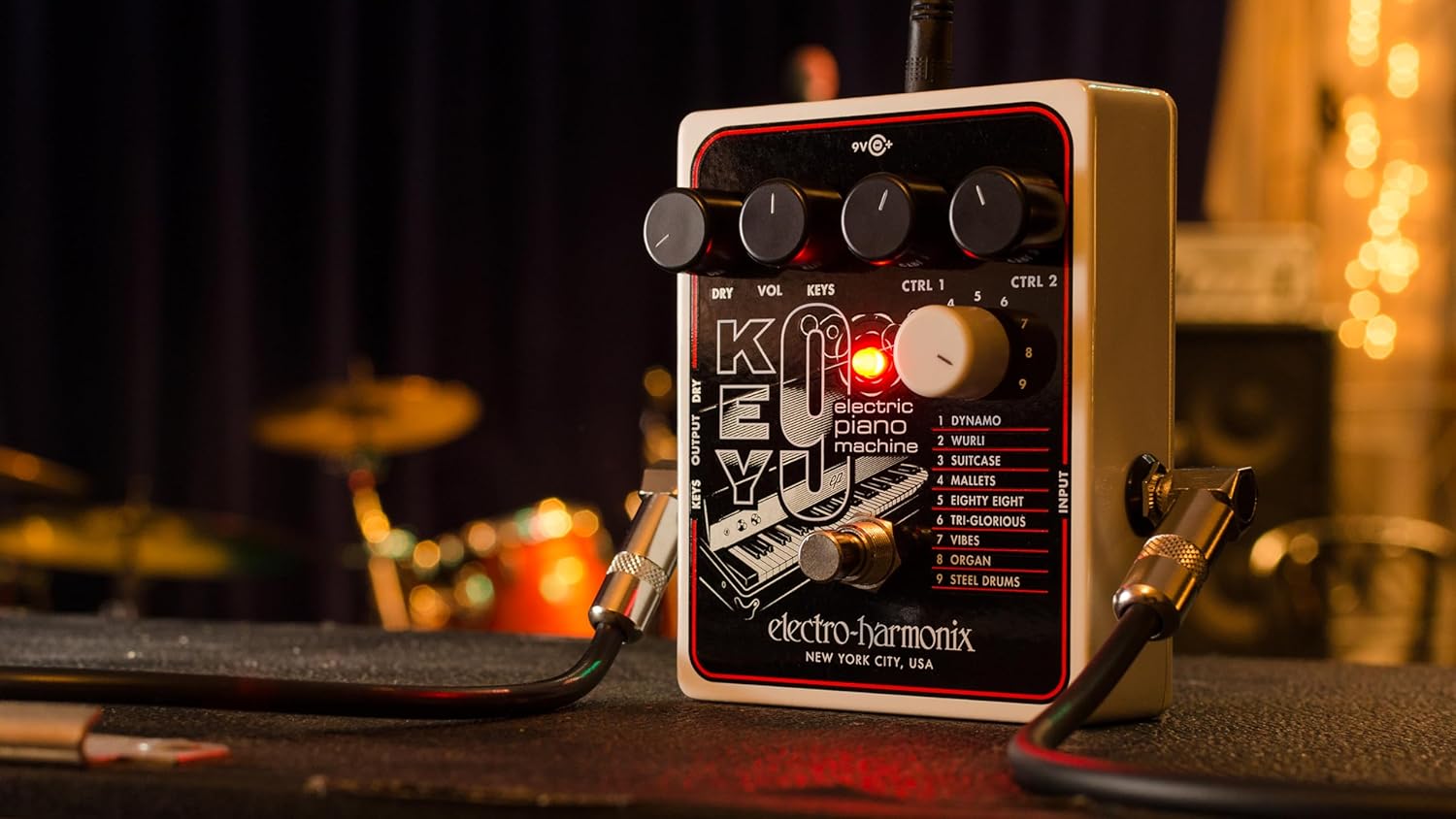
Whakaahua 3: Koki view of the KEY9 pedal, highlighting the control knobs and jacks.
Te tiaki
To ensure the longevity and optimal performance of your Electro-Harmonix KEY9 pedal, follow these maintenance guidelines:
- Te horoi: Whakamahia he kakahu ngohengohe, maroke hei horoi i waho o te hikoi. A ape i te kai horoi, te whakarewa ranei.
- Rokiroki: Whakaorangia te hikoi ki te waahi matao, maroke kia matara atu i te ra tika me te wera nui ina kore e whakamahia.
- Tuku Hiko: Always use the included 9.6VDC 500mA power supply or a compatible, regulated power supply to prevent damage.
- Hononga: Tirotirohia nga hononga taura katoa mo te kakahu me te pakaru. Me whakarite kia noho kore he puehu me te para o nga koo.
Raparongoā
If you encounter issues with your KEY9 pedal, consult the following common troubleshooting steps:
- Kore Oro:
- Tirohia nga hononga taura katoa (whakauru, putanga, hiko).
- Me whakarite kia tika te hono me te mahi o te hiko hiko.
- Manatokohia ko to ampKua whakakāhia te whakakā, te mīhini whakaranu rānei, ā, kua piki ake tōna oro.
- Adjust the DRY and KEYS/VOL knobs on the pedal.
- Kounga Oro Kino/Haruru:
- Ensure you are using a proper, regulated 9.6VDC power supply.
- Tirohia mo nga taura he.
- Experiment with different guitar pickups or guitar settings.
- Adjust the CTRL 1 and CTRL 2 knobs, as some settings may introduce unwanted artifacts depending on your guitar and playing style.
- Te Painga Kaore i te Whakauru:
- Press the footswitch firmly to ensure it engages. The LED should illuminate.
- If the LED does not light up, check the power supply.
Whakatakotoranga
| Taumaha Tūemi | 1.1 Pauna |
| Hunga Hua | 4.75"L x 4"W x 2.25"H |
| Tauira Tuemi | KEY9 |
| Puna Mana | Corded Electric (9.6VDC 500mA power supply included) |
| Atanga Pūmārō | 1/4-inihi Ororongo |
| Hōputu Tohu | Tauritenga |
| Momo Rawa | Plastic (brushed aluminum finish) |
| Taumata Matatau | Intermediate, Advanced |
Pūtāhui me te Tautoko
Electro-Harmonix products are designed for reliability and performance. For warranty information, technical support, or service inquiries, please refer to the official Electro-Harmonix webpaetukutuku, whakapā atu ranei ki ta raatau tari ratonga kaihoko. Puritia to riirii hoko hei tohu mo te hoko mo nga kereme whakamana.


