Kupu Whakataki
The esinkin Bluetooth Audio Adapter is designed to bring wireless music streaming capabilities to your existing sound systems. Connect it to computer speakers, home stereo systems, or other speaker systems via 3.5mm or RCA cables, and then pair it with your Bluetooth-enabled devices like smartphones or tablets to stream audio wirelessly. This adapter acts as a Bluetooth receiver, enabling your non-Bluetooth audio equipment to receive wireless signals.
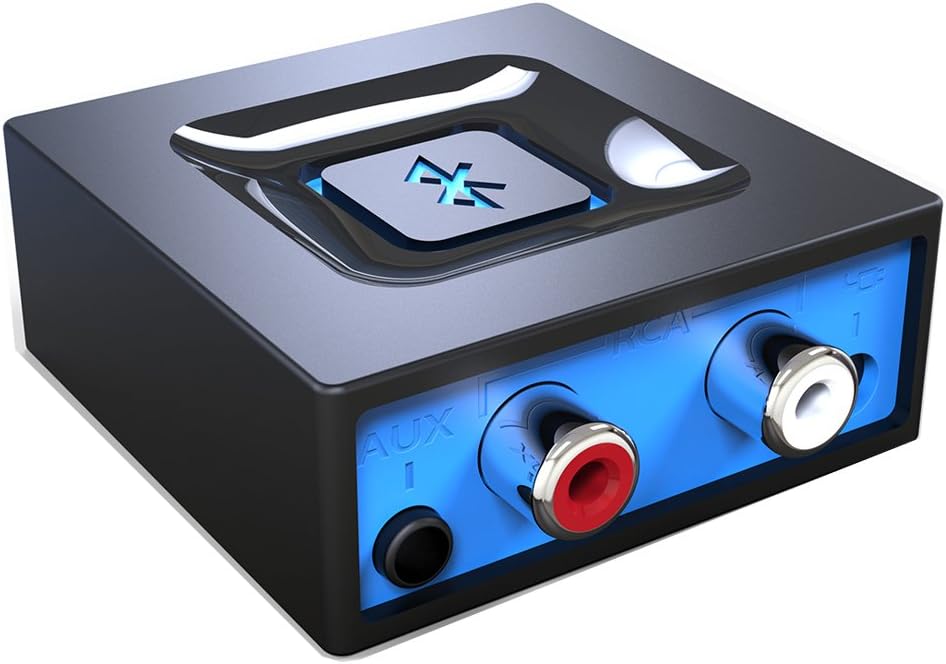
Whakaahua: Mua view of the esinkin Bluetooth Audio Adapter, showing the AUX and RCA input ports.
He aha kei roto i te Pouaka
I te whakatuwheratanga o te kete, tirohia nga mea katoa e whai ake nei:
- 1 x Kaiwhiwhi Nihokikorangi
- 1 x AC to DC Power adapter
- 1 x 3.5mm to RCA Audio cable
- 1 x USB Power taura
- 1 x Kaiwhakamahi pukapuka
 Image: All included accessories for the esinkin Bluetooth Audio Adapter.
Tatūnga
Follow these steps to set up your esinkin Bluetooth Audio Adapter:
- Tūhono ki te Hiko: Connect the Bluetooth adapter to a power source using either the provided AC to DC power adapter or the USB cable. Note that this adapter does not have a built-in battery and requires continuous power.
- Tūhono ki te Pūnaha Ororongo: Connect the adapter to your computer speakers, home stereo system, or other speaker system using either the 3.5mm audio cable or the RCA cable. Ensure the connection is secure.
- Whakahiko: The device will power on when connected to power.
- Aratau takirua: Press and hold the large Bluetooth symbol button in the middle of the adapter for approximately 3 seconds until the blue light starts blinking. This indicates the adapter is in pairing mode.
- Tauhoa ki to Pūrere: On your Bluetooth-enabled device (smartphone, tablet, computer), go to the Bluetooth settings and search for available devices. Select the esinkin Bluetooth Audio Adapter from the list to pair. Once paired, the blue light on the adapter will become solid.

Image: Connection diagram for the esinkin Bluetooth Audio Adapter.

Image: Illustrates the function of the main Bluetooth button for power and playback control.
Nga Tohutohu Whakahaere
Once successfully set up and paired, operating the esinkin Bluetooth Audio Adapter is straightforward:
- Waiata Waiata: After pairing, music played on your Bluetooth-enabled device will stream wirelessly to the connected audio system.
- Mana Whakahoki:
- Click the Bluetooth symbol button once to Tīmata/Tatari purei waiata.
- Hold the Bluetooth symbol button for 3 seconds to turn the device ON/OFF.
- Tūhono Aunoa: The adapter is designed to automatically reconnect with the last paired device when both are within range and Bluetooth is enabled.
- Awhe Ahokore: The effective wireless range indoors (without significant obstacles) is approximately 30-40 feet (10-12 meters).

Image: Demonstrates wireless music streaming from mobile devices to a home stereo via the adapter.
Te tiaki
To ensure the longevity and optimal performance of your esinkin Bluetooth Audio Adapter, please observe the following maintenance guidelines:
- Te horoi: Use a soft, dry cloth to clean the surface of the adapter. Avoid using liquid cleaners or abrasive materials.
- Parenga Hiko: To protect the adapter from potential damage due to power surges or brown-outs, especially during electrical supply issues or storms, it is recommended to unplug the unit from the wall outlet.
- Rokiroki: Ki te kore e whakamahia mō te wā roa, rongoatia te urutau ki te wāhi hauhautanga, maroke, kia matara atu i te rā tika me te pāmahana tino kino.
- Mahi Tonu: The adapter is designed to remain powered when connected to a power source. To completely turn it off, disconnect it from the power outlet.
Raparongoā
If you encounter issues with your esinkin Bluetooth Audio Adapter, please refer to the following common solutions:
| Raruraru | Te Take Taea / Rongoa |
|---|---|
| Karekau he oro, he iti te reo: |
|
| Kaore e taea te hono ki te taputapu: |
|
| Intermittent connection or poor range: |
|
| Adapter is always on: |
|
Whakatakotoranga
| Āhuahira | Taipitopito |
|---|---|
| Waitohu | esinkin |
| Tau tauira | W29 |
| Momo Ahokore | Nihokikorangi |
| Taumaha Tūemi | 3.52 hekere |
| Rahi Hua (LxWxH) | 1.97 x 1.97 x 0.94 inihi |
| Tae | Pango |
| Pūrere Hototahi | Smartphone, Tablet, Home Stereo System |
| Momo Tuhono | RCA, Auxiliary (3.5mm) |
| Whakauru Mana | 5V === 150mA |
Pūtāhui me te Tautoko
For warranty information or technical support, please refer to the documentation included with your purchase or visit the official esinkin website. Contact details for customer service are typically available on the product packaging or the brand's online support page.
Mo etahi atu rauemi me nga korero hua, ka toro atu koe ki te esinkin Store on Amazon.


