1. Kupu Whakataki
Mauruuru koe mo te hokoasing the Supersonic IQ-1428BT Bluetooth Active Portable Hi-Fi Speaker. This manual provides essential information for the safe and efficient operation of your device. Please read it thoroughly before use and retain it for future reference.
The IQ-1428BT is a versatile 2.1 channel outdoor Bluetooth speaker designed to deliver clear sound and heavy bass. It features Bluetooth 3.0 connectivity, USB/SD inputs, FM radio, 3.5mm Aux input, and two microphone inputs, all powered by a rechargeable battery.
2. Nga Korero Haumaru Nui
- Kaua e tukuna te kaikorero ki te tino mahana, te makuku, te ra tika ranei.
- A ape i te tuku, te tuku ranei i te kaikorero ki nga paanga kaha.
- Kaua e ngana ki te wetewete, ki te whakarereke ranei i te korero. Ma tenei ka whakakore i te whakamana.
- Keep the speaker away from water and other liquids. While it is listed as waterproof, prolonged submersion or exposure to high-pressure water jets should be avoided.
- Whakamahia anake te taura utu kua whakaratohia, he taurite whaimana ranei.
- Kaua e taea e nga tamariki.
- Me whakarite kia tika te hau i te wā e whakamahia ana te kaikorero.
3. Ihirangi mokete
Tena koa tirohia kei roto katoa nga taonga kei roto i to kete:
- Supersonic IQ-1428BT Bluetooth Active Portable Hi-Fi Speaker
- Moroiti USB Charging Cable
- 3.5mm Taonga Ahuru
- Pukapuka Kaiwhakamahi (tenei tuhinga)
4. Hua Neke Atuview
Kia mohio koe ki nga waahanga me nga mana whakahaere a te kaikorero.
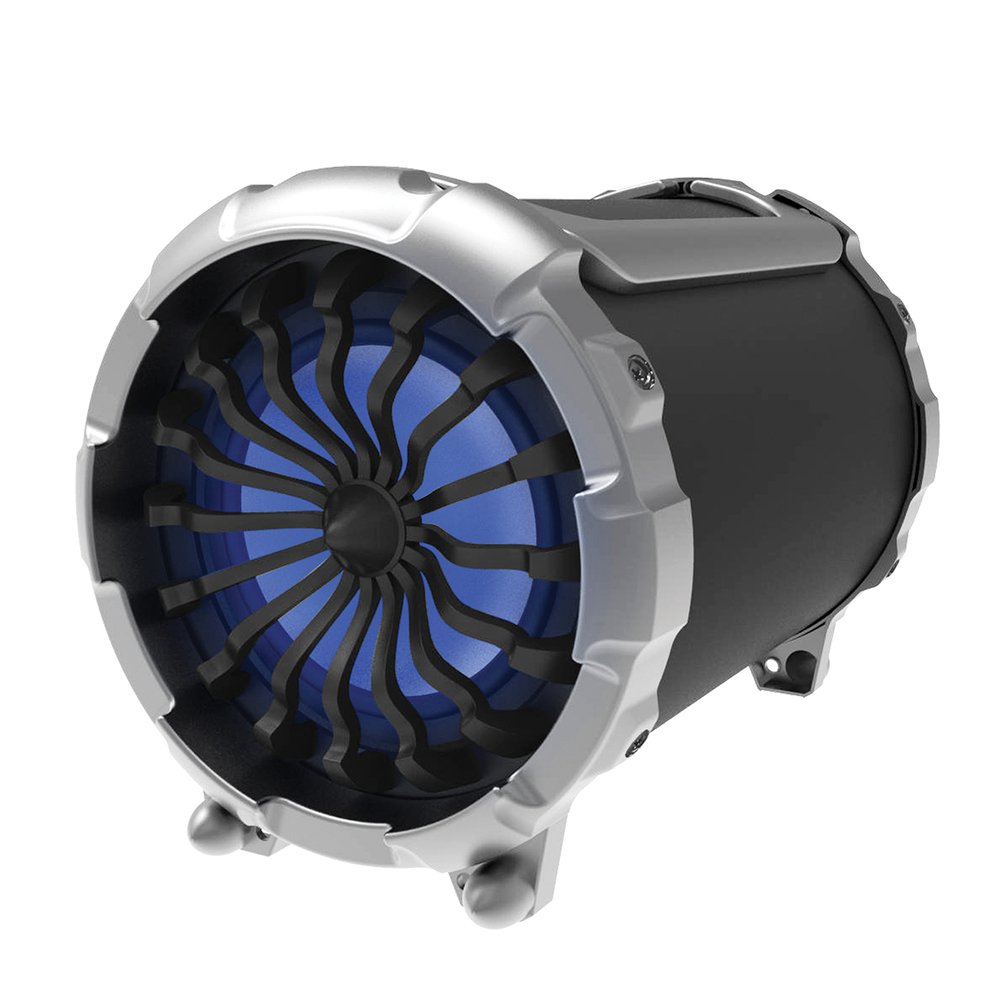
Whakaahua: Mua view of the Supersonic IQ-1428BT speaker, showing the main speaker grille and control panel.
4.1. Control Panel and Ports
- Pātene Hiko: Ka whakakā, whakawetohia te kaikōrero.
- Patene Aratau: Switches between Bluetooth, FM Radio, USB, SD, and Aux input modes.
- Pātene Purei/Tatari: Ka purei, ka whakamutu rānei i te pureitanga ororongo.
- Patene Aroturuki o mua/panuku: Skips to the previous or next track. Also used for FM station tuning.
- Mana Rōrahi: Te whakarite i te rahi o te rangatira.
- Whakauru USB: Mō te purei ororongo mai i ngā puku kohiko USB.
- Mokamoka Kaari SD: For playing audio from SD memory cards.
- Tāuru AUX (3.5mm): Mo te hono i nga taputapu oro o waho ma te taura 3.5mm.
- Ngā Whakaurunga Hopuoro (x2): Mo te hono i nga hopuoro waea.
- Tauranga Whakatau USB Moroiti: Mo te utu i te pākahiko o roto.
5. Tatūnga
5.1. Whakataki Tuatahi
- I mua i te whakamahinga tuatahi, whakakīia katoatia te kaikorero.
- Connect the Micro USB charging cable to the speaker's charging port.
- Connect the other end of the cable to a DC5V USB power adapter (not included) or a computer USB port.
- The charging indicator light will illuminate. Charging takes approximately 6 hours.
- Kia kī tonu te utu, ka huri pea te rama tohu, ka mate rānei. Momotuhia te taura utu.
5.2. Te Whakakaha/Weto
- To power on, press and hold the Power button until the speaker activates.
- Hei whakaweto i te mana, pēhia anō te pātene Mana kia whakaweto rā anō te kaikorero.
6. Nga Tohutohu Whakahaere
6.1. Aratau Nihokikorangi
- Power on the speaker. It will automatically enter Bluetooth pairing mode, indicated by an audible prompt or flashing LED.
- I runga i tō pūrere Nihokikorangi (waea atamai, papa, pona), whakahohea te Nihokikorangi, ka rapu mō ngā pūrere e wātea ana.
- Select "IQ-1428BT" from the list of devices.
- Once paired, the speaker will confirm with an audible prompt. You can now stream music wirelessly.
- The operating range for Bluetooth is approximately 10 meters (33 feet).
6.2. USB/Kari SD Purei
- Insert a USB flash drive or SD card into the corresponding slot.
- Ka huri aunoa te kaikorero ki te aratau USB/SD ka tīmata te purei oro files. If not, press the Mode button to select the correct input.
- Whakamahia ngā pātene Purei/Whakamutu me te Riu o Mua/Panuku hei whakahaere i te purei anō.
6.3. Irirangi FM
- Pēhia te pātene Aratau hei huri ki te aratau Reo Irirangi FM.
- Patohia me te pupuri i te paatene Play/Pause hei karapa aunoa me te tiaki i nga teihana FM e waatea ana.
- Use the Previous/Next Track buttons to navigate between saved stations.
6.4. AUX Whakauru
- Connect one end of the 3.5mm Aux cable to the speaker's AUX input port.
- Honoa te tahi pito ki te torooro ororongo ranei o to taputapu o waho.
- Press the Mode button to switch to AUX input mode.
- Whakahaerehia te purei me te oro mai i to taputapu o waho.
6.5. Whakamahi hopuoro
- Connect up to two wired microphones (not included) to the microphone input jacks.
- Adjust the microphone volume using the dedicated control (if available) or the main volume control.
7. Whakakii i te Tukuoro
The speaker is equipped with a 2200mAh rechargeable Lithium Ion battery. Follow these guidelines for charging:
- Tauranga Whakatau: USB moroiti
- Whakapae Voltage: DC5V
- Kei te Whakataki i naianei: 400mA
- Wā Whakataki: Tata ki te 6 haora mo te utu katoa.
- Ora Pūhiko: Approximately 6 hours at 50% volume, or 4 hours at 80% volume.
- Whakamahia tonu te taura Micro USB kua whakaratohia mō te utu.
8. Tiaki
- Te horoi: Whakamahia he kakahu ngohengohe, maroke hei horoi i waho o te kaikōrero. Kaua e whakamahi i nga kai horoi me nga whakarewa.
- Rokiroki: When not in use for extended periods, store the speaker in a cool, dry place. It is recommended to charge the battery at least once every three months to maintain its lifespan.
- Ātete wai: The speaker is waterproof. However, ensure all port covers are securely closed before exposure to water. Do not submerge for long periods or expose to high-pressure water.
9. Te Raru
| Raruraru | Take pea | Rongoā |
|---|---|---|
| Karekau te kaikorero e kaha ana. | Kua pau te pākahiko. | Me utu te kaikorero mo te iti rawa 30 meneti. |
| Karekau he tangi. | He iti rawa te oro, he ngū rānei. He aratau tāuru hē. | Increase volume. Press the Mode button to select the correct input (Bluetooth, AUX, USB/SD, FM). |
| Kaore e taea te hono ma te Nihokikorangi. | Speaker is not in pairing mode. Device Bluetooth is off. Too far from speaker. | Ensure speaker is in Bluetooth mode. Turn Bluetooth on your device. Move device closer to speaker (within 10m). |
| He kino te tango i te reo irirangi FM. | Tohu ngoikore. | Nekehia te kaikorero ki tētahi wāhi e pai ake ai te whiwhinga oro. |
10. Whakatakotoranga
| Āhuahira | Taipitopito |
|---|---|
| Tau tauira | IQ-1428BT |
| Putanga Nihokikorangi | 3.0 |
| Awhe Mahi Nihokikorangi | Tae atu ki te 10 mita (33 putu) |
| Whirihoranga Tukuoro | 2.1 Channel Outdoor HiFi Speaker |
| Watts mo ia Channel | 15W + 3W*2 |
| Rahi taraiwa | 6.5 inch + 3 inch x 2 |
| Whakautu auau | 100Hz-20KHz |
| Impedance Ingoa | 4 Ohm |
| Nga whakaurunga | USB, SD, FM Radio, 2x Microphone, 3.5mm Aux |
| Momo Pūhiko | Katote Lithium Rechargeable |
| Pūhiko Raukaha | 2200mAh |
| Whakapae Voltage | DC5V |
| Waa Whakatau | Approx. 6 haora |
| Playback Time (50% volume) | Approx. 6 haora |
| Playback Time (80% volume) | Approx. 4 haora |
| Ahu (LxWxH) | 30.23 x 25.91 x 36.07 cm (11.9 x 10.2 x 14.2 inihi) |
| Taumaha | 2.95 kg (6.5 lbs) |
| parewai | Ae |
11. Pūtāhui me te Tautoko
Supersonic products are designed and manufactured to the highest quality standards. For detailed warranty information or technical support, please refer to the warranty card included with your purchase or visit the official Supersonic website. Do not attempt to repair the product yourself, as this may void the warranty.
For customer service inquiries, please contact your retailer or the manufacturer directly.


