Kupu Whakataki
The LAUNCH CRP123 V2.0 OBD2 Scanner is a powerful diagnostic tool designed for comprehensive vehicle analysis. It offers advanced 4-system diagnostics, full OBDII functions, and newly added reset features for Oil, SAS, and Throttle. This manual provides detailed instructions on setting up, operating, and maintaining your device to ensure optimal performance and accurate vehicle diagnosis.

Image: LAUNCH CRP123 V2.0 OBD2 Scanner device.
Tatūnga
Te hono i te Pūrere
To begin, locate your vehicle's OBDII port, typically found under the dashboard on the driver's side. Connect the CRP123 V2.0 scanner's OBD-16 connector to this port. The device will power on automatically once connected to the vehicle's power supply.
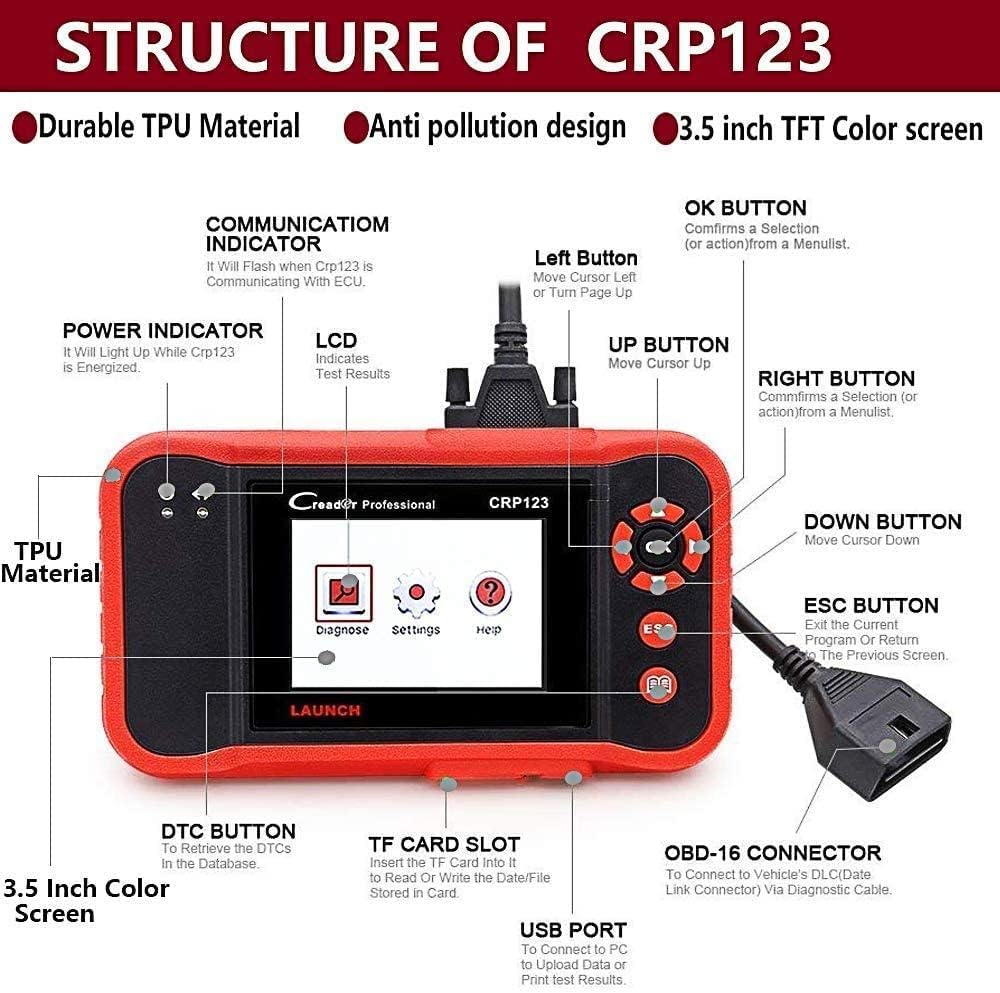
Whakaahua: Ka mutuview of the CRP123 V2.0 device structure and ports.
Initial Setup and Software Update
Upon first use or after a major update, the device may prompt you for initial setup steps, such as language selection. Ensure your device's software is up-to-date for the best performance and compatibility with the latest vehicle models. The CRP123 V2.0 supports lifetime free updates.
Video: Instructions on how to update the LAUNCH CRP123 V2.0 scanner.
Nga Tohutohu Whakahaere
4-System Diagnostics
The CRP123 V2.0 provides comprehensive diagnostics for four key vehicle systems: Engine (ENG), Anti-lock Braking System (ABS), Supplemental Restraint System (SRS), and Transmission (AT). This allows you to view live data streams, read, and clear diagnostic trouble codes (DTCs) related to these systems.

Image: Visual representation of the 4-system diagnostic capabilities.
Full OBDII Functions
The scanner supports all 10 modes of OBDII standard, ensuring thorough and accurate system diagnosis. Key functions include:
- Read and Clear DTCs: Retrieve and erase diagnostic trouble codes.
- I / M Te Rite: Check if the various emissions-related systems are operating correctly and are ready for inspection and maintenance testing.
- O2 Whakamatau Whakamatau: Retrieve O2 sensor monitor test results for the most recently completed tests from the vehicle's on-board computer.
- Whakatio Raraunga Tāpare: View a snapshot of the vehicle's operating conditions at the moment a fault code was triggered.
- Mode 06 EVAP System Test: Perform tests on the evaporative emission control system.
- Mode 08 On-board Monitor Test: Uru atu ki ngā hua o ngā whakamātautau aroturuki tātaritanga kei runga i te papa mō ngā wāhanga/pūnaha motuhake.

Image: Icons representing the full suite of OBD2 functions.
Video: Demonstration of how to scan your car using the Launch CRP123 V2.0.
Live Data Graph and Print
The CRP123 V2.0 allows you to view live data streams from your vehicle's sensors. This data can be displayed in graphical format, recorded for later review, replayed, and even printed for detailed analysis. This feature is crucial for identifying intermittent issues and monitoring real-time performance.

Image: Display showing live data graphing and options to print diagnostic data.
Video: Detailed demonstration of data playback functionality on the CRP123 V2.0.
Newly Added Reset Functions
The 2025 upgraded V2.0 model includes three essential reset functions:
- Tautuhi Hinu: Reset the oil life system after an oil change to turn off the oil light.
- Te Whakarerekētanga o te Tātari: Relearn the throttle body's position to optimize engine performance and idle stability.
- Tautuhi Anō SAS (Pūoko Koki Urunga): Calibrate the steering angle sensor after repairs or replacements to ensure proper vehicle handling and stability control.
Vehicle Information (VIN) Reading
The scanner can quickly read and display vehicle identification number (VIN) information, which is useful for verifying vehicle details and ensuring compatibility with diagnostic procedures.

Image: Screen showing the VIN reading capability of the device.
Waka Hototahi
The LAUNCH CRP123 V2.0 supports diagnostics for over 38 car brands, covering a wide range of vehicles manufactured from 1996 onwards. This broad compatibility makes it a versatile tool for various automotive needs.

Image: List of supported car brands for diagnostics.
Video: Demonstration of LAUNCH CRP123 V2.0 compatibility with BMW vehicles.
Video: Demonstration of LAUNCH CRP123 V2.0 compatibility with Porsche vehicles.
Te tiaki
To ensure your LAUNCH CRP123 V2.0 scanner remains accurate and compatible with the latest vehicle technologies, regular software updates are recommended. The device offers lifetime free updates. Refer to the 'Setup' section for detailed instructions on how to perform software updates.
Raparongoā
If you encounter issues such as a 'check connections' message or unexpected readings, first ensure the OBD-16 connector is securely plugged into the vehicle's port and the vehicle's ignition is on. For specific diagnostic trouble codes, use the 'Read DTCs' function to identify the issue. The 'Clear DTCs' function can be used to erase codes after repairs are completed.
Video: Demonstration of checking camshaft sensor data with the CRP123 V2.0.
Whakatakotoranga
- Mata: 3.5 inihi TFT LCD Whakaatu
- Whakauru Voltage Awhe: 9-15V
- Hononga: 16-PIN DLC
- Taumaha Tūemi: 1.64 pauna
- Rahi Hua: 3 x 1 x 2 inihi
- Pūhiko: 1 AAA batteries required (for internal clock/memory, not operation)
Pūtāhui me te Tautoko
For any product-related inquiries, technical support, or warranty claims, please contact LAUNCH customer service. Additional protection plans may be available for purchase to extend coverage beyond the standard manufacturer's warranty. A user guide in PDF format is also available for detailed information.
Kaihanga: LAUNCH
For user guide PDF, please refer to the official product page or contact support.


