1. Kupu Whakataki
This manual provides essential instructions for the safe and efficient operation of your beFree Sound BFS-6445 Projection Party Light Dome Subwoofer Bluetooth Portable Speaker. Please read this manual thoroughly before using the product and retain it for future reference.
The beFree Sound BFS-6445 is a versatile portable speaker system featuring a 10-inch subwoofer, Bluetooth connectivity, USB/SD input, FM radio, and a unique projection light dome. It includes a wireless microphone and a remote control for enhanced functionality.
2. Hua Neke Atuview
2.1 Nga waahanga matua
- Putanga Mana Tino Pai 800 Watts
- 10-inch Subwoofer for deep bass
- 7" x 4.5" LED Light Projection Dome
- Hononga Ahokore Nihokikorangi
- USB and SD Card Input for media playback
- FM Radio Tuner
- Microphone and Guitar Inputs with priority switch
- Bass, Treble, Echo, Mic Volume, and Guitar Volume Controls
- Built-in Side Handles, Rolling Handle, and Wheels for portability
- Includes Wireless Microphone and Remote Control
2.2 Speaker Components and Controls
Refer to the image below for a visual guide to the speaker's main components and control panel.

Whakaahua 1: Mua view of the beFree Sound BFS-6445 speaker, showing the projection light dome, control panel, 10-inch subwoofer grille, and included wireless microphone and remote control. The inset images highlight the light dome's color variations (green, blue, red), USB/SD card slots, Bluetooth logo, and FM radio icon.
The control panel, located on the top front of the speaker, provides access to various functions including volume, input selection, equalization, and light dome control.
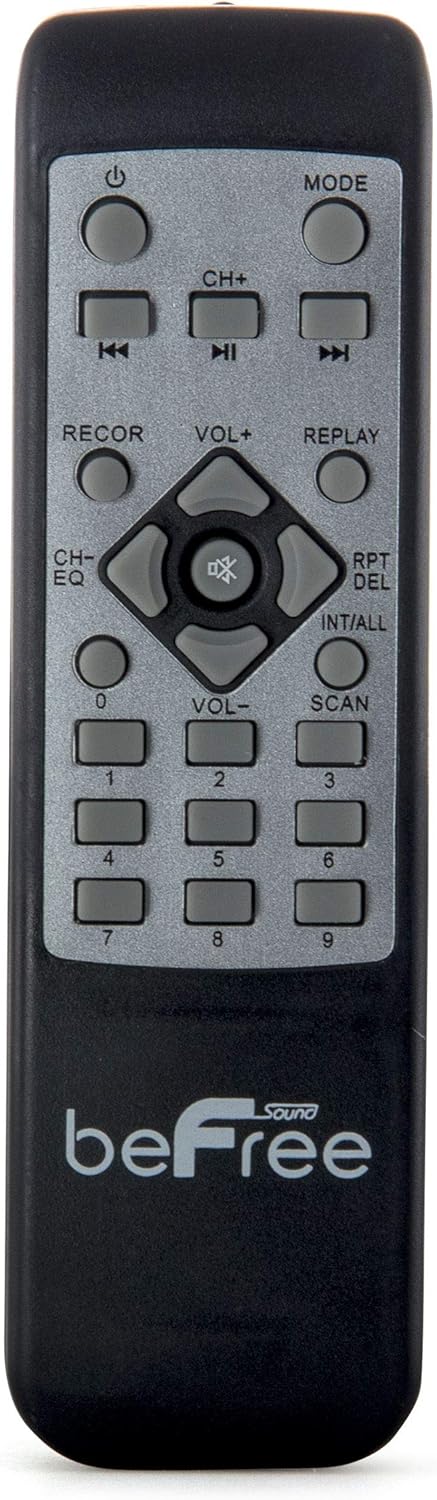
Whakaahua 2: Kati-ake view of the beFree Sound BFS-6445 remote control. It features buttons for power, mode selection, track navigation, volume adjustment, EQ, record, replay, scan, and numerical input.
The remote control allows for convenient operation of the speaker from a distance.
3. Tatūnga
3.1 Te Wetewete me te Whakanoho
- Āta tango i te kaikōrero me ngā taputapu katoa mai i te tākai.
- Place the speaker on a stable, flat surface. Ensure adequate ventilation around the unit.
- The speaker is equipped with rolling wheels and an extendable handle for easy transport.
3.2 Hononga Hiko
- Connect the provided AC power cord to the speaker's AC input port (AC 100-240V, 50/60Hz).
- Monohia tetahi pito o te taura hiko ki tetahi putanga pakitara pai.
- The speaker can operate on AC power.
3.3 Battery Installation (Remote Control & Wireless Microphone)
- Mana Mamao: Open the battery compartment on the back of the remote control. Insert 2 x AAA batteries, ensuring correct polarity (+/-). Close the compartment.
- Waeaoro Ahokore: Open the battery compartment on the microphone. Insert 2 x AA batteries, ensuring correct polarity (+/-). Close the compartment.
4. Nga Tohutohu Whakahaere
4.1 Hiko / Whakaweto
Pehia te MANA pēhi i te pātene i te papa whakahaere, i te mana mamao rānei hei whakakā, hei whakaweto rānei i te kaikorero.
4.2 Kōwhiringa Aratau Whakauru
Pehia te MODE button on the control panel or remote control to cycle through available input modes: Bluetooth, USB, SD, FM Radio, and AUX (if an external device is connected via audio input).
4.3 Takirua Nihokikorangi
- Whakakāhia te kaikorero, kātahi ka tīpako Nihokikorangi mode using the MODE button. The display will indicate Bluetooth mode, and a pairing tone may sound.
- Whakahohehia te Nihokikorangi i runga i to taputapu pūkoro (waea atamai, papa, aha atu).
- Rapua available Bluetooth devices. The speaker will appear as "beFree Sound BFS-6445" or similar.
- Select the speaker from the list to pair. Once paired, a confirmation tone will sound.
- Ka taea e koe te purei ororongo mai i to taputapu ma te kaikorero.
4.4 USB/Kari SD Purei
- Insert a USB flash drive or SD card into the respective slot on the control panel.
- The speaker will automatically switch to USB or SD mode and begin playing compatible audio files. Ki te kore, pēhia te MODE te paatene hei kowhiri i te whakaurunga tika.
- Whakamahia te TAKARO/PAUSE, O MUA, a KAUPAPA buttons on the control panel or remote to control playback.
4.5 FM Radio Mahi
- Tīpakohia Irirangi FM mode using the MODE button.
- Patohia me te pupuri i te KAUPAPA button (often the PLAY/PAUSE button) to automatically scan and save available FM stations.
- Whakamahia te O MUA a KAUPAPA nga paatene hei whakatere i roto i nga teihana kua tiakina.
4.6 Ngā Whakaurunga Hopuoro me te Kītā
- Honoa he hopuoro waea ki te MIC INPUT koki.
- Honoa he kita ki te INITU GITARU koki.
- Whakaritea te MIC MANU a MANUITU PUKA knobs on the control panel to set desired levels.
- Whakamahia te MIC WHAKAMAHI WHAKAMAHI to enable or disable microphone priority. When enabled, the music volume will automatically lower when the microphone is in use.
- Whakaritea te ECHO knob for microphone echo effects.
4.7 Light Projection Dome
The speaker features an integrated LED light projection dome. Use the LIGHT POWER SWITCH on the control panel to turn the light dome on or off. The dome projects various colored patterns to enhance the ambiance.
4.8 Te Whakatikatika Ororongo
Whakamahia te Bass a Tuhinga knobs on the control panel to adjust the low and high frequencies of the audio output.
Ko te matua ROTO knob controls the overall output level of the speaker.
4.9 Using as Main or Passive Speaker
This speaker supports dual audio input/output, allowing it to be used in conjunction with another unit. Connect the audio output of one speaker to the audio input of another using an AV cable to amplify sound or create a stereo setup.
5. Tiaki
5.1 Te horoi
- Wewetehia te kaikōrero i te putanga hiko i mua i te horoi.
- Whakamahia he kakahu ngohengohe, maroke hei muru i nga mata o waho o te korero.
- Kaua e whakamahi i nga kai horoi, te wax, te whakarewa ranei na te mea ka pakaru te otinga.
- Keep the speaker grilles free of dust and debris.
5.2 Rokiroki
When not in use for extended periods, store the speaker in a cool, dry place, away from direct sunlight and extreme temperatures. If possible, use the original packaging for protection.
6. Te Raru
| Raruraru | Take pea | Rongoā |
|---|---|---|
| Karekau he kaha | Kāore te taura hiko i hono; kāore te putanga hiko e kaha ana; kua whakawetohia te pana hiko. | Ensure power cord is securely connected. Check wall outlet with another device. Turn the speaker's power switch on. |
| Karekau he tangi | Volume too low; incorrect input mode; device not paired (Bluetooth); media error (USB/SD). | Increase master volume. Select the correct input mode. Re-pair Bluetooth device. Check USB/SD card for compatible files and proper insertion. |
| Nihokikorangi kore hono | Speaker not in Bluetooth mode; device too far; interference; speaker already paired to another device. | Ensure speaker is in Bluetooth mode. Move device closer to speaker. Turn off other Bluetooth devices. Disconnect from previous device. |
| Kaore e mahi ana te hopuoro | Microphone not powered; volume too low; incorrect input. | Check microphone batteries (if wireless) or connection (if wired). Increase MIC VOLUME. Ensure MIC PRIORITY switch is set correctly. |
| Light dome not working | Light power switch off. | Ensure the LIGHT POWER SWITCH is in the ON position. |
7. Whakatakotoranga
- Momo Kaikorero: Subwoofer
- Rahi Tukuoro: 10 Inihi
- Mana Putanga Morahi Tukuoro: 800 Watts
- Hangarau Hononga: Nihokikorangi, USB
- Nga waahanga motuhake: Portable, Projection Light Dome, FM Radio, USB/SD Input, Microphone/Guitar Input
- Tikanga Mana: Mana mamao, Mana whakahaere i runga i te waeine
- Puna Hiko: AC 100-240V, 50/60Hz
- Rahi Hua (D x W x H): 13.5" x 12.5" x 29.75"
- Taumaha Tūemi: 30.3 Pauna
- Pūhiko Mana Mamao: 2 x AAA (kei roto)
- Wireless Microphone Batteries: 2 x AA (whakauruhia)
- Tau tauira: BFS-6445
- UPC: 602573151884
8. Pūtāhui me te Tautoko
beFree Sound products are designed for reliability and performance. For warranty information, technical support, or service inquiries, please refer to the warranty card included with your purchase or contact beFree Sound customer service directly.
Tena koa pupurihia to tohu mo te hoko mo nga kereme whakamana.


