1. Kupu Whakataki
Thank you for choosing the Lenco PDR-030 DAB+/FM Portable Digital Radio. This manual provides essential information for setting up, operating, and maintaining your device. The PDR-030 offers high-quality digital radio reception (DAB+) and traditional FM radio, along with features such as an integrated rechargeable battery for portability, an RDS display, station memory, and an alarm clock function.
Nga Waahanga Kei roto:
- Lenco PDR-030 Digital Radio
- AC Power Adapter (220 Volt)
- Pukapuka Kaiwhakamahi
2. Nga Korero Haumaru Nui
- Kaua e tukuna te taputapu ki te ua, ki te makuku ranei hei aukati i te ahi me te ru hiko.
- Me whakarite te urutau hiko voltage ōrite ana ki to tuku hiko rohe.
- Kaua e whakatuwheratia te casing. Tukuna atu nga ratonga katoa ki nga kaimahi whai tohu.
- A ape i te whakanoho i te waeine ki te taha o nga puna wera, ki te ra tika ranei.
- Handle the integrated battery with care. Do not attempt to replace it yourself.
- Tiakina te taputapu mai i nga papa autō kaha.
3. Hua Neke Atuview
Familiarize yourself with the main components and controls of your Lenco PDR-030 radio.
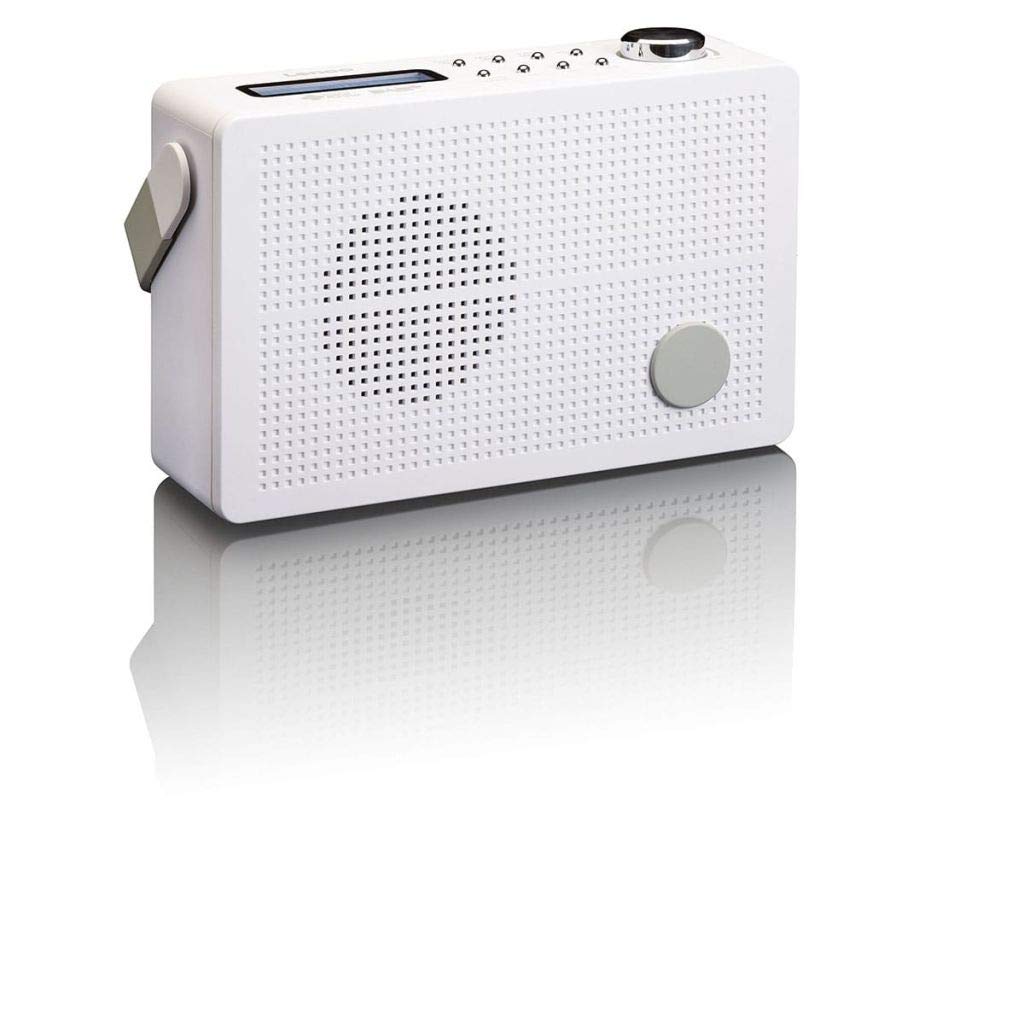
Whakaahua 3.1: Front Panel of Lenco PDR-030 Radio. Features include a blue backlit LCD display, power/source button, alarm, sleep, info/menu, preset buttons, select/snooze, scan, previous, next buttons, and a rotary volume knob.
Ngā Mana Matua me ngā Āhuatanga:
- Whakaatu: Two-line illuminated LCD for time, date, station name, and information.
- Pātene Mana/Pūtake: Turns the radio on/off and switches between DAB+ and FM modes.
- Matapihi Rōrahi: Whakaritea te taumata whakaputa ororongo.
- Antenna Telescopic: For optimal radio signal reception.
- Jack Puoro (3.5mm): Mo te whakarongo motuhake.
- Alarm/Sleep/Info/Menu/Preset Buttons: For various functions including setting alarms, sleep timer, accessing information, menu navigation, and managing station presets.
- Select/Snooze/Scan/Prev/Next Buttons: For station tuning, menu selection, and snooze function.
4. Tatūnga
4.1 Whakakaha i te Reo Irirangi
The PDR-030 can be powered by the included AC adapter or its integrated rechargeable battery.
- Mana AC: Connect the supplied 220V AC power adapter to the DC input jack on the radio and then to a wall outlet. The radio will automatically begin charging the internal battery.
- Mana Pūhiko: The integrated Lithium-ion battery allows for portable use. Ensure the battery is sufficiently charged before use without the AC adapter.
4.2 Tatūnga Antenna
Extend the telescopic antenna fully for optimal reception of both DAB+ and FM signals. Adjust its position for the best signal quality.
4.3 Initial Power On and Station Scan
- Pehia te Mana / Puna pātene hei whakakā i te reo irirangi.
- Upon first use, the radio will automatically enter DAB+ mode and perform a full scan for available digital radio stations. This may take a few minutes.
- Kia oti te karapa, ka anga te reo irirangi ki te teihana tuatahi e waatea ana.
5. Nga Tohutohu Whakahaere
5.1 Hiko / Whakaweto
Pehia te Mana / Puna pātene hei whakakā, whakaweto rānei i te reo irirangi.
5.2 Mode Selection (DAB+/FM)
Pehia te Puna button repeatedly to switch between DAB+ and FM radio modes.
5.3 Nga Teihana Tuning
- DAB+ Mode:
- After the initial scan, use the Tuhinga o mua a Whai muri buttons to navigate through the list of available DAB+ stations.
- To perform a new full scan, press the Tahua button, navigate to "Full Scan" using Tuhinga o mua / Panuku, ka pehi Tīpakohia.
- Aratau FM:
- Pehia te Matawai button to automatically scan for the next available FM station.
- For manual tuning, press and hold the Tuhinga o mua or Whai muri ngā pātene hei whakatikatika i te auau.
5.4 Saving and Recalling Preset Stations
The radio allows you to store up to 10 DAB+ and 10 FM preset stations.
- Hei Tiaki Tatūkē:
- Whakatangihia ki te teihana e hiahiatia ana.
- Patohia me te pupuri i te Tatūkē pātene tae noa ki te "Tautuhi Toa" ka puta ki te whakaaturanga.
- Whakamahia te Tuhinga o mua / Panuku nga patene hei kowhiri i te tau tatūkē (1-10).
- Perehi Tīpakohia ki te whakaū me te whakaora i te teihana.
- Hei maumahara i te tatūkē:
- Pehia te Tatūkē poto poto.
- Whakamahia te Tuhinga o mua / Panuku nga paatene hei kowhiri i te tau tatūkē e hiahiatia ana.
- Perehi Tīpakohia to tune to the preset station.
5.5 Mana Rōrahi
Hurihia te Koura Volume huri ki te taha matau hei whakanui i te oro, huri ki te taha maui hei whakaiti hoki.
5.6 RDS Functionality (FM Mode)
In FM mode, the RDS (Radio Data System) function displays information such as station name, program type, and other broadcast data on the two-line LCD display.
5.7 Mahi Karaka Whakaoho
The PDR-030 can be used as an alarm clock with two separate alarm times.
- Tautuhi Whakaoho:
- Pehia te Whakaoho pātene.
- Whakamahi Tuhinga o mua / Panuku to select Alarm 1 or Alarm 2, then press Tīpakohia.
- Follow the on-screen prompts to set the alarm time, duration, source (Buzzer or Radio), frequency (Daily, Once, Weekdays, Weekends), and volume.
- Ensure the alarm is set to "On" and press Tīpakohia ki te whakaora.
- Mahinga Tohu: Ka tangi ana te whakaoho, paatohia te whakamoe patene ki te wahangu mo te wa poto.
- Waka Moe: Pehia te Moe mai button repeatedly to set a sleep timer (e.g., 15, 30, 45, 60 minutes) after which the radio will automatically turn off.
5.8 Hononga Puoro
Connect 3.5mm stereo headphones to the headphone jack for private listening. The internal speaker will be muted automatically.
6. Tiaki
6.1 Te horoi
Wipe the radio's exterior with a soft, dry cloth. Do not use abrasive cleaners, waxes, or solvents as they may damage the finish. Ensure no liquids enter the device.
6.2 Tiaki Pūhiko
The integrated Lithium-ion battery is designed for long life. To maximize battery lifespan:
- A ape i te tino tuku i te pākahiko i nga wa katoa.
- If storing the radio for an extended period, charge the battery to approximately 50% and store in a cool, dry place.
- Do not attempt to replace the battery yourself. Contact qualified service personnel if battery issues arise.
7. Te Raru
| Raruraru | Take pea | Rongoā |
|---|---|---|
| Karekau he kaha | AC adapter not connected or faulty; battery discharged. | Check AC adapter connection. Charge the battery. |
| Te koretake o te whiwhinga DAB+/FM | Ko te Antenna kaore i roa; waahi tohu ngoikore; pokanoa. | Fully extend and adjust the telescopic antenna. Move the radio to a location with better signal. Avoid placing near other electronic devices. |
| Karekau he tangi | Volume too low; headphones connected; mute activated. | Increase volume. Disconnect headphones. Check if mute is active (if applicable). |
| Kare e tangi te whakaoho | Alarm not activated; alarm volume too low; incorrect time setting. | Ensure alarm is set to "On". Check alarm volume. Verify current time and alarm time settings. |
8. Whakatakotoranga
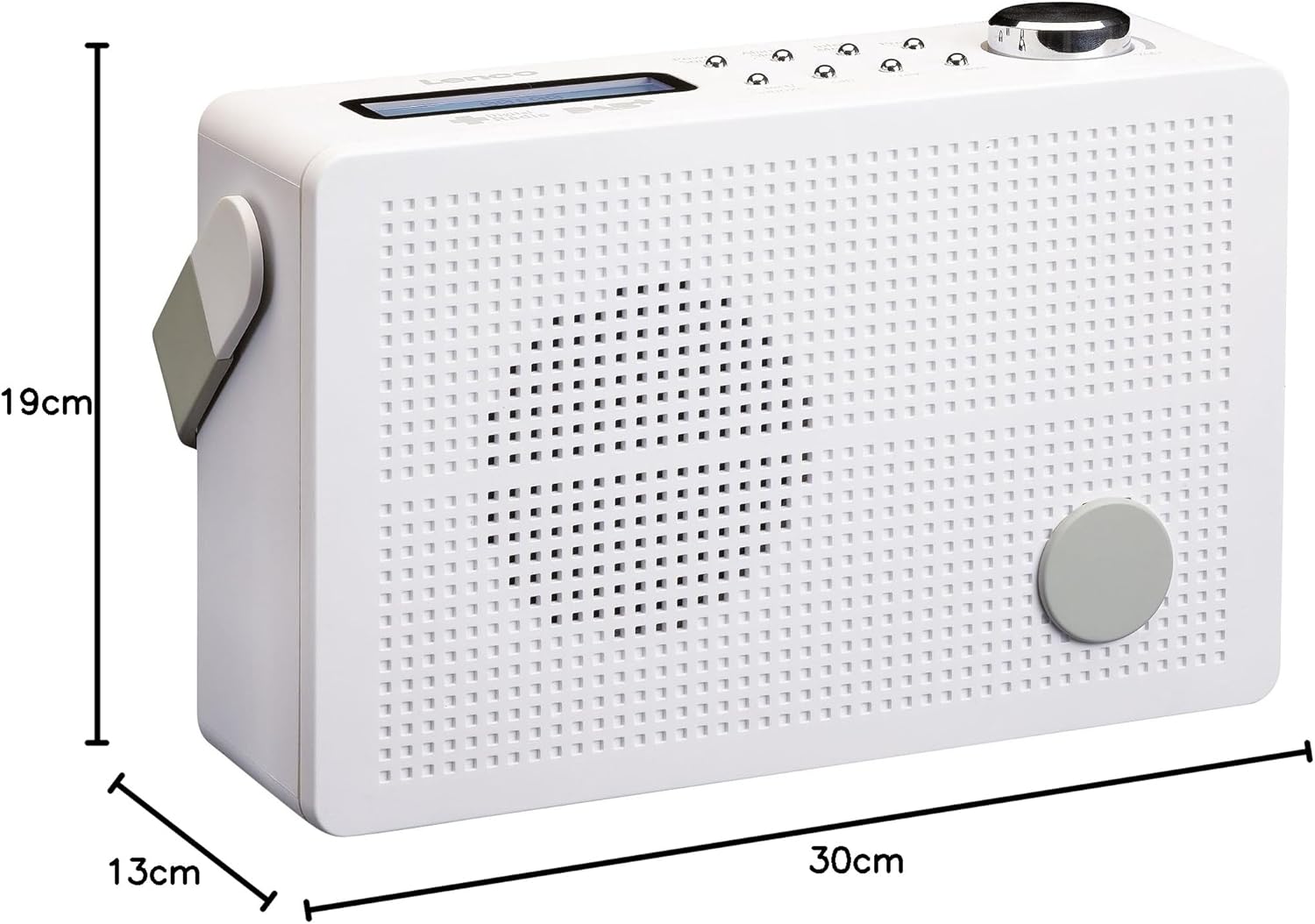
Whakaahua 8.1: Lenco PDR-030 Dimensions.
| Āhuahira | Taipitopito |
|---|---|
| Tau tauira | PDR-030 |
| Hangarau Tuner | DAB+, FM (Ukw) |
| Puna Mana | Battery-Powered (Integrated Lithium-ion), AC Adapter |
| AC Voltage | 220 Volt |
| Nga Ahinga Hua (W x D x H) | 21.4 x 6.5 x 13.8 cm (approx. 22.5 x 8.5 x 15 cm as per another spec) |
| Taumaha Tūemi | 9 g (Note: This seems incorrect, likely 670g from description) |
| Momo Rawa | Kirihou |
| Atanga Pūmārō | Ororongo 3.5 mm (Pūrere Paneoro) |
| Nga waahanga motuhake | Portable, RDS Display, Alarm Clock, Station Memory (10 DAB+, 10 FM) |
Note: Some dimensions and weight specifications provided by the manufacturer may vary slightly. The description states 670 grams for weight, while specifications list 9g. Please refer to the product packaging for the most accurate information.
9. Pūtāhui me te Tautoko
Lenco products are designed for reliability and performance. This product typically comes with a 24-month manufacturer's warranty from the date of purchase, covering defects in materials and workmanship. Please retain your proof of purchase for warranty claims.
For technical support, service, or warranty inquiries, please refer to the contact information provided on the Lenco official website or your local retailer. Do not attempt to repair the device yourself.
Mo etahi atu korero, ka toro atu koe ki te Lenco Store on Amazon.


