Kupu Whakataki
This manual provides detailed instructions for the setup, operation, and maintenance of your Hyperkin Knight Premium Controller. Designed for use with PlayStation 3 (PS3), PC, and Mac systems, this controller offers a versatile gaming experience with its ergonomic design and responsive controls. Please read this manual thoroughly before using the product to ensure optimal performance and longevity.
Nga waahanga hua
- Ngā Rākau Harikoa Analoga Takirua: Two wide-spectrum analog joysticks for precise control.
- Pressure-Sensitive D-Pad: An eight-way directional pad with pressure sensitivity.
- Pressure-Sensitive Buttons: Four shoulder buttons and four face buttons with pressure sensitivity for nuanced input.
- Whakakaha Urupare: Integrated force feedback for immersive gaming experiences.
- Pātene Kāinga: Dedicated button for system menu access.
- Taura Roa: A 6-foot (1.8 meter) cable for flexible positioning.
- Hototahitanga-maha: Compatible with all PS3 models, as well as PC and Mac via USB.
Ihirangi mokete
- Hyperkin Knight Premium Controller (White)
- Integrated USB Cable (6 ft.)
Tohutohu Tatūnga
Te hono atu ki te PlayStation 3 (PS3)
- Ensure your PS3 console is powered off or in standby mode.
- Kimihia he tauranga USB e waatea ana i runga i to papatohu PS3.
- Plug the USB connector of the Hyperkin Knight Controller into the USB port on your PS3.
- Power on your PS3 console. The controller should be automatically recognized and assigned a player number.
- If the controller does not respond, try a different USB port or restart the console.
E hono ana ki te PC/Mac
- Locate an available USB port on your PC or Mac computer.
- Plug the USB connector of the Hyperkin Knight Controller into the USB port.
- Your operating system (Windows, macOS) should automatically detect and install the necessary drivers. This process may take a few moments.
- Once installed, the controller will be ready for use with compatible games and applications. You may need to configure controller settings within individual games or system preferences.
- Tuhipoka: Functionality may vary depending on the operating system and specific game titles.
Nga Tohutohu Whakahaere
The Hyperkin Knight Premium Controller features a standard layout for intuitive gameplay.
Tahora Kaiwhakahaere

Whakaahua: Runga view of the Hyperkin Knight Premium Controller, showing the D-pad, analog sticks, face buttons, and central buttons.
- Papa-D (Papa Aronga): Located on the left, used for directional input.
- Rakau Analog Mauī: Below the D-Pad, for precise movement and camera control.
- Rakau Analog Matau: On the right side, typically for camera control or aiming.
- Pātene Kanohi (Triangle, Porowhita, Ripeka, Tapawhā): On the right, used for actions within games.
- Ngā Pātene Pakihiwi (L1, L2, R1, R2): Located on the top edge of the controller, used for various in-game functions.
- PONO PAIA: Typically used for menu access or specific game functions.
- Pātene Tīmata: Typically used for pausing games or confirming selections.
- Pātene KĀINGA: Central button to access the PS3 XMB (CrossMediaBar) or system menus on PC/Mac.
Whakakaha Urupare
The controller features force feedback (rumble) functionality, which provides tactile sensations during gameplay, enhancing immersion. This feature is automatically enabled when supported by the game and system. If you wish to disable it, check your game's or system's controller settings.
Te tiaki
- Te horoi: Whakamahia he kakahu ngohengohe, maroke hei muru i te kaiwhakahaere. Mo te paru maro, paku dampen te kakahu ki te wai. A ape i te whakamahi i nga matū kino, i nga horoi horoi ranei.
- Rokiroki: Whakaorangia te pūmana ki te wahi matao, maroke atu i te ra tika me te wera nui. A ape i te takai i te taura kia kore e pakaru.
- Tiaki taura: Do not pull the controller by its cable. Always grasp the USB connector when plugging or unplugging.
Raparongoā
Karekau te Kaiwhakahaere i te Whakautu
- Taki Hononga: Me whakarite kia mau te hono o te taura USB ki te pūmana me te papatohu/rorohiko.
- Whakamātauria Tauranga USB rereke: Connect the controller to another USB port on your system.
- Tīmata anō te Pūnaha: Power cycle your PS3, PC, or Mac.
- Driver Check (PC/Mac): On PC, check Device Manager to see if the controller is recognized and if there are any driver issues. On Mac, check System Information > USB.
Incorrect Button Mapping or Limited Functionality
- Tautuhinga Kēmu: Many games allow for custom controller mapping. Check the in-game settings for controller configuration.
- System Settings (PC/Mac): For PC, some games or emulators may require specific controller configurations or third-party software. For Mac, check System Preferences > Game Controllers (if available) or specific application settings.
- PS3 Hototahi: While compatible with all PS3 models, some older games or specific PS3 system software versions might have unique controller handling. Ensure your PS3 system software is up to date.
Force Feedback Not Working
- Tautoko Kēmu: Manatokohia kei te tautoko te kēmu e tākarohia ana e koe i te urupare kaha.
- Ngā Tautuhinga i roto i te Kēmu: Check the game's options menu to ensure force feedback (rumble) is enabled.
- Tautuhinga Pūnaha: On PC, ensure rumble is enabled in your controller settings.
Whakatakotoranga
| Tau tauira | M07213-WH |
| Hototahi | PlayStation 3, PC, Mac (mā te USB) |
| Te roa o te taura | 6 putu (tata ki te 1.8 mita) |
| Momo Whakauru | Pressure-sensitive buttons and D-pad, dual analog joysticks |
| Urupare | Force Feedback (Rumble) |
| Ahu | 2.99 x 7.99 x 7.01 inihi (tata ki te 7.6 x 20.3 x 17.8 cm) |
| Taumaha | 12.5 hekere (tata ki te 354 karamu) |
| Kaihanga | Hyperkin Inc |
Pūtāhui me te Tautoko
Mō ngā mōhiohio pūtāhui me te tautoko hangarau, tirohia te paetukutuku mana o Hyperkin webpaetukutuku, whakapā atu ranei ki ta raatau ratonga kaihoko. Puritia to riirii hoko hei tohu mo te hoko mo nga kereme whakamana.
Kaihanga: Hyperkin Inc
Webpae: www.hyperkin.com (Tirohia koa te rangatira website for the most current support information.)
Ka mutu te huaview Whakaahua
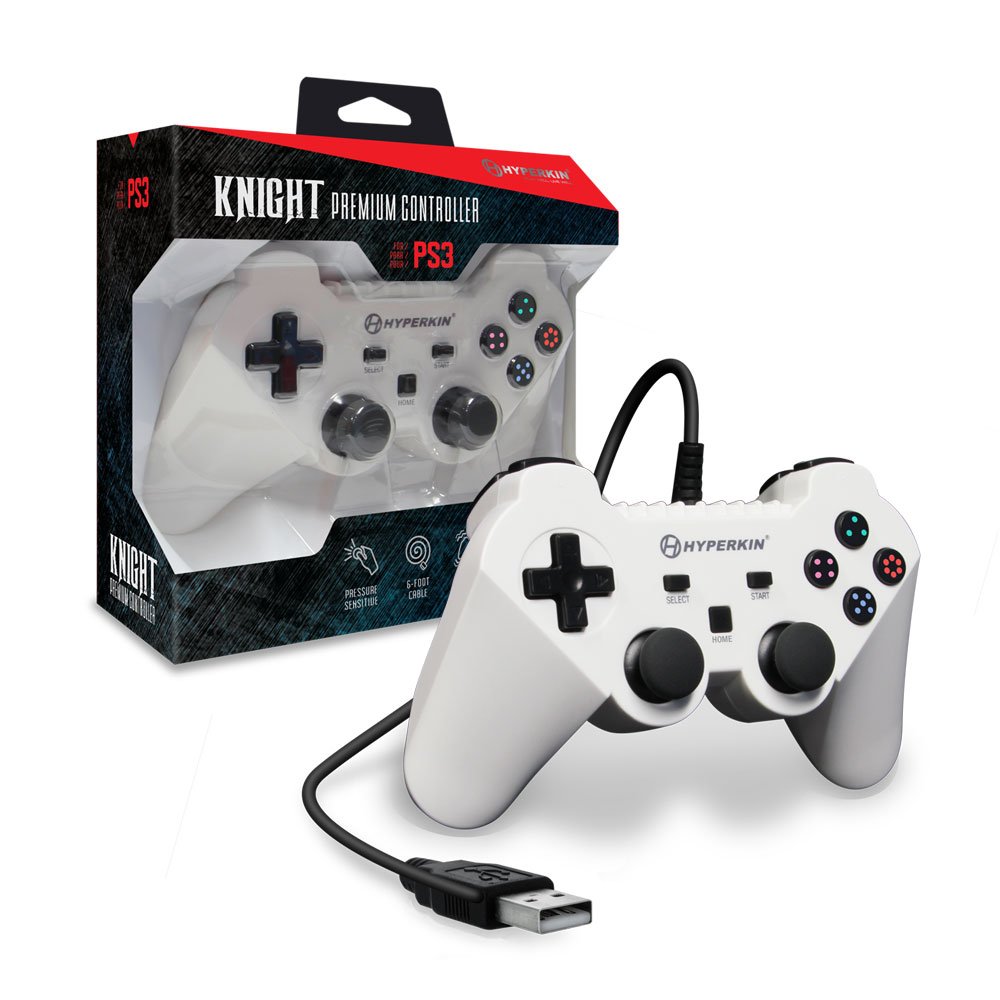
Image: The Hyperkin Knight Premium Controller displayed alongside its retail packaging, highlighting the product's design and branding.

Whakaahua: He tata view of the Hyperkin Knight Premium Controller's retail box, showcasing nga ahuatanga matua me nga waahanga hoahoa.

Whakaahua: He koki view of the Hyperkin Knight Premium Controller, emphasizing its ergonomic shape and button placement.


