1. Kupu Whakataki
Thank you for choosing the NTC V380 WiFi Smart Camera. This device is designed to provide reliable indoor security monitoring with advanced features such as remote access, two-way audio, and night vision. This manual will guide you through the setup, operation, and maintenance of your camera to ensure optimal performance.
2. Hua Neke Atuview
The NTC V380 WiFi Smart Camera is a compact, indoor surveillance camera featuring pan, tilt, and zoom capabilities. It connects wirelessly to your home network, allowing for remote viewing and control via a smartphone or desktop application.
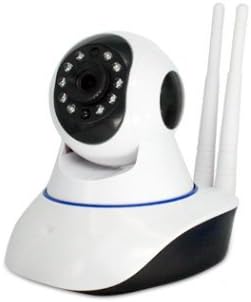
Whakaahua 2.1: Mua view of the NTC V380 WiFi Smart Camera, showing the lens, infrared LEDs, and microphone.
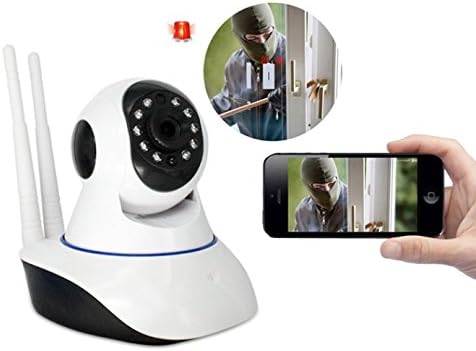
Figure 2.2: The NTC V380 camera demonstrating remote monitoring capabilities with a smartphone displaying the live video feed.
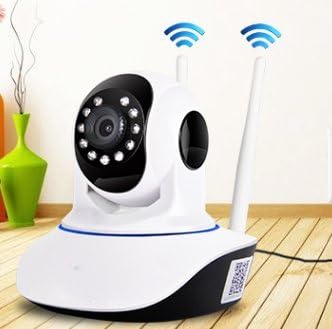
Figure 2.3: The NTC V380 camera positioned in an indoor environment, illustrating its wireless connectivity with WiFi signal indicators.
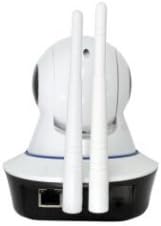
Whakaahua 2.4: Whakamuri view of the NTC V380 camera, highlighting the dual antennas for enhanced WiFi reception and the Ethernet port for wired connection.
3. Nga waahanga matua
- Ororongo Ara-rua: Communicate through the camera with built-in microphone and speaker.
- Mana PTZ: Pan (355° horizontal) and Tilt (120° vertical) functionality for comprehensive area coverage.
- Ataata Whakamarama-Teitei: Records video at 1080p resolution with a frame rate of up to 25 frames per second.
- Matakitenga po: Equipped with 10 infrared LEDs, providing clear visibility up to 10 meters in low-light conditions.
- Kitenga Nekehanga: Receive alerts via email or FTP upload when motion is detected, with adjustable sensitivity.
- Hononga Ahokore: Supports Wi-Fi for flexible placement and easy integration into your network.
- Aroturuki Mamao: Access live video and control camera functions from your smartphone (iOS/Android) or desktop via the V380 application.
- Rokiroki Paetata: Supports TF (microSD) card for local video recording.
4. Aratohu Tatūnga
4.1 Ihirangi mokete
Ensure all items are present:
- NTC V380 WiFi Smart Camera
- Pūurutau Hiko
- Mounting Accessories (screws, wall plug)
- Pukapuka Kaiwhakamahi (tenei tuhinga)
4.2 Hiko-Whakaahua Tuatahi
- Connect the power adapter to the camera's power input port.
- Plug the adapter into a power outlet. The camera will power on and initiate its self-test sequence.
- Wait for the camera to indicate readiness (e.g., a voice prompt or LED indicator change).
4.3 Taupānga Taupānga me te Hononga Wi-Fi
- Tikiake te V380 application from your smartphone's app store (available for iOS and Android).
- Rēhitahia he pūkete hōu, takiuru mai ranei mena kua whai koe i tetahi.
- Follow the in-app instructions to add your camera. This typically involves scanning a QR code on the camera or using an AP hotspot connection method.
- Select your 2.4GHz Wi-Fi network and enter the password when prompted. The camera does not support 5GHz Wi-Fi networks.
- Once connected, the camera will confirm its network status, and you will see it listed in your app.
4.4 Whakauru i te Kamera
The camera supports wall mounting for optimal positioning.
- Choose a suitable indoor location with a clear view and within Wi-Fi range.
- Use the provided mounting bracket as a template to mark screw holes on the wall.
- Drill pilot holes and insert wall plugs if necessary.
- Whakamaua te taiapa whakapuru ki te pakitara ma te whakamahi i nga hiu.
- Tāpirihia te kāmera ki te anga whakairi, kia tino mau te mau.
5. Nga Tohutohu Whakahaere
5.1 Ora View me te Mana PTZ
- Open the V380 app and select your camera from the device list to access the live video feed.
- Use the on-screen joystick or swipe gestures to pan (move horizontally) and tilt (move vertically) the camera lens.
- Pinch-to-zoom on the live feed to digitally zoom in or out.
5.2 Ororongo Waa-rua
- I te wa e ora ana view, patohia te ata hopuoro i roto i te taupānga hei kōrero mā te kaikorero o te kāmera.
- Pāwhiritia te ata o te kaikorero hei whakarongo ki te oro mai i te taiao o te kāmera.
5.3 Video Recording and Playback
- Insert a TF (microSD) card into the camera's card slot for continuous or event-based recording.
- In the app, navigate to the playback section to view tuhia footage stored on the TF card.
- You can also manually record video or capture screenshots directly from the live view interface in the app.
5.4 Te Motini me nga Matohi
- Access the camera settings in the V380 app to configure motion detection.
- Whakatikatikahia ngā taumata tairongo hei whakaiti i ngā whakaoho teka.
- Enable push notifications, email alerts, or FTP uploads for motion detection events.
6. Tiaki
- Te horoi: Āta horoia te karāhe me te tinana o te kāmera ki tētahi kakahu ngohengohe, maroke. Kaua e whakamahi i ngā matū kino, i ngā rauemi whakakoi rānei.
- Whakahōu Firmware: Periodically check the V380 app for available firmware updates to ensure your camera has the latest features and security enhancements. Follow the in-app instructions for updating.
- Whakahaere Kāri TF: Regularly back up important recordings from your TF card. Format the TF card periodically within the app to maintain optimal recording performance.
7. Te Raru
Nga take me nga otinga noa:
- Kāmera Tuimotu:
- Check if the camera is powered on.
- Verify your Wi-Fi network is active and the camera is within range.
- Tīmataria anō te kāmera me tō pouara Wi-Fi.
- Me mohio kei te hono te kamera ki te whatunga Wi-Fi 2.4GHz.
- Kounga Ataata Kino:
- Ensure a strong Wi-Fi signal. Move the camera closer to the router if necessary.
- Horoia te arotahi kamera.
- Tirohia to tere hononga ipurangi.
- Kaore i te Mahi te Motini:
- Manatokohia kua taea te rapu nekehanga i roto i nga tautuhinga taupānga.
- Whakaritehia nga taumata tairongo.
- Ensure notification permissions are granted for the V380 app on your smartphone.
- Kaore e taea te hono ki te Taupānga:
- Ensure you have the correct V380 app.
- Tirohia to ingoa kaiwhakamahi me to kupuhipa.
- If issues persist, try resetting the camera to factory defaults (refer to the camera's physical reset button, usually a small pinhole, and hold for 5-10 seconds while powered on) and re-add it to the app.
8. Whakatakotoranga
| Āhuahira | Taipitopito |
|---|---|
| Tau tauira | ICP-T3810-Q5 (T) V380 |
| Waitohu | NTC |
| Whakataunga Hopu Ataata | 1080p |
| Auau anga | 25 papa mo ia hekona |
| Hangarau Hononga | Ahokore (Wi-Fi) |
| Kawa Hononga | Wi-Fi (2.4GHz anake) |
| Tawhiti Matakite Po | 10 Mita |
| Nga waahanga motuhake | Night Vision, Motion Sensor, PTZ Technology, Two-Way Audio |
| Pūrere Hototahi | Waea atamai, Papamahi |
| Momo Kaiwhakahaere | Android (via V380 App) |
| Momo Whakaeke | Maunga Taiepa |
| Tauwehe Puka | Turret (Dome Type) |
| Nga Whakamahinga Manakohia | Haumarutanga o roto |
| Whakamahi o roto/waho | Roo-roto |
| Puna Mana | Corded Electric (No batteries required) |
9. Pūtāhui me te Tautoko
For warranty information and technical support, please refer to the documentation provided at the time of purchase or contact your retailer. Keep your purchase receipt as proof of purchase for any warranty claims.


