Kupu Whakataki
This manual provides comprehensive instructions for the safe and effective use of your Winplus AC55925-80 3-in-1 Emergency Socket Power Bank. This device combines a compact power bank, a USB car charger, and an emergency glass-breaking tool. Please read this manual thoroughly before operation and retain it for future reference.
Ka mutu te huaview
The Winplus 3-in-1 Emergency Socket Power Bank is designed for convenience and safety, offering multiple functionalities in a compact form factor.

Figure 1: Winplus 3-in-1 Emergency Socket Power Bank with key features highlighted.
Waehanga:
- Compact Power Bank: Provides portable power for charging devices.
- USB Car Charger: Plugs into a 12V car socket to charge devices and the power bank.
- Emergency Glass-Breaking Tool: Integrated for emergency situations.
- Tauranga Huaputa USB: For connecting charging cables to devices.
- Tauranga Whakauru USB Micro: For charging the internal power bank.
- Tohu LED: Ka whakaatu i te mana utu.

Whakaatu 2: Taipitopito view of the device's ports.
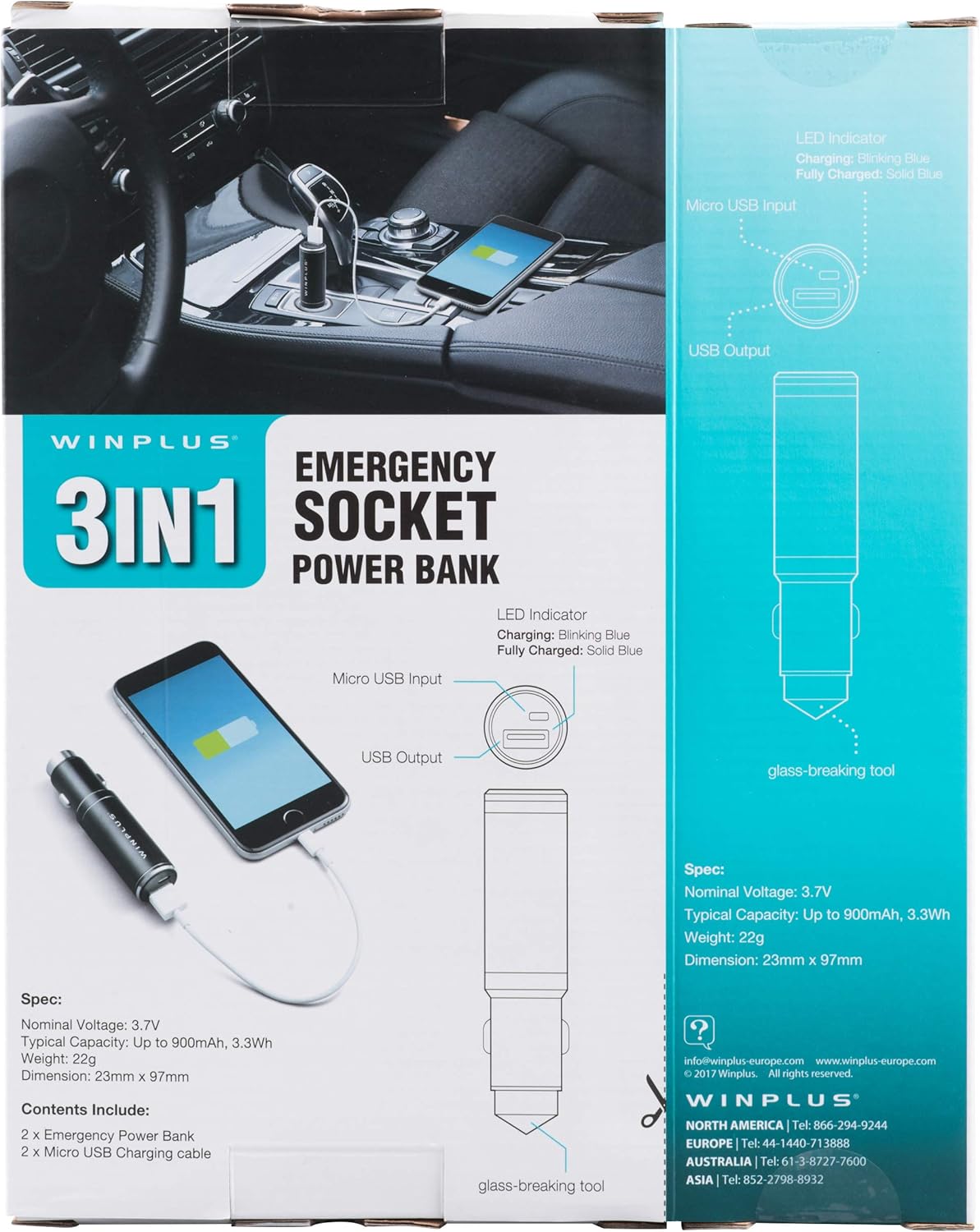
Figure 3: LED indicator status and glass-breaking tool location.
Tatūnga
Whakataunga Tuatahi o te Peeke Hiko:
- Locate the Micro USB Input port on the device.
- Connect the provided Micro USB charging cable to the Micro USB Input port.
- Connect the other end of the USB cable to a standard USB power source (e.g., a computer USB port, a wall adapter, or the car's 12V socket when used as a car charger).
- The LED indicator will blink blue during charging.
- Once fully charged, the LED indicator will turn solid blue.
Note: It is recommended to fully charge the power bank before its first use.
Nga Tohutohu Whakahaere
Ma te whakamahi hei peeke hiko kawe:
- Ensure the power bank is charged (solid blue LED indicator).
- Connect your device's charging cable to the USB Output port on the power bank.
- Connect the other end of the cable to your mobile device (smartphone, tablet, etc.).
- Ka timata te peeke hiko ki te utu aunoa i to taputapu.
Using as a USB Car Charger:
- Insert the Winplus 3-in-1 device into your vehicle's 12V accessory socket (cigarette lighter socket).
- Connect your device's charging cable to the USB Output port on the Winplus device.
- Whakauruhia tetahi atu pito o te taura ki to taputapu waea.
- Your device will begin charging. The internal power bank will also charge simultaneously if it is not full.
Using the Emergency Glass-Breaking Tool:
The emergency glass-breaking tool is located at the tip of the device, opposite the USB ports. This tool is intended for emergency use only to break vehicle side windows in situations where occupants are trapped.
- In an emergency, firmly press the tip of the tool against a corner of a side window.
- Apply steady pressure until the spring-loaded mechanism activates and shatters the glass.
- Once the glass is broken, carefully clear any remaining shards before exiting the vehicle.
WHAKATŪPATO: Use this tool only in genuine emergencies. Misuse can cause serious injury. Keep out of reach of children.
Te tiaki
- Keep the device dry. Moisture can damage internal circuits.
- Kaua e pa atu ki nga wera nui (wera, makariri ranei).
- Horoia te taputapu ki te kakahu ngohengohe, maroke. Kaua e whakamahi i nga matū kino, i nga horoi horoi ranei.
- Whakaorangia ki te waahi makariri, maroke ka kore e whakamahia.
- A ape i te tuku, te tuku ranei i te taputapu ki nga paanga kaha.
Raparongoā
| Raruraru | Take pea | Rongoā |
|---|---|---|
| Kaore te taputapu e utu ana. | Power bank is depleted. Cable is faulty. USB port is dirty or damaged. | Whakaorangia te putea hiko. Whakamātauria tētahi atu taura utu. Clean the USB ports carefully or try another port. |
| Ko te tohu LED kaore i te rama. | Device is not connected to a power source. Device is fully charged (if solid blue). He he te taputapu. | Ensure proper connection to a power source. Check if it's already solid blue. Whakapa atu ki te tautoko a nga kaihoko mena ka mau tonu nga raru. |
| Puturi te utu. | Cable is not suitable. Power source is low current. Device being charged has high power requirements. | Whakamahia he taura utu kounga teitei. Connect to a higher current USB adapter. This device provides 2.1A output, which is standard for fast charging most phones. |
Whakatakotoranga
- Tauira: AC55925-80
- Nomine Voltage: 3.6V
- Raukaha Angamaheni: Up to 2500 mAh, 9 Wh
- Hanganga Pūtau Pūhiko: Hikahiko Polymer
- Putanga USB: 5V / 2.1A
- Input USB Micro: 5V / 0.5A
- Ahu: 23mm x 127mm (approximate)
- Taumaha Tūemi: 510 g (for the 2-pack)
- Momo Tuhono: Micro USB (Input), USB Type-A (Output)
Nga korero haumaru
- Kaua e wetewete, e whakatuwhera, e tihorea ranei te kete pākahiko.
- Kaua e tukuna te kohinga puhiko kia wera kia ahi ranei. Aukati i te rokiroki i te ra tika.
- Kaua e porowhita-poto i te kete pākahiko. Kaua e penapena nga pukoro pākahiko i roto i te pouaka, i te pouaka ranei kei te waahi poto tetahi ki tetahi, ka poto ranei e etahi atu mea whakarewa.
- Kaua e tukuna nga putea pākahiko ki te wiri miihini.
- Mena ka pakaru te pākahiko, kaua e tukua te wai kia pa ki te kiri me nga kanohi. Mena kua pa atu, horoia te waahi kua pa ki te wai maha me te rapu tohutohu hauora.
- Kaua e whakamahi i tetahi riihi i tua atu i tera kua whakaritea mo te whakamahi me nga taputapu.
- Kaua e taea e nga tamariki nga putea pākahiko.
- Rapua he tohutohu hauora mena kua horomia he kete pākahiko.
- Hokona te kete pākahiko tika mo nga taputapu.
- Kia ma, kia maroke nga putea pākahiko.
- Kaua e waiho he pākahiko i runga i te utu roa ina kore e whakamahia.
- Horoihia nga putea pākahiko kia rite ki nga ture o te rohe.
Pūtāhui me te Tautoko
For warranty information or technical support, please contact Winplus North America Inc. directly.
- Kaihanga: Winplus North America Inc
- Mōhiohio Whakapā: Refer to product packaging or the official Winplus webpae mo nga taipitopito tautoko o naianei.
You can also visit the Winplus website for FAQs and additional product information: www.winplus-europe.com


