Kupu Whakataki
The Klein Tools NCVT-4IR is a versatile tool designed for professionals, combining non-contact AC voltage detection with an integrated infrared (IR) thermometer. This manual provides essential information for safe and effective operation of your device.

Image: The Klein Tools NCVT-4IR device, a yellow and black pen-style tool, shown from an angled perspective.
Nga korero haumaru
Always prioritize safety when using electrical testing equipment. Read and understand all instructions before operation.
- Kaua e tukuna te kurupae laser ki roto i nga kanohi, na te mea ka pakaru tonu te kanohi.
- Read, understand, and follow all instructions, cautions, and warnings attached to and/or packed with all Test & Measurement devices before each use.
- KORE te ine ine wera mo te tangata, kararehe ranei.
- Test on a known live circuit before use to confirm proper operation.
Nga waahanga hua
- Kore-Whakapā AC Voltage Detection: 12 to 1000V AC.
- Integrated Infrared Thermometer: Measures temperatures from -22 to 482°F (-30 to 250°C).
- Laser Pointer: For targeting temperature measurement areas.
- Visual and Audible Indicators: For voltage kitenga.
- Dust and Water Resistant: IP40 rating.
- Pocket Clip: For convenient portability.
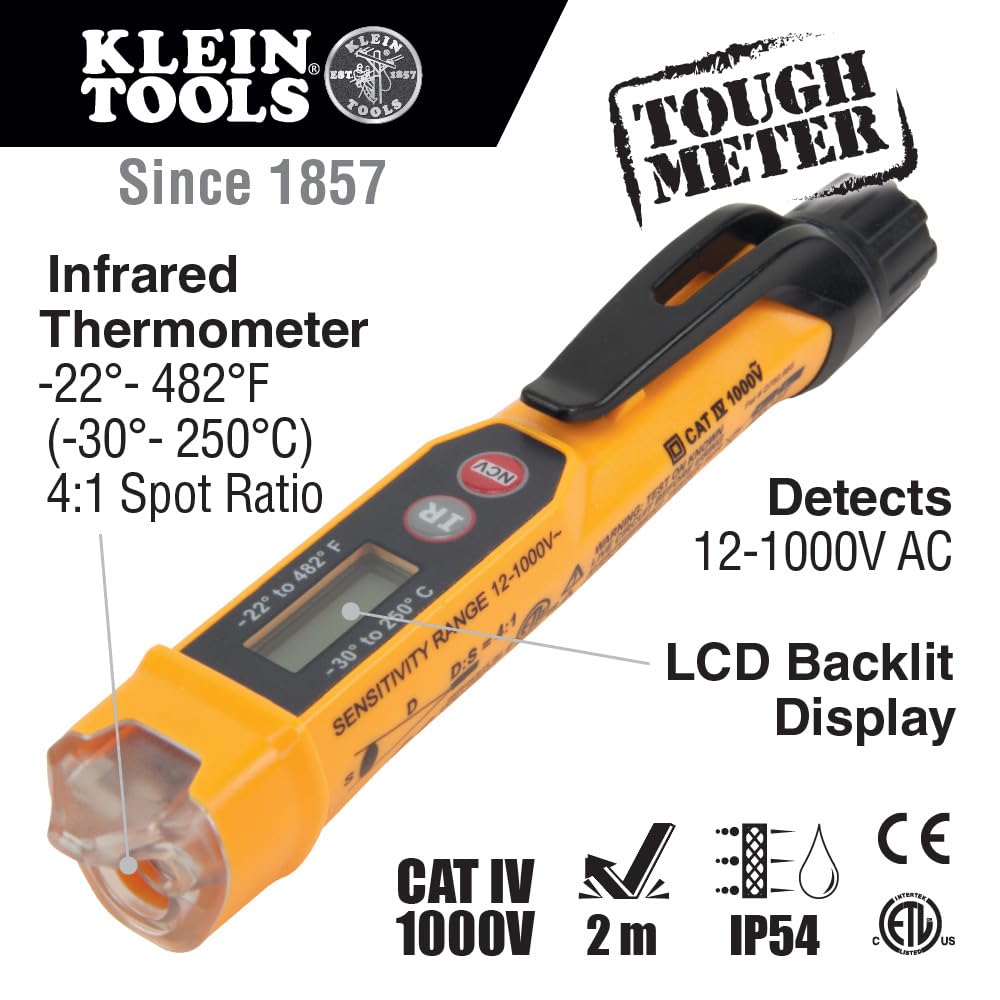
Image: An infographic highlighting key features of the NCVT-4IR, such as its infrared thermometer range, AC voltage detection, and LCD backlit display.
Tatūnga me te Tāuta Pūhiko
- To install or replace batteries, twist the end cap counter-clockwise to remove it.
- Insert two new AAA 1.5V batteries, ensuring correct polarity (+/-).
- Replace the end cap and twist clockwise until secure. Ensure the cap is fully tightened for proper operation and IP40 rating.
- To prevent accidental activation and battery drain during storage, slightly loosen the end cap to disengage battery contact.
Nga Tohutohu Whakahaere
Kore-Whakapā Voltage Testing (NCVT)
- Pehia te NCV button to activate the non-contact voltage detection mode. The tip will illuminate blue.
- Place the tester's tip near the conductor, outlet, or circuit you wish to test.
- Mena AC voltage is detected (12V to 1000V), the tip will glow red, and an audible alarm will sound. The intensity of the visual and audible indicators increases with voltage strength or proximity to the source.
- Always test on a known live circuit first to ensure the tester is functioning correctly.
Infrared Thermometer (IR)
- Pehia te IR button to activate the infrared thermometer. The laser pointer will activate to help aim.
- Point the laser at the surface you wish to measure. The temperature will be displayed on the LCD screen.
- The temperature range is -22 to 482°F (-30 to 250°C).
- To switch between Fahrenheit and Celsius, press and hold the IR button.

Image: The NCVT-4IR being used to measure the temperature of an electrical component, with the laser pointer visible.
Te tiaki
- Keep the device clean and free from dust and debris. Use a dry, lint-free cloth for cleaning.
- Whakakapia tonutia ngā pākahiko ina puta te tohu pākahiko iti ki te mata hei whakarite kia tika ngā panuitanga.
- Whakaorangia te taputapu ki te waahi makariri, maroke atu i te ra tika me te wera nui.
Raparongoā
- Kore Hiko/Whakaatu Weto: Check battery installation and ensure the end cap is fully tightened. Replace batteries if necessary.
- Inaccurate NCV Readings: Ensure the tip is close enough to the conductor. Test on a known live circuit to verify functionality. Environmental factors can sometimes affect sensitivity.
- Inaccurate IR Readings: Ensure the laser is aimed directly at the target surface. Reflective surfaces can affect accuracy.
Whakatakotoranga
| Āhuahira | Whakatakotoranga |
|---|---|
| Tau tauira | NCVT-4IR |
| AC Voltage Awhe | 12V ki te 1000V AC |
| Te Awhe Pawera IR | -22 ki te 482°F (-30 ki te 250°C) |
| Momo Taiaho | akomanga 2 |
| Tawhiti-ki-Spot Ratio | 4:1 |
| Whakatauranga Whakamarutanga (IP). | IP40 (Dust Resistant) |
| Puna Mana | 2 x AAA pākahiko (kei roto) |
| Ahu | 6.26 x 1.08 x 1.21 inihi |
| Taumaha | 2 hekere |
Pūtāhui me te Tautoko
Klein Tools products are designed for durability and performance. For warranty information or technical support, please refer to the official Klein Tools webpaetukutuku, whakapā atu ranei ki ta raatau ratonga kaihoko. Puritia to rihiti hoko mo nga kereme whakamana.


