1. Kupu Whakataki
The VEMER VE618500 CM100 is a battery-powered, daily programmable wall thermostat designed for controlling heating systems. Its intuitive mechanical interface allows for easy setting of daily heating schedules and desired temperatures. This manual provides detailed instructions for the proper installation, setup, operation, and maintenance of your thermostat.
2. Nga korero haumaru
- Haumaru Hiko: Installation should be performed by a qualified electrician or competent person in accordance with local wiring regulations. Always disconnect power to the heating system at the main circuit breaker before beginning any wiring work.
- Haumaru Pūhiko: Use only the specified battery type (2 x 1.5V AA). Do not mix old and new batteries, or different types of batteries. Dispose of used batteries responsibly.
- Turanga: Install the thermostat away from direct sunlight, drafts, and heat sources (e.g., radiators, lamps) kia tika ai ngā pānui pāmahana.
- Te horoi: Do not use abrasive cleaners or solvents. Clean the thermostat with a soft, damp kakahu anake.
3. Ihirangi mokete
Tena koa tirohia nga mea katoa kei roto i te kete:
- VEMER VE618500 CM100 Wall Thermostat Unit
- Kete Tāutanga (ngā tīwiri, ngā mono pakitara)
- Pukapuka Kaiwhakamahi
4. Hua Neke Atuview
Familiarize yourself with the main components and controls of your thermostat.

Whakaahua 1: Mua View of the Thermostat. This image displays the front of the VEMER VE618500 CM100 thermostat, showing the large central time dial with 15-minute riders, the temperature setting dial on the right, and the mode selector switch.
4.1 Mana Paewhiri Mua
- Time Dial (Left): A 24-hour dial with 96 movable riders (pins). Each rider represents a 15-minute interval. Push riders outwards for 'ON' periods and inwards for 'OFF' periods. The current time is indicated by a pointer.
- Temperature Dial (Right): Used to set the desired room temperature, typically ranging from 5°C to 35°C.
- Whakawhiti Kaitohu Aratau: Located near the temperature dial, this switch allows you to select the operating mode.
- Pātene RESET: A small button, usually recessed, to reset the thermostat.

Whakaahua 2: Taha View with Mode Selector. This image shows a close-up of the side of the thermostat, highlighting the mode selector switch, which typically has positions for 'OFF', 'Programmed', and 'Continuous ON'.
4.2 Rear Panel (for Installation)

Whakaahua 3: Whakamuri View of the Thermostat. This image displays the back of the VEMER VE618500 CM100 thermostat, showing the mounting holes, wiring terminals (L, NO, NC), and the battery compartment cover. The model number and electrical ratings are also visible.
- Nga Waea Waea: Connections for the heating system (typically Live, Normally Open, Normally Closed).
- Wāhanga Pūhiko: Holds 2 x 1.5V AA batteries.
- Kohanga Whakapuru: For securing the thermostat to the wall.
5. Tāutanga
Hiranga: Ensure power to the heating system is disconnected before proceeding.
5.1 Te Tauwhi Maunga
Choose an interior wall location, approximately 1.5 meters (5 feet) from the floor, away from:
- Te ra tika
- Drafts from windows or doors
- Heat sources (e.g., radiators, televisions, lamps)
- Areas with poor air circulation
5.2 Whakapiki i te Thermostat
- Carefully separate the front cover from the backplate of the thermostat.
- Position the backplate on the chosen wall location and mark the drilling points.
- Drill holes and insert wall plugs (if necessary).
- Whakamaua te pereti tuara ki te pakitara ma te whakamahi i nga wiri kua whakaratohia.
5.3 Waea Whakahoahoa
Refer to the wiring diagram on the back of the thermostat (see Whakaahua 3) and your heating system's manual for specific connections. Typically, the thermostat acts as a simple switch for your boiler. Connect the heating system's control wires to the appropriate terminals (L, NO, NC) on the thermostat's backplate.
Me whakarite kia mau nga hononga katoa, kia tika te kiriweti.
5.4 Whakauru Pūhiko
- Open the battery compartment cover on the rear of the thermostat.
- Insert two 1.5V AA alkaline batteries, observing the correct polarity (+/-).
- Katia te uhi o te wahanga pākahiko.
Once wiring and batteries are installed, reattach the front cover to the backplate. Restore power to the heating system.
6. Tatūnga Tuatahi
6.1 Setting the Current Time
- Gently rotate the central time dial clockwise until the current time aligns with the fixed pointer on the thermostat. The dial is a 24-hour clock.
6.2 Te Whakaritea i te Pawera Hiahia
- Rotate the temperature dial on the right to your desired room temperature. This is the temperature the thermostat will maintain during 'ON' periods.
7. Mahi
7.1 Daily Programming
The VEMER VE618500 CM100 uses 96 movable riders around the time dial for daily programming. Each rider represents a 15-minute interval.
- To set an 'ON' period (heating active): Push the corresponding riders outwards.
- To set an 'OFF' period (heating inactive): Push the corresponding riders inwards.
The thermostat will activate the heating system when the current time falls within an 'ON' period (riders pushed outwards) and the room temperature is below the set temperature.
7.2 Kōwhiringa Aratau
Use the mode selector switch (see Whakaahua 2) to choose the operating mode:
- Programmed Mode (Clock/Timer Symbol): The thermostat operates according to the daily program set by the riders on the time dial.
- Continuous ON Mode (Sun Symbol): The heating system will remain active continuously, attempting to maintain the set temperature, regardless of the program.
- OFF Mode (Moon Symbol / Snowflake Symbol): The heating system will remain off, regardless of the program or temperature. This is useful for extended absences or during warmer seasons.
8. Tiaki
8.1 Whakakapinga Pūhiko
When the batteries are low, the thermostat's performance may be affected. Replace the batteries as follows:
- Tangohia marietia te taupoki o mua o te whakamahana wera.
- Whakatuwherahia te waahi pākahiko.
- Tangohia nga pākahiko tawhito me te tuku tika.
- Insert two new 1.5V AA alkaline batteries, ensuring correct polarity.
- Close the battery compartment and reattach the front cover.
After battery replacement, you may need to reset the current time.
8.2 Te horoi
Clean the thermostat's exterior with a soft, dry, or slightly damp cloth. Do not use chemical cleaners, abrasives, or solvents, as these can damage the casing.
9. Te Raru
| Raruraru | Take pea | Rongoā |
|---|---|---|
| Thermostat not turning on / No display | Kua mate, kua he ranei te whakauru i nga pākahiko. | Tirohia te polarity pākahiko; whakakapi pākahiko. |
| Heating not activating |
|
|
| Heating runs continuously | Mode selector in 'Continuous ON' position. | Switch to 'Programmed' or 'OFF' mode. |
| Whakaatu wa hē | Time dial not set correctly. | Whakatikahia te tohu wā ki te wā o nāianei. |
10. Whakatakotoranga
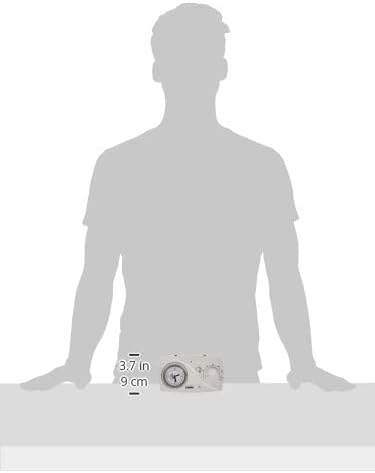
Figure 4: Thermostat Dimensions. This image provides a visual representation of the VEMER VE618500 CM100 thermostat's dimensions, indicating a width of approximately 15.6 cm (6.1 inches) and a height of 9 cm (3.5 inches).
| Āhuahira | Taipitopito |
|---|---|
| Tauira | VE618500 CM100 |
| Waitohu | VEMER |
| Tae | Mā |
| Ahu (L x W x H) | 15.6 x 3.3 x 9 cm (tata ki te 6.1 x 1.3 x 3.5 inihi) |
| Taumaha | 183 karamu (tata ki te 6.4 auneke) |
| Tuku Hiko | 2 x 1.5V Pakahiko AA |
| Voltage | 3 Volts (battery) |
| Rauemi | Kirihou |
| Aratau Mahi | Whakawera |
| Papatonotanga | Daily, 15-minute intervals (mechanical riders) |
| Tāutatanga | Whakanohoia ki te pakitara |
| Momo Kaiwhakahaere | Dial / Mechanical |
| Āhuahira Motuhake | Whakaatu Karaka |
| Whakamahi Hua | HVAC Systems (Heating) |
| Momo Mana Pawera | ā-ringa |
11. Pūtāhui me te Tautoko
This VEMER product is covered by a manufacturer's warranty. For specific warranty terms and conditions, please refer to the documentation provided with your purchase or contact VEMER customer support. For technical assistance or inquiries, please visit the official VEMER webpaetukutuku, whakapā atu ranei ki o raatau pokapū ratonga whai mana.


