Kupu Whakataki
Mauruuru koe mo te hokoasing the VONYX SPX-PA9210 Portable PA System. This manual provides essential information for the safe and efficient operation of your device. Please read it thoroughly before use and retain it for future reference.
Nga Tohutohu Haumaru
- Me ata panui nga tohutohu katoa i mua i te whakahaere i te taputapu.
- Puritia te waeine kia matara atu i te wai, te makuku me te pāmahana tino kino.
- Kaua e whakatuwheratia te casing; tirohia nga ratonga katoa ki nga kaimahi whai tohu.
- Whakamahia anake te urutau hiko kua tohua hei utu.
- Me whakarite kia tika te hau kia kore e wera rawa.
- A ape i te rongonga roa ki nga taumata oro teitei kia kore ai e pakaru te rongo.
Ihirangi mokete
Manatokona kei roto katoa nga mea kei roto i te kete:
- VONYX SPX-PA9210 Portable PA System Unit
- 2 x Ngā Hopuoro Ahokore UHF
- Pūurutau Hiko / Uera Whakatau
- Pukapuka Kaiwhakamahi (tenei tuhinga)
Ka mutu te huaview
The VONYX SPX-PA9210 is a portable PA system designed for various audio applications. It features integrated speakers, media playback options, and wireless microphones for versatile use.
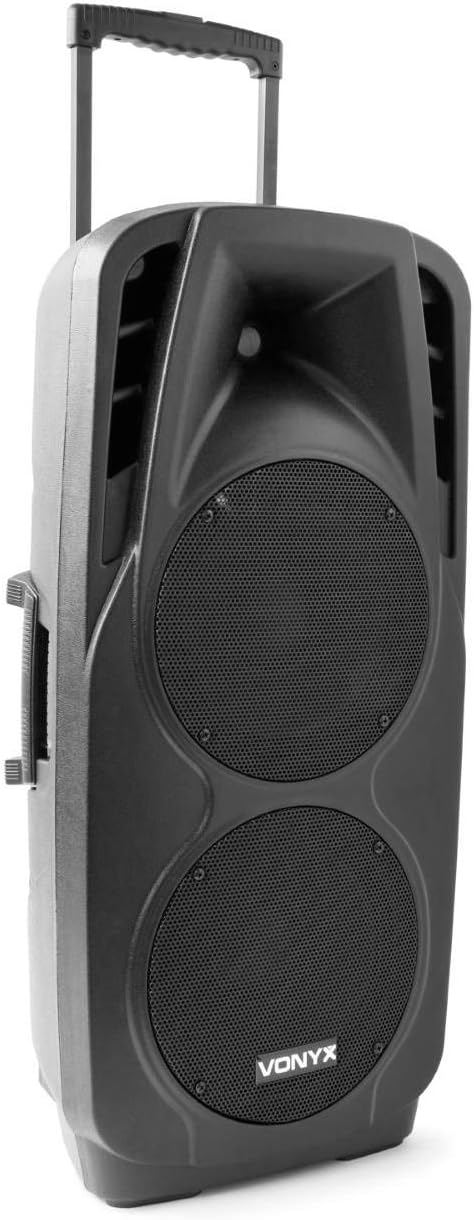
An image showing the VONYX SPX-PA9210 portable PA system. It features a black casing, two large speaker grilles on the front, and a retractable handle at the top for easy transport. A side handle is also visible.
Āhuatanga matua:
- Integrated 2x 10-inch speakers with titanium tweeter controller.
- Built-in media player with USB and SD/MMC card slots.
- Hononga Nihokikorangi mo te rere ororongo ahokore.
- High-performance 12V/7A rechargeable battery for 4-6 hours of autonomy.
- Two UHF wireless microphones with up to 50m range.
- Integrated trolley with telescopic handle and wheels for portability.
- LCD screen for media information display.
Tatūnga
1. Whakataki Tuatahi
Before first use, fully charge the internal 12V/7A battery. Connect the provided power adapter to the charging port on the PA system and then to a suitable power outlet. The charging indicator will show the charging status. A full charge typically provides 4-6 hours of operation.
2. Te Whakakaha/Weto
- To power on the unit, locate the power switch (usually on the rear or control panel) and set it to the "ON" position.
- To power off, set the switch to the "OFF" position.
3. Tatūnga Hopuoro
- Insert fresh batteries into the two UHF wireless microphones.
- Turn on the microphones. They should automatically connect to the PA system.
- Adjust the microphone volume on the PA system's control panel. The wireless range is up to 50 meters.
Nga Tohutohu Whakahaere
1. Media Playback (USB/SD/MMC)
- Insert a USB flash drive or an SD/MMC card into the corresponding slot on the control panel.
- The system will automatically detect the media and begin playback, or you may need to select the input source using the "Mode" button.
- Use the playback controls (Play/Pause, Next, Previous) on the control panel to manage your music.
- The LCD screen will display track information.
2. Takirua Nihokikorangi
- Press the "Mode" button on the PA system until "Mode" button on the PA system until "Bluetooth" is selected.
- I runga i tō waea atamai, papahiko, i tētahi atu taputapu rānei e whakahohea ana e te Nihokikorangi, whakahohea te Nihokikorangi, ka rapu mō ngā taputapu e wātea ana.
- Select "VONYX SPX-PA9210" (or similar name) from the list to pair.
- Kia honoa, ka taea e koe te rere ahokore i te oro mai i tō pūrere ki te pūnaha PA.
3. Volume and Tone Controls
- Adjust the master volume knob to control the overall sound output.
- Separate volume controls are available for microphones and media playback.
- Use the bass and treble controls (if available) to adjust the tone of the audio.
Te tiaki
1. Te horoi
Wipe the exterior of the unit with a soft, dry cloth. Do not use abrasive cleaners or solvents. Ensure no liquids enter the device.
2. Tiaki Pūhiko
- Hei whakaroa i te ora o te pākahiko, karohia te tuku katoa i te pākahiko.
- Charge the unit regularly, even if not in use, to maintain battery health.
- Penapenahia te taputapu ki te wāhi hauhautanga, maroke hoki ina kore e whakamahia mō te wā roa.
Raparongoā
- Kore Mana: Ensure the unit is charged or connected to a power source, and the power switch is in the "ON" position.
- Kore Oro: Check all volume controls (master, microphone, media player). Ensure the correct input source is selected. Verify microphone batteries.
- Nihokikorangi Kaore i te Tuhono: Ensure the PA system is in Bluetooth mode and discoverable. Turn off and on Bluetooth on your device and try pairing again. Move closer to the PA system.
- Oro korikori: Reduce the volume. Check audio cables if using wired inputs. Ensure microphones are not too close to the speakers (feedback).
Whakatakotoranga
| Waitohu | VONYX |
| Tau tauira | Sky-170.082 (SPX-PA9210) |
| Ahu (L x W x H) | 27 x 38.5 x 81 cm |
| Taumaha | 16.25 kg |
| Hangarau Hononga | Nihokikorangi, USB |
| Whakamahi Hua Manakohia | Waea atamai papa ranei |
| Nga waahanga motuhake | Bluetooth, USB Port, Portable, LCD Screen |
| Puna Mana | Wireless (Internal Battery) |
| Pūhiko | 12V/7A, 4-6 hours autonomy |
| Rauemi | Acrylonitrile Butadiene Styrene (ABS) |
| Te maha o nga hongere | 5 |
| Kaikōrero | 2x 10-inch woofers, Titanium tweeter controller |
| Nga hopuorooro | 2x UHF Wireless Microphones (up to 50m range) |
Pūtāhui me te Tautoko
For warranty information and technical support, please refer to the documentation provided with your purchase or contact VONYX customer service directly.
Wāhanga Wāhanga Wātea: Information regarding the availability of spare parts for this product is currently unavailable.
Whakahōu Pūmanawa: Information regarding guaranteed software updates for this product is currently unavailable.


