1. Kupu Whakataki
Mauruuru koe mo te hokoasing the Sharp HT-SB140MT 2.0 150W Soundbar. This soundbar is designed to enhance your audio experience, providing clear and powerful sound for your television, music, and other media. With its sleek design and versatile connectivity options, including Bluetooth, HDMI ARC/CEC, Optical, and Auxiliary inputs, it integrates seamlessly into any home entertainment setup. This manual provides essential information for safe and effective use, including setup, operation, maintenance, and troubleshooting.
2. Nga korero haumaru
- Puna Hiko: Whakaritehia te voltage matches the requirements specified on the soundbar. Use only the provided power cable.
- Whakahau: Do not block any ventilation openings. Maintain adequate space around the soundbar for proper airflow.
- Te wai me te makuku: Do not expose the soundbar to dripping or splashing water. Do not place objects filled with liquids, such as vases, on the apparatus.
- wera: Do not place the soundbar near heat sources such as radiators, heat registers, stoves, or other apparatus (including ampkaiwhakaora) e whakaputa ana i te wera.
- Te horoi: Unplug the soundbar from the power outlet before cleaning. Use a dry, soft cloth for cleaning. Do not use liquid cleaners or aerosol cleaners.
- Ratonga: Kaua e tarai ki te mahi i tenei hua maau ake. Tirohia nga ratonga katoa ki nga kaimahi tohu tohu.
- Pūhiko: The remote control uses a CR2 battery. Ensure correct polarity when inserting batteries. Do not mix old and new batteries.
3. Ihirangi mokete
Tena koa tirohia nga mea katoa kei roto i te kete:
- Sharp HT-SB140MT Soundbar
- Mana Mamao
- Waea Hiko
- Pukapuka Kaiwhakamahi (tenei tuhinga)
4. Hua Neke Atuview

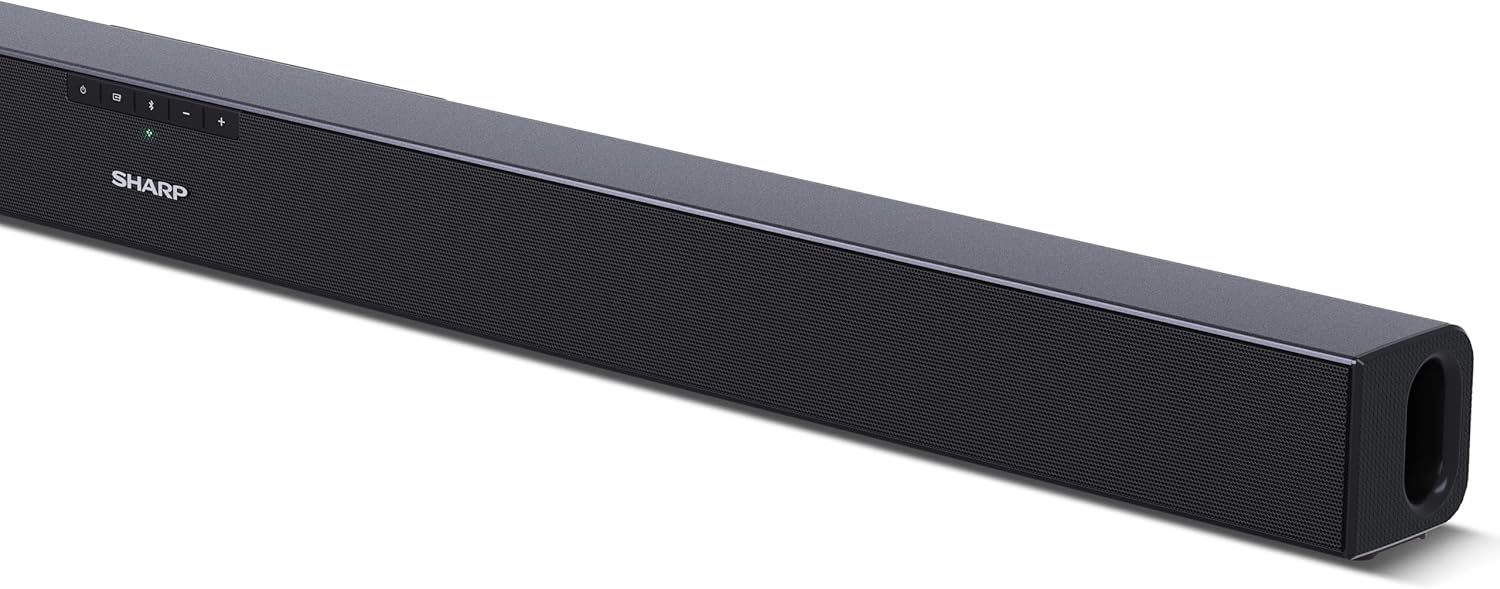
Whakaahua 4.1: Mua View
The front of the soundbar features the Sharp logo and LED indicators for source selection and status. Control buttons for power, input, and volume are located on the top panel.
Whakaahua 4.2: Whakamuri View (Connections)
The rear panel provides all necessary connection ports: HDMI ARC, Optical (S/PDIF), and Auxiliary (3.5mm) input, along with the power input.

Whakaahua 4.3: Mana Mamao
The included remote control allows for convenient operation of the soundbar, including power, input selection, volume, bass, and treble adjustments.
5. Tatūnga
5.1 Whakanoho
The Sharp HT-SB140MT Soundbar can be placed on a flat surface, such as a TV stand, or wall-mounted. Its slim profile of 6 cm allows it to fit easily under most TV screens without obstructing the view.

Figure 5.1: Soundbar Placement
The soundbar is ideally positioned directly in front of your television for optimal sound projection.
5.2 Te hono ki to pouaka whakaata
Kōwhiria tētahi o ngā tikanga tūhonohono e whai ake nei:
- HDMI ARC/CEC (Recommended): Connect an HDMI cable (not included) from the HDMI ARC port on your TV to the HDMI ARC port on the soundbar. This allows your TV remote to control the soundbar's volume and power. Ensure HDMI ARC/CEC is enabled in your TV's settings.
- Digital Optical Audio (S/PDIF): Connect an optical cable (not included) from the Optical Out port on your TV to the OPTICAL IN port on the soundbar. Select the Optical input on the soundbar.
- Āwhina (AUX): Connect a 3.5mm audio cable (not included) from the headphone jack or AUX Out port on your TV to the AUX IN port on the soundbar. Select the AUX input on the soundbar.
5.3 Hononga Hiko
After connecting the audio cable, plug the power cable into the soundbar's power input and then into a wall outlet (220-240V / 50Hz).
6. Nga Tohutohu Whakahaere
6.1 Hiko / Whakaweto
Pēhia te pātene Hiko i te pae oro, te mana mamao ranei hei whakakā, whakaweto rānei i te kōwae.
6.2 Kōwhiringa Pūtake
Press the Input button on the soundbar or the remote control repeatedly to cycle through the available input sources: HDMI ARC, Optical, AUX, and Bluetooth. The LED indicator on the soundbar will change to reflect the selected source.
6.3 Whakaritenga Rōrahi
Use the Volume Up (+) and Volume Down (-) buttons on the soundbar or the remote control to adjust the sound level.
6.4 Takirua Nihokikorangi
Hei hono i tetahi taputapu Nihokikorangi:
- Select Bluetooth input on the soundbar. The Bluetooth LED indicator will flash, indicating pairing mode.
- On your smart device (smartphone, tablet, etc.), enable Bluetooth and search for available devices.
- Select "SHARP HT-SB140MT" from the list of devices.
- Once connected, the Bluetooth LED indicator will stop flashing and remain solid. You can now stream audio wirelessly to the soundbar.
6.5 Ngā Aratau Oro (Whakaōrite)
The soundbar features an equalizer with different sound modes to optimize audio for various content types. Use the EQ button on the remote control to cycle through these modes (e.g., Movie, Music, News). You can also adjust Bass and Treble levels using dedicated buttons on the remote.
7. Tiaki
7.1 Te horoi
To clean the soundbar, unplug it from the power outlet. Use a soft, dry, lint-free cloth to wipe down the surfaces. Do not use abrasive cleaners, waxes, or solvents as they may damage the finish.
7.2 Rokiroki
If you plan to store the soundbar for an extended period, disconnect it from the power supply and store it in a cool, dry place, away from direct sunlight and extreme temperatures.
8. Te Raru
Mena ka raru koe ki to paeoro, tirohia nga raru me nga otinga e whai ake nei:
| Raruraru | Take pea | Rongoā |
|---|---|---|
| Karekau he oro mai i te pae oro. | Kua weto, kua whakangū rānei te paeoro. Ko te puna whakaurunga he i tohua. Kāore i te tika te hono o ngā taura. TV audio output settings are incorrect. | Ensure the soundbar is powered on and not muted. Select the correct input source (HDMI ARC, Optical, AUX). Check all cable connections (HDMI, Optical, AUX). Verify your TV's audio output settings are set to external speakers or the correct digital output. |
| Kaore e taea e te taputapu Nihokikorangi te hono. | Soundbar is not in pairing mode. Kei waho te taputapu i te awhe. Te pokanoa mai i etahi atu taputapu. | Ensure the soundbar is in Bluetooth input mode and the LED is flashing. Whakanuia to taputapu Nihokikorangi ki te pae oro (i roto i te 10 mita). Turn off other Bluetooth devices nearby. Try unpairing and re-pairing. |
| Kaore te mana mamao e mahi. | Battery is low or inserted incorrectly. He ārai i waenganui i te mana mamao me te paeoro. Remote control is faulty. | Replace the CR2 battery and ensure correct polarity. Remove any obstructions between the remote and the soundbar's sensor. Mena kei te haere tonu nga raru, whakapā atu ki te tautoko a te kaihoko. |
9. Whakatakotoranga
| Ingoa Tauira | HT-SB140(MT) |
| Momo Kaikorero | Paorooro |
| Whirihoranga Hongere oro a tawhio noa | 2.0 |
| Te Mana Huaputa Tukuoro Morahi | 150 Watts |
| Whakautu auau | 60 Hz |
| Hangarau Hononga | Bluetooth, HDMI ARC/CEC, Digital Optical Audio (S/PDIF), 3.5mm Auxiliary (AUX) |
| Hangarau Whakawhitiwhiti Ahokore | Nihokikorangi |
| Awhe Mōrahi (Nihokikorangi) | 10 Mita |
| Tikanga Mana | Mana Mamao |
| Puna Mana | AC (Matua) |
| Whakauru Voltage | 220-240 volts |
| Tae | Pango |
| Rauemi | Kirihou, Metal |
| Momo Whakaeke | Maunga Taiepa, Ripanga |
| Rahi Hua (L x W x H) | 95 x 6 x 6 cm |
| Taumaha Tūemi | 1.5 Kirokaramu |
| Nga Waahanga kei roto | Mana Mamao |
| E hiahiatia ana te pākahiko | 1 puhiko CR2 |
| parewai | Kao |
| Nga waahanga e waatea ana | 5 Tau |
| Whakahōunga Pūmanawa Kua Whakamanahia Tae noa ki | Ko nga korero kaore i te waatea |
10. Pūtāhui me te Tautoko
The Sharp HT-SB140MT Soundbar comes with a Limited Warranty. Please refer to the warranty card included in your package for specific terms and conditions. Spare parts are available for up to 5 years from the date of purchase.
For technical support, service, or warranty claims, please contact Sharp customer service through their official website or the contact information provided in your product documentation. When contacting support, please have your product model number (HT-SB140(MT)) and purchase details ready.


