1. Kupu Whakataki
This manual provides essential information for the installation, operation, and maintenance of the MOXA AWK-1137C-US 802.11n Wireless Client. Please read this manual thoroughly before using the device to ensure proper functionality and safety.
2. Hua Neke Atuview
The MOXA AWK-1137C-US is an industrial-grade 802.11n wireless client designed for reliable wireless connectivity in demanding environments. It supports IEEE 802.11a/b/g/n standards and offers comprehensive interfaces including one serial port and two Ethernet LAN ports, along with integrated robust antenna and power isolation for enhanced performance and durability.

Whakaahua 2.1: MOXA AWK-1137C-US Wireless Client (Top View). This image displays the device from a top-down perspective, highlighting the two external antennas, the power input terminal block, the DB9 serial port, and the two Ethernet LAN ports labeled LAN1 and LAN2. The device casing is black with a green MOXA logo and model number AWK-1137C.
3. Nga ahuatanga
- IEEE 802.11a/b/g/n compliant client for versatile wireless connectivity.
- Comprehensive interfaces including one serial port (RS-232/422/485) and two 10/100Mbps Ethernet LAN ports.
- Integrated robust antenna design for reliable signal transmission and reception.
- Power isolation for enhanced system stability and protection in industrial environments.
- Designed for operation in a temperature range of 0 to 60°C.
- Anti-vibration design for durability in harsh conditions.
4. Ihirangi mokete
Manatokohia kei roto i to kete nga mea e whai ake nei:
- MOXA AWK-1137C-US Wireless Client unit
- Ngā tuhinga (Aratohu Tāutanga Tere, Kāri Pūtāhui)
- Paraka kapeka mo te whakauru hiko
- Antennas (typically two, as shown in product images)
- Mounting kit (e.g., DIN-rail kit)
Note: Specific accessories may vary. Please refer to the packing list included with your product.
5. Tatūnga
5.1 Whakatupato Haumaru
- Whakaritehia te voltagkei roto i te awhe kua tohua (9-30 VDC).
- Kaua e whakahaerehia te taputapu i roto i ngā taiao e neke atu ana i ngā taumata pāmahana me te haumākū kua whakaritea.
- Momotuhia te hiko i mua i te hanga hononga, momotuhanga ranei.
5.2 Whakapiki i te Pūrere
The AWK-1137C-US is designed for DIN-rail mounting. Attach the device securely to a standard DIN-rail in a suitable enclosure or cabinet. Ensure adequate ventilation around the device.
5.3 Hononga Antenna
Screw the provided antennas firmly onto the antenna connectors (A and B) on the device. Ensure they are oriented for optimal signal reception.
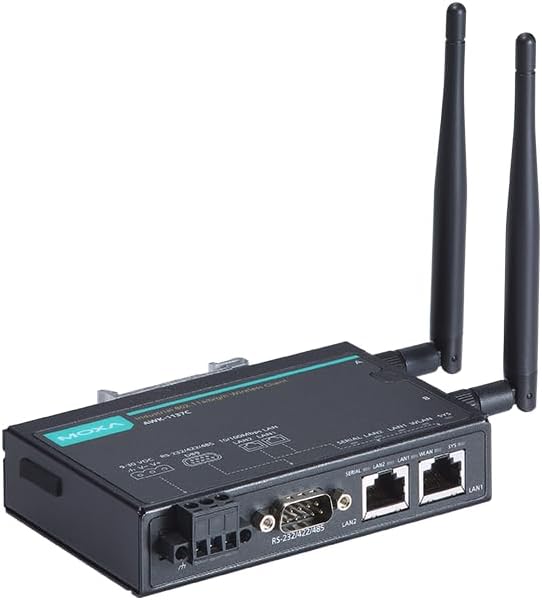
Whakaahua 5.1: MOXA AWK-1137C-US Wireless Client with Antennas. This image shows an angled view of the device, emphasizing the attached antennas and the various connection ports on the side, including the power terminal block, serial port, and two Ethernet ports.
5.4 Hononga Hiko
- Connect a 9-30 VDC power source to the terminal block labeled V+ and V-.
- Whakaritea te polarity tika.
- Secure the wires firmly in the terminal block.
5.5 Hononga Whatunga
- Tauranga Itarangi: Connect your wired network devices (e.g., PLCs, industrial PCs) to the LAN1 and LAN2 Ethernet ports using standard RJ45 Ethernet cables.
- Tauranga Serial: Connect serial devices (e.g., sensors, legacy equipment) to the DB9 serial port. The port supports RS-232, RS-422, and RS-485 modes, which can be configured via software.

Whakaahua 5.2: MOXA AWK-1137C-US Connection Ports. This image provides a closer angled view of the device's connection side, clearly showing the DB9 serial port and the two RJ45 Ethernet LAN ports, along with the power input terminal block.
5.6 Whirihoranga Tuatahi
After physical connections, the device requires software configuration. This typically involves:
- Accessing the device's web-based management interface via an Ethernet connection.
- Configuring wireless settings (SSID, security, channel).
- Setting up IP addresses and network parameters.
- Configuring serial port parameters (baud rate, data bits, parity, stop bits, flow control).
Refer to the detailed software user manual available on the MOXA website for specific configuration steps.
6. Nga Tohutohu Whakahaere
Once configured, the AWK-1137C-US operates as a transparent wireless client, extending network connectivity to your wired and serial devices. The device will automatically connect to the configured wireless access point.
- Tohu LED: Monitor the LED indicators on the device for status information (e.g., power, WLAN activity, LAN link/activity, system status). Refer to the full user manual for a detailed explanation of each LED.
- Tuku Raraunga: Data from connected Ethernet and serial devices will be transmitted wirelessly to the access point and vice-versa.
- Aroturuki: Ko te web-based management interface can be used to monitor the device's status, wireless signal strength, and connected clients.
7. Tiaki
Regular maintenance helps ensure the longevity and reliable operation of your AWK-1137C-US wireless client.
- Te horoi: Puritia te pūrere kia ma, kia kore hoki he puehu. Whakamahia he kakahu ngohengohe, maroke hei horoi. Kaua e whakamahi i ngā horoi wai, i ngā horoi āerosol rānei.
- Taki Taiao: Periodically inspect the operating environment to ensure it remains within specified temperature and humidity ranges.
- Whakahōu Firmware: Check the MOXA webte waahi mo nga whakahou firmware. Ma te tono whakahou ka taea te whakapai ake i te mahi, te taapiri i nga ahuatanga, me te whakatika i nga whakaraeraetanga haumarutanga.
- Tikanga taura: Tirohia ngā taura hono katoa (hiko, Ethernet, raupapa) mō ngā tohu o te pakaru, te pakaru rānei. Whakakapia tonutia ngā taura pakaru.
8. Te Raru
This section provides solutions to common issues. For more complex problems, consult the full user manual or contact MOXA technical support.
| Raruraru | Take pea | Rongoā |
|---|---|---|
| Kaore te taputapu i te hiko | Incorrect power connection, faulty power supply, incorrect voltage. | Verify power cable connection and polarity. Check power supply voltage (9-30 VDC). Test with a known good power supply. |
| Kaore he hononga ahokore | Incorrect wireless settings (SSID, security key), out of range, antenna issues, access point problem. | Check wireless configuration in the device's web interface. Ensure antennas are securely attached. Move the device closer to the access point. Verify the access point is operational. |
| Ethernet devices not connecting | Faulty Ethernet cable, incorrect IP settings, device port issue. | Test with a different Ethernet cable. Verify IP address and subnet mask settings. Check LED indicators for link status. |
| Rahunga korero rangatū | Incorrect serial port settings (baud rate, parity), incorrect wiring, faulty serial cable. | Verify serial port configuration (baud rate, data bits, parity, stop bits, flow control) matches the connected device. Check serial cable wiring (RS-232/422/485). |
9. Whakatakotoranga
| Tawhā | Uara |
|---|---|
| Tau tauira | AWK-1137C-US |
| Paerewa Ahokore | IEEE 802.11a / b / g / n |
| Auautanga Mahi | US Band |
| Tauranga Itarangi | 2 x 10/100 Mbps LAN (RJ45) |
| Tauranga Rangatū | 1 x RS-232/422/485 (DB9) |
| Whakauru Voltage | 9-30 VDC |
| Te Waahi Mahi | 0 ki te 60°C (32 ki te 140°F) |
| Ahu mōkihi | 7.91 x 6.61 x 1.97 inihi |
| Taumaha Tūemi | 1.13 pauna |
| Kaihanga | MOXA |
10. Pūtāhui me te Tautoko
MOXA products are typically covered by a manufacturer's warranty. For detailed warranty information, please refer to the warranty card included with your product or visit the official MOXA webpae.
For technical support, product documentation, and software downloads, please visit the MOXA support portal:
When contacting support, please have your product model number (AWK-1137C-US) and serial number ready.


