1. Kupu Whakataki
Thank you for choosing the ASAKUKI Smart Wi-Fi Essential Oil Diffuser. This device combines aromatherapy with smart technology, allowing you to control it via a mobile application or voice commands. It is designed to humidify and purify the air, creating a relaxing atmosphere in your home or office.
This manual provides detailed instructions for the safe and efficient use of your diffuser. Please read it thoroughly before operation and retain it for future reference.

Image: The ASAKUKI Smart Wi-Fi Essential Oil Diffuser is versatile for various environments, including nurseries, family rooms, bedrooms, yoga studios, and workspaces.
2. Whakatupato Haumaru
Hei whakarite i te haumaru o te mahi, me te ārai i ngā kino, me whai i ēnei:
- Always place the diffuser on a flat, stable surface.
- Do not exceed the maximum water fill line (500ml).
- Use only clean tap water or distilled water. Avoid using hot water.
- Add essential oils carefully to avoid spilling on the exterior of the unit.
- Tiakina te diffuser kia kore e taea e nga tamariki me nga kararehe.
- Do not cover the mist outlet during operation.
- Unplug the device from the power outlet before cleaning or refilling.
- Kaua e rumakina te waahanga ki te wai me etahi atu wai ranei.
- If the unit is damaged, do not attempt to repair it yourself. Contact customer support.
- The diffuser features an automatic shut-off when water runs out, but it is recommended to monitor water levels.
3. Ihirangi mokete
Manatokona kei roto katoa nga mea kei roto i to kete:
- ASAKUKI Smart Wi-Fi Essential Oil Diffuser (Model DF010)
- Pūurutau Hiko
- Pukapuka Kaiwhakamahi
- Measuring Cup (may be included)
4. Hua Neke Atuview
Familiarize yourself with the main components of your diffuser:

Image: The ASAKUKI Smart Wi-Fi Essential Oil Diffuser, showing its sleek design and the accompanying mobile app for control.
- Te taupoki: Top cover of the diffuser.
- Putanga Kohu: Te wahi ka tukuna te kohu.
- Tāke Wai: Ka pupuri i te 500ml o te wai.
- Max Water Line: Indicates the maximum fill level.
- Pereti Ultrasonic: Located at the bottom of the water tank, responsible for mist generation.
- Putanga Hau: Located on the base.
- Drain Side: Indicated for proper water drainage.
- Pātene Māmā: Controls the LED light functions.
- Mist/Wi-Fi Button: Controls mist output and initiates Wi-Fi pairing.
- Jack Hiko: Mo te hono i te urutau hiko.
5. Tohutohu Tatūnga
A pee i enei taahiraa mo te tatūnga tuatahi:
- Whakatakotoria te Kaiwhakaputa: Position the diffuser on a flat, stable, and water-resistant surface.
- Tango i te taupoki: Gently lift the top lid off the diffuser.
- Tāpiri wai: Using a measuring cup, fill the water tank with clean tap water or distilled water up to the maximum water line (500ml). Do not overfill.
- Tāpirihia nga Hinu Tino: Add 3-5 drops of your preferred essential oil directly into the water tank. Adjust the amount based on personal preference and room size.
- Whakakapia te taupoki: Securely place the lid back onto the diffuser.
- Hono Hono: Plug the power adapter into the power jack at the base of the diffuser, then plug the adapter into a wall outlet.
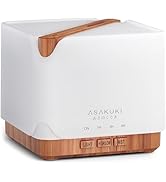
Image: Simple setup guide illustrating connecting power, app pairing, and wireless control.
6. Nga Tohutohu Whakahaere
6.1 Mana a-ringa
- Mana Kohu: Pehia te Mist/Wi-Fi button once for continuous mist. Press again for intermittent mist (30 seconds on, 30 seconds off). Press a third time to turn off the mist.
- Mana Maama: Pehia te Maama button once to turn on the LED light with automatic color cycling. Press again to fix the light to a specific color. Continue pressing to cycle through colors. Press and hold the Light button to turn off the light.
6.2 Smart Wi-Fi and App Control
The diffuser can be controlled remotely using the TuyaSmart app.
- Tikiake i te Taupānga: Rapua "TuyaSmart" in your smartphone's app store (iOS or Android) and download it.
- Rēhita/Takiuru: Whakatuwheratia te taupānga ka rēhita he pūkete hou, takiuru rānei mēnā kei a koe tētahi.
- Whakauruhia te Aratau takirua: With the diffuser plugged in, press and hold the Mist/Wi-Fi button for 5 seconds until the indicator light flashes rapidly. This indicates the diffuser is in pairing mode.
- Tāpiri Pūrere: In the TuyaSmart app, tap "Add Device" or the "+" icon. Select "Small Home Appliance" > "Diffuser" (Wi-Fi).
- Tūhono ki Wi-Fi: Follow the in-app instructions to connect the diffuser to your 2.4GHz Wi-Fi network. Ensure your phone is also connected to the same 2.4GHz network during setup.
- Mana: Once successfully paired, you can control the mist, light, set timers, and create schedules directly from the TuyaSmart app.

Image: The mobile app allows for convenient control of the diffuser's functions.
6.3 Mana Reo me Alexa
The diffuser is compatible with Amazon Alexa for voice control.
- Whakahohe Pukenga: In the Alexa app, search for and enable the "TuyaSmart" skill.
- Hononga Pūkete: Link your TuyaSmart account to your Alexa account.
- Tirohia nga Pūrere: Ask Alexa to "Discover devices" or manually discover them in the Alexa app.
- Tono Reo: Kia kitea, ka taea e koe te whakamahi i ngā whakahau pēnei i:
- "Alexa, turn on the diffuser."
- "Alexa, turn off the diffuser."
- "Alexa, set the diffuser to red."
- "Alexa, set diffuser brightness to 50%."

Image: Voice control with Alexa allows hands-free operation of the diffuser.
7. Tiaki
Mā te horoi auau ka mau tonu te mahi tino pai, ā, ka roa ake te ora o tō kaiwhakawhitiwhiti.
7.1 Te horoi
Horoia te mīhini whakakā hinu i muri i ia whakamahinga 5-6, i ia rā 3-5 rānei, inā koa ka whakawhiti i ngā hinu kakara.
- Wetewete: Disconnect the diffuser from the power outlet.
- Wai Putua: Remove the lid and carefully pour out any remaining water from the drain side of the water tank.
- Ūkui Ma: Use a soft cloth or cotton swab with a small amount of mild dish soap to gently wipe the inside of the water tank and the ultrasonic plate.
- Horoi: Rinse the water tank with clean water, being careful not to get water into the air outlet.
- maroke: Wipe all parts dry with a clean, soft cloth.
- Horoi Hōhonu (Whiringa): For stubborn residue, add a small amount of white vinegar to the water tank and let it sit for 10-15 minutes before wiping and rinsing.
7.2 Rokiroki
When not in use for an extended period, ensure the diffuser is clean and completely dry. Store it in a cool, dry place away from direct sunlight.
8. Te Raru
Mena ka raru koe, tirohia nga raru me nga otinga e whai ake nei:
| Raruraru | Take pea | Rongoā |
|---|---|---|
| Kaore he kohu, he kohu iti ranei te whakaputa |
|
|
| Diffuser does not power on |
|
|
| Kāore e taea te hono atu ki te Wi-Fi/Taupānga |
|
|
| Te rerenga wai |
|
|
9. Whakatakotoranga
| Āhuahira | Taipitopito |
|---|---|
| Waitohu | ASAKUKI |
| Tau tauira | DF010 |
| Te kaha | 500 Miririta |
| Ahu | 6"L x 6"W x 7"H |
| Rauemi | Acrylonitrile Butadiene Styrene (ABS), Polypropylene (PP) |
| Puna Mana | Hiko Hiko |
| Wattage | 10 watts |
| Te Rohe Kapi | Tae atu ki te 323 Puawai Tapawha |
| Nga waahanga motuhake | App Control, Automatic Shut-Off, Multiple Light Settings, Multiple Mist Settings, Voice Control (Alexa) |
| Taumata Haruru | Lower than 35 dB |
| Runtime (Full Capacity) | Up to 16 hours (on weak mist setting) |
10. Pūtāhui me te Tautoko
The ASAKUKI Smart Wi-Fi Essential Oil Diffuser comes with a 1-year technical support warranty. Ka kapi tenei whakamana i nga hapa o te hangahanga me nga take ka puta mai i te whakamahinga noa.
For technical assistance, troubleshooting, or warranty claims, please contact ASAKUKI customer support through the retailer where you purchased the product or visit the official ASAKUKI webpae mo nga korero whakapā.
Please have your model number (DF010) and proof of purchase ready when contacting support.


