1. Kupu Whakataki
This manual provides comprehensive instructions for the safe and effective operation, setup, and maintenance of the OWON B41T+ Digital Multimeter. The B41T+ is a versatile 3-in-1 device, functioning as a datalogger, a multimeter, and a temperature meter. It incorporates True RMS measurement capabilities and a clear backlight for enhanced readability in various environments.
2. Nga korero haumaru
To ensure safe operation and prevent personal injury or damage to the device, please observe the following safety precautions:
- Always disconnect test leads from the circuit before changing functions or ranges.
- Do not exceed the maximum input limits specified for each function. Refer to the specifications section for details.
- Kia tino tupato i te wā e mahi ana me ngā ara iahiko ora. Teitei te kahataghe mea morearea pea ēnei.
- Ensure the correct fuse rating is used when replacing fuses. Incorrect fuses can lead to damage or fire.
- Inspect test leads for damage before each use. Do not use damaged leads.
- Kaua e whakahaerehia te mita maha mēnā te āhua kua pakaru, kāore rānei e mahi tika ana.
- Puritia te pūrere kia maroke. Āta karohia te makuku, te pāmahana tino kino rānei.
3. Ihirangi mokete
I te whakatuwheratanga o te kete, tirohia kei te whakauruhia nga mea katoa e whai ake nei:
- 1x OWON B41T+ Multimeter
- 1x Multimeter Lead Set (Red and Black)
- 1x K-Momo Thermocouple
- 1x Alligator Clip Set
- 1x Multi-function Test Bench
- 1x Pukapuka Kaiwhakamahi (Ingarihi)
- 1x Kawe Puke

4. Hua Neke Atuview
The OWON B41T+ Digital Multimeter features a robust design with a clear digital display, a central rotary function dial, and various input terminals for different measurement types.
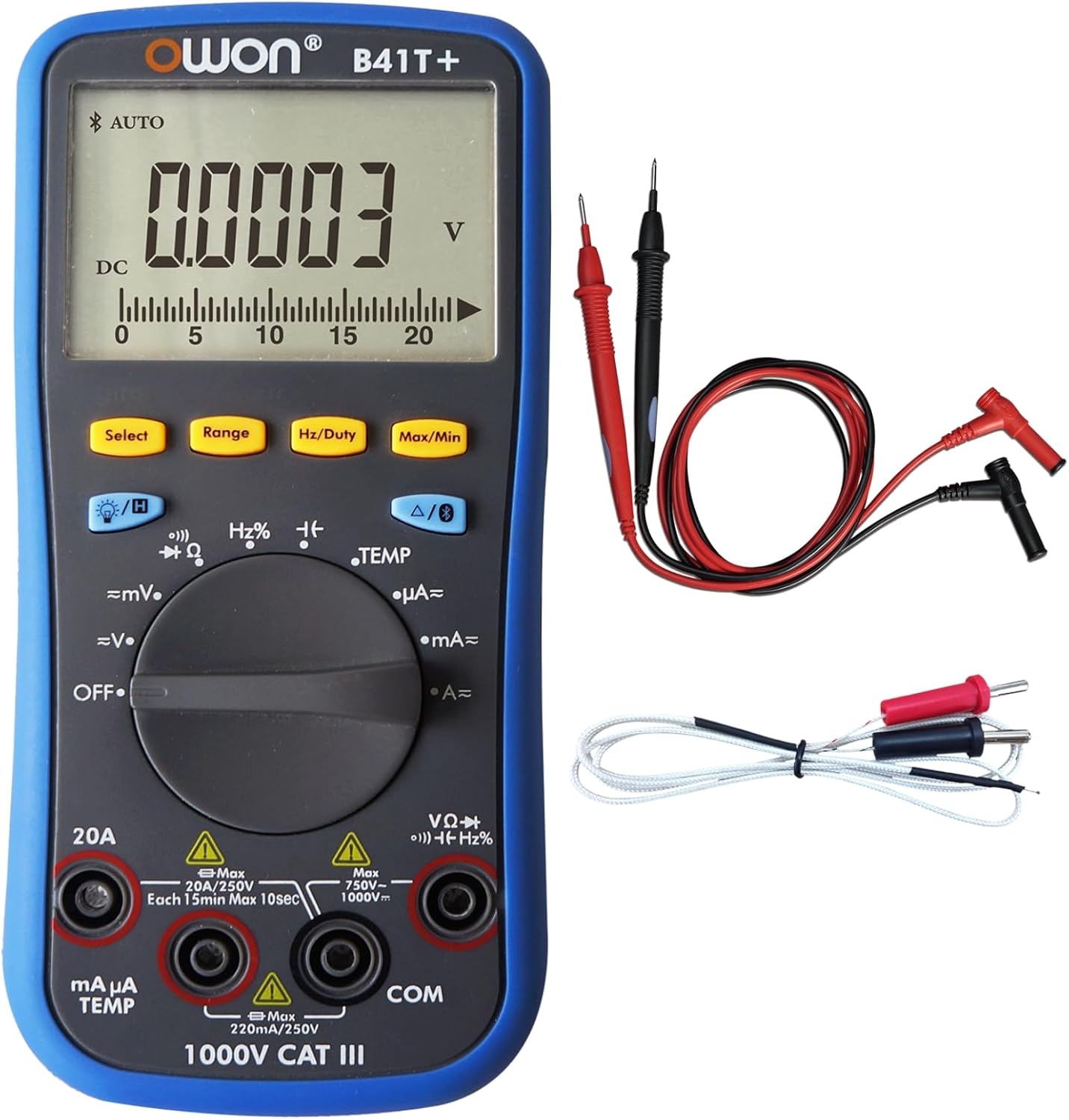
4.1. Nga Wae Matua
- Whakaatu: 4(1/2)-digit LCD with backlight, capable of showing 21999 counts.
- Waea Mahi: Rotary switch to select measurement modes (e.g., Voltage, Current, Resistance, Temperature).
- Pātene: Include Select, Range, Hz/Duty, Max/Min, Backlight, and Data Hold functions.
- Ngā Jack Tāuru: Dedicated terminals for test leads, including COM (common), VΩHz, mAµA, and 20A inputs.


5. Tatūnga
5.1. Tāuta Pūhiko
The OWON B41T+ requires two 1.5V AA batteries for operation. Batteries are typically included with the device.
- Ensure the multimeter is powered OFF.
- Rapua te wahanga pākahiko kei muri o te taputapu.
- Whakamahia he huriwiri hei whakatuwhera i te uhi o te wahanga pākahiko.
- Whakauruhia kia rua ngā pākahiko AA, me te tirotiro i te polarity tika (+ me te -) e whakaaturia ana i roto i te wāhanga.
- Whakakapia te uhi o te wahanga pākahiko ka mau ki te huri.
5.2. Te hono i nga Kaitohu Whakamatau
He mea nui te hono tika o nga kaiarahi whakamatautau mo nga inenga tika me te haumaru.
- Honoa te pango arahi whakamatautau ki te COM hononga tāuru (noa).
- Mo te nuinga voltage, resistance, frequency, diode, and continuity measurements, connect the whero arahi whakamatautau ki te VΩHz Jack tāuru.
- For current measurements (mA/µA), connect the whero arahi whakamatautau ki te mAµA TEMP Jack tāuru.
- For high current measurements (up to 20A), connect the whero arahi whakamatautau ki te 20A Jack tāuru.
6. Nga Tohutohu Whakahaere
6.1. Basic Measurement Procedure
- Honoa nga kaiarahi whakamatautau pera i te waahanga 5.2.
- Turn the function dial to the desired measurement mode.
- Honoa ngā probe whakamātautau ki te ara iahiko, ki te wāhanga rānei e whakamatautauria ana.
- Pānuihia te uara ine i runga i te whakaaturanga.
6.2. Kōwhiringa Mahi
Use the rotary dial to select the primary measurement function:
- WATE: Powers off the device.
- =mV / =V: DC Voltage measurement (millivolts/volts).
- ~mV / ~V: AC Voltage measurement (millivolts/volts).
- Ω: Ine ātete.
- Continuity / Diode: For continuity checks and diode testing.
- Hz%: Frequency and Duty Cycle measurement.
- TEMP: Temperature measurement using the K-type thermocouple.
- µA / mA / A: Current measurement (microamperes/milliamperes/amperes).
6.3. Nga Mahi Patene
- Tīpakohia: Toggles between sub-functions within a dial position (e.g., AC/DC, Continuity/Diode).
- Awhe: Manually selects the measurement range. The device also supports auto-ranging.
- Hz/Tahi: Whakahohe ana i te ine auau, i te ine huringa mahi rānei.
- Mōrahi/Min: Records and displays the maximum and minimum values measured.
- Maama Whakamuri: Toggles the display backlight for improved visibility.
- Data Hold (H): Ka whakatio i te panui o naianei kei te whakaaturanga.
6.4. Data Logging and Bluetooth Connectivity
The OWON B41T+ features Bluetooth connectivity, allowing it to interface with a mobile application for advanced data logging and analysis.
- Multi-connection: The mobile app supports monitoring of more than one device simultaneously, enhancing measurement safety and flexibility.
- Offline Recording: The device can record up to 10,000 data points over a period of 168 hours (7 days) without being continuously connected to the app. This data can be downloaded later.
- Tātari Auaha: The mobile app provides a special chart mode for analyzing measurement trends over time.
- Voice Warning & Reading: The app offers voice warnings for measurement safety and smart voice-reading of measurements.
Refer to the specific mobile application's instructions for detailed guidance on pairing and using these advanced features.
7. Tiaki
7.1. Te horoi
Hei pupuri i te mahi me te ahua o te taputapu:
- Horoia te casing me te ngohengohe, damp kakahu.
- Do not use abrasive cleaners, solvents, or harsh chemicals, as these can damage the plastic components.
- Ensure the device is powered off and disconnected from any circuits before cleaning.
7.2. Whakakapinga Pūhiko
When the low-battery indicator appears on the display, replace the batteries promptly to ensure accurate readings.
- Power off the multimeter and disconnect all test leads.
- Open the battery compartment cover on the rear of the device (refer to Section 5.1).
- Tangohia nga pākahiko AA tawhito.
- Whakauruhia nga pākahiko 1.5V AA hou, kia tika te polarity.
- Me tino kati te taupoki o te waahanga o te papahiko.
7.3. Whakakapinga Fuse
If the current measurement functions cease to work, the internal fuse may need replacement. Refer to the device's internal markings or the full technical manual for specific fuse ratings and replacement procedures. Always use a fuse with the correct voltage me te whakatauranga o naianei.
7.4. Rokiroki
For long-term storage, remove the batteries to prevent leakage and store the multimeter in its carry bag in a cool, dry place, away from direct sunlight and extreme temperatures.

8. Te Raru
This section addresses common issues you might encounter with your OWON B41T+ Multimeter.
- Kāore he Whakaaturanga, he Whakaaturanga Ngāwari rānei:
Tirohia te tāutanga o te pākahiko, kia mōhio ai kāore ngā pākahiko e pau. Whakakapia ngā pākahiko mēnā e tika ana. - Pānui hē:
Verify that the function dial is set to the correct measurement mode. Ensure test leads are properly connected to the correct input jacks. Check for damaged test leads. - Kāore te Ine o Nāianei e Mahi Ana:
The internal fuse for current measurement may be blown. Refer to Section 7.3 for fuse replacement guidance. - Nga Take Hononga Nihokikorangi:
Ensure Bluetooth is enabled on your mobile device. Confirm the OWON B41T+ is powered on and within range. Restart both the multimeter and the mobile application. - Device Powers Off Unexpectedly:
The multimeter has a smart power-off feature to conserve battery life. If it powers off too frequently, check battery level. This feature can often be configured or disabled via the mobile app or specific button combinations (refer to the full manual).
9. Whakatakotoranga
| Āhuahira | Whakatakotoranga |
|---|---|
| Waitohu | OWON |
| Tauira | B41T+ |
| Whakaatu | 21999 Counts, 4(1/2)-digit |
| RMS pono | Ae |
| Auto-scale | Ae |
| Max / Min Value | Ae |
| Offline Recording Function | Ae |
| Record Period | 168 haora (7 ra) |
| Te roa o te tuhi | 10,000 tohu |
| LCD Whakamuri | Ae |
| Whakamatau Diode | Ae |
| Continuity Test (Audion Test) | Ae |
| Pupuri Raraunga | Ae |
| Parenga Whakauru | Ae |
| Whakamatau Aunoa | Ae |
| Tohu Hiko-iti | Ae |
| Impedance Tāuru | 10MΩ |
| Ine whanaunga | Ae |
| Whakautu auau | (40 - 10000) Hz |
| Shift Rate | 3 ngā wā / s |
| Simulate Chart Shift Rate | 30 ngā wā / s |
| Pūhiko | 3V (1.5V x 2) AA |
| Ahu (WxHxD) | 85mm x 185mm x 30mm (tata ki te 3.35 x 7.28 x 1.18 inihi) |
| Taumaha Pūrere | 0.32 kg (approx. 11.3 ounces) |
| Tae | Pango, Kahurangi |
| Puna Mana | Pūhiko Powered |
| Momo Ine | Imita maha |
| Min. Mahi Voltage | 3 Volts |
| UPC | 884473045276, 695087763636 |
10. Pūtāhui me te Tautoko
For detailed warranty information, technical support, or service inquiries regarding your OWON B41T+ Digital Multimeter, please refer to the official OWON webpaetukutuku, whakapā atu ranei ki ta raatau tari ratonga kaihoko. Puritia to riirii hoko hei tohu mo te hoko mo nga kereme whakamana.


