Ka mutu te huaview
This manual provides comprehensive instructions for the Rollerhouse 14-Channel Hand Held Remote Control, designed for use with motorized blinds, shades, and curtains. This remote offers convenient control over individual or multiple window coverings, enhancing ease of use and child safety.
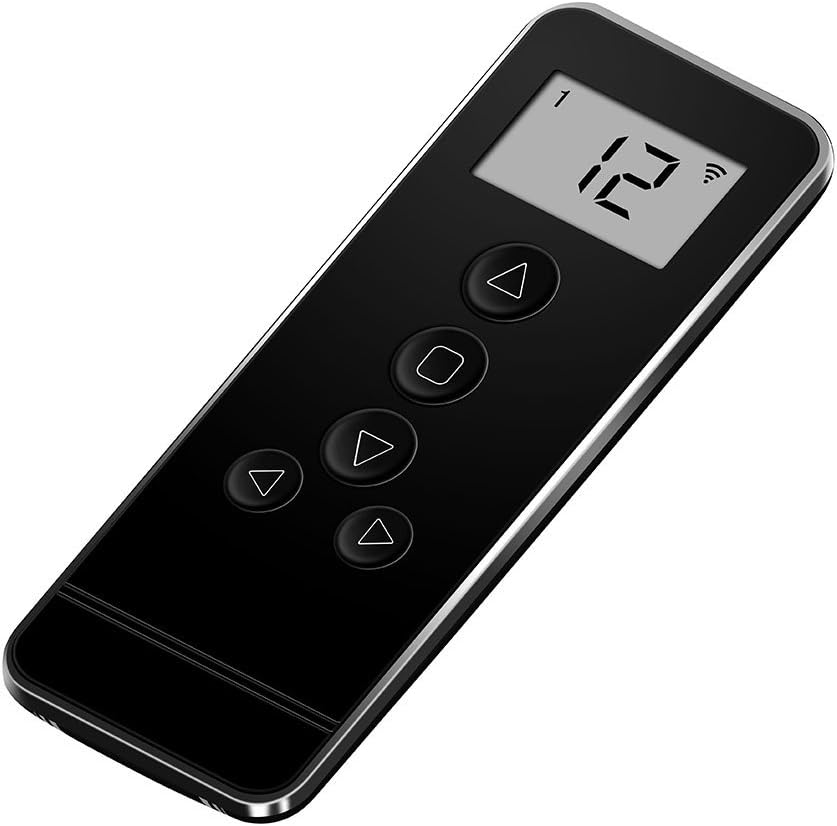
Image: The Rollerhouse 14-Channel Hand Held Remote Control, black in color, featuring a digital display and control buttons.
Mōhiohio Hototahi
Hiranga: This remote control is specifically designed to be compatible only with Rollerhouse RF blinds shade motors. It will not sync or work with motorized blinds or shades from other brands. Please verify the brand of your existing motor before attempting to pair this remote.

Image: A graphic emphasizing the need to check brand compatibility, stating "Doesn't pair/work with other brands."

Image: A hand holding the remote control with motorized blinds in the background, accompanied by text "Tips before place an order: You need to find out what's the brand motor you used before place an order."
Some brands known to be incompatible include, but are not limited to: Somfy, Hunter Douglas, 3-Day Blinds, Lutron, Bali, Rollease Acmeda, Graber blinds, Levolor, Coulisse CM-13, ac123, dc251, dd2702h (this model number refers to the remote itself, not an incompatible motor), dc306, raextwl25, Tucson DC1602b, Sivoia GS Triathion, SM Automatic, Tuscan Rolling Shutters, Warp & Phil, Kirsch, Makita, SunSetter blinds, Timber Blind, ZStarr blinds, Sony TV, Taylor, Velux, Yoolax.
Ngā Tohutohu Tatūnga me te Honohono
This section outlines the steps to pair your new remote control with your motorized shades and to set the upper and lower limits for optimal operation.
Adding a New Remote or Copying a Channel
A previously programmed remote control (Transmitter A) can be used to add a new remote control (Transmitter B) or to copy an operating channel within the same remote control.
- I runga i te first programmed transmitter (Remote A), pehia me te pupuri i te "L" button. While holding "L", simultaneously press the "C" button. Release both buttons when the motor jogs (moves slightly up and down) twice.
- I runga i te new transmitter (Remote B), pehia te "C" button. The motor will jog again, indicating that Remote B has been successfully programmed with the motor.

Image: A diagram illustrating the process of adding a new remote (Remote B) using a primary programmed remote (Remote A).
Te Whakatau i nga Tepe o Runga me Raro
To ensure your blinds stop at desired positions, you can set specific upper and lower limits.
- Pehia te "L" button on the back of the remote control to enter Learn mode. The motor will jog once.
- Whakamahia te Patene ki runga on the front of the control to move the blinds to your desired upper limit.
- Once the blinds are at the desired upper position, press the "L" button on the back again. The blinds will jog up and down to confirm the upper limit is set.
- Whakamahia te Patene o raro on the front of the control to move the blinds to your desired lower limit.
- Once the blinds are at the desired lower position, press the "L" button on the back again. The blinds will jog up and down to confirm the lower limit is set.
Your blinds now have defined upper and lower limits and will automatically stop at these points.

Image: A diagram showing the process of setting the upper and lower limits for motorized blinds using the remote's "L" button.
Te whakahaere i to Mana Mamao
The Rollerhouse 14-channel remote allows for precise control of your motorized blinds. It features dedicated buttons for movement and channel selection.
Ngā Mahi a te Pātene Mamao:
- Pātene Runga (▲): Raises the blinds.
- Pātene Whakamutu (■): Stops the blinds at their current position.
- Pātene Whakararo (▼): Lowers the blinds.
- Channel Buttons (◄ / ►): Cycles through the 14 available channels. Each channel can control an individual blind or a group of blinds.
- "UL" Channel: This special channel allows you to control all programmed blinds simultaneously.

Whakaahua: He taipitopito view of the Rollerhouse 14-channel remote control, highlighting the LED screen, Up, Stop, Down, and Channel buttons, along with the Limit and Confirm buttons on the back.

Image: A hand holding the Rollerhouse remote, showing the digital display indicating channel "14", with motorized blinds in the background being adjusted.

Image: Three motorized blinds in a room, with the remote control in the foreground, illustrating its ability to control blinds for both top-down and bottom-up operation across multiple channels.
Whakatakotoranga Hangarau
| Āhuahira | Whakatakotoranga |
|---|---|
| Rauemi | Kirihou |
| Hunga Hua | 4.8"R x 1.8"W (1.8"W x 4.8"H) |
| Tae | Pango |
| Aratau Mahi | Aunoa |
| Āhuahira Motuhake | 433MHz fixed code |
| Nga Waahanga kei roto | Remote, Wall mount holder & fixing screws, 3V-CR2450 battery (included) |
| Pūrere Hototahi | Rollerhouse blinds motor |
| Voltage | 3V |
| Auautanga | 433.92 MHz |
| Te Whakawhiti Mana | 30 miliwatt |
| Te Pawera Mahi Ambient | -10°C ki te 50°C |
| Tawhiti Whakawhiti | Approx. 65 feet in open space |
| Pūhiko | 3V-CR2450 |

Image: A visual representation of the remote control with a table overlaying technical specifications such as voltage, frequency, and transmission distance.

Image: A diagram showing the dimensions (4.8" x 1.8") of the 14-channel remote, along with a list of features and package contents.
Raparongoā
Remote Won't Program to My Motor
If you are experiencing issues programming the remote to your motor, please consider the following:
- Hototahi: Ensure your motorized blinds or shades are from the Rollerhouse brand. This remote is not compatible with other brands.
- Tikanga Tika: Double-check that you are following the pairing instructions precisely, especially the timing of button presses and motor jogs.
- Pūhiko: Verify that the 3V-CR2450 battery in the remote is correctly installed and has sufficient charge.
- Motor Reset: Some motors may require a reset before pairing. Refer to your motor's specific instructions for reset procedures.
If problems persist, please contact Rollerhouse customer service for professional assistance. They can recommend suitable replacement remotes or provide technical solutions.

Image: A customer service representative with a headset, indicating 24-hour support for programming issues.
Tiaki me te Tiaki
To ensure the longevity and proper functioning of your remote control, follow these simple care guidelines:
- Te horoi: Use a soft, dry cloth to wipe the remote. For stubborn dirt, a slightly damp cloth can be used, but ensure no moisture enters the device. Avoid abrasive cleaners or solvents.
- Whakakapinga Pūhiko: When the remote's performance degrades, replace the 3V-CR2450 battery. Refer to the battery compartment for correct polarity.
- Rokiroki: Whakaorangia te mamao ki te waahi makariri, maroke atu i te ra tika me te wera nui.
- Aukati i nga Whakataka: Āraia te mana mamao mai i te pānga ā-tinana, i te mea ka pakaru pea ngā wāhanga o roto.
Tautoko Kiritaki
For further assistance, technical support, or inquiries regarding Rollerhouse products, please visit the official Rollerhouse store or contact their customer service.
Rollerhouse Store: Visit the Rollerhouse Store on Amazon
You can also refer to the official user guides provided by Rollerhouse:


