1. Kupu Whakataki
This manual provides detailed instructions for the safe and proper installation, operation, and maintenance of your RICOO S3811 TV Wall Mount. Please read this manual thoroughly before installation to ensure correct setup and to prevent damage or injury.

Image: The RICOO S3811 TV Wall Mount, a black, articulated arm mount designed for flat-panel displays.
2. Nga korero haumaru
WARNING: Failure to read and follow these instructions may result in serious personal injury, property damage, or voiding of your warranty.
- Me whakarite kia taea e te mata whakairi te tautoko i te taumaha o te whakairinga me te mata.
- Kaua e neke ake i te kaha o te kawenga o te 20 kg (44 lbs).
- This mount is designed for VESA patterns 75x75mm and 100x100mm. Verify your display's VESA pattern before installation.
- Use appropriate tools and follow all drilling instructions carefully.
- Always use a stud finder to locate wooden studs or ensure you are drilling into solid concrete/brick walls.
- Tiakina nga tamariki me nga kararehe i te wa e whakauru ana.
- Mena kaore koe i te tino mohio mo tetahi waahanga o te tukanga whakauru, korero ki tetahi tohunga ngaio.
3. Ihirangi mokete
Manatokohia kei te noho katoa nga waahanga me te kore e pakaru i mua i te tiimata o te whakaurunga.
- Pre-assembled Wall Mount Unit (1)
- Wall Plugs for Concrete Walls (Quantity as needed)
- Screws for TV/Monitor Attachment (Various sizes)
- Wall Mounting Screws (Quantity as needed)
- Installation Hardware and Accessories (Washers, spacers, etc.)
4. Aratohu Whakauru
4.1 Nga Tirohanga i mua i te whakaurunga
- Hototahitanga VESA: Ensure your TV or monitor has a VESA mounting pattern of 75x75mm or 100x100mm.
- Raukaha Taumaha: Confirm your display's weight does not exceed 20 kg (44 lbs).
- Momo pakitara: Identify your wall type (solid concrete, brick, wood stud). Use appropriate anchors/screws.
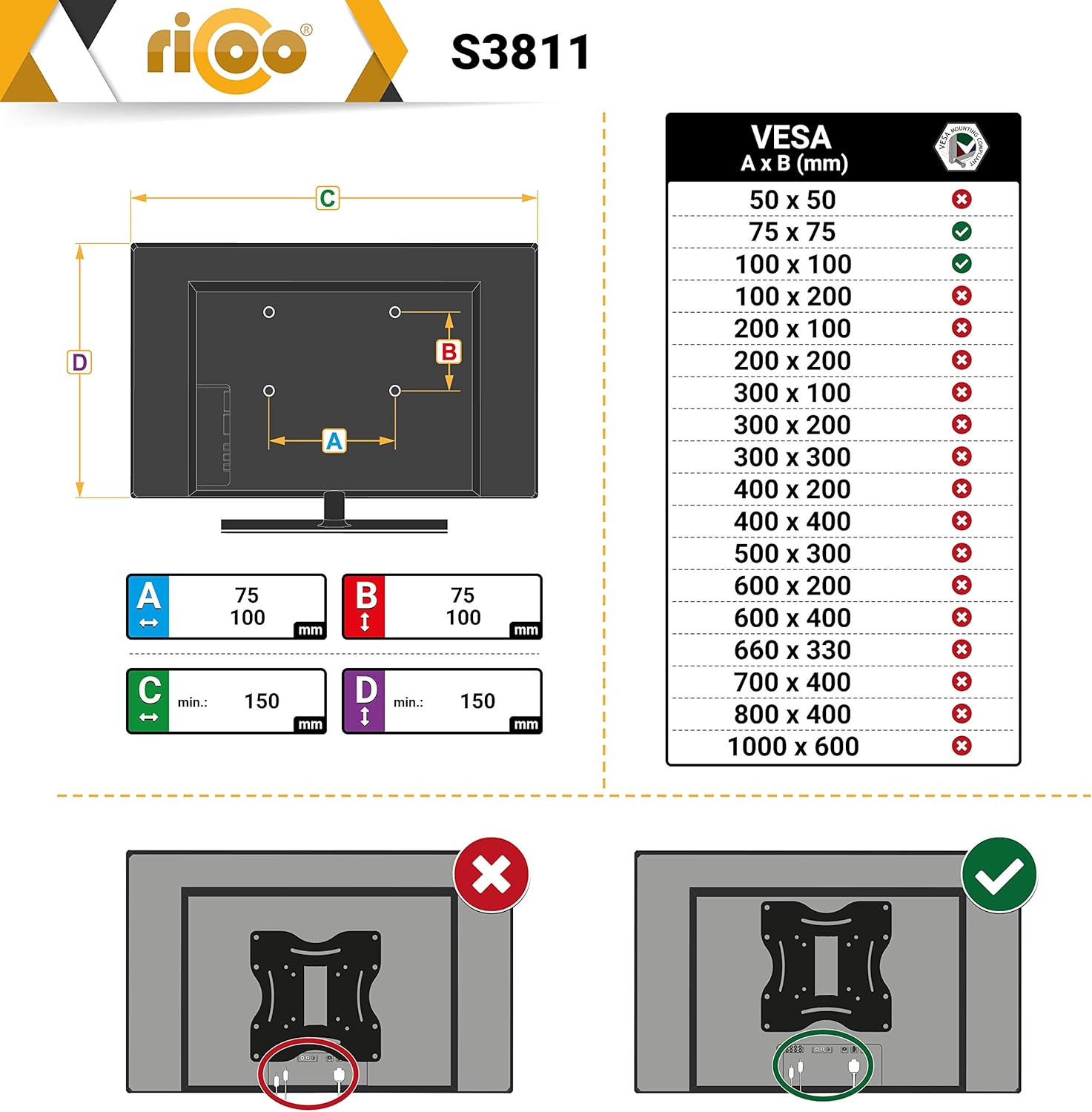
Image: A diagram illustrating VESA compatibility, showing supported (green check) and unsupported (red X) VESA patterns. The S3811 supports 75x75mm and 100x100mm.
4.2 Te Whakamau i te Pereti Pakitara
- Determine the desired height and position for your display.
- Place the wall plate against the wall and mark the drilling holes. Use a level to ensure it is straight.
- Drill pilot holes at the marked locations. For wood studs, drill directly. For concrete/brick, insert wall plugs.
- Secure the wall plate to the wall using the provided wall mounting screws. Ensure it is firmly attached.
4.3 Attaching the Bracket to the Display
- Carefully place your TV/monitor face down on a soft, clean surface to prevent scratches.
- Align the mounting bracket of the S3811 to the VESA holes on the back of your display.
- Select the appropriate screws from the provided hardware kit that fit your display's VESA holes. Use washers and spacers if necessary to ensure a secure fit without overtightening.
- Kia kaha te whakamau i nga wiri, engari kaua e whiti rawa.
4.4 Mounting the Display to the Wall Plate
- With assistance, carefully lift the display with the attached bracket.
- Hook the bracket onto the wall plate. Ensure it is securely seated.
- Secure the display to the wall plate using any locking mechanisms or screws provided with the mount.
5. Mahi me nga Whakaritenga
The RICOO S3811 offers various adjustment options for optimal viewing.
- Whakaritea Tita: The display can be tilted +12°/-5° to reduce glare and achieve a comfortable viewing angle. Loosen the tilt knobs, adjust, and then retighten.
- Whakatikatika hurihuri: The mount allows for 180° swivel (left/right) depending on screen width, providing flexible viewing from different positions in the room.
- Hurihuri: The front panel can be rotated +/-3° for fine-tuning the horizontal level of your display after installation.
- Tawhiti mai i te Taiepa: The distance from the wall can be adjusted between 50mm and 180mm by extending or retracting the arm.

Image: A composite image demonstrating the various adjustment capabilities of the mount, including tilt, swivel, rotation, and cable management.
5.1 Whakahaere taura
The mount includes integrated cable management clips or channels to keep cables tidy and out of sight. Route your display cables through these features for a clean installation.
6. Tiaki
- Takitaki ia ia nga wa katoa nga wiri me nga hononga kia mau tonu, kia mau.
- Clean the mount with a soft, dry cloth. Do not use abrasive cleaners or solvents.
- Do not lubricate any parts of the mount.
7. Te Raru
| Raruraru | Take pea | Rongoā |
|---|---|---|
| Kāore e pumau te āhua o te whakairinga i muri i te tāutanga. | Screws not fully tightened; incorrect wall anchors used; wall not strong enough. | Re-tighten all screws. Ensure correct anchors for your wall type. Consult a professional if wall strength is a concern. |
| Display is not level. | Wall plate not level; front panel rotation needs adjustment. | Use the +/-3° rotation feature to level the display. If the wall plate is significantly off, re-install. |
| He uaua ki te whakatika i te honga/hurihuri. | Adjustment knobs/screws are too tight. | Loosen the relevant adjustment knobs/screws slightly, make the adjustment, then re-tighten. |
8. Whakatakotoranga
| Tau tauira | S3811 |
| Waitohu | RIKIO |
| Rahi Mata Hototahi | 13 - 27 inihi (33 - 69 cm) |
| VESA Hototahi | 75x75mm, 100x100mm |
| Te Kaha Uta Morahi | 20 kg (44 lbs) |
| Koki Honga | +12° / -5° |
| Koki Hurihuri | 180° (screen dependent) |
| Te hurihanga | +/-3° |
| Tawhiti mai i te Taiepa | 50mm - 180mm |
| Rauemi | Korotahi Steel |
| Tae | Pango |

Image: A technical diagram showing the detailed dimensions and adjustable angles of the RICOO S3811 wall mount in millimeters.
9. Pūtāhui me te Tautoko
RICOO products are manufactured with quality and durability in mind. For specific warranty information, please refer to the warranty card included with your product or visit the official RICOO webpae.
If you encounter any issues or have questions regarding your RICOO S3811 TV Wall Mount, please contact RICOO customer support for assistance. Contact details can typically be found on the product packaging or the official brand webpae.


